Seedream 5 vs Seedream 5 Pro: We Tested ByteDance’s New Image Model
Last Updated:
2026-09-28
Seedream 5 vs Seedream 5 Pro: We Tested ByteDance’s New Image Model
We've tested Seedream 5 vs Seedream 5.0 on a series of head to heads spanning different challenging image generation scenarios — and while the new model closes the performance gap that existed between the old Seedream and GPT Image 2, we also found quirks that we didn't expect to find.
Seedream 5 Pro is a real step up from the standard model. It performs much better with text, complex layout design, and fine detail. However, it's less stable than GPT Image 2 or Nano Banana 2 and seems to have trouble with spatial understanding, resulting in glitches that you wouldn't normally expect to see in a new generation flagship. Here's everything you need to know:
Seedream 5 Pro is ByteDance's flagship image model, released July 8, 2026, and it's already live in Overchat AI for both generation and editing.
Seedream 5 Pro creates excellent infographics, typography layout, glass and light refraction, and multilingual text render noticeably better than on the standard model.
Seedream 5 Pro is highly realistic, with deeper textures and more small detail.
Seedream 5 Pro seems to struggle with spatial awareness — the model sometimes distorts space and disregards perspective rules.
What is Seedream 5?
Seedream 5.0 is a text-to-image and image-editing model from ByteDance's Seed team, released on July 8, 2026. The model generates at up to 2K resolution (2048×2048) with aspect ratios ranging from 1/16 to 16, and renders native text in 14 languages, including Chinese, English, French, German, Russian, Japanese, Korean, Spanish, and Arabic. It also accepts up to 10 reference images and supports grounded, region-specific edits — changing one element while the rest of the frame stays intact — along with layer separation, color and material swaps, and sketch completion.
Seedream 5 at a glance:
Spec
Seedream 5 Pro
Developer
ByteDance (Seed team)
Released
July 8, 2026
Max resolution
2048×2048 (2K)
Aspect ratio range
1/16 to 16
Native text languages
14
Reference images (editing)
Up to 10
Images per request
Up to 6
Output formats
JPEG, PNG
How we tested Seedream 5 vs Seedream 5 Pro
Every test below uses one prompt sent to both the standard Seedream 5 and Seedream 5 Pro. Three editing tests also share a single input image, generated separately so both models edit exactly the same source. In each comparison image, the standard Seedream 5 result is on the left (or center, for edits) and Seedream 5 Pro is on the right.
Product accuracy
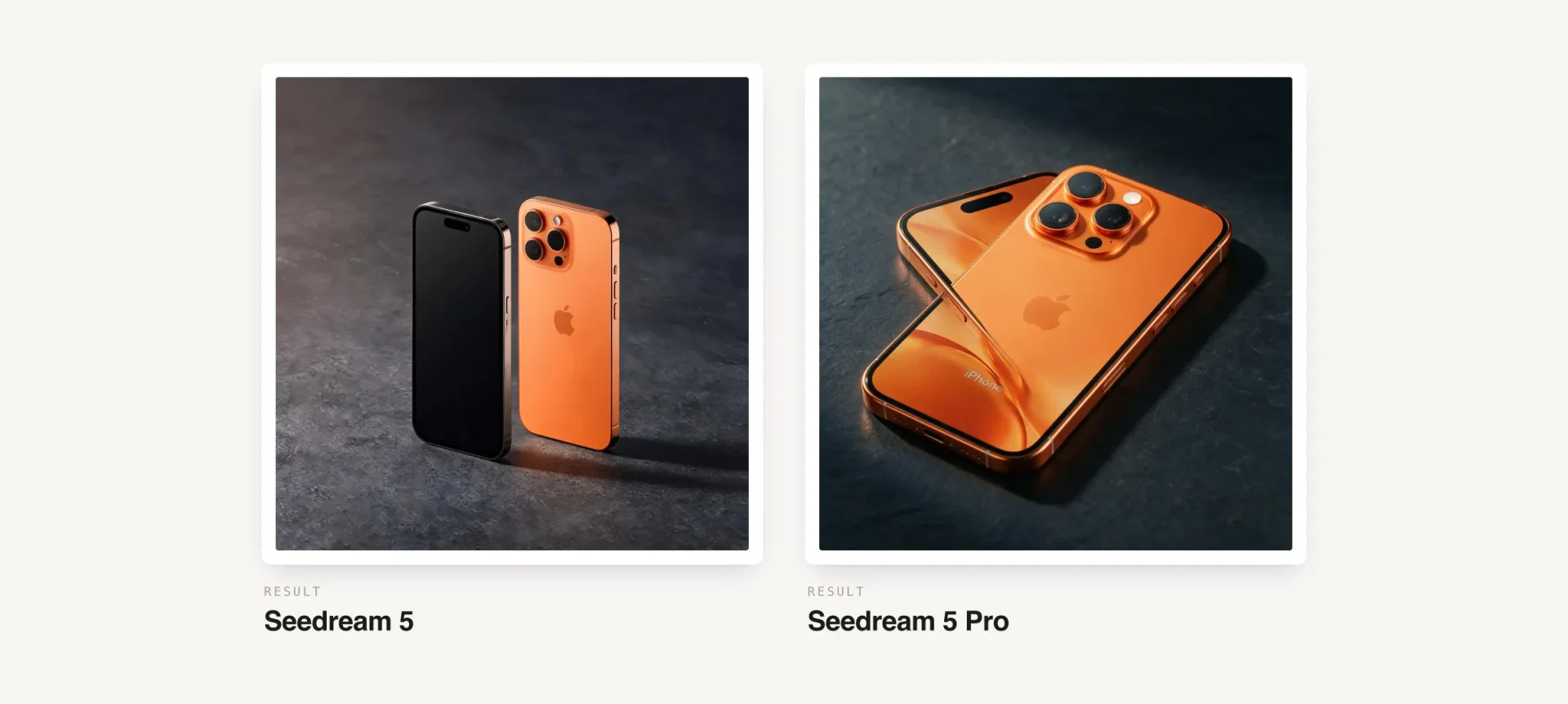
Prompt:"A professional product photography of the orange iPhone 17 Pro Max, showing the front and back of the device at a 45-degree angle. Accurate design details including the camera module layout, button placement, and screen bezels. Placed on a matte dark slate surface with soft warm side lighting casting a gentle shadow, commercial advertising style."
Seedream 5 (left) vs Seedream 5 Pro (right): iPhone product shot
This one surprised us. Seedream 5 Pro renders the surface textures more convincingly but produces the strangest artifact — the two phones melted into each other and partially liquified. On an image that doesn't have difficult spatial relationships or many objects, it is highly unusual to see such errors. When it comes to Seedream 5, no surprises, it didn't introduce glitches.
Refraction in a glass of water
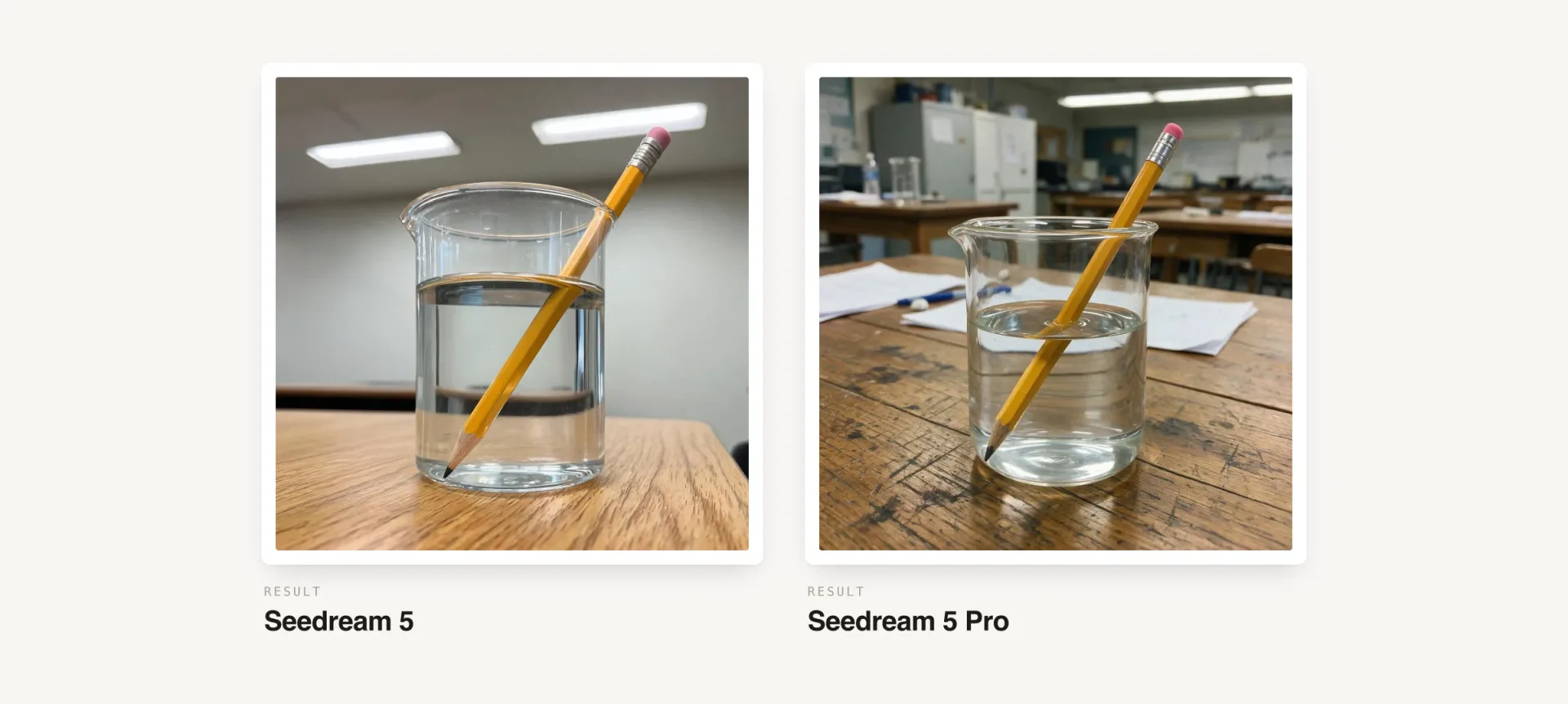
Prompt:"A realistic science experiment scene: a glass beaker half-filled with water sits on a wooden table. A pencil is placed diagonally inside the beaker, partially submerged. Show the optical refraction effect where the pencil appears bent at the water surface. Natural classroom lighting from overhead fluorescent lights. The water surface shows a subtle meniscus curve where it meets the glass wall."
Seedream 5 (left) vs Seedream 5 Pro (right): refraction in a glass of water
Not only is the water far more detailed on Seedream 5 Pro, but it also designed a much more interesting background. This is a generational leap.
Dense infographic with charts
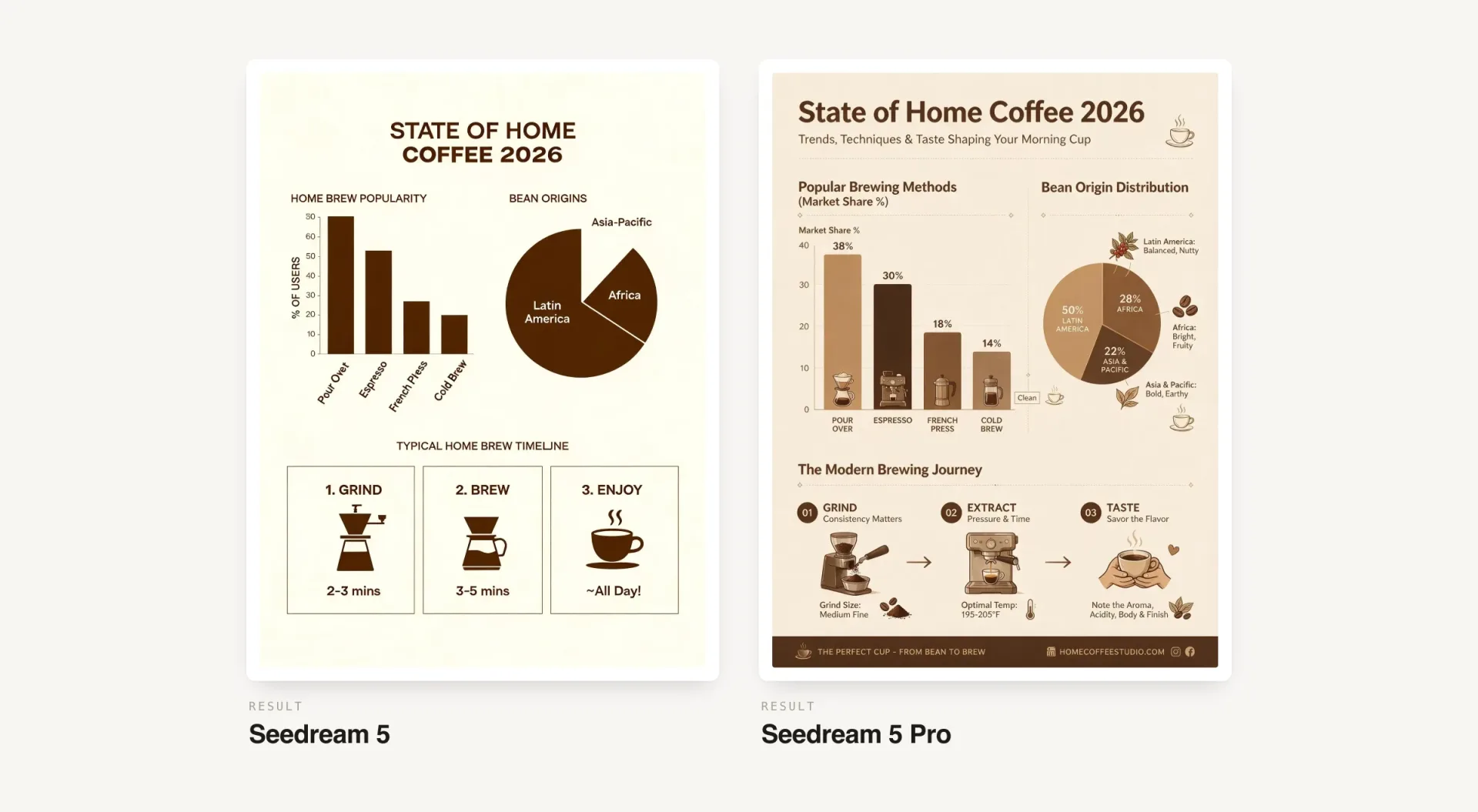
Prompt:"A single-page infographic titled 'State of Home Coffee 2026.' Headline across the top reading 'State of Home Coffee 2026'. Below it, a bar chart center-left comparing four brew methods, a small pie chart of bean origins to the right, and a three-step brewing timeline along the bottom. Clean editorial layout, cream and espresso palette, legible labels, 4:5 format."
Seedream 5 (left) vs Seedream 5 Pro (right): dense infographic
Seedream 5 Pro's infographic is far ahead both in terms of design and in terms of richness of information. Dense information design is one of the tasks ByteDance built Pro for, and the gap over the standard model is easy to see here.
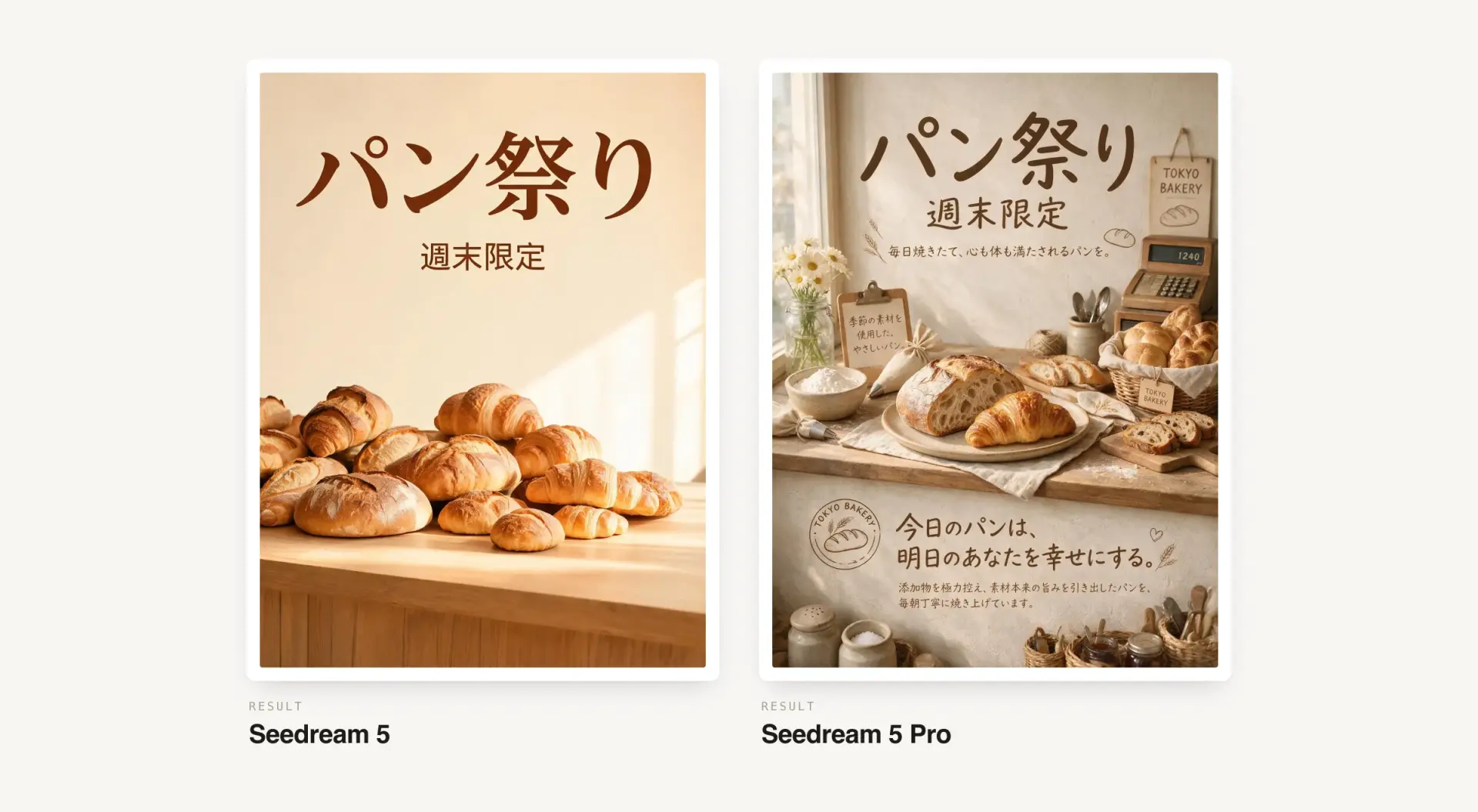
Japanese bakery poster
Prompt:"A vertical sale poster for a Tokyo bakery, warm morning light on a wooden counter with fresh bread. Japanese headline text reading 'パン祭り' across the top, with a smaller line below reading '週末限定'. Minimalist layout, soft beige palette, 4:5 format."
Seedream 5 (left) vs Seedream 5 Pro (right): Japanese bakery poster
Seedream 5 Pro is the only one of the two that renders the Japanese text correctly from top to bottom, on top of the added scene detail.
Typography
Prompt:"Minimalist poster on white background, big text WIRO, smaller text API MARKETPLACE, Swiss grid layout, clean typography, print texture"
Seedream 5 (left) vs Seedream 5 Pro (right): Swiss-grid typography
This is another very interesting test where Seedream 5 Pro shows that it can create very sophisticated layouts that play with space and scale the way a real designer would.
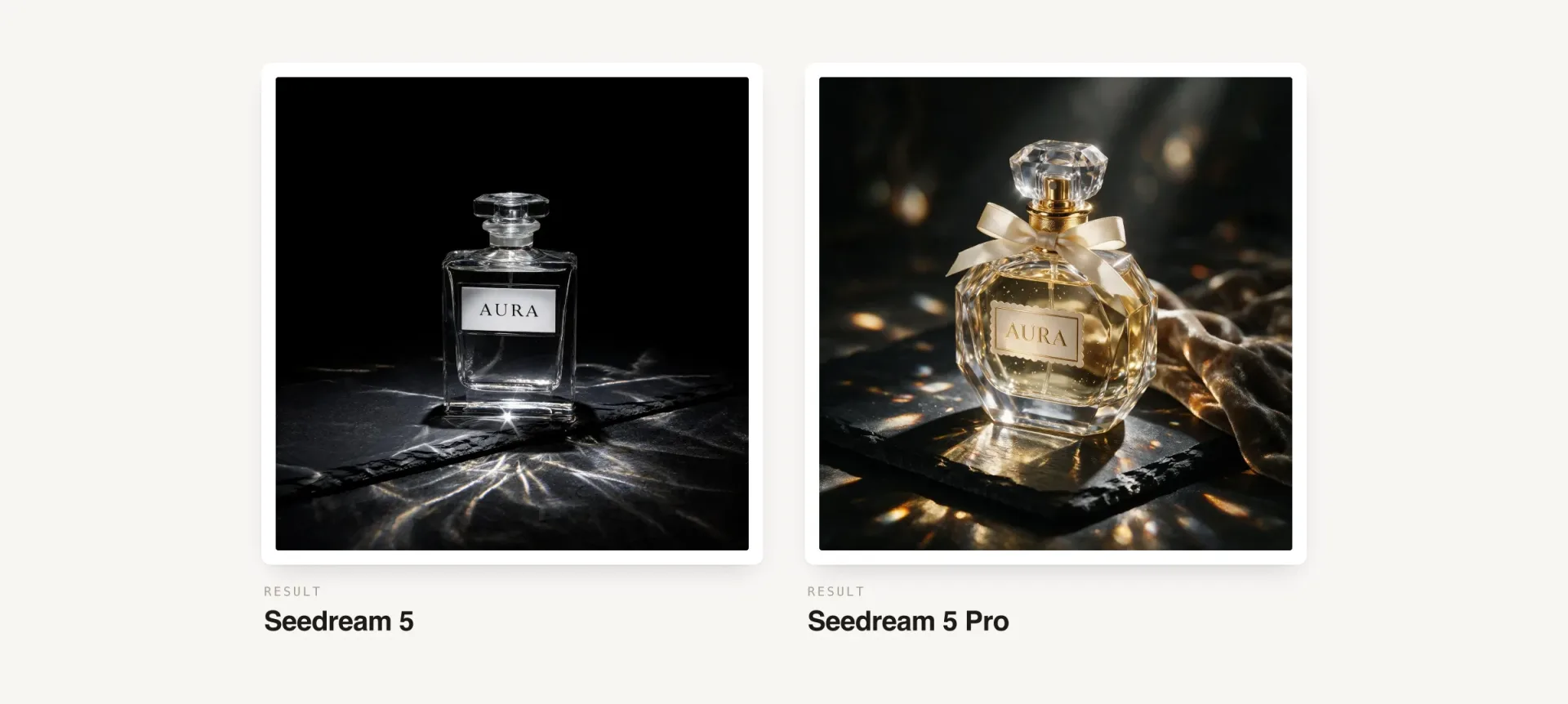
Glass, caustics, and label text
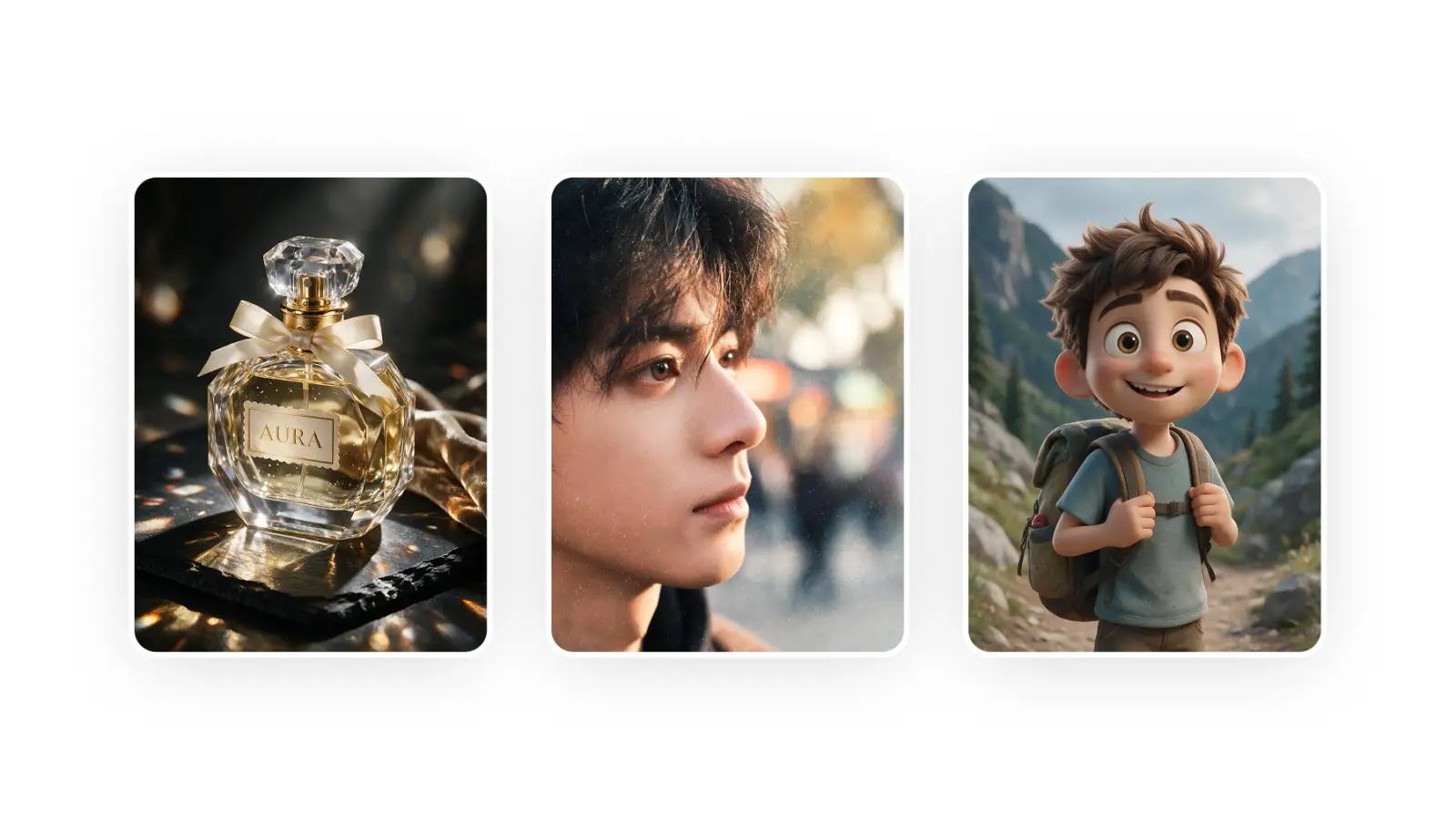
Prompt:"Transparent glass perfume bottle on black slate, label text AURA, dramatic spotlights, realistic caustics, high detail, product photo"
Seedream 5 (left) vs Seedream 5 Pro (right): glass, caustics and label text
The light refraction and caustics are much richer on Seedream 5 Pro — the way light bends through the glass and scatters across the slate has far more dimension and nuanced color. Another big visual fidelity leap in this test.
Recolor an object and remove another
Prompt:"Make the ceramic mug on the table matte black instead of white, and remove the small plant in the top-right corner. Keep the lighting, the table, and the composition exactly the same."
Seedream 5 (center) vs Seedream 5 Pro (right): targeted edit, with the input on the left
Both tiers handled this with ease — the mug is recolored and the plant is erased, the rest of the frame is preserved. No surprises here.
Region color swap with a material change
Prompt:"Change pumpkins to alternating dark green (#3E4A2E) and turmeric yellow (#DB973E); give background typography embroidered texture."
Seedream 5 (center) vs Seedream 5 Pro (right): region color swap with a material change
This test asks to recolor the pumpkins to specific hex values in an alternating pattern, and apply an embroidered texture to the background lettering. Seedream 5 Pro applied the embroidered look to the typography while keeping the pumpkins reading as real pumpkins, closer to the intent of a targeted edit. The standard Seedream 5 pushed the texture across the whole frame, turning both the letters and the pumpkins into yarn — a mistake.
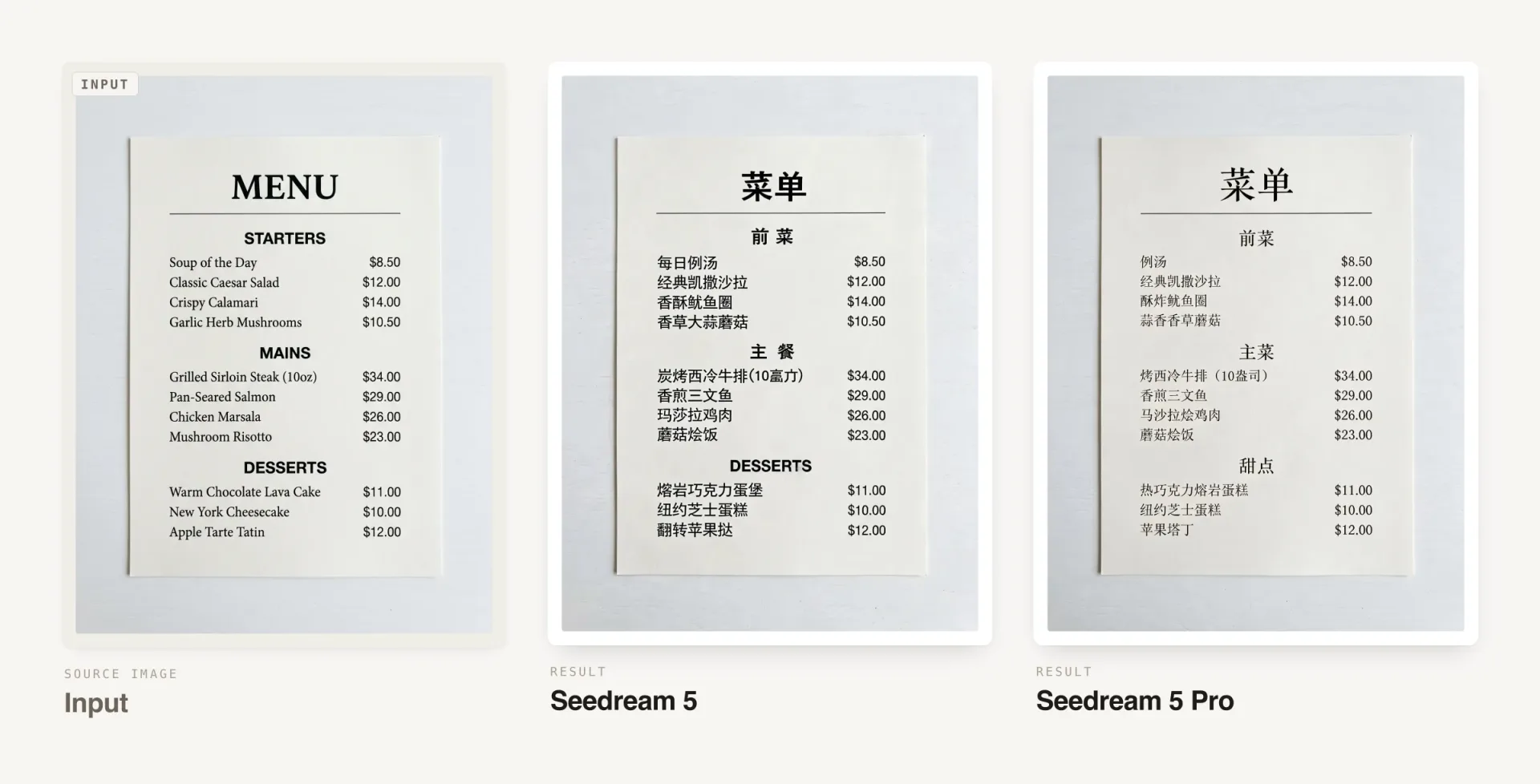
Translate a menu to Chinese
Prompt:"Translate the menu into Chinese."
Seedream 5 (center) vs Seedream 5 Pro (right): translate a menu to Chinese
Seedream 5 Pro translated the whole menu, the standard Seedream 5 missed some text. The typography also looks more naturally integrated into the world in the Pro.
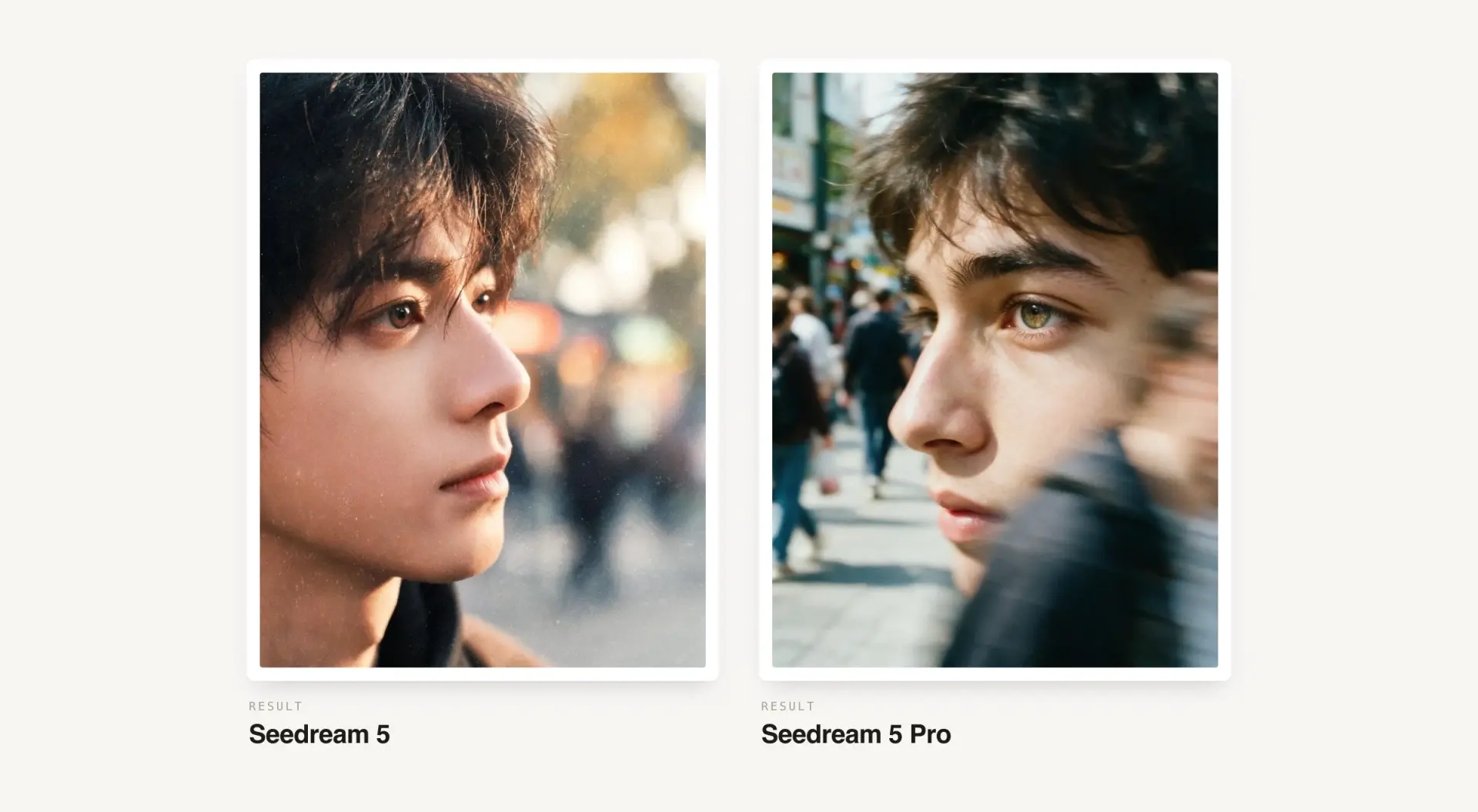
Photorealistic portrait
Prompt:"A color film-inspired portrait of a young man looking to the side with a shallow depth of field that blurs the surrounding elements, drawing attention to his eye. The fine grain and cast suggest a high ISO film stock, while the wide aperture lens creates a motion blur effect, enhancing the candid and natural documentary style."
Seedream 5 (left) vs Seedream 5 Pro (right): photorealistic portrait
Another test where Seedream 5 Pro showed issues with understanding of 3D space. The portrait it renders features incredibly deep details, textures, and colors, and the overall composition is artistic, but it glitched again and added a motion blurred figure across the front of the frame, where a passerby couldn't physically exist in 3D space. So strange to see this happening in a flagship model, but here we are.
3D and CGI character render
Prompt:"Design a 3D character based on Pixar animation; a young happy adventurer with expressive eyes and playful attitude wearing a slightly worn-out backpack. Soft cinematic light, smooth textures, detailed, but soft and subtle, and vivid colors."
Seedream 5 (left) vs Seedream 5 Pro (right): 3D and CGI character render
Rendering cartoon styles is one of the more common use cases for AI image generation, so how do the models do here? We're split. The standard Seedream 5 uses poppy colors and hits the Pixar look well. Seedream 5 Pro — it's weird, the textures are deeper and there are more micro details (notice the dust specks on clothes and yarn of the jacket), but at the same time — the image is more muted and the composition is more static. What do you think about this one?
Should you use Seedream 5 or Seedream 5 Pro?
Seedream 5 Pro is a very interesting model, and on a good generation its output can sit at the level of GPT Image 2, but it has troubles with spatial reasoning, as our tests have shown, which is unexpected. For reference, GPT Image 2 almost never makes a mistake. In practice that means you might need to generate several times to get a usable output.
Still, as a whole, we're very impressed with this model's performance, and some of the images it produces are among the most aesthetically pleasing AI images we've seen — and it must be said that all of that visual candy comes from very simple and short prompts (which we deliberately chose to see raw model output). This makes Seedream 5 Pro one of the easiest AI image generation models to get a stunning result from, along with GPT Image 2 — and yes, better than Nano Banana 2 in this regard.
And as always, if you want to experiment with the new model yourself, you can run the same prompts through Seedream 5 Pro on Overchat AI and see what you get.