Access frontier text-to-sound generation models on the Overchat AI platform through our easy-to-use online interface. Create professional-sounding SFX for videos, games, podcasts, and home films.
The Overchat AI sound effect generator is online software that can create any sound effect or ambient audio from a plain English text description. All SFX are royalty-free and downloadable as high-resolution WAV files, which you can use commercially.
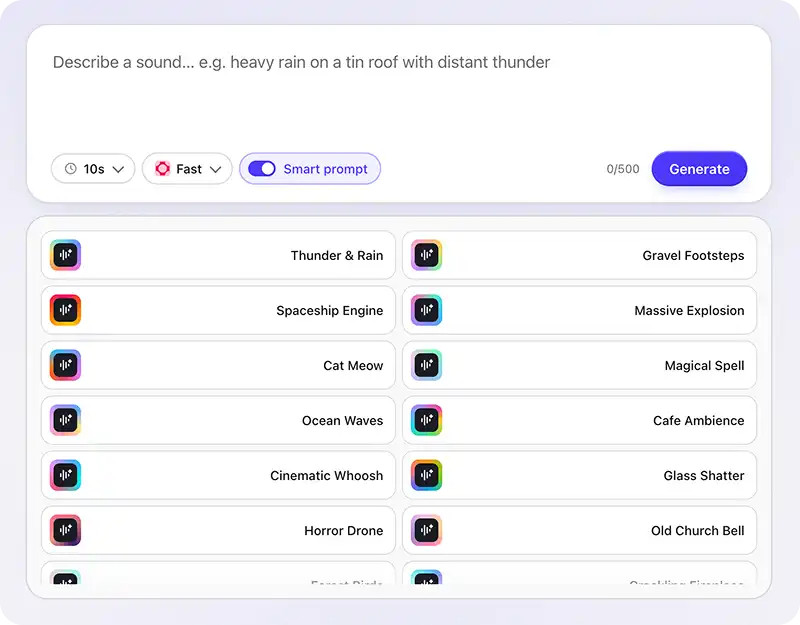
Traditionally, sound effects are generated by recording, mixing, and modifying sounds in DAW software. With Overchat AI, however, you can achieve the same result simply by describing what you want to hear.
Receive your sound effects with lossless WAV encoding in crisp, 44.1 kHz stereo. Generating a 30-second video takes just two seconds.
Generate sound effects online without creating an account or signing up — much faster than booting up a digital audio workstation (DAW) or searching through stock libraries.
Hear that?
With Overchat AI sound effect generator, game developers can create sound effects for footsteps, explosions, material deformations, vehicle noises, animations, firearm shots, and character noises.
Digital creators and influencers can use Overchat AI to enhance their videos by generating whooshes, risers, glitch sounds, punch sounds, and sounds for transitions, animated intros, segues, and more.
Radio producers and podcasters can create stingers, intros, ad bumps, and atmospheric beds under narration.
Movie makers and sound designers can create Foley layers, impacts, risers, drones, and SFX for various environmental soundscapes — indoor, outdoor, in space, under water, or anything you can imagine.
Sound designers can create background sounds, like the rustling of leaves in the wind, rain, utensils clattering in a dining room, crowd murmurs, creaking of stressed metal, nature sounds, or noise from cars passing by on a busy highway, by describing your scene — where it takes place and what's happening in the background.
Producers and beatmakers can make vocal chops, percussion one shots, and texture beds for online shows and sketches.
Join thousands of creators already using Overchat AI to create audio, video, and images with the world's most advanced AI models from the leading developers, such as Eleven Labs, MiniMax, Kling, Google, and OpenAI.
Overchat AI brings you the power of the world's top AI models: GPT, Claude, Gemini, Mistral, and more.

Overchat AI Sound Effects Generator routes your text prompt to specialized audio models — Cassette AI and ElevenLabs — that have been trained on massive datasets of real-world sounds paired with descriptive language. When you describe a sound, the model parses both the literal sound source and the contextual cues (material, action, environment, mood) and generates a new waveform from scratch.
It's very easy. Type a description of the sound you want into the prompt field, and hit generate. To maximize the quality of sound effects, add as many details as you can think of to the prompt so that the model has something to anchor the sound against. For example, typing "rain" will provide a worse result than typing "heavy rain hitting a tin roof, thunder rumbling in the distance". The variables worth specifying are sound source, action, material, environment, distance, intensity, and duration — you don't need all of them every time, but two or three will dramatically sharpen the output. Once generated, you can play the result online, tweak the prompt and regenerate if it's not quite right, and download the file as a high-res WAV for use in your project.
Overchat is one of the best free AI sound effect generators — it gives you access to some of the world's best text to sound AI models through an easy to use online interface, allowing you to switch between models that prioritize speed and those that prioritize quality on the fly, depending on your need.
Absolutely — our sound effect generator is 100% free to use, you can access it online, and you don't need to input a credit card or create an account to try it. Overchat AI also gives you access to over 150 useful AI tools across audio, image, and video generation, available with a free account or without restrictions under our Pro subscription.

Chinese company Baidu has quietly released a model that's just as good as DeepSeek and ChatGPT — ERNIE 4.5 delivers exceptional performance at a fraction of the cost — and most people outside China have never even heard of it.

If you're wondering: what is DeepSeek AI, the answer is quite simple. DeepSeek AI is a Chinese AI research lab that builds large language models. The company released several models in late 2024 and early 2025 that compete directly with OpenAI's GPT-4 and Anthropic's Claude, but at a fraction of the operating cost.

ChatGPT Plus costs $20 per month plus tax, while the Pro plan costs $200 per month plus tax. Understandably, not everyone is willing to pay that much for a chatbot, especially if the premium features aren’t worth it to them. This raises an obvious question: how can I use ChatGPT for free?
Available on Web, iOS, and Android. Access your AI assistant anywhere, anytime.



.svg)
