The Overchat AI voice generator provides access to top-tier voice-to-text AI models, such as ElevenLabs V2.5 and Eleven v3, through a user-friendly online interface.
Our advanced AI technology can narrate audiobooks, podcasts, explainer videos, scripts, and screenplays. It features 15+ voice presets with different accents, genders, and tones, as well as Voice Cloning.
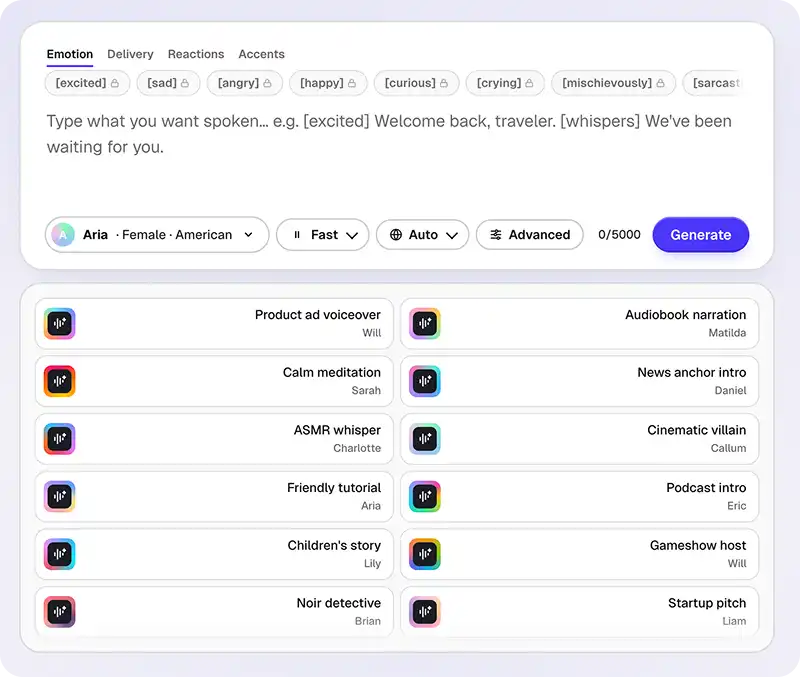
Overchat AI supports generation through both Turbo v2.5 and Eleven v3, two cutting-edge voice models that produce natural results with subtle variations in tone and color.
Users can choose from over 30 studio voices with American, British, Australian, and other accents. Narration can be made even more colorful by adding emotion tags like [excited], [whisper], or [sad] directly into the text prompt.
The Overchat AI voice generator works directly in browsers. It offers dedicated desktop and mobile web apps, as well as iOS and Android apps.
USE CASES
Generate voiceovers for vlogs, YouTube tutorials, and background narration just by pasting your script into the Overchat AI voice generator.
The Overchat AI voice generator supports long-form narration of up to 5,000 characters per generation, making it suitable for audiobooks.
Generate voices for podcast intros, outros, and even interior episodes. Each voiceover is royalty-free and can be used for commercial purposes.
Generate long-form monologues of a single character in one pass and control the emotional delivery through [Tags] like [angry] or [whisper] by enclosing expressions in square brackets.
Need a voiceover for a Udemy course, internal training video, or product walkthrough? Use our AI tutorial voiceover and get a professional read first try.
Create sleep stories, narrate meditation sessions, and easily make ASMR viral content for social media in a soft, whispery voice.
Join thousands of creators already using Overchat AI to generate audio, video, and images.
Overchat AI brings you the power of the world's top AI models: GPT, Claude, Gemini, Mistral, and more.
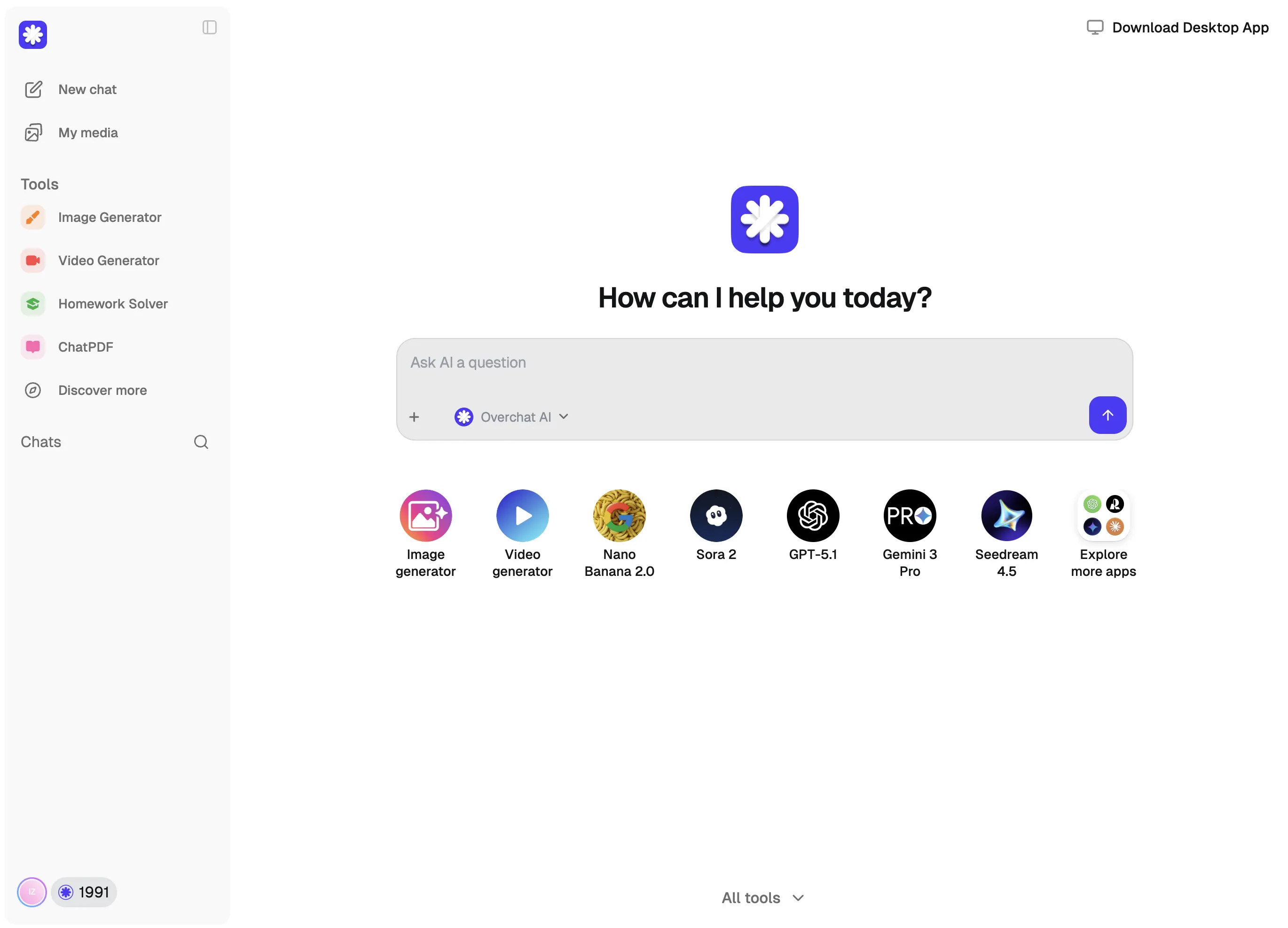
Behind the interface, Overchat AI uses an advanced text-to-speech engine that treats voice synthesis as a prediction task: given a piece of text and a target voice, what would a human actually sound like saying it? The model has been trained on enough recorded speech to capture the nuances of human voices, including timbre, accent, age, and speaking patterns. The text you provide serves as the content, while the model generates the corresponding speech waveform.
Using the Overchat AI voice generator is simple: select a voice out of over 30 presets, select the language (this improves accuracy, but you can also leave it on auto), write or paste your text — up to 5,000 characters — and the model will turn it into speech using the selected voice. You can also add tags to control the delivery and emotion of the voice. For example, tags like [scream], [whisper], or [exclaim] can change the tone, pitch, or speaking style and these work with all of the 30+ voice presets.
Optionally, you can also tweak advanced settings:
- Stability balances expressiveness against consistency — lower values let the voice react more dramatically to the text but can produce uneven takes across long scripts, while higher values lock the delivery into a steadier, more predictable read.
- Similarity controls how faithfully the output matches the original voice's character; pull it down and you get more flexibility but risk drift, push it up and the voice stays recognizably itself.
- Style exaggeration controls how much the model leans into the voice's signature mannerisms, from neutral to dramatic.
- Speed controls pacing from 0.5× to about 2× without changing pitch.
The defaults (Stability 0.55, Similarity 0.70, Style 0.40, Speed 1.00×) are tuned as a good starting point but you might want to experiment with these sliders to find the sound that you like. We suggest changing just one variable at a time to see how this impacts the voice.
Overchat is one of the best free AI voice generators. Not only does it include two Frontier models (Turbo v2.5 and Eleven v3) in its free usage tier, but it also gives you access to over 30 studio voices. It supports inline emotion tags and outputs voices in a high-resolution, lossless WAV format.
Yep, the Overchat AI voice generator is free and doesn't require an account. It's part of Overchat AI, an all-in-one AI platform with over 150 specialized tools and models. It gives you access to the best AI technology through a single, easy-to-use interface.
Chinese company Baidu has quietly released a model that's just as good as DeepSeek and ChatGPT — ERNIE 4.5 delivers exceptional performance at a fraction of the cost — and most people outside China have never even heard of it.

If you're wondering: what is DeepSeek AI, the answer is quite simple. DeepSeek AI is a Chinese AI research lab that builds large language models. The company released several models in late 2024 and early 2025 that compete directly with OpenAI's GPT-4 and Anthropic's Claude, but at a fraction of the operating cost.
ChatGPT Plus costs $20 per month plus tax, while the Pro plan costs $200 per month plus tax. Understandably, not everyone is willing to pay that much for a chatbot, especially if the premium features aren’t worth it to them. This raises an obvious question: how can I use ChatGPT for free?
Available on Web, iOS, and Android. Access your AI assistant anywhere, anytime.



.svg)
