


Fix blurry, out-of-focus, and motion-blurred photos instantly with AI. Restore sharp details and clarity to any image in seconds.

Unblurred a shaky photo from my daughter's birthday. Every face is now perfectly clear. Can't believe the difference!

My phone photos always come out blurry. Ran them through this and now they look like they were shot on a DSLR. Amazing.

Had a motion-blurred photo from a concert. AI made it sharp and clear — you can see every detail now. Love it!

Fixed an out-of-focus group photo and it looks incredible — every face is sharp now. Way better than any other tool I've tried.

Rescued a bunch of blurry vacation photos. They're sharp and clear now — saved my whole trip album!

Used this on blurry screenshots and they came out crystal clear. The AI unblurring is next level. 10/10.
Unblurred a shaky photo from my daughter's birthday. Every face is now perfectly clear. Can't believe the difference!
My phone photos always come out blurry. Ran them through this and now they look like they were shot on a DSLR. Amazing.
Had a motion-blurred photo from a concert. AI made it sharp and clear — you can see every detail now. Love it!
Fixed an out-of-focus group photo and it looks incredible — every face is sharp now. Way better than any other tool I've tried.
Rescued a bunch of blurry vacation photos. They're sharp and clear now — saved my whole trip album!
Used this on blurry screenshots and they came out crystal clear. The AI unblurring is next level. 10/10.
Upload your out-of-focus photo. Wait a few seconds for the AI model to do its magic. Get a sharp version of your photo in under 30 seconds.
Use image-to-image AI, powered by GPT-Image-1.5 model, to sharpen any picture to perfection with just a couple of clicks. Even if the original photo is severely out of focus, our online app can fix it to perfection.
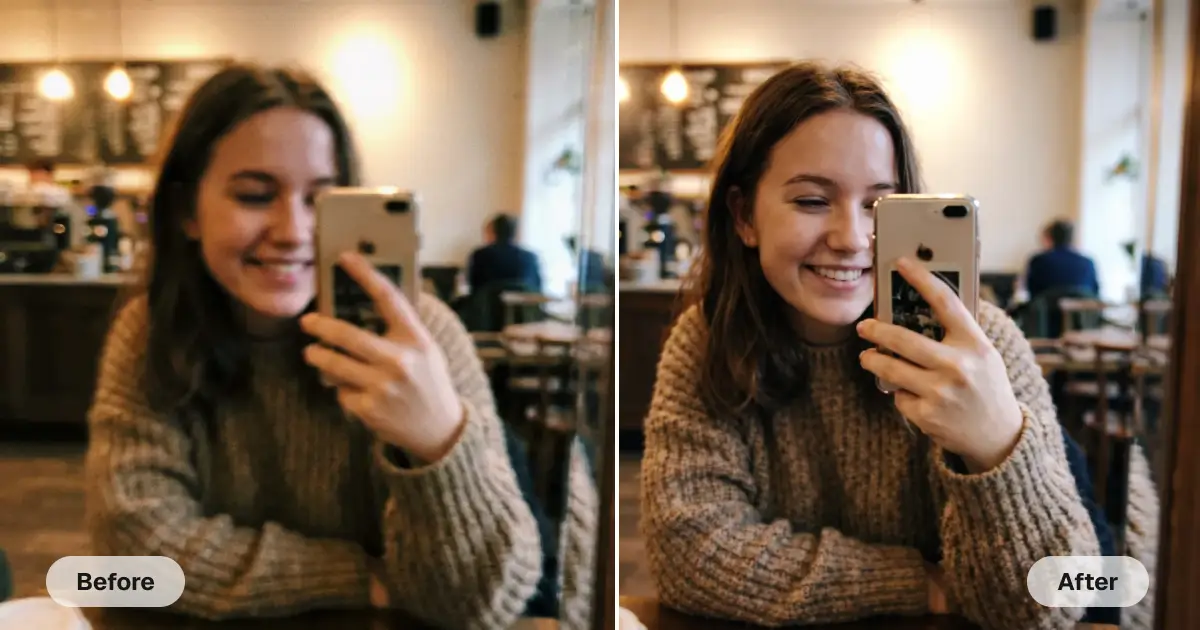
Our AI automatically detects and removes all types of blur, like camera shake, motion, or poor focus. All you have to do is upload a picture and wait a few seconds for the result.
This isn't just a sharpening pass; it's intelligent image reconstruction technology. This technology regenerates the entire image, which makes it possible to save even those images that were severely distorted.
Get clear pictures in just seconds. Save yourself hours of time that would have been spent on similar edits in Photoshop.
USE CASES
If your perfect selfie was taken in less-than-ideal conditions and came out blurry, don't give up on that moment! Let our Unblur AI technology bring it into perfect focus.
Do you have old pictures that turned out blurry because they were taken with a potato camera? Make them look like they were shot with professional equipment in just a few clicks!
Motion blur occurs when the shutter speed is set too low when shooting a moving subject. It is notoriously difficult to fix, but now it is possible to remove it instantly with Overchat AI.
If you have a shaky hand, your pictures may turn out slightly blurry in low light. Save those kinds of images easily with Overchat AI.
Not long ago, missing focus meant ruining an image forever. But now, thanks to powerful artificial intelligence processing algorithms, it's possible to refocus a photo.
Do you have photos in your library that you love but that were ruined by softness? Can't bring yourself to delete them? Now's the time to give them a new life with Overchat AI!
Join thousands of people who are already using Overchat AI to unblur their photos and get crystal-clear results.
Overchat AI brings you the power of the world's top AI models: GPT, Claude, Gemini, Mistral, and more.

It's an online tool that uses AI to remove blur from any image. To use it, upload your blurry photo, and wait for our AI to do it's magic, fixing motion blur, camera shake, and out-of-focus areas. It will turn fuzzy images into sharp, clear results.
Overchat AI uses advanced technology to analyze your photo and create a new version of it that is identical but without any blur. The AI identifies the type of blur — motion, focus, or compression — then applies deblurring, sharpening, and restoring fine details. The whole process only takes a few seconds.
There are literally all types. This includes blur caused by motion, such as when a camera is set to a low shutter speed and a subject is moving quickly. It also includes blur caused by camera shake or by the camera lens not being focused correctly. This last type of blur is the most difficult to remove. But with Overchat AI, it's possible because this tool doesn't just apply a filter. It actually creates a new version of the image that is identical, except for the removal of the blur.
The AI Unblur tool is a paid tool on Overchat AI. However, our service offers many other free AI tools, which you can access by creating an account.

Chinese company Baidu has quietly released a model that's just as good as DeepSeek and ChatGPT — ERNIE 4.5 delivers exceptional performance at a fraction of the cost — and most people outside China have never even heard of it.

If you're wondering: what is DeepSeek AI, the answer is quite simple. DeepSeek AI is a Chinese AI research lab that builds large language models. The company released several models in late 2024 and early 2025 that compete directly with OpenAI's GPT-4 and Anthropic's Claude, but at a fraction of the operating cost.

ChatGPT Plus costs $20 per month plus tax, while the Pro plan costs $200 per month plus tax. Understandably, not everyone is willing to pay that much for a chatbot, especially if the premium features aren’t worth it to them. This raises an obvious question: how can I use ChatGPT for free?
Available on Web, iOS, and Android. Access your AI assistant anywhere, anytime.



.svg)
