
Or try it with
 Overchat AI
Upload an audio file and our AI turns speech into accurate text in seconds — with timestamps and speaker labels.
Or try it with
Overchat AI
Drop an audio file into Overchat AI and it will convert it to text in seconds. It's powered by Whisper, an audio-to-text technology from OpenAI.
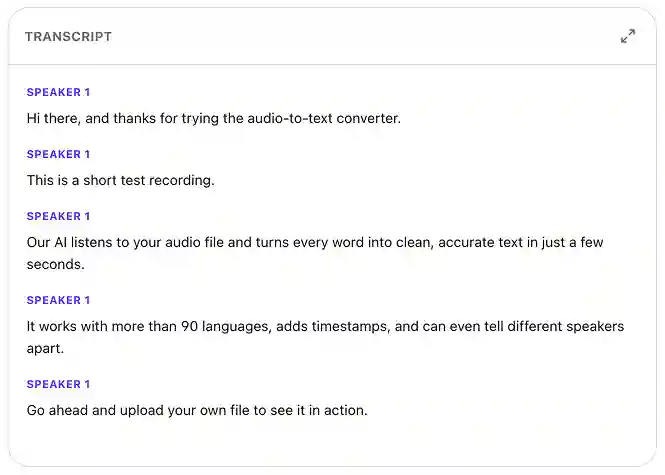
Our AI audio-to-text converter can detect who is speaking, split the transcript into speaker turns, and align timestamps with every line. This gives you a readable and searchable transcript. Here's how it works in three easy steps:
Drag your file into the upload zone at the top of the page (Overchat AI supports MP3, WAV, M4A, AAC, FLAC, and OGG, as well as audio tracks from MP4 and MOV videos).
Overchat AI runs the audio through Whisper AI, separating each voice into its own track, and labeling the speakers. Punctuation and capitalization are handled automatically.
Export the result as TXT, or SRT/VTT for subtitles. Or, you can also copy the transcript directly to the clipboard.
USE CASES
Drop in a recorded interview, Zoom call, or sales meeting and get a clean transcript.
Convert audio to SRT or VTT for YouTube, TikTok, Reels, Vimeo.
Convert a podcast episode to text and turn it into show notes.
Upload a recorded lecture or seminar and get a searchable transcript with timestamps.
Turn depositions, hearings, and dictations transcripts at a fraction of the cost of a human typist.
Convert voice memos into clean written notes you can editand paste into a text editor.
Join 350,000+ creators already using Overchat AI to create audio, images, and videos with AI.
Overchat AI brings you the power of the world's top AI models: ChatGPT, Claude, Gemini, Mistral, and more.

An audio-to-text converter transforms audio recordings into text. It transcribes audio files using artificial intelligence. Overchat AI, for example, is powered by Whisper, an audio-to-text model developed by OpenAI. Unlike older speech-to-text tools, Overchat AI preserves punctuation and capitalization and can handle overlapping voices seamlessly.
It's very accurate. Not only is the transcription accurate in terms of text, but it is also accurate in terms of punctuation. It even separates and clearly labels the speakers, which is useful for transcribing audio tracks with multiple voices when you want to keep track of who said what.
TXT, SRT, or VTT. The latter two formats are suitable for uploading subtitles to YouTube, TikTok, Premiere, or Final Cut Pro. You can also copy the full text directly to your clipboard. Speaker labels and timestamps are preserved in every format. The Overchat AI audio-to-text converter accepts the following audio inputs: MP3, WAV, M4A, AAC, FLAC, and OGG, as well as the audio tracks from MP4 and MOV videos.
Yes, Overchat AI’s Audio to Text Converter is free to use. Enjoy unlimited usage for a limited time!

Chinese company Baidu has quietly released a model that's just as good as DeepSeek and ChatGPT — ERNIE 4.5 delivers exceptional performance at a fraction of the cost — and most people outside China have never even heard of it.

If you're wondering: what is DeepSeek AI, the answer is quite simple. DeepSeek AI is a Chinese AI research lab that builds large language models. The company released several models in late 2024 and early 2025 that compete directly with OpenAI's GPT-4 and Anthropic's Claude, but at a fraction of the operating cost.

ChatGPT Plus costs $20 per month plus tax, while the Pro plan costs $200 per month plus tax. Understandably, not everyone is willing to pay that much for a chatbot, especially if the premium features aren’t worth it to them. This raises an obvious question: how can I use ChatGPT for free?
Available on Web, iOS, and Android. Access your AI assistant anywhere, anytime.


 Powered by OpenAI Whisper
.svg)
