10 Best Runway Alternatives Compared (2026)
Runway charges more for Kling 4.0, resets credits every month and gives 125 free credits once. We compared 10 alternatives by models and price.

Runway AI allows you to generate videos with Runway models, as well as models from other developers, such as Kling 4.0 and Seedance 2.5. But how competitive are the prices, and are there apps that offer more features or a wider selection of models?
To answer that, we've picked 10 Runway alternatives and compared them on costs, capabilities, and value.
Why look for a Runway alternative?
There are three common reasons to look for a Runway alternative.
1. Other developers' models can cost more on Runway
For example, on the $15 plan, a single Kling 4.0 video costs about $5.66, when converted to real-world money. $15 covers just two videos.
In the Kling AI app, on the other hand, that video would cost $2.00 and a comparable $8.80 Standard plan allows you to make 4 videos with the same settings.

2. Monthly credits reset on your billing date
On the Standard and Pro plans, unused credits don't move to the next month. Runway resets them within 24 hours of your billing date, so if you had a quiet month, the credits you paid for are gone. Unused credits carry over only on the $95 Max plan, and only for one month.
Extra credits you buy on top of a plan never expire. However, the smallest pack is 1,000 credits, which is more than the whole monthly allowance of the Standard plan.
3. Limited free usage
When you first sign up with Runway, the platform awards you 125 credits that you can spend on select models. When you spend them, you need a paid plan to keep generating, because you can't buy extra credits on a free account.
That's not a very generous free usage policy. Overchat AI, for example, gives you 100 credits every day (although they don't stack).
Runway alternatives at a glance
Before looking at each alternative in more detail, let's quickly go over their main features and prices:
| App | Best for | Paid from | Free plan |
|---|---|---|---|
| Runway | Aleph 2.0 video editing and ads | $12/month | 125 one-time credits |
| Overchat AI | Kling, Seedance and MiniMax models in one app | $7.50/month | 100 credits a day |
| Luma | HDR video for color grading | $25/month | Paid plans only |
| Higgsfield | Camera and lens control | $15/month | Limited models, watermark |
| OpenArt | Multi-scene videos with the same characters | $13/month | Trial credits |
| Magnific | Credits that last a whole year | €10.50/month | 20 images a day, Auto only |
| Kling AI | Kling 4.0 at the developer's price | $6.60/month | Monthly credits, watermark |
| Dreamina | Seedance from ByteDance | $15/month | Daily credits, watermark |
| Hailuo AI | MiniMax H3, which Runway doesn't have | $8.40/month | One-time trial credits |
| PixVerse | Lots of short videos on a small budget | $8/month | 30 credits a day |
| Google Flow | The best free plan | $4.99/month | 50 credits a day |
And now let's look at each Runway alternative in more detail:
1. Overchat AI
Overchat AI is our AI aggregator that lets you use video models from different developers in one place.
In the AI video generator, you can choose from one of 31 models (and counting), including Kling 4.0 and Seedance 2.5. Instead of relying on one model for every project, you can choose a different one depending on the video you want to create.
Overchat AI also covers some of Runway's editing workflows:
- If you use Aleph 2.0 to modify existing footage, Overchat has an Edit video mode powered by Kling 3.0 Video to Video. Upload your video, describe what you want to change, and add reference images if needed. You can use it to change visual details without generating the entire scene from scratch.

- For character animation, Motion control transfers movements from a 3–30 second reference video to a character in a still image. It uses Kling V3 Motion Control, so you can animate a character without describing every movement in a prompt. Overchat also has more than 300 ready-made video filters for effects that don't require much setup.
You get 100 free credits every day, which lets you try the platform without subscribing.
Price:
| Plan | Monthly | Yearly, per month | Credits a month |
|---|---|---|---|
| Mini | $15 | $7.50 | 7,000 |
| Pro | $29 | $14.50 | 15,000 |
| Max | $59 | $29.50 | 35,000 |
| Ultra | $119 | $59.50 | 80,000 |
You can also try full access to Overchat for $1.99 before committing to a subscription. One limitation of the paid plans is that unused monthly credits don't roll over. If you generate videos irregularly, one-time credit packs may be more practical because those credits never expire.
Videos generated with Overchat AI come with full commercial rights, including use in client projects.
Best forCreators who want to experiment with multiple video models, edit existing footage, and get free credits for occasional generations.
Pros
- 31 video models with upfront credit costs
- Video editing and motion-control tools
- 100 free credits daily
Cons
- Free credits aren't enough for higher-cost models like Kling 4.0
- Subscription credits don't roll over
2. Luma
Luma is the best Runway alternative for professional color grading. On Runway, HDR (high dynamic range) and ProRes output are only available on the $95 Max plan. On Luma, HDR is available on every plan.
If your video pipeline includes a post-production step, Luma's Ray3.2 model can also save HDR in EXR. However, HDR and EXR videos cost about two and three times the base price, so it makes sense to turn them on only for the footage you'll grade.
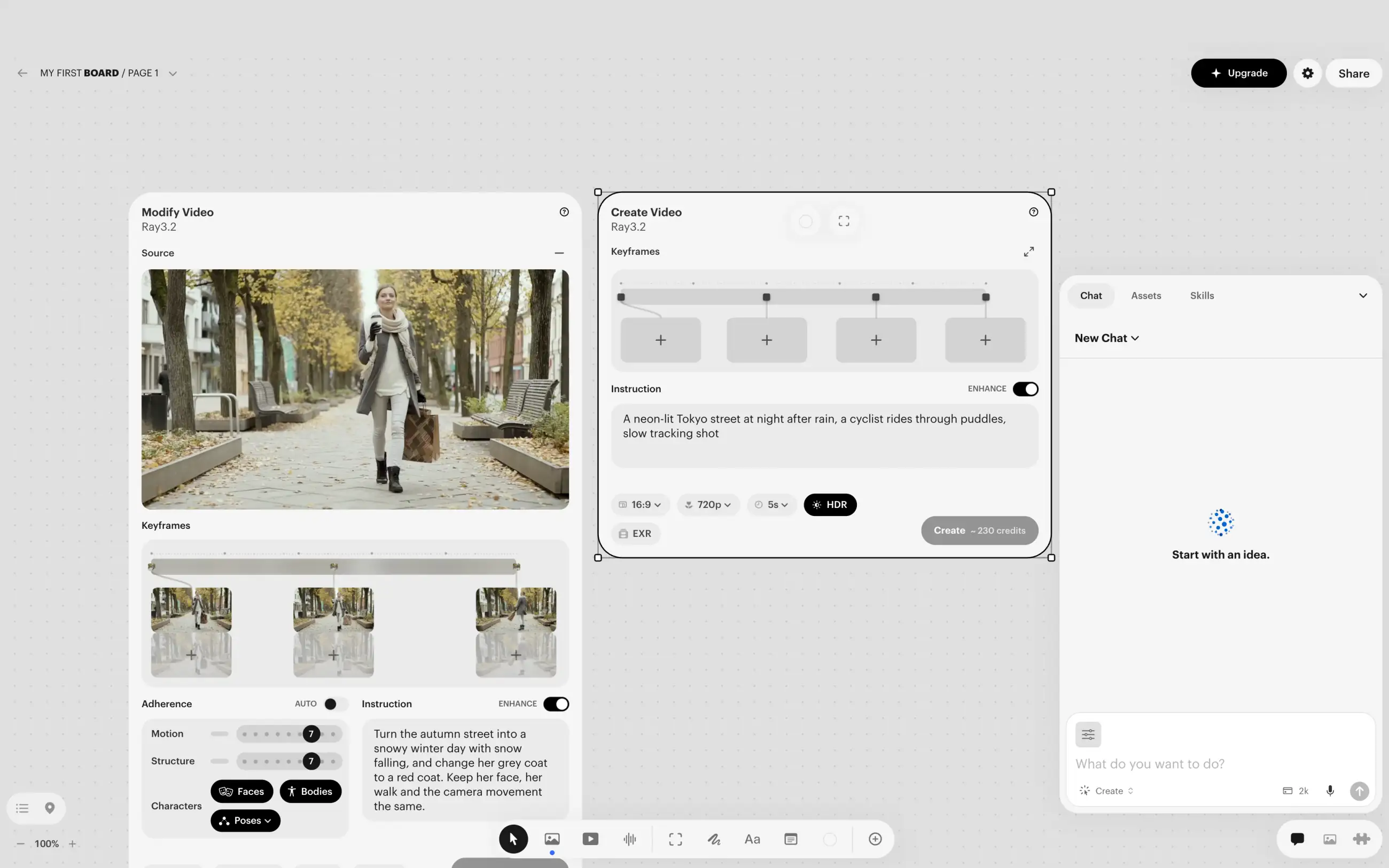
Luma doesn't limit you to its proprietary models, though. For example, Kling 4.0 is supported and costs less than on Runway. A 10-second Kling 4.0 video in 1080p costs about $2.37 on the $30 Plus plan, which is less than half of what it costs on Runway's Standard. With the same budget, you can make more than twice as many Kling 4.0 videos.
If you use Runway's Agent to make a whole video from one request, Luma has AI agents too.
Price:
| Plan | Monthly | Yearly, per month | Credits a month |
|---|---|---|---|
| Plus | $30 | $25 | 10,000 |
| Pro | $90 | $75 | 40,000 |
| Ultra | $300 | $250 | 150,000 |
Best forVideo teams who color grade their footage, need HDR or EXR output, or make ad variants with AI agents.
Pros
- HDR and EXR output on any plan
- Kling 4.0 for less than half of its Runway price
- AI agents that keep your brand's style
Cons
- No free plan
- The cheapest plan costs $30 a month
3. Higgsfield
Higgsfield is the best Runway alternative if you plan every shot like a cinematographer. In its Cinema Studio 4.0, you choose the camera, the lens and the aperture before you generate, instead of describing them in a prompt. You can also combine up to three camera movements in one shot.
Every setting has ready-made presets, so you don't need to know camera specs to get the look you want.

Besides its own Genjutsu model, Higgsfield has Kling 4.0 and Seedance 2.5, so you can use the same camera settings with them too.
The main drawback is the price. A 5-second 1080p video in Cinema Studio costs 80 credits, so on the $15 Starter plan, each one costs about $6.
Price:
| Plan | Monthly | Yearly, per month | Credits a month |
|---|---|---|---|
| Starter | $15 | $15 | 200 |
| Plus | $49 | $39 | 1,000 |
| Ultra | $129 | $99 | 3,000 |
Best forAd and film creators who set up the camera and its movement for every shot.
Pros
- Camera, lens and aperture presets in Cinema Studio 4.0
- Up to three camera movements in one shot
Cons
- About $6 per 5-second 1080p video on the Starter plan
- Free videos have a watermark
4. OpenArt
OpenArt is the best Runway alternative for multi-scene videos with the same characters. When you generate a video shot by shot, small details change from one shot to the next, like a character's jacket that changes by the third shot. To fix it, you have to generate the shot again and pay for it again.
OpenArt solves this with Director Mode. You describe the whole story in a chat, and the AI agent turns it into scenes with the same characters in every one.
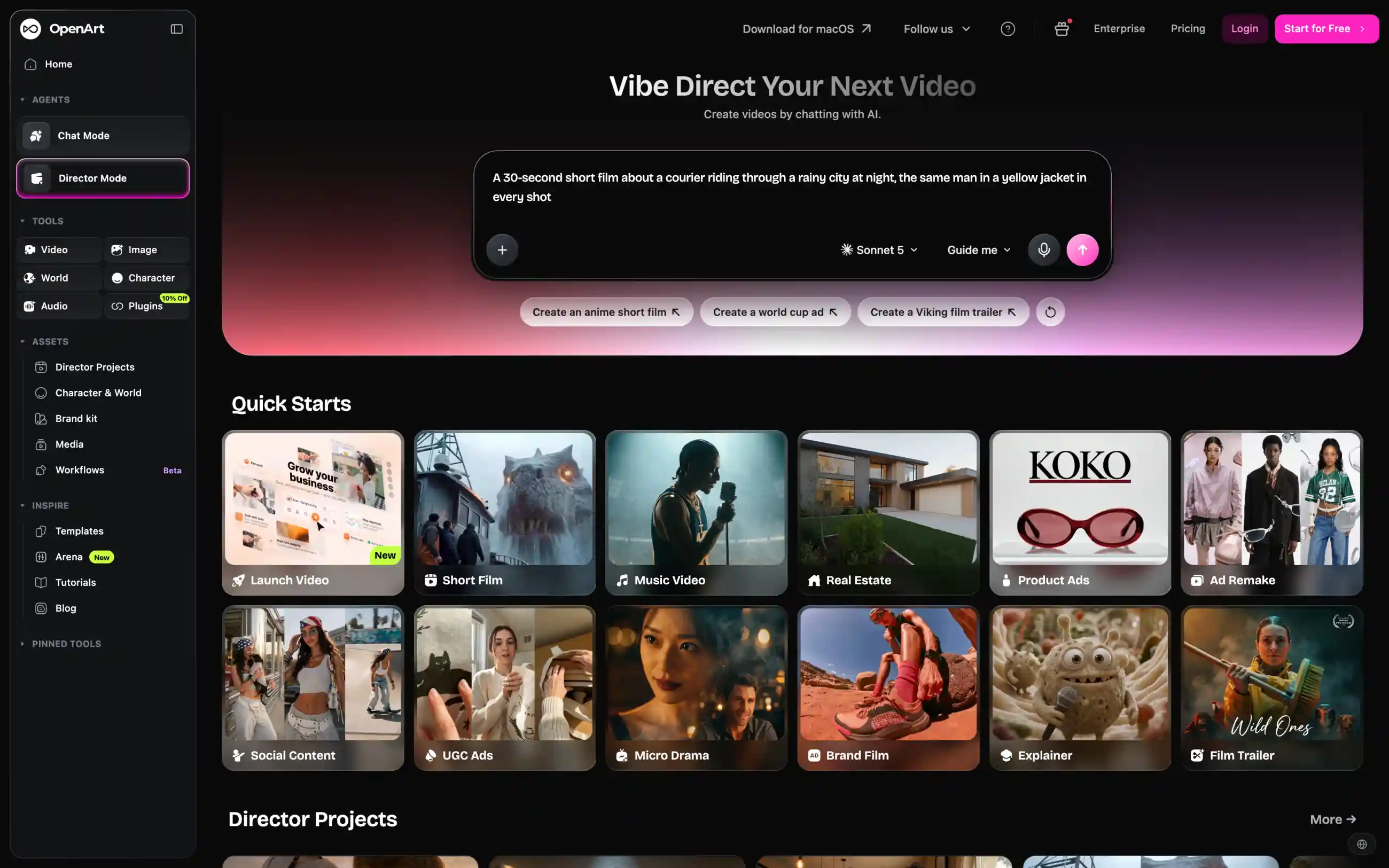
For ads, there are also quick starts like Product Ads and UGC Ads.
For commercial use, you need at least the $34 Plus plan. To avoid paying for the next month, cancel at least five days before your renewal date.
Price:
| Plan | Monthly | Yearly, per month | Credits a month |
|---|---|---|---|
| Starter | $14 | $13 | 4,000 |
| Plus | $34 | $27 | 12,000 |
| Pro | $56 | $44 | 24,000 |
| Wonder | $240 | $175 | 106,000 |
Best forCreators who make short films, ads and music videos with the same characters in every scene.
Pros
- Director Mode keeps characters the same across scenes
- Quick starts for ads, music videos and micro dramas
Cons
- Commercial use only from the $34 Plus plan
- You have to cancel five days before renewal
5. Magnific (formerly Freepik)
Magnific is the best Runway alternative if you make videos irregularly. Runway resets your credits every month, while on Magnific, you get a pool of credits for the whole year. This way, you can save them through quiet months and spend most of them on one big project.
With the subscription, you also get the stock library Freepik was known for, with more than 250 million photos, vectors and other assets.

Magnific also has Kling 4.0, but on the free plan, the model is chosen automatically, so you can't pick it.
Price:
| Plan | Monthly | Yearly, per month | Credits a year |
|---|---|---|---|
| Premium | €15 | €10.50 | 240,000 |
| Plus | €34 | €25.50 | 600,000 |
| Pro | €83 | €62.25 | 1,500,000 |
These are prices for Europe. On Premium, you can't top up credits, so if you run out before the year ends, you have to upgrade to a higher plan.
Best forCreators who have a few big projects a year and need stock assets for them.
Pros
- Credits stay valid for 12 months
- More than 250 million stock assets in the same subscription
Cons
- You can't choose the model on a free account
- No credit top-ups on Premium
6. Kling AI
Kling AI is Kuaishou's own app for its Kling models. New Kling versions and features come out there first, before they reach Runway. Kling 4.0 also costs about a third of its Runway price, so with the same budget, you can make about three times as many videos.
Kling 4.0 can generate up to 30 seconds in one go with keyframes, so you don't have to stitch a longer scene from several clips. The app also has Motion Control and Lip Sync.

However, Kling AI has only Kling models, so for Seedance or MiniMax, you'll need another app. Plan credits also expire 31 days after you get them, and payments for plans and credit packs aren't refundable.
Price:
| Plan | Monthly | Yearly, per month | Credits a month |
|---|---|---|---|
| Standard | $8.80 | $6.60 | 660 |
| Pro | $32.56 | $24.42 | 3,000 |
| Premier | $181.99 | $136.67 | 18,000 |
Best forCreators who mostly use Kling 4.0 and want to pay less for it.
Pros
- Kling 4.0 at about a third of its Runway price
- Up to 30 seconds in one generation, plus Motion Control
Cons
- Only Kling models
- Payments aren't refundable
7. Dreamina
Dreamina is ByteDance's AI image and video app, and the first place where new versions of Seedance appear. A Seedance 2.5 video costs about twice as much as a Kling 4.0 one, so failed attempts add up quickly. To save credits, you can start with Seedance 2.5 Draft. It makes a 480p version of your idea, and you pay for the full video only when the draft looks right.
If you use Aleph 2.0 to change objects in a clip, Dreamina Recreate does a similar job. It can swap objects, transfer motion from one video to another and remix clips up to 30 seconds long.

In Dreamina, you get free credits every day, but videos you download on the free plan have a watermark.
Price:
| Plan | Monthly | Credits a month |
|---|---|---|
| Basic | $15 | 1,575 |
| Standard | $49 | 3,885 |
| Advanced | From $99 | 8,645 |
These are US prices at the time of writing.
Best forCreators who work mostly with Seedance and want to try its new versions first.
Pros
- New Seedance versions from ByteDance first
- 480p drafts before the full video
- Recreate for object swaps and motion transfer
Cons
- Free downloads have a watermark
- No Kling models
8. Hailuo AI
Hailuo AI is MiniMax's own app, and the best Runway alternative for MiniMax H3, which Runway doesn't have. In Hailuo, you get all of the model's settings, including 2K resolution and up to 12 reference files.

Hailuo lists how many seconds of video you get on each plan, which makes it easy to compare its prices with Runway's. On the Standard plan at $8.40 a month with yearly billing, you get about 84 seconds of MiniMax H3 in 2K. On Runway's $12 Standard plan, you get 52 seconds of Gen-4.5. That's more video for less money.
On the free plan, you only get one-time trial credits for Hailuo's models.
Price:
| Plan | Monthly | Yearly, per month | Credits a month |
|---|---|---|---|
| Standard | $14.99 | $8.40 | 1,000 |
| Pro | $54.99 | $30.40 | 4,500 |
| Master | $119.99 | $71.20 | 10,500 |
Best forCreators who want MiniMax H3 and a clear price per second of video.
Pros
- MiniMax H3 in 2K with up to 12 references
- Plans show how many seconds of video you get
Cons
- Free credits are a one-time trial
- Only Hailuo models on the free plan
9. PixVerse
PixVerse is the best Runway alternative if you make short videos every day. Runway adds credits once a month, while on PixVerse's paid plans, you also get 60 credits every day on top of the monthly allowance. Even when the monthly credits are gone, you can keep generating the next day.
For social media videos, PixVerse also has a Template tab with ready-made videos sorted into categories.

If a video can wait, Off-Peak Mode generates it with PixVerse models when the servers are less busy, and you save 30% of credits on Pro or 50% on Premium.
The Standard plan goes up to 720p. For 1080p, 4K or models from other developers like Kling 4.0 and Seedance 2.5, you need Pro.
Price:
| Plan | Monthly | Yearly, per month | Credits a month |
|---|---|---|---|
| Standard | $10 | $8 | 1,200 + 60 a day |
| Pro | $30 | $24 | 6,000 + 60 a day |
| Premium | $60 | $48 | 15,000 + 60 a day |
Best forSocial media creators who post short videos every day.
Pros
- 60 extra credits every day on paid plans
- Off-Peak Mode saves up to 50% of credits
- Kling 4.0 and Seedance 2.5 from the Pro plan
Cons
- Only 720p on the Standard plan
- Off-Peak discounts only work with PixVerse models
10. Google Flow
Google Flow has the best free plan among Runway alternatives. With any Google account, you get 50 credits a day, and a 10-second 720p video with Gemini Omni 1.2 Flash costs 30 of them, so you can make one such video every day without paying anything.
Gemini Omni 1.2 Flash is Google's newest video model, and it isn't available on Runway. It can also edit finished videos from a chat message, so for small fixes, it replaces Aleph 2.0 for free.
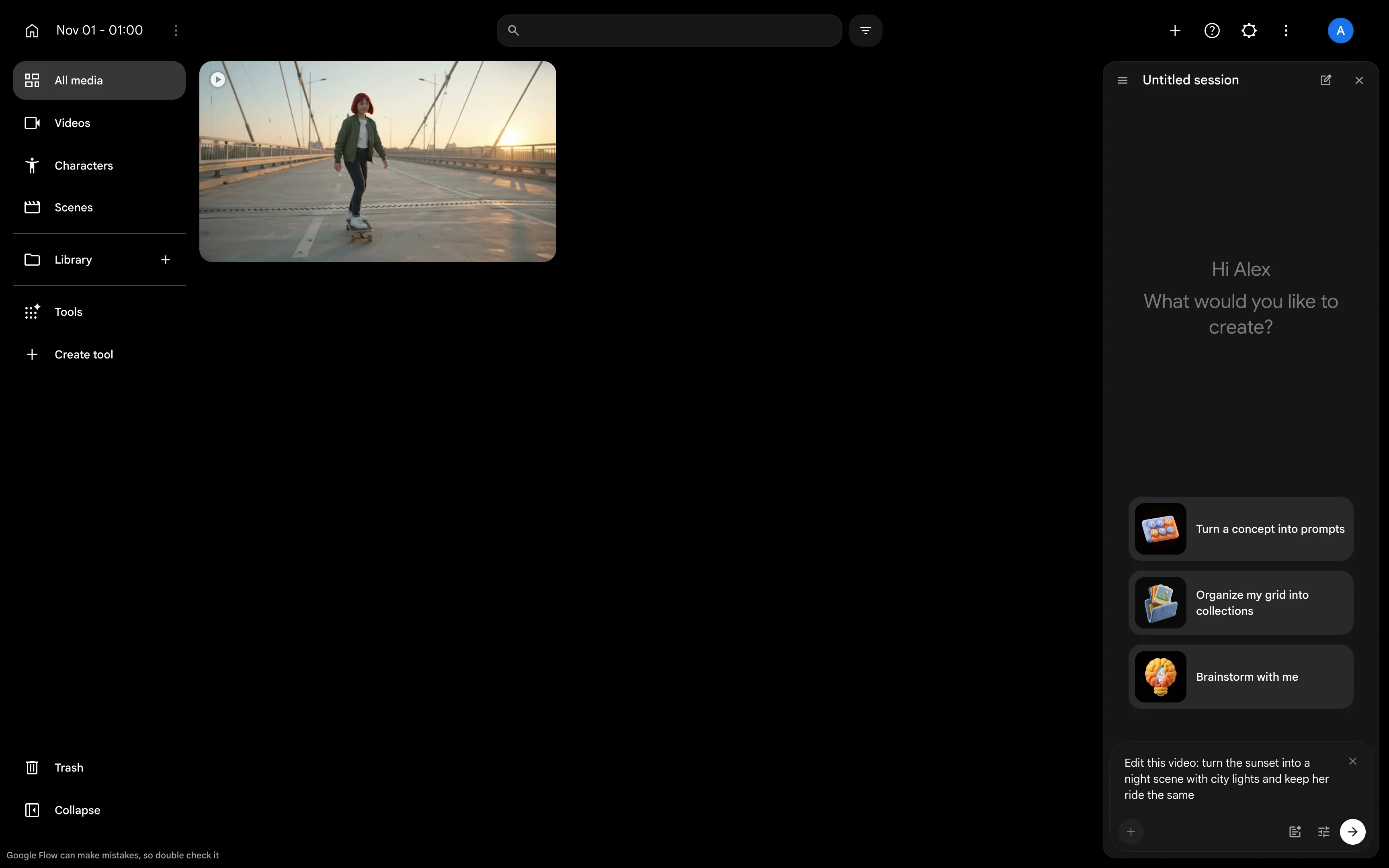
On the free plan, you also get most of Flow's tools, such as Frames to Video and Scenebuilder. To make videos longer than 10 seconds, you need a Google AI subscription, which starts at $4.99 a month.
Price:
| Plan | Monthly | Flow credits a month |
|---|---|---|
| Google AI Plus | $4.99 | 200 |
| Google AI Pro | $19.99 | 1,000 |
| Google AI Ultra | $99.99 | 10,000 |
| Google AI Ultra | $199.99 | 25,000 |
The 50 daily credits stay on every plan, on top of the monthly ones. Prices may vary by country.
Best forCreators who want to make and edit AI videos for free.
Pros
- 50 free credits every day
- Video editing in a chat on the free plan
Cons
- No videos longer than 10 seconds on the free plan
- Unused daily credits don't carry over
FAQ
These are the questions people ask most often about Runway and the apps that replace it.
Overchat AI is the best Runway alternative. It has 31 video models, including Kling 4.0, Seedance 2.5 and MiniMax H3. It also has an Edit video mode for changing finished videos, and you get 100 free credits every day.
In Google Flow, you get 50 free credits a day, which is enough for one 10-second Gemini Omni 1.2 Flash video in 720p. In Overchat AI, you get 100 free credits a day, and Dreamina and PixVerse also refill their free credits daily.
Luma and Higgsfield work the most like Runway. Both are AI video studios with their own models, Ray3.2 and Genjutsu, and models from other developers like Kling 4.0 and Seedance 2.5.
Runway has a Free plan with 125 credits. You get them once, they don't expire, and you can use them with a selection of Runway's models. To get more credits, you need a paid plan, which starts at $12 a month with yearly billing.
Midjourney is better for images, while Runway is better for video. Midjourney can only animate an image into a 5-second clip and extend it to 21 seconds, in 480p or in 720p from the Standard plan. Runway has its own video models, Gen-4.5 and Aleph 2.0, and models from other developers, including Kling 4.0.
Several Runway alternatives also work as AI video editors. Overchat AI has an Edit video mode, where Kling 3.0 Video to Video changes an uploaded video from your prompt and reference images. Google Flow edits videos from a chat message with Gemini Omni 1.2 Flash for free, and Dreamina Recreate swaps objects in clips up to 30 seconds long.
Runway carries unused credits over for one month, but only on the Max plan. On Standard and Pro, monthly credits reset within 24 hours of your billing date. Credits you buy separately and the 125 free credits never expire.
You get a refund only if you bought or renewed your plan in the last 30 days and haven't used it, or have barely used it. Runway doesn't refund plans because of bad generation results, and a refund cancels your plan right away. If you subscribed through the App Store or Google Play, you need to ask Apple or Google for the refund.