In this article we're going to break down ten OpenArt AI alternatives and explain their prices, pros and cons, and what kind of tasks each one suits the best. We've used each tool on this list extensively, and for the sake of this comparison tested them by generating the same video clip in each platform: a 10-second clip in two shots, where a girl with a red bob and a green bomber jacket skateboards down an empty bridge at sunrise, then a close-up of her kicking the board up, catching it and laughing.
Before we dive deep into the comparison, let's quickly discuss the potential reasons for looking for an OpenArt alternative:
You can't try OpenArt for free. Unfortunately, OpenArt doesn't offer a free trial, making it difficult to judge if the platform suits you. The cheapest plan, Starter, costs $14 a month. Technically, when you create a new account, you get about 40 trial credits, but a 10-second PixVerse V6 clip at 360p costs 100, so you can't make a single video before you pay.
Video uses credits fast. Starter's 4,000 credits cover about 50 videos a month. In OpenArt's Trustpilot reviews, users also complain about paying credits for chatting with the assistant and about a single text-to-speech generation costing a quarter of their monthly allowance.
Commercial use starts with Plus. You need the $34 Plus plan to use your videos in commercial projects, and only Plus subscribers can buy extra credits.
OpenArt AI alternatives at a glance
App
Best for
Free plan
Paid plan
Overchat AI
Picking the video model for each clip
100 credits a day
Mini: $15/month
Higgsfield
Cinematic camera moves and VFX presets
No credits, a few basic models
Starter: $19/month
LTX Studio
Storyboards and multi-scene films
About 800 credits, one time
Lite: $15/month
Google Flow
Google's video models with an AI agent
50 credits a day
Google AI Pro: $19.99/month
Krea
Style control and custom models
Image models only
Basic: $9/month
Runway
Planning, generating and editing with an agent
125 credits, one time, no video models
Standard: $15/month
Leonardo AI
Consistent characters and custom models
150 tokens a day
Essential: $12/month
Dreamina
Seedance clips without a subscription
120 credits a day
Basic: $19/month
Kling AI
Kling models from the developer
A few credits, not enough for Kling 4.0
Standard: $10/month
Civitai
Open-source models and LoRAs
Daily Buzz rewards
Bronze: $10/month
1. Overchat AI
Overchat AI is our own all-in-one AI platform, and like OpenArt, it brings video, image and text models from different developers into one app.
For example, in the Overchat AI Video Generator you can create videos with Kling 4.0, Seedance 2.5, Grok Imagine Video, Wan 3.0, Happy Horse 1.1 and other models, but you can also use image models to generate frames for the videos, or text models to create scripts and direct the shots.
For a series of clips with the same person or product, you can add images as references, or create consistent characters to feature across your videos.
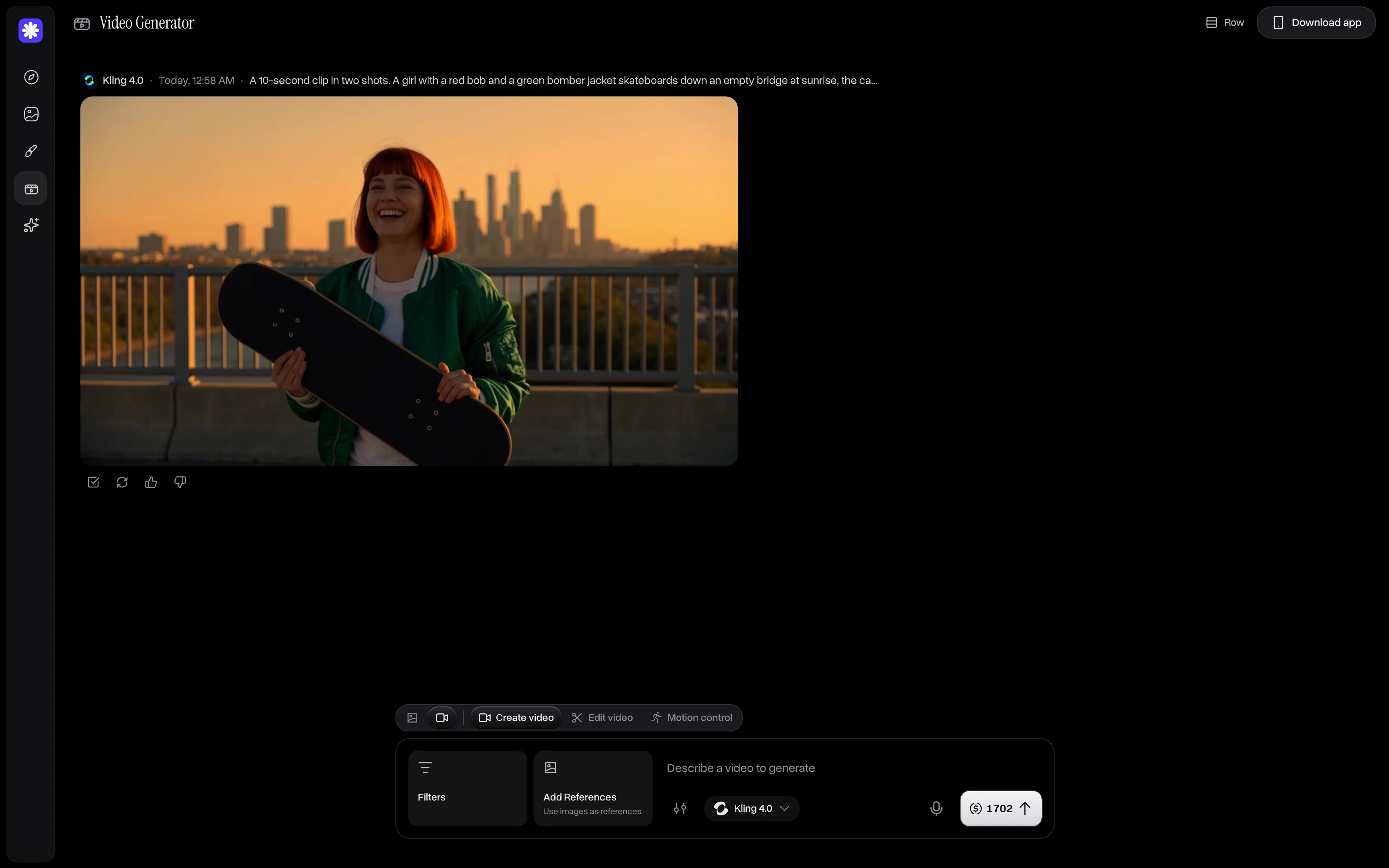
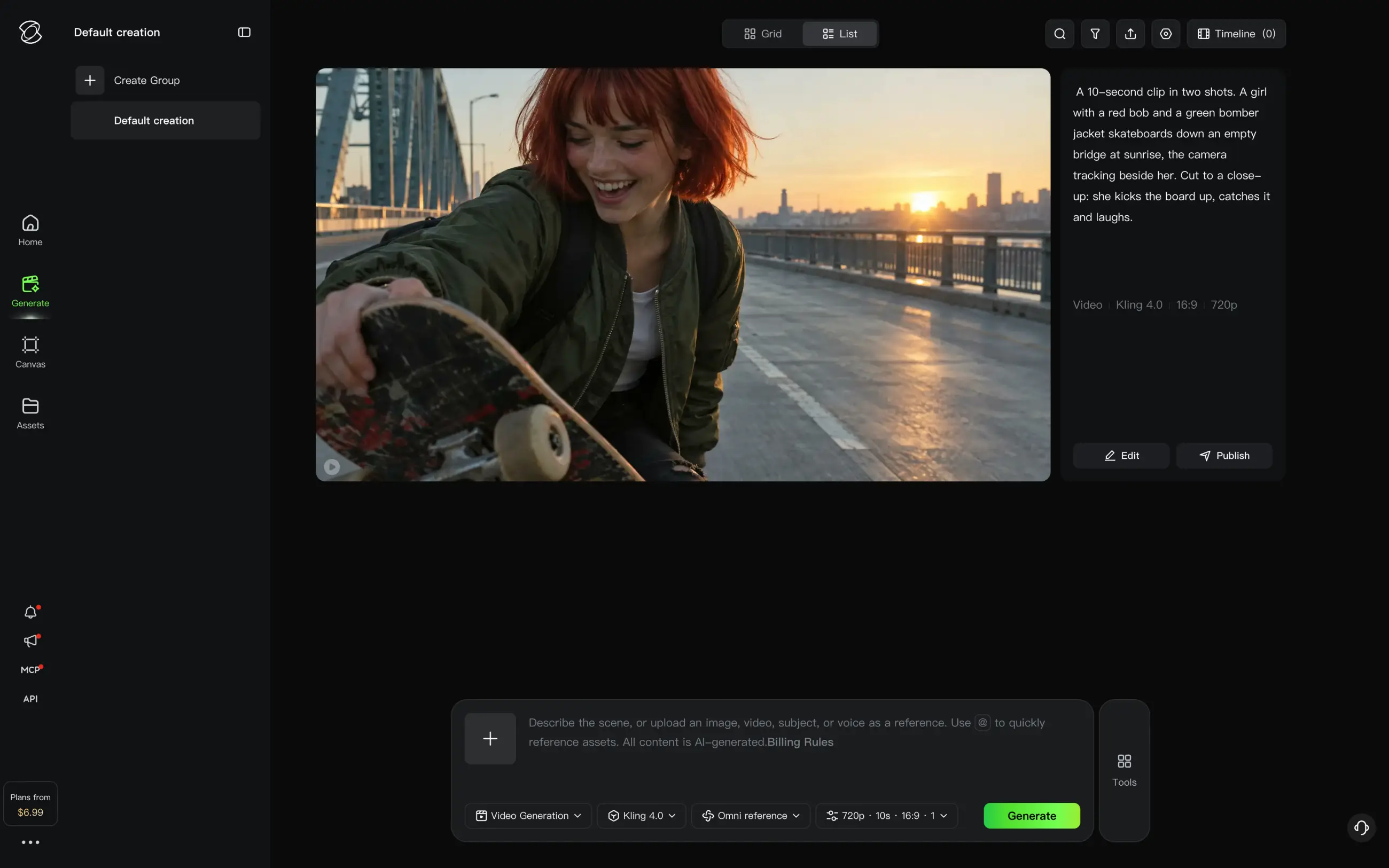
That combination of tools makes Overchat AI a great choice for creating various types of content: from AI animations to UGC videos, from short films to talking-head style content, and with over 50 different models at your fingertips, you can choose the best tool for any job. For our test, we used Kling 4.0 at 10 seconds and 720p:
Overchat AI Video Generator with a Kling 4.0 clip of a red-haired girl in a green bomber jacket holding a skateboard on a bridge at sunrise
Kling 4.0 made the two shots we asked for. The first follows the girl from the side as she rides down a bridge road, with a city skyline behind the railing and the sun low over the river. Then the clip cuts to a close-up: the board flips up into the air, she reaches for it and ends the clip holding it and laughing. Her face, red bob and green bomber over a white T-shirt are the same in both shots. The only odd moment is the kick, when the board flies higher than a real one would.
Price:
Plan
Monthly
Yearly, per month
Credits a month
Mini
$15
$7.50
7,000
Pro
$29
$14.50
15,000
Max
$59
$29.50
35,000
Ultra
$119
$59.50
80,000
Best for: People who want to choose the video model for each scene and keep video, images and chat in one subscription.
Pros:
✅ Kling 4.0, Seedance 2.5, Veo 3.1 and other video models in one app
✅ Kling 4.0 kept the same character across the cut in our clip
✅ Multiple selection runs one prompt on several models at once
Cons:
❌ No storyboard or timeline for assembling clips into a film
2. Higgsfield
Higgsfield is a video platform built around camera work. It gives you access to models like Seedance 2.5, and more than 250 presets add camera moves, framing and visual effects, so you can direct shots by choosing from a gallery of presets instead of writing complicated prompts. And it just works.
While using Higgsfield we appreciated how the interface is designed with different studios for different tasks:
Cinema Studio for film scenes
Ads Studio and Marketing Studio for product videos
and AI Influencer studio for a recurring virtual person.
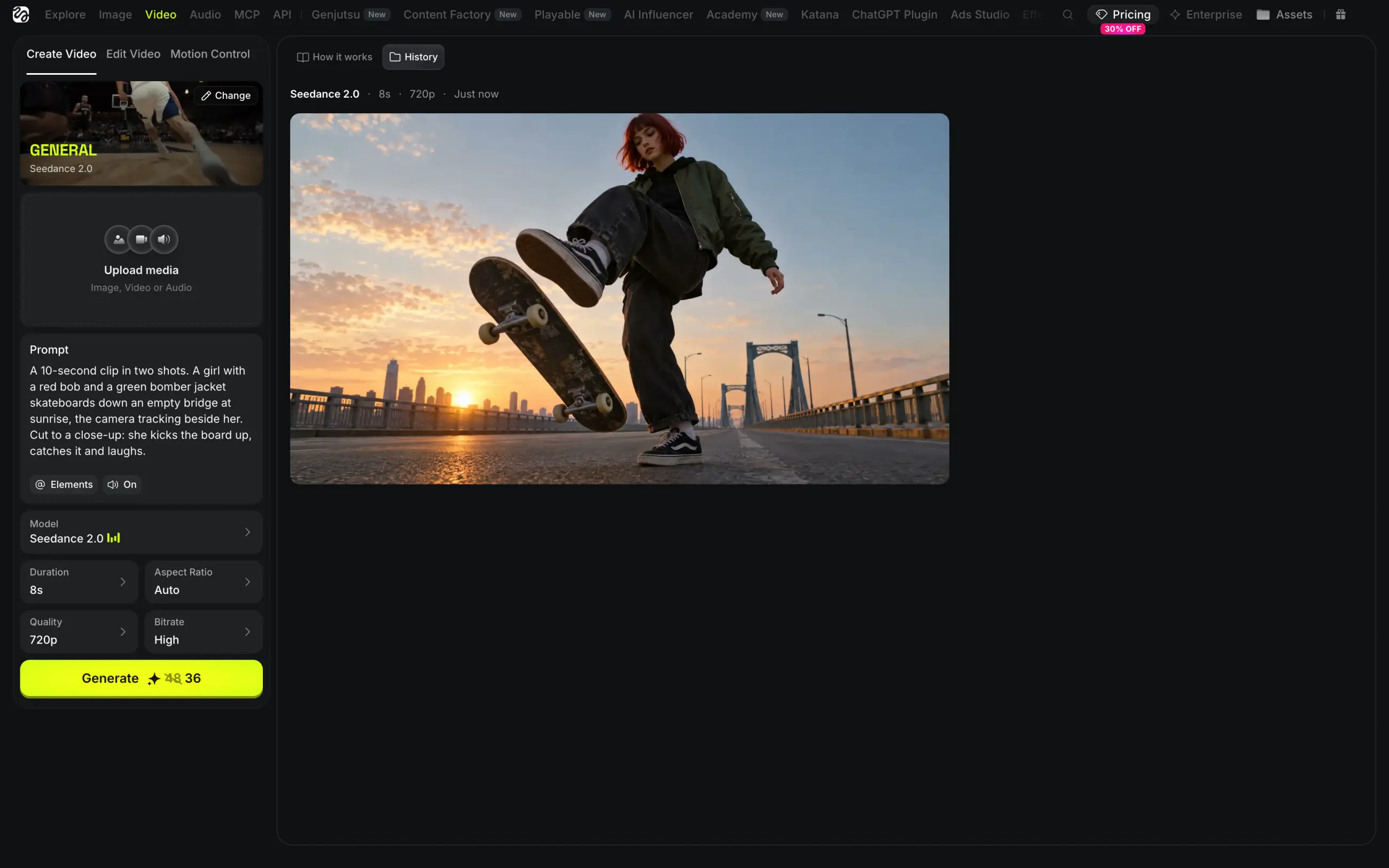
For our test, though, we used a simple General preset setup and created a Seedance 2.0 clip at 8 seconds and 720p:
Higgsfield video page with the skateboarding prompt, Seedance 2.0 settings and a frame of a girl kicking her skateboard up on a bridge at sunrise
Price:
Plan
Monthly
Yearly, per month
Credits a month
Starter
$19
—
270
Plus
$59
$47
1,200
Ultra
$129
—
3,000
Seedance 2.0 requires at least Plus, where 1,200 credits pay for about 25 eight-second clips at 720p. Commercial use is allowed on every paid plan.
Best for: Creators who want stylized camera moves and effects in short clips and ads.
Pros:
✅ Camera moves, framing and VFX from more than 250 presets
✅ Separate studios for film scenes, ads and AI influencers
✅ Commercial use on every paid plan
Cons:
❌ Seedance 2.0 starts with the $59 Plus plan
❌ The app shows a lot of pop-ups with offers and new features
3. LTX Studio
LTX Studio is the video platform from Lightricks, the company behind the open LTX video models. The coolest feature that is worth highlighting in our opinion is the Director Mode, where you can use a Storyboard to turn a script or an idea into a sequence of shots, and Elements keep the same characters and objects in every shot, and the AI then integrates all of that into the shot during the final generation. This gives you greater control over the shot than a text prompt.
For single clips, there's Gen Space, where you write a prompt, choose a model and set the length from 2 to 20 seconds. The app defaults to LTX series models, but you can pick other options from other providers like Kling 3.0, Seedance 2.5 and Veo 3.1.
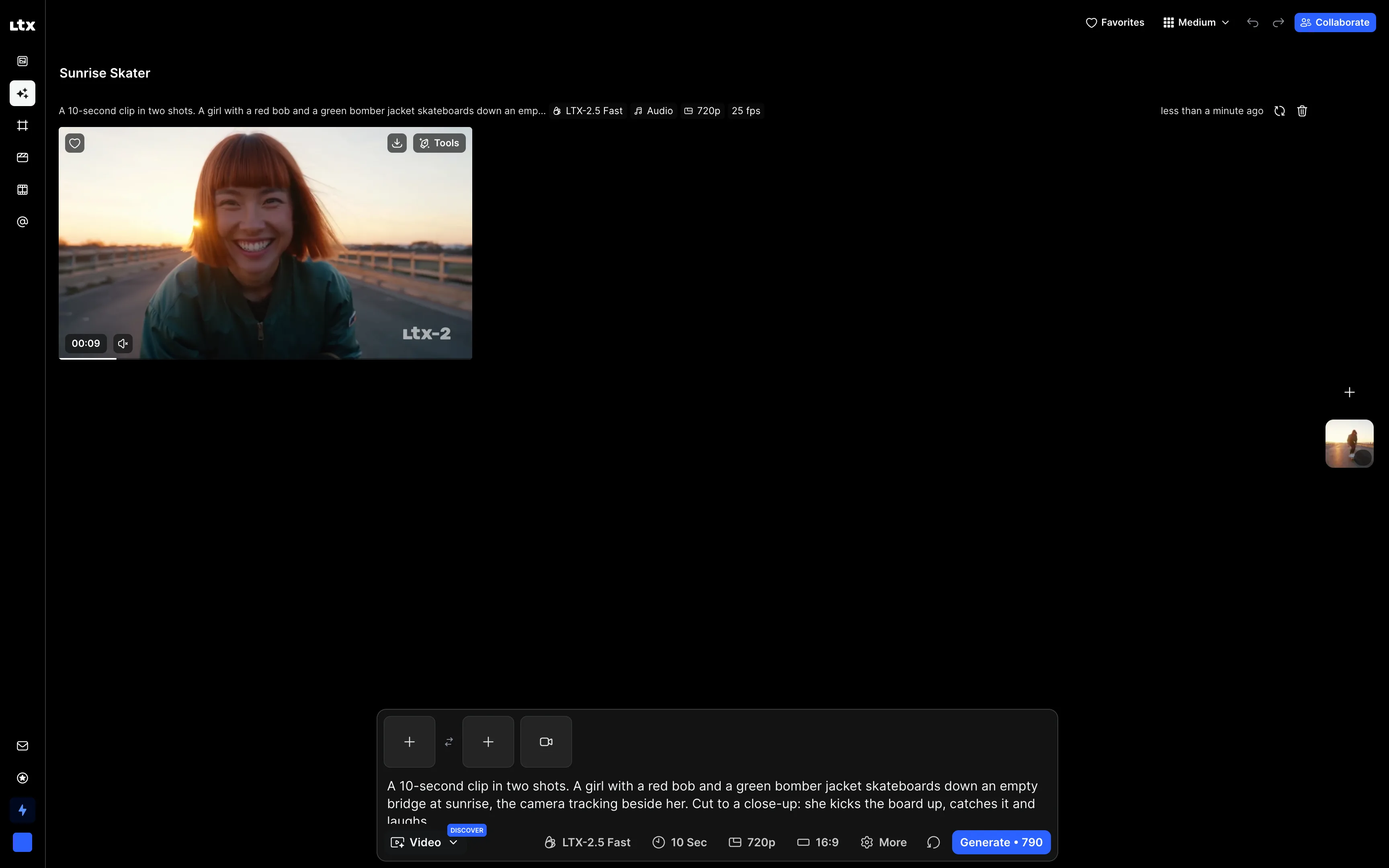
We made our clip in Gen Space with LTX-2.5 Fast at 10 seconds and 720p:
LTX Studio Gen Space with an LTX-2.5 Fast clip of a smiling red-haired girl in a green bomber jacket on a bridge at sunset
LTX-2.5 Fast isn't the best model for prompt following, as it cut the scene into more shots than we asked for. The clip opens with a low camera in front of the girl as she crouches on the board, then shows close-ups of her feet as the board kicks up and her hands catching it. It ends on two close-ups of her face as she laughs into the low sun. Her copper-red bob and dark green bomber stay the same in every shot.
Price:
Plan
Monthly
Yearly, per month
Credits a month
Lite
$15
$12
8,000
Standard
$35
$28
28,000
Pro
$125
$100
110,000
A 10-second LTX-2.5 Fast clip at 720p costs 790 credits, so Lite covers about ten of them a month. Lite removes the watermark but includes only a personal-use license. Commercial use, Elements and third-party models start with Standard.
Best for: Filmmakers and creators who plan a short film or an ad as a storyboard before generating it.
Pros:
✅ Storyboard turns a script into a sequence of shots
✅ Elements keep characters and objects consistent across shots
✅ Our clip kept the same girl through every cut
Cons:
❌ Elements and commercial use require the $35 Standard plan
❌ LTX-2.5 Fast made more shots than the prompt asked for
4. Google Flow
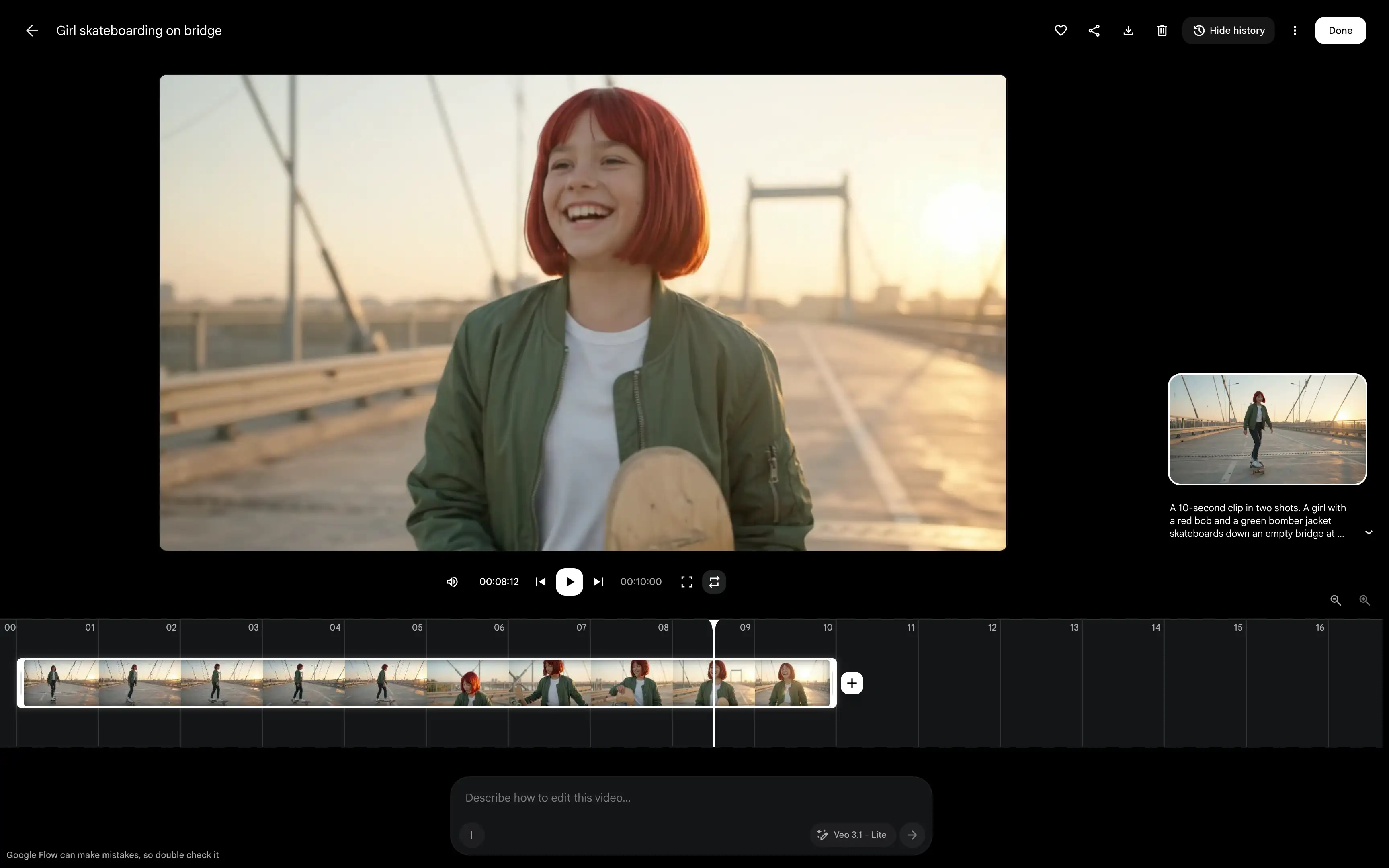
Flow is Google's AI filmmaking app, built on the Veo video models, Imagen and Gemini. Like OpenArt, it now works through a text-based agent. Essentially, you can describe the video in a chat, and the agent picks a model and asks you to approve the generation, and the clips appear in your project. For even more control, Flow gives you Characters and Scenes, so you can reuse the same person in new clips and put clips together into a longer scene.
When we sent our prompt, the agent noticed that the default model, Veo 3.1 Lite, supports clips up to 8 seconds, and offered two options: switch to Omni Flash 1.1 for the full 10 seconds, or keep Veo 3.1 Lite and shorten the clip. We chose Omni Flash 1.1:
Google Flow editor with a 10-second clip of a laughing red-haired girl on a bridge at sunrise and a timeline showing both shots
Flow's clip followed the prompt most closely in our test. The first shot starts in front of the girl on a cable-stayed bridge and then moves alongside her as she rides toward the sun. After the cut, a close-up shows her flipping the board up, catching it and laughing. Her red bob, green bomber and white T-shirt match in both shots.
In the editor, you can add more clips to the timeline or describe changes to the clip in words. Downloads go up to 4K with upscaling.
Price:
Plan
Price
Flow credits
Free
$0
50 a day
Google AI Pro
$19.99/month
1,000 a month
Our 10-second Omni Flash 1.1 clip cost 15 credits, so Google AI Pro covers more than 60 clips like this a month, and the daily free credits are enough for three.
Best for: Creators who want Google's video models and an agent that plans clips and builds scenes on a timeline.
Pros:
✅ The closest result to our prompt, with the same character after the cut
✅ The agent explains model limits and asks before spending credits
✅ Characters, Scenes and a timeline editor in the same project
Cons:
❌ Only Google's models
❌ Availability depends on your country
5. Krea
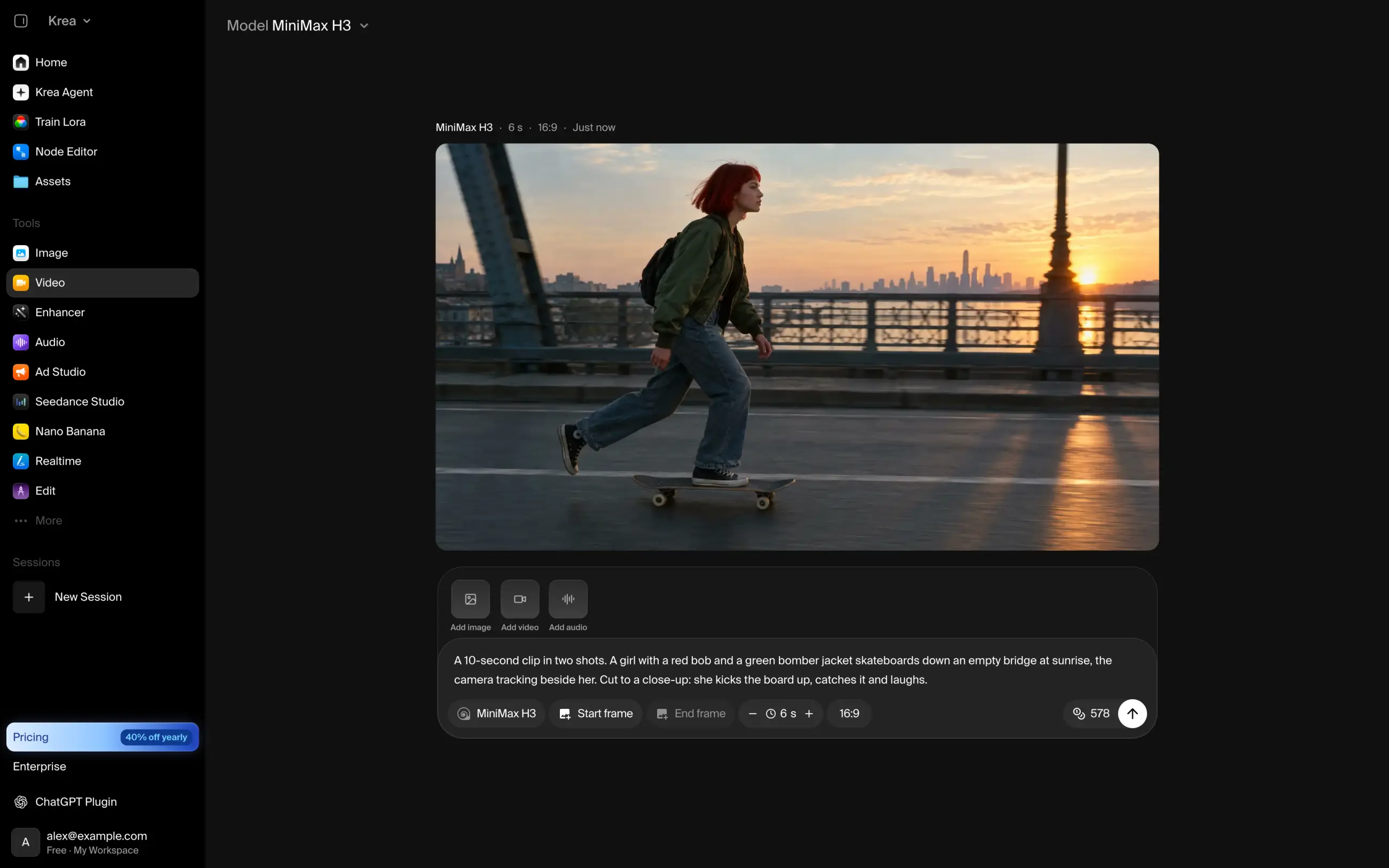
Krea is a creative platform that offers access to its own proprietary models as well as models from third parties. All the usual suspects are here: Seedance 2.5, Kling 4.0, Veo 3.1, MiniMax H3 and LTX-2.5. The video models are split into Fast Models for quick drafts and Intelligent Models for harder scenes.
Out of everything we tested, Krea perhaps gives you the biggest degree of control over style — not in the sense of directing separate elements but in the sense of creating the overall color scheme and vibe of the shots that you want to achieve. This is done through training a LoRA on a character or a look, building image pipelines in the Node Editor, and seeing changes as you draw in Realtime.
But it's not all manual work. Krea Agent can take your requirements in the chat and orchestrate the production pipeline autonomously, much like OpenArt's Chat Mode.
On Krea's video page, we kept the default model, MiniMax H3:
Krea video page with the skateboarding prompt, MiniMax H3 settings and a frame of a red-haired girl skateboarding on a steel bridge at sunrise
Price:
Plan
Monthly
Yearly, per month
Units a month
Basic
$9
$5.25
5,000
Pro
$35
$21
20,000
Max
$105
$63
60,000
Basic includes selected video models, and its 5,000 units pay for about 15 Seedance 2.0 Fast clips. A 6-second MiniMax H3 clip costs 578 units.
Best for: Creators who need a consistent style or character and want to train their own LoRA.
Pros:
✅ LoRA training and the Node Editor for custom looks
✅ The price of every video model is shown before you generate
✅ Krea Agent for requests in a chat
Cons:
❌ Video generation requires a paid plan
❌ Flagship video models use up Basic's units quickly
6. Runway
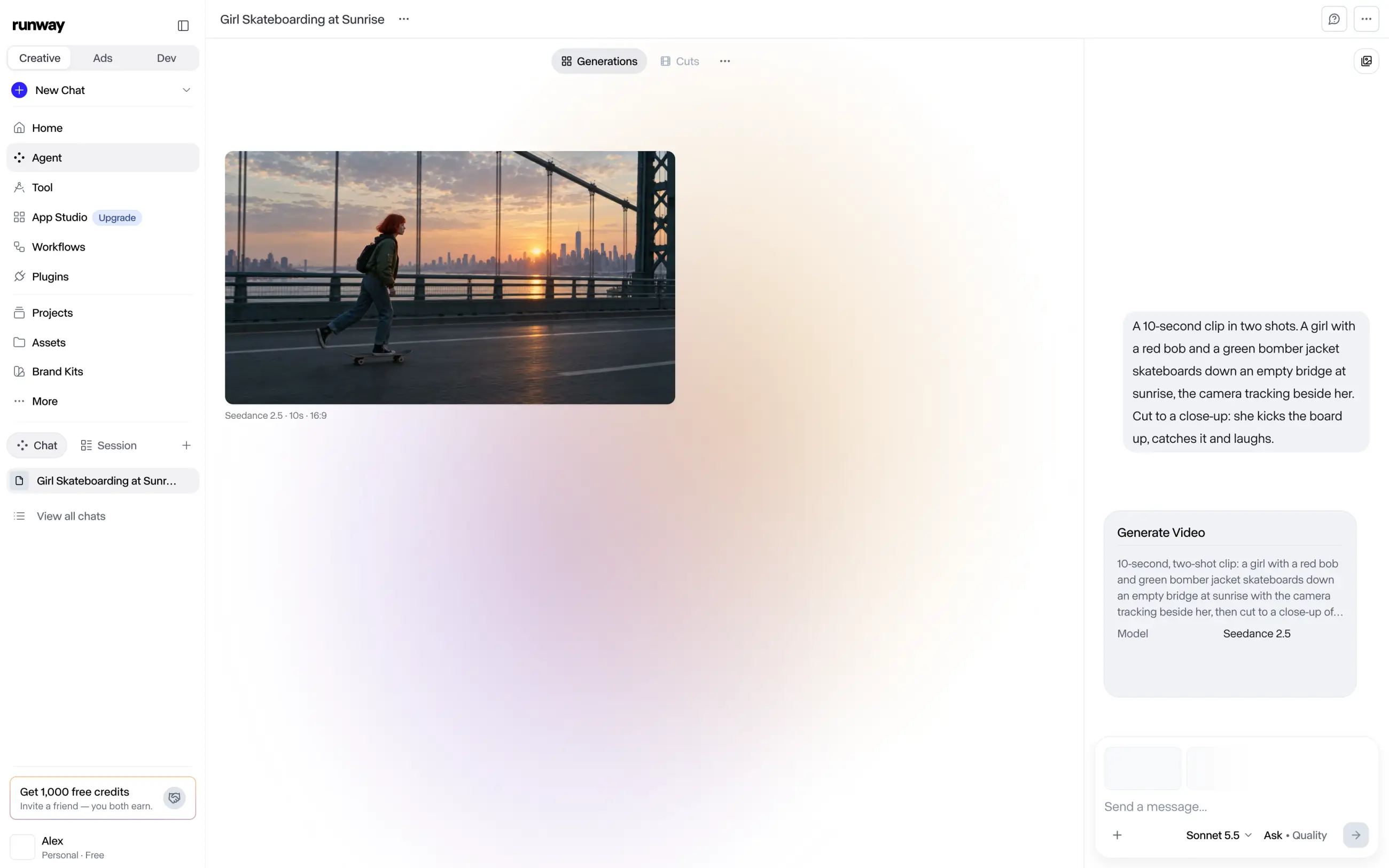
Runway also develops and trains its own models, such as Runway Gen-4.5 for generation and Aleph 2.0 for editing footage. Its platform also runs models from other developers, including Seedance 2.5 and Kling.
Runway is another agent-based tool where you describe the video in a chat, and the agent plans the shots, picks a model and collects the results in one session. From there, you can cut the clips together on a timeline without switching to another app.
Runway Agent planned our clip as two shots on Seedance 2.5. It also offered to make a still of the girl before any video, to lock her red bob and green bomber for both shots:
Runway Agent session with the skateboarding prompt, a Seedance 2.5 Generate Video card and a frame of a girl skateboarding across a suspension bridge at sunrise
This is a useful habit for any multi-shot video: a reference image of the character gives the video model something to match, and it's the same idea OpenArt uses in Character Builder.
Price:
Plan
Monthly
Yearly, per month
Credits a month
Standard
$15
$12
625
Pro
$35
$28
2,250
Max
$95
$76
9,500
Video generation starts with Standard. At 12 credits per second of Gen-4.5 video, Standard pays for less than a minute of footage a month.
Best for: Video teams who want an agent to plan shots and a timeline to finish the edit.
Pros:
✅ The agent plans shots and suggests a reference still for the character
✅ Own models for generating and editing video
✅ A timeline in the same session as the agent
Cons:
❌ All video models require a paid plan
❌ Gen-4.5 uses up the Standard plan in under a minute of video
7. Leonardo AI
Leonardo AI is an image and video platform owned by Canva. It combines its own image models, such as Lucid Origin and Phoenix, with video models from other developers, including Seedance 2.5, MiniMax H3 and Hailuo.
Leonardo is a good fit for character work. Character Reference keeps the same face across images, and you can train a custom model on your own pictures of a character or a style. Blueprints are ready-made templates for common tasks, and Leo Agent handles multi-step requests in a chat.
We used Auto Video, which picks a model for the prompt. It chose MiniMax H3 and made a 6-second clip:
Leonardo AI with a MiniMax H3 clip of a laughing red-haired girl in a green bomber jacket on a bridge at sunset
MiniMax H3 cut the scene into four shots. The clip opens on a wide view of the girl far down the bridge road, then cuts to her feet on the board, a close-up of the board flipping under her and, finally, a close-up of her smiling. The last shot matches the prompt, with a red bob and a green bomber, but in the wide shot she is too small to recognize.
Price:
Plan
Monthly
Yearly, per month
Tokens a month
Essential
$12
$10
8,500
Premium
$30
$24
25,000
Ultimate
$60
$48
60,000
A 6-second Auto Video clip costs 90 tokens, so Essential covers more than 90 of them a month. Paid plans also make your generations private.
Best for: Illustrators and creators who need the same character in images and short clips.
Pros:
✅ Character Reference and custom model training
✅ Auto Video picks a model for each prompt
✅ Blueprints for common tasks
Cons:
❌ Auto Video shows which model it used only after the clip is ready
❌ Generations are public unless you pay
8. Dreamina
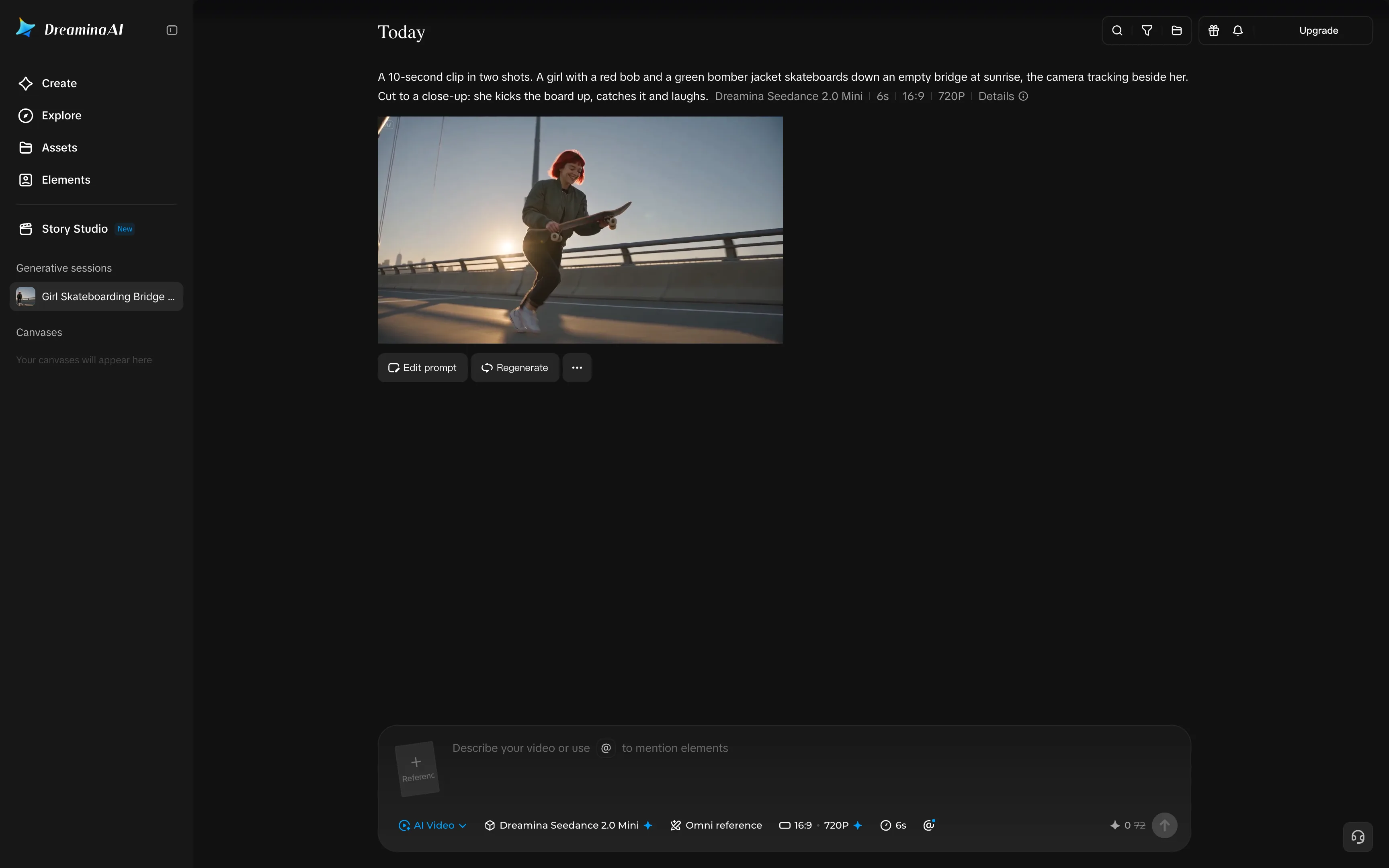
Dreamina is ByteDance's image and video platform and the most direct way to use the company's Seedance video models. It belongs to the CapCut family, so it's a natural choice if you already edit in CapCut. Use the Story Studio to draft stories and break them up into scenes, and Elements to save a character or an object that you can mention in any prompt with @. Omni reference lets you guide a generation with your own files.
We generated our clip with Seedance 2.0 Mini, which made a 6-second video:
Dreamina with a Seedance 2.0 Mini clip of a red-haired girl kicking up her skateboard on a suspension bridge at sunrise
Seedance 2.0 Mini put the whole trick into the first shot: the camera rolls low in front of the girl on a suspension bridge, and she kicks the board up and catches it. The clip then cuts to a close-up of her laughing, with the city behind her. Her face and red bob stay the same after the cut, but the jacket came out olive instead of green.
Price:
Plan
Monthly
Credits a month
Basic
$19
1,575
Standard
$36
3,885
Advanced
$159
17,600
A 6-second Seedance 2.0 Mini clip costs 72 credits, so Basic covers about 20 of them a month. Paid plans remove the watermark, allow longer clips and higher resolution, and add lip sync.
Best for: Creators who want Seedance clips at no cost, especially if they already edit in CapCut.
Pros:
✅ Seedance clips without a subscription, thanks to daily credits
✅ Story Studio and Elements for multi-scene stories
✅ Kept the girl's face and hair after the cut in our clip
Cons:
❌ Longer clips require a paid plan
❌ Free downloads carry a watermark
9. Kling AI
Kling AI is the app from Kuaishou, the company behind the Kling video models. Kling 4.0 is featured in many platforms we tested, but if you want to go straight to the source and use it in the platform made by the company that also made the model, you need to use Kling AI.
Kling 4.0 is one of the most powerful video models, able to make clips from 3 to 30 seconds at 720p or 1080p, and use up to 10 reference images in one generation. Paid plans include three free uses a day of Element AI Multi-Shot, a mode for multi-shot clips with saved elements. The app also has a Canvas and a Timeline for your generations.
We set up our clip on Kling 4.0 with Omni reference, at 720p and 10 seconds:
Kling AI creations list with the skateboarding prompt, Kling 4.0 settings and a frame of a laughing red-haired girl catching her skateboard on a bridge
Price:
Plan
Monthly
Credits a month
Standard
$10
660
Pro
$37
3,000
Premier
$207
18,000
A 5-second Kling 4.0 clip at 720p costs 50 credits, so Standard covers about 13 of them a month. Paid plans remove the watermark, add 1080p and 4K, and allow commercial use.
Best for: Creators who mostly use Kling models and want Kling's own tools.
Pros:
✅ Kling 4.0 clips up to 30 seconds with up to 10 reference images
✅ Element AI Multi-Shot on paid plans
✅ Canvas and Timeline in the same app
Cons:
❌ Only Kling's own models
❌ Standard's credits cover about 13 Kling 4.0 clips a month
10. Civitai
Civitai is one of the largest community hubs for open-source image and video models. People share models and LoRAs there, and the on-site generator lets you run them without a powerful computer. This makes it a natural choice for anyone who used OpenArt for its Stable Diffusion workflows.
The generator supports open video models such as Wan (from 2.1 to 3.0) and LTX Video, and hosted models such as Seedance, Kling, Veo 3 and Grok. You can add up to nine LoRAs to a generation, and modes such as Keyframes to Video and First/Last Frame give you more control over how the clip moves. Generation is paid for with Buzz, Civitai's own currency.
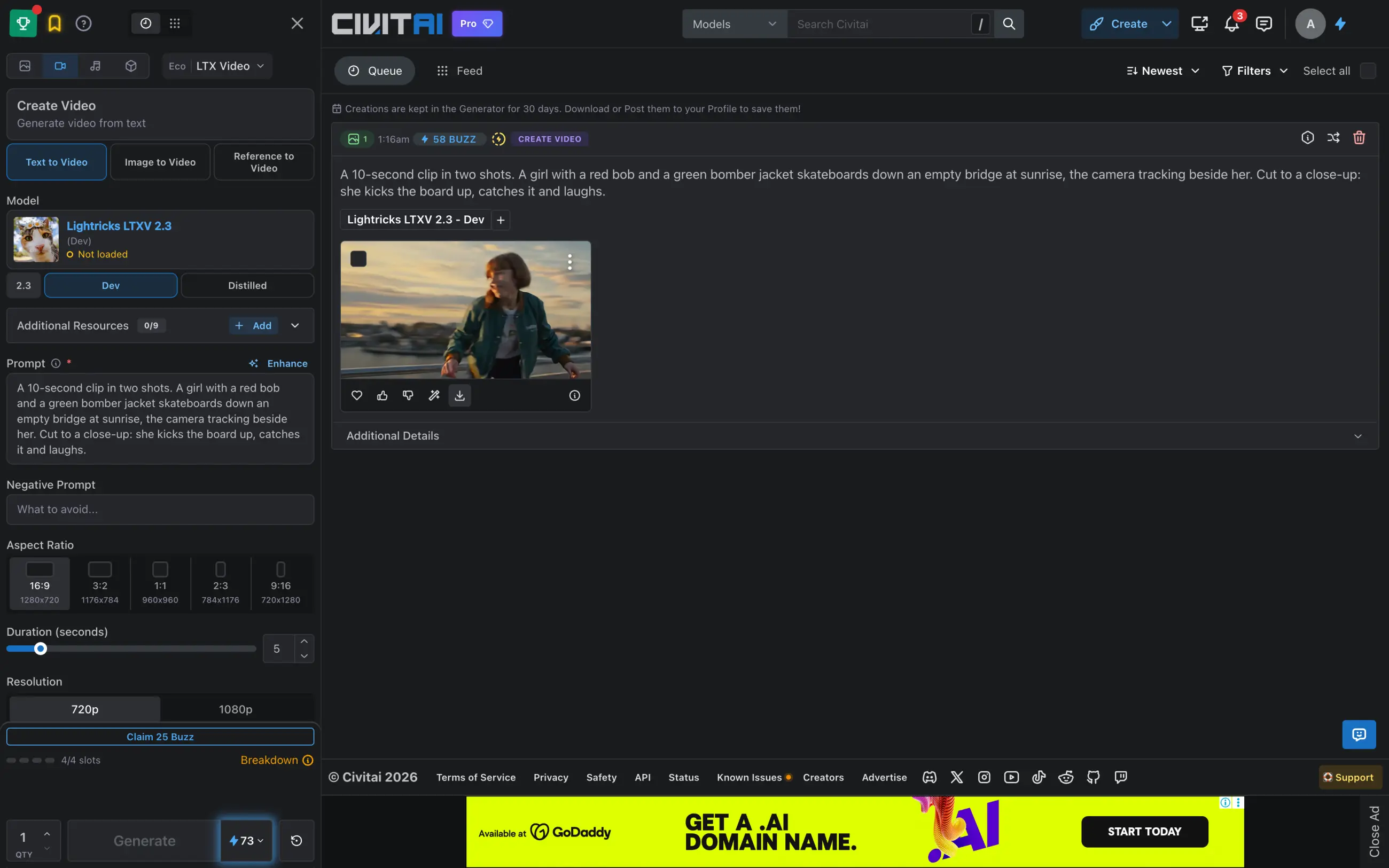
We used Lightricks LTXV 2.3 Dev, which made a 5-second clip:
Civitai generator with an LTXV 2.3 clip of a girl in a green jacket on a bridge at sunset and the skateboarding prompt
LTXV 2.3 cut the five seconds into about six short shots, including a jump on the board and a low shot of her red sneakers. The girl changes between the cuts: in one shot she has a short brown bob, in others long red hair, and her green jacket has orange trim. Open models like this one need a LoRA or a reference image to keep a character consistent.
Price:
Plan
Monthly
Buzz a month
Bronze
$10
10,000
Silver
$25
25,000
Gold
$50
50,000
A 5-second LTXV 2.3 clip at 720p costs 73 Buzz, so Bronze pays for more than 130 of them a month. Memberships also remove ads and give priority in the generation queue.
Best for: Users who want open-source models, community LoRAs and full control over generation settings.
Pros:
✅ Thousands of community models and LoRAs
✅ Open models such as Wan and LTX next to hosted ones
✅ The cheapest clips per dollar in this list
Cons:
❌ Open models don't keep a character consistent without a LoRA
❌ Settings such as CFG scale and steps make the generator harder for beginners
FAQ
Below are answers to the most common questions about OpenArt and its alternatives.
What is the best OpenArt AI alternative?
Overchat AI is the best OpenArt AI alternative for making clips with top video models such as Kling 4.0, Seedance 2.5 and Veo 3.1, and its Mini plan costs $7.50 a month on a yearly plan. LTX Studio is the closest to OpenArt's Director Mode: it turns a script into a storyboard and keeps characters consistent with Elements.
Is OpenArt AI free?
No. OpenArt has no free plan, and its cheapest plan, Starter, costs $14 a month. New accounts get about 40 trial credits, which isn't enough for one video: a 10-second PixVerse V6 clip at 360p costs 100 credits.
Is there a free OpenArt alternative?
Yes. Dreamina gives 120 credits a day and makes short Seedance 2.0 Mini clips with a watermark. Google Flow gives 50 credits a day, enough for three 10-second clips with Omni Flash 1.1. Overchat AI gives 100 credits a day, and Leonardo AI gives 150 tokens a day.
Is Higgsfield better than OpenArt?
Higgsfield is better for camera work: it has more than 250 presets for camera moves and VFX, plus separate studios for ads and AI influencers. OpenArt is better for longer stories, because Director Mode builds videos with several scenes. Higgsfield's Starter plan costs $19 a month, but Seedance 2.0 requires the $59 Plus plan.
Which OpenArt alternative is best for consistent characters?
In our test, Google Flow, Overchat AI with Kling 4.0, and LTX Studio kept the same girl after the cut. For longer projects, LTX Studio's Elements, Leonardo AI's Character Reference and Dreamina's Elements save a character and reuse it in every shot. Civitai's open models changed the girl's hair between cuts, so they need a LoRA for character work.
Which OpenArt alternative is best for AI short films?
LTX Studio is the best for short films: Storyboard plans the shots from a script, and the video editor puts them together. Google Flow and Runway also combine an AI agent with a timeline, and Dreamina's Story Studio makes short multi-scene stories.
What is the cheapest OpenArt alternative?
Most paid plans in this list start at $10–19 a month. Overchat AI's Mini plan costs $90 a year, or $7.50 a month, and includes Kling 4.0, Seedance 2.5 and Veo 3.1. Krea's Basic plan costs $5.25 a month on a yearly plan but includes only selected video models, and Civitai's $10 Bronze membership pays for more than 130 short clips with open models.
Is OpenArt AI safe?
OpenArt is a legitimate service, and paid plans make your generations free of watermarks. Most problems in its Trustpilot reviews are about billing: renewals after canceling, refunds refused once a billing cycle has started, and slow support. Before you subscribe, check how to cancel and turn off automatic renewal if you only need one month.