With an AI video editor you can make targeted changes to a video file — like changing the color of a dress the main subject is wearing simply by typing "make her dress red" — it really feels like magic, because actions that used to take extensive editing can be entirely automated.
This is made possible thanks to video-to-video models such as Kling 3.0, Runway Aleph 2.0 and Gemini Omni Flash.
In this article, we've put together the 11 best AI video editors and tested five of them. Here's what we found:
Hailuo AI — best for editing with reference images and audio
Runway — best for professional video production
Luma — best for fine control over the edit
Higgsfield — best for choosing between edit models
Dreamina — best for marking up the edit on the frame
Wan — best for open-source video models
Vidu — best for swapping objects with a reference image
AI video editor
Best for
Tested
Free plan
Paid plans from
Overchat AI
Overall
Yes
100 credits a day
$14.99/month
Kling AI
Long clips
Yes
66 credits
$10/month
Adobe Firefly
Commercially safe edits
Yes
1 video edit a day
$9.99/month
Google Flow
Free editing
Yes
50 credits a day
$4.99/month
Hailuo AI
Editing with references
Yes
150 credits at sign-up
$9.99/month
Runway
Professional production
No
500 credits at sign-up, no video edits
$15/month
Luma
Fine control
No
No
$30/month
Higgsfield
Choice of edit models
No
No credits
$15/month
Dreamina
Marking up the frame
No
216 credits at sign-up
$19/month
Wan
Open-source models
No
6 credits a day
$10/month
Vidu
Swaps with a reference image
No
No credits
$10/month
Types of AI video editors
AI video editors can be divided into three types, which differ mainly in which video models they offer:
AI platforms. They put video models from different companies in one app. If one model gets the edit wrong, you can run the same clip through another one without moving to a different service. Overchat AI and Higgsfield belong to this type.
Apps from model developers. Companies that build video models usually have their own apps: Kuaishou has Kling AI for its Kling models, Google has Flow for Gemini Omni Flash, and MiniMax has Hailuo AI for MiniMax H3. Runway, Luma, Wan, Vidu and Dreamina by ByteDance also belong here. New versions of a developer's models usually appear in its own app first.
Creative suites. Adobe Firefly combines Adobe's video model with partner models from Runway, Google and Kuaishou, as well as a timeline editor for cutting the edited clips together.
Timeline editors such as CapCut and Descript also have AI features, but they mostly help with cutting, captions and sound, so we didn't include them.
How we tested the AI video editors
For the test, we used a 5-second clip in which a woman walks down an autumn street and turns around at the end:
The original clip used in the test
With the following prompt:
Turn the autumn street into a snowy winter day with snow falling, and change her grey coat to a red coat. Keep her face, her walk and the camera movement the same.
We'll be judging whether the model can:
Change the season and the weather in the whole scene.
Change the color of one piece of clothing.
Keep the woman's face and the details of the scene, such as her patterned shopping bag.
1. Overchat AI — best AI video editor overall
Overchat AI is an AI platform we've built which combines text, image and video models in one app — and features a Video Generator with video-to-video support.
Video editing in Overchat AI
Without further ado, here's how Overchat AI edited our video:
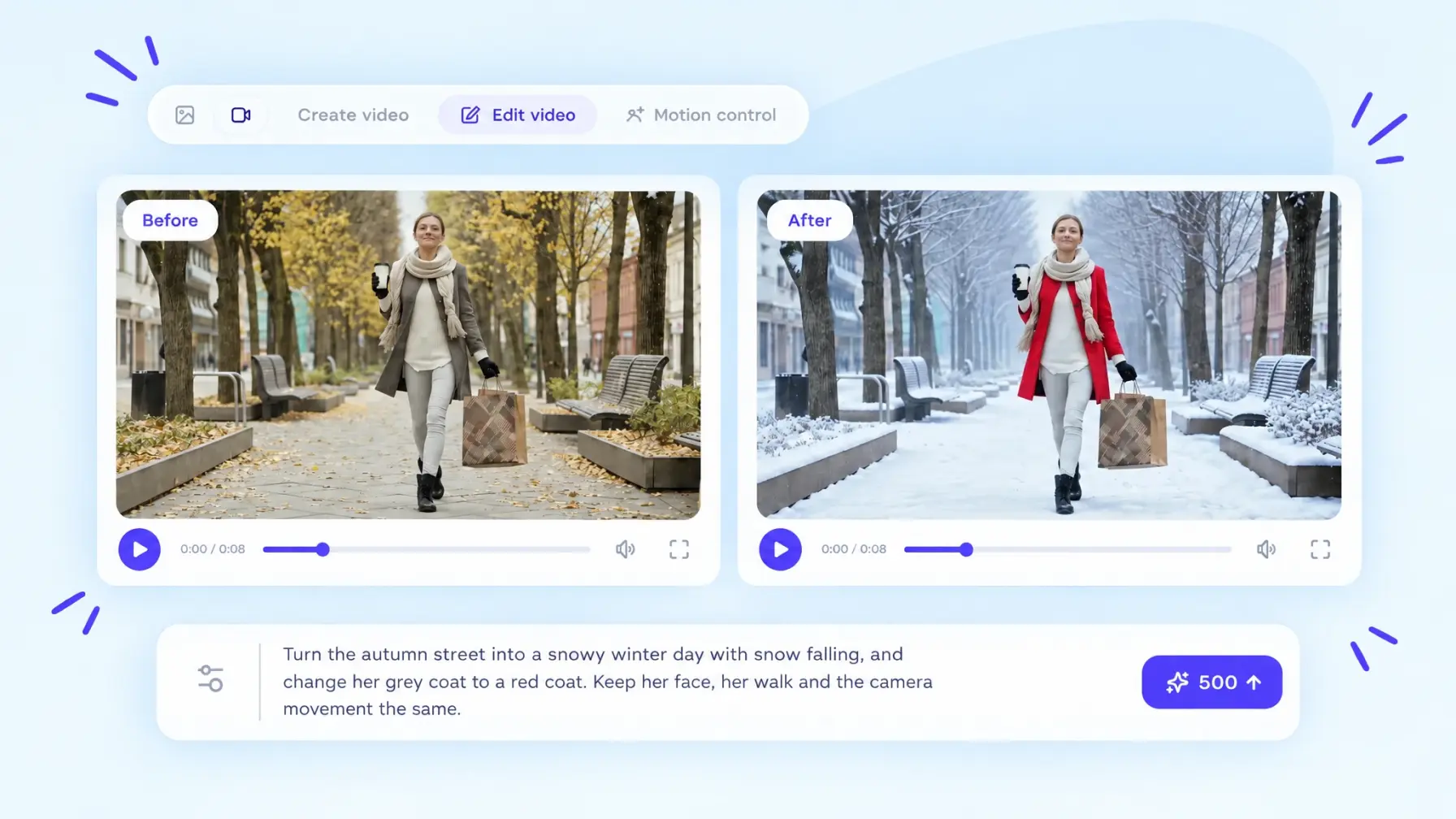
Before and after: Overchat AI with Kling 3.0 Video to Video
As you can see, the app successfully turned the street into a snowy winter day and changed the coat to red, while the subject's face, the pattern on her shopping bag, and the benches didn't change at all.
Also worth noting is that Overchat AI outputs edited videos in 1080p.
Usually you edit videos through prompts — text commands to the AI model that you write in plain English — but Overchat AI also has ready-made filters, including Background Swap, Character Swap, Replace Clothing and New Hairstyle, allowing you to make common edits quickly.
Price:
Plan
Price
What you get
Free
$0
100 credits a day
Pro
$14.99/month or $49.99/year
8,000 credits a month, all models
2. Kling AI — best for editing long clips
Kuaishou, the company behind the Kling AI app, is not only an app developer but also a model developer — they make their own video models, some of the best in the industry.
As of the time of writing, Kling just recently released its newest model, Kling 4.0, which can edit clips of up to 30 seconds (many video-to-video models stop at 10 seconds). The official Kling app is one of the best places to access this model.
Video editing in Kling AI
While filming results for this article, we tested video editing with Kling 3.0 Omni — for our test there shouldn't be much of a difference as that model used to be a flagship, and the result speaks for itself:
Before and after: Kling AI with Kling 3.0 Omni
The Kling app is an excellent AI video editor choice if you want to use Kling AI models specifically.
Price:
Plan
Price
Credits
Free
$0
66
Standard
$10/month
660 a month
Pro
$37/month
3,000 a month
Premier
$207/month
18,000 a month
Another great benefit of Kling is that when you sign up with a free account you get 66 credits, which is enough to test the app, because a 5-second edit at 720p costs 45 credits, so the free trial covers it fully. This is subject to change, of course.
Note: There's a longer queue for free users, and you can't export without a watermark.
3. Adobe Firefly — best for commercially safe edits
Adobe Firefly is Adobe's generative AI app for images, video and audio. Adobe trains its Firefly models on licensed content, such as Adobe Stock, so they're safe for commercial use.
Adobe's model for video editing is Firefly Video 2. Paid plans also include Runway Aleph 2.0, Gemini Omni Flash and Kling 3.0 Omni.
Video editing in Adobe Firefly
We tested Firefly Video 2, which is available on the free plan:
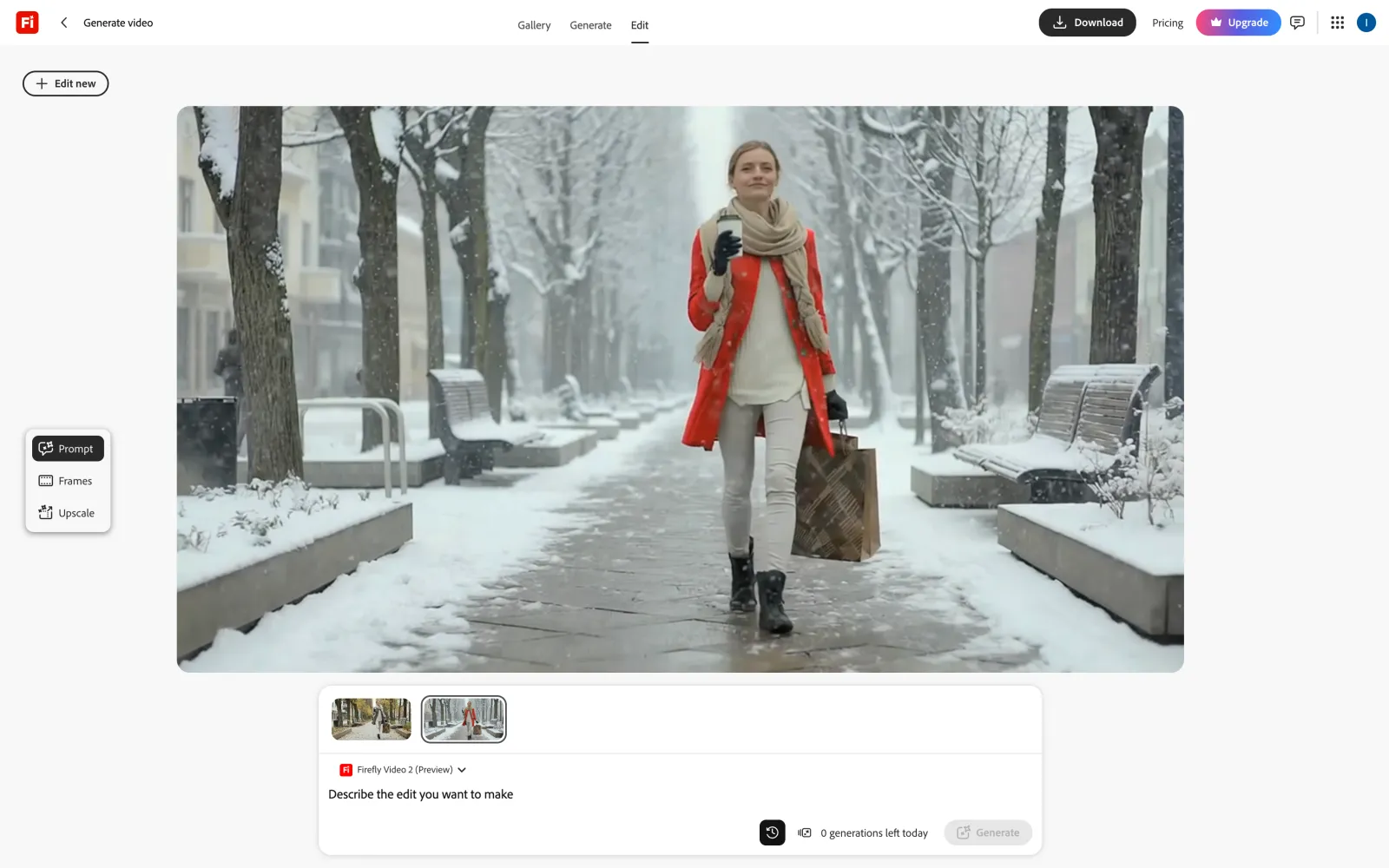
Before and after: Adobe Firefly with Firefly Video 2
Firefly Video 2 made the most realistic falling snow in our test. The woman's face, her bag and her walk stayed the same. The only miss is the coat, which came out orange-red.
The edited video comes out in 720p without a visible watermark.
Price:
Plan
Price
Generative credits
Free
$0
1 video edit a day
Standard
$9.99/month
2,000 a month
Pro
$19.99/month
4,000 a month
Pro Plus
$49.99/month
10,000 a month
Premium
$199.99/month
50,000 a month
The free plan gives you one video edit a day with Firefly Video 2. Paid plans come with monthly generative credits for all models.
4. Google Flow — best free AI video editor
Google Flow is Google's AI filmmaking app. Videos in Flow are made and edited with Gemini Omni Flash, Google's newest video model.
In Flow, you edit videos in a chat with an AI agent. You attach the clip, describe the change and confirm the cost in credits. The edited version appears next to the original, so you can compare them.
Video editor in Google Flow
This is the result we got from Gemini Omni Flash:
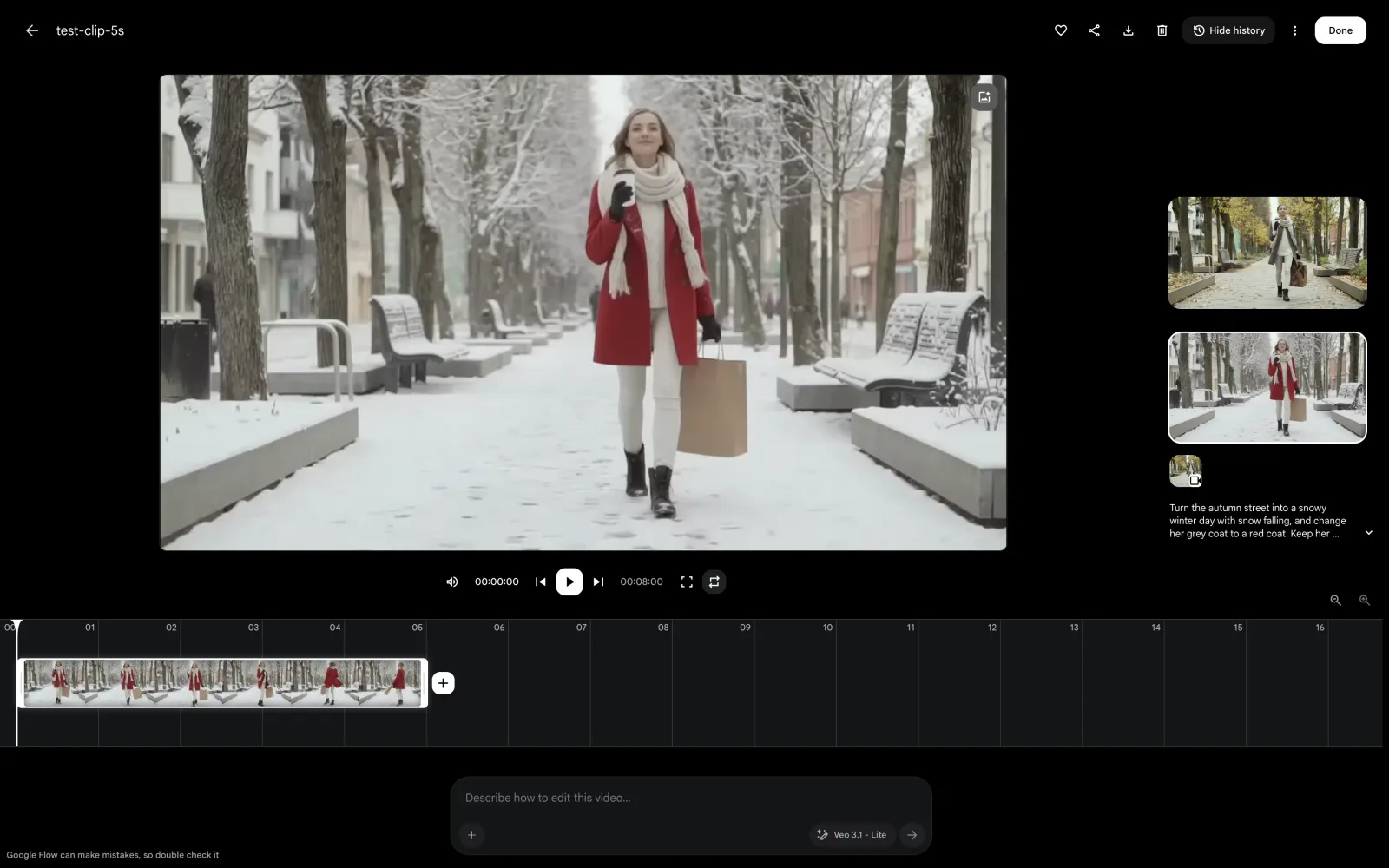
Before and after: Google Flow with Gemini Omni Flash
The winter scene looks good: the street is covered in snow, snow is falling, and the coat is red. However, the model redrew the whole frame. The woman got a different face and hair, and her patterned bag turned into a plain paper one.
The video comes out in 720p without a visible watermark.
Price:
Plan
Price
Flow credits
Free
$0
50 a day
Google AI Plus
$4.99/month
50 a day + 200 a month
Google AI Pro
$19.99/month
50 a day + 1,000 a month
Google AI Ultra
From $99.99/month
50 a day + 10,000 a month
Out of all the apps we've researched, Flow has the best free plan. Every account gets 50 credits a day, with or without a subscription. Our edit cost 20 credits, so you can make two edits a day for free. At peak hours, though, free users may be unable to generate video.
5. Hailuo AI — best for editing with reference images and audio
Hailuo AI is MiniMax's video app. It edits videos with MiniMax H3, the newest MiniMax model.
Along with the video, you can attach up to nine images and three audio files to the prompt. This is useful when you need to put a specific product into the scene or give a person a particular voice.
Video editing in Hailuo AI
We gave MiniMax H3 our clip with the same prompt:
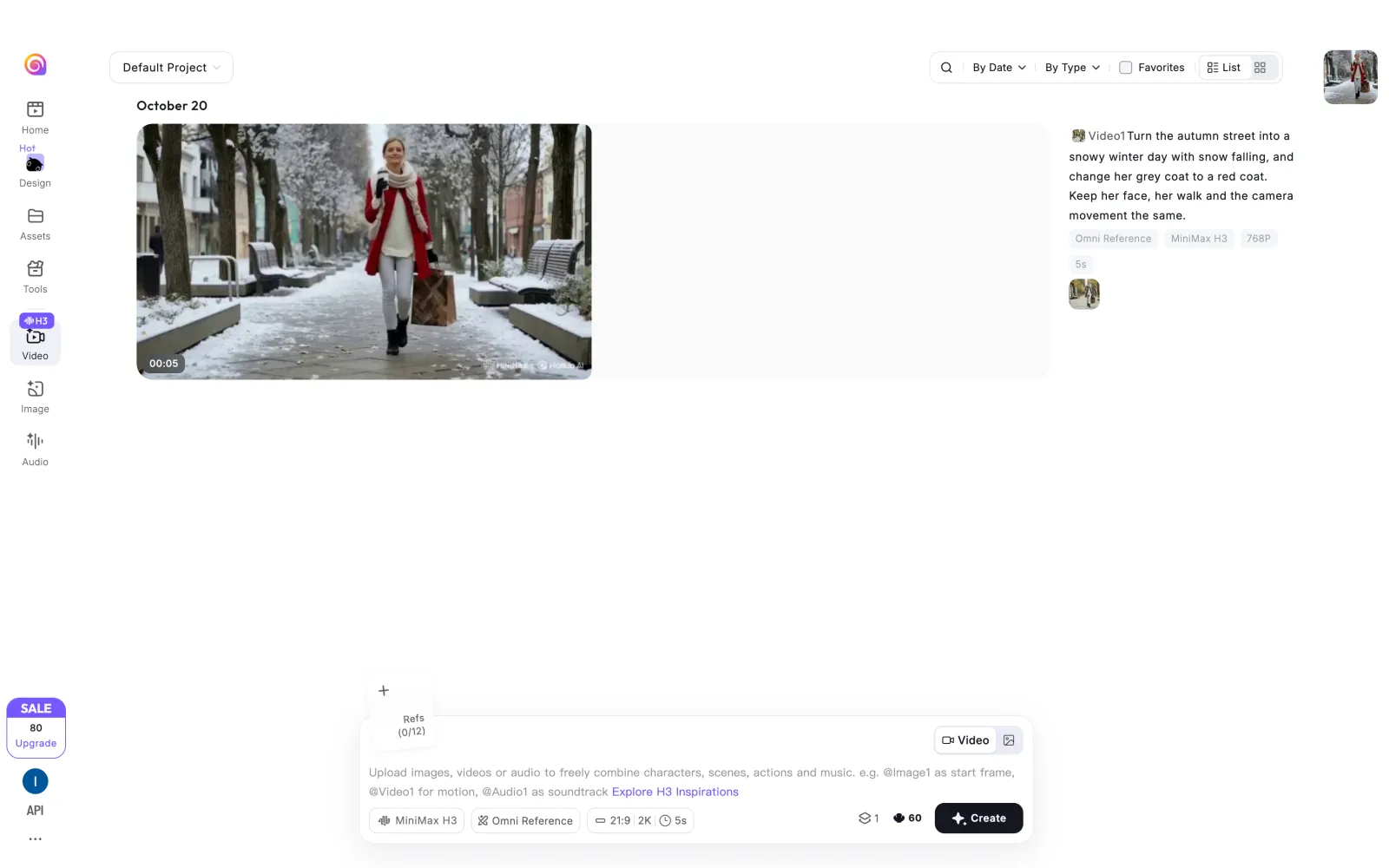
Before and after: Hailuo AI with MiniMax H3
The coat turned red and the woman's face stayed the same, but the winter came out only partly. The pavement looks wet, and some trees still have yellow leaves. Her turn at the end of the clip also differs from the original.
The video comes out in 768p with a MiniMax and Hailuo AI watermark.
Price:
New users get 150 credits at sign-up. Our 5-second edit at 768p cost 70 credits, so the free credits are enough for two edits. Paid plans start at $9.99 a month.
6. Runway — best for professional video production
Runway released one of the first video-to-video models, Gen-1, in 2023. Its current model for video editing is Aleph 2.0, which works with clips of up to 30 seconds.
In Runway, you can edit only part of a clip: you select a range, preview the edit on one frame, and Aleph 2.0 applies the change to that part.
Runway also has plugins for Premiere Pro, After Effects and DaVinci Resolve.
Unfortunately, we couldn't test Runway: a new account gets 500 credits, but video editing with Aleph 2.0 is only available on paid plans.
Edit Studio in Runway
Price:
An edit with Aleph 2.0 costs 28 credits per second, so a 5-second edit costs 140 credits.
Plan
Price
Credits
Free
$0
500 at sign-up, no video edits
Standard
$15/month or $12/month billed yearly
625 a month
Pro
$35/month or $28/month billed yearly
2,250 a month
Max
$95/month or $76/month billed yearly
9,500 a month
7. Luma — best for fine control over the edit
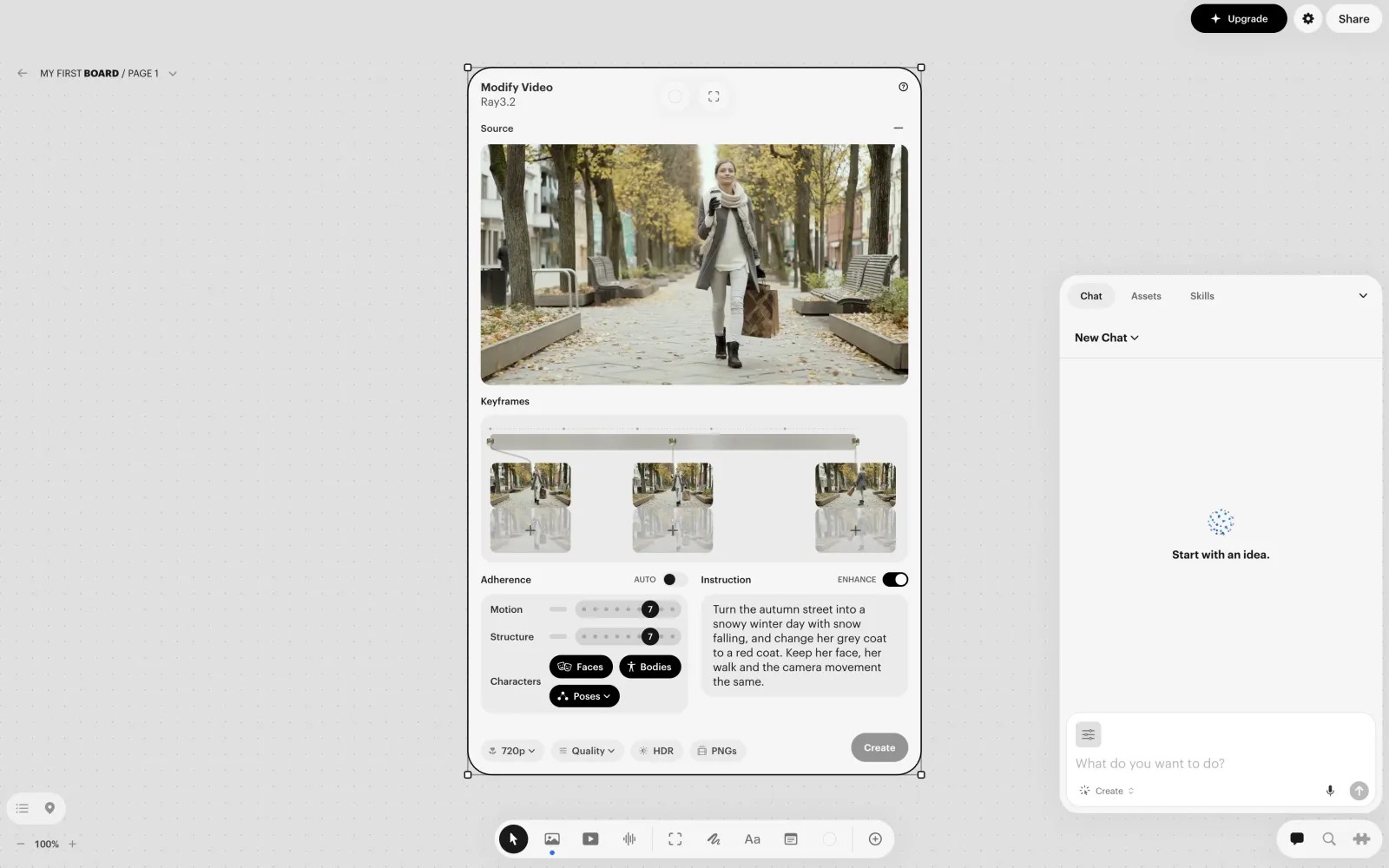
Luma edits videos of up to 18 seconds with its Ray models, in a feature called Modify Video.
In Modify Video, you set how closely the result follows the motion and the structure of the original. Face and body capture keeps the people in the clip moving the same way.
You can also edit a few frames of the clip as images, and Ray carries those changes through the whole video.
We couldn't run our test in Luma, because a new account has no credits. Modify Video also needs at least one edited keyframe before it starts.
Modify Video in Luma
Price:
An edit with Ray3.2 at 720p costs 72 credits per second, so a 5-second edit costs 360 credits.
Plan
Price
Credits
Plus
$30/month or $25/month billed yearly
10,000 a month
Pro
$90/month or $75/month billed yearly
40,000 a month
Ultra
$300/month or $250/month billed yearly
150,000 a month
8. Higgsfield — best for choosing between edit models
Higgsfield, like Overchat AI, is an AI platform that brings together video and image models from different companies: Seedance 2.5 Edit, Kling 3.0 Omni Edit, Kling O1 Video Edit, FLUX.3 Video Edit, Grok Imagine Edit and Gemini Omni Flash 1.1 Edit.
Higgsfield also has tools for finishing the clip: you can extend a clip, reframe it, upscale it, increase the frame rate or remove the background.
We couldn't test Higgsfield, since its free plan doesn't include any credits.
Edit models in Higgsfield
Price:
Plan
Price
Credits
Free
$0
No credits
Starter
$15/month
200 a month
Plus
$49/month or $39/month billed yearly
1,000 a month
Ultra
$129/month or $99/month billed yearly
3,000 a month
9. Dreamina — best for marking up the edit on the frame
Dreamina is an AI image and video app from ByteDance, the company behind TikTok and CapCut. For video, it uses ByteDance's Seedance models.
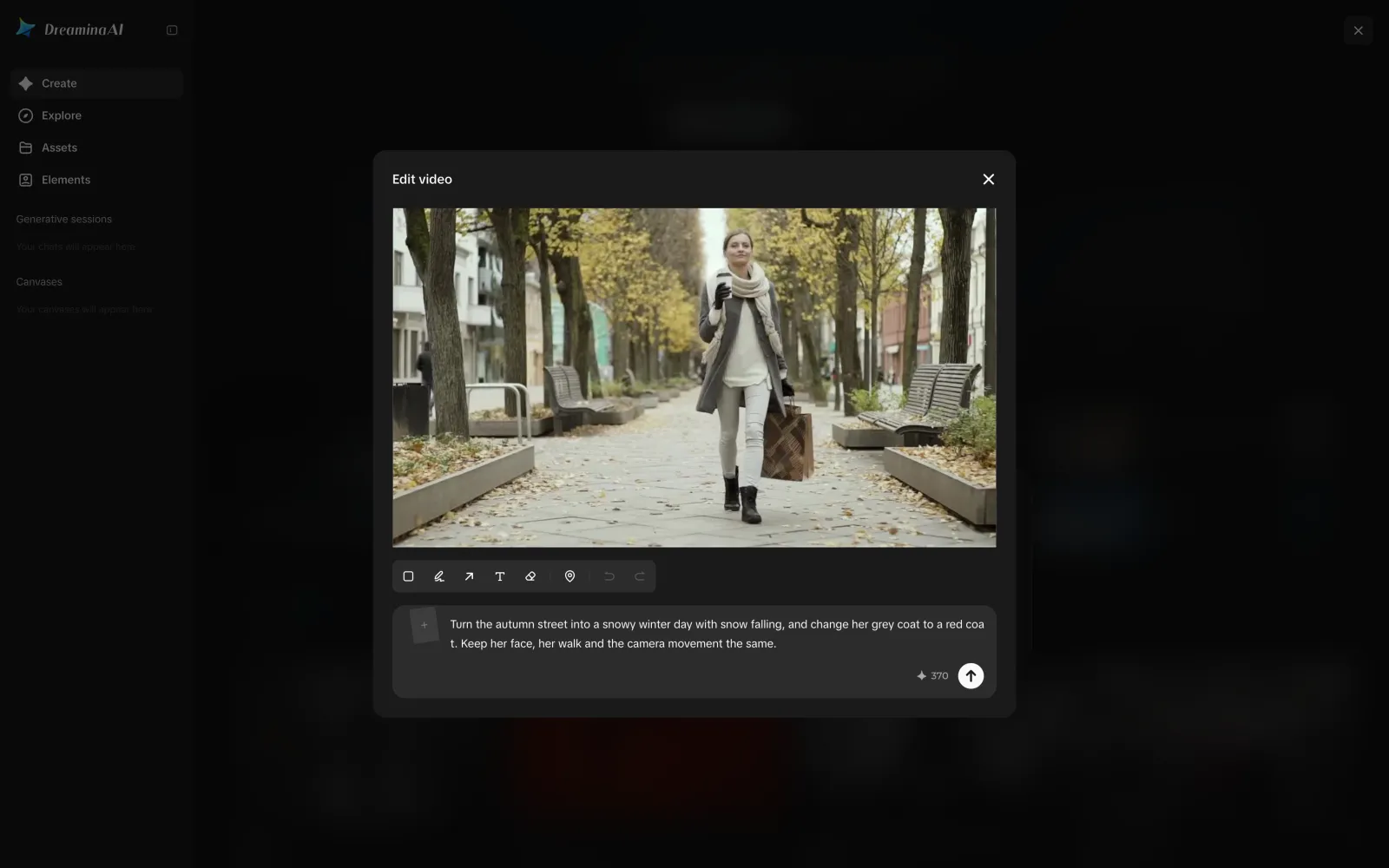
In Dreamina, you can draw a box, an arrow or a note right on the frame to show what to change. This helps when the frame has several similar objects, for example two people in coats.
We couldn't test Dreamina: an edit costs 370 credits, and a new account gets 216.
Video editing in Dreamina
Price:
Plan
Price
Credits
Free
$0
216 at sign-up
Basic
$19/month or $14/month billed yearly
1,575 a month
Standard
$36/month or $34.17/month billed yearly
3,885 a month
Advanced
$79/month or $75/month billed yearly
8,645 a month
10. Wan — best for open-source video models
Wan is a family of AI video models from Alibaba. Some of them are open-source: Wan2.1-VACE and Wan2.2-Animate are available on Hugging Face under the Apache 2.0 license, so you can run them for free on a computer with a powerful graphics card.
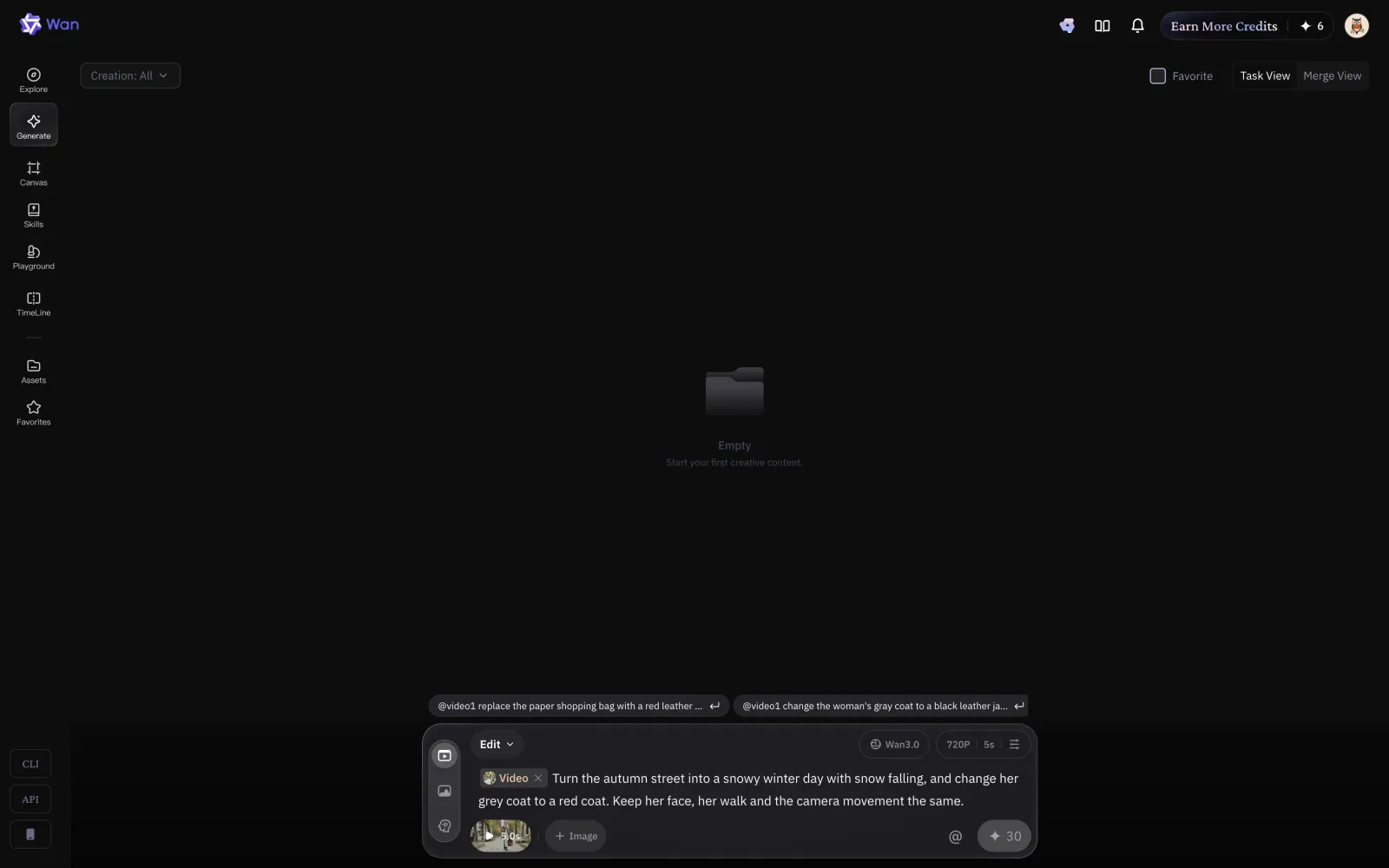
The newest model, Wan 3.0, is available only in the Wan app and through Alibaba's API. It can replace objects in a video, change its style or lighting, and change what people in the video say.
In the app, a new account has no credits, so we couldn't test Wan 3.0. Each daily check-in gives 6 free credits, while our 5-second edit would cost 30.
Video editing in Wan
Price:
Plan
Price
Credits
Free
$0
6 a day for checking in
Pro
$10/month or $5/month billed yearly
300 a month
Premium
$40/month or $20/month billed yearly
1,200 a month
11. Vidu — best for swapping objects with a reference image
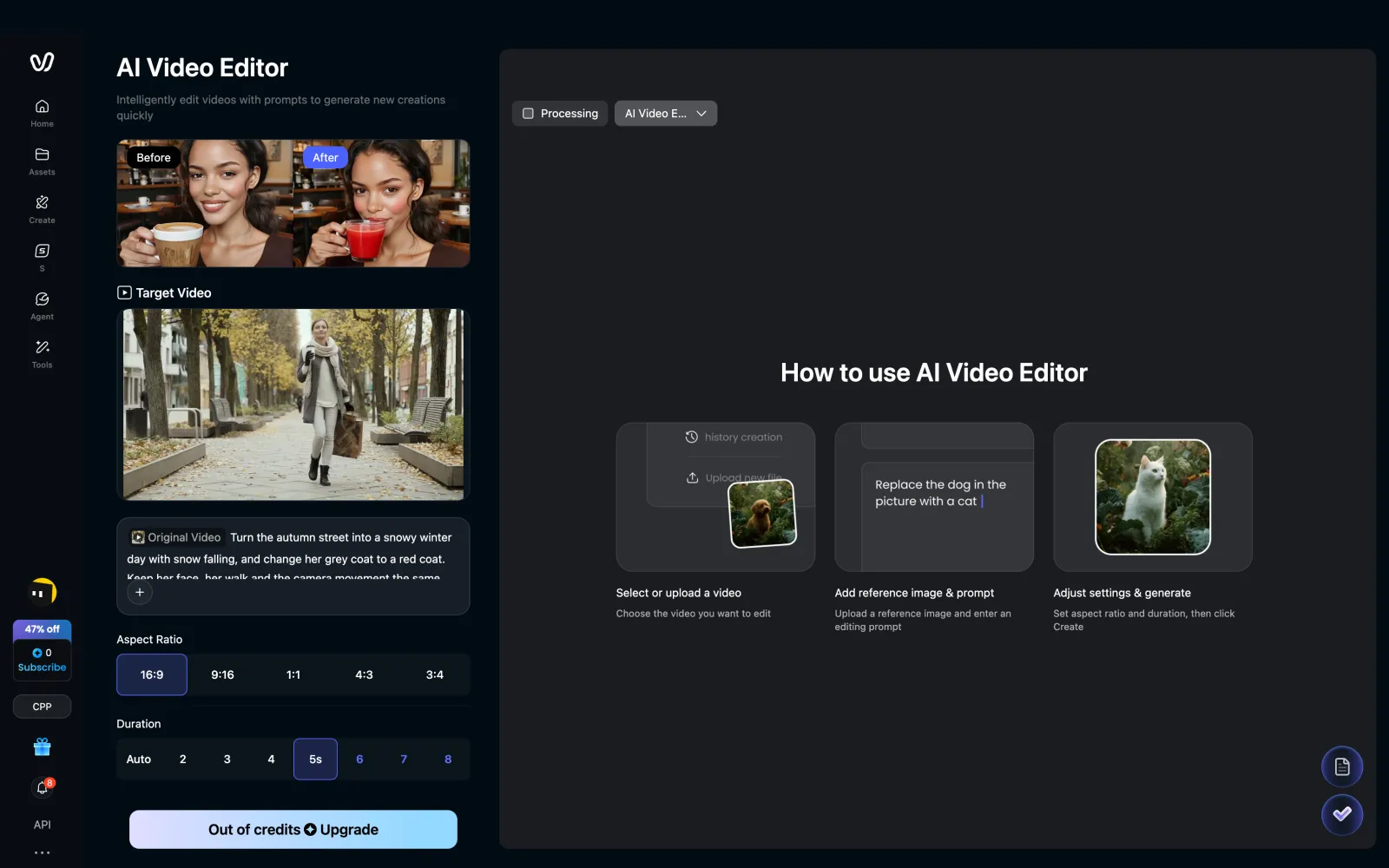
Vidu is an AI video app built on the Vidu models. Its video editor works with clips of up to 8 seconds. You can attach a photo of a product or a person, and Vidu puts it into the clip in place of something in the frame.
We couldn't test Vidu because a new account starts with no credits. You can earn a few by watching ads in the app.
AI Video Editor in Vidu
Price:
Plan
Price
Credits
Free
$0
No credits
Standard
$10/month or $8.25/month billed yearly
800 a month
Premium
$43/month or $35.42/month billed yearly
3,500 a month
Ultimate
$115/month or $95.83/month billed yearly
10,000 a month
FAQ
What is the best AI video editor?
Overchat AI is the best AI video editor. In our test, it made the full edit in 1080p and kept the woman's face, her walk and the details of the scene. For common edits, such as a new background or outfit, it also has ready-made filters that don't need a prompt.
Is there a free AI video editor?
Yes. Google Flow gives 50 credits a day, which covers two edits with Gemini Omni Flash. A new Kling AI account gets 66 credits, enough for one 5-second edit at 720p with a watermark. Adobe Firefly allows one video edit a day with Firefly Video 2. Hailuo AI gives new users 150 credits, which is enough for two edits.
Which AI video editor has no watermark?
In our test, Overchat AI, Adobe Firefly and Google Flow returned edited clips without a visible watermark. Kling AI and Hailuo AI add their logo to videos on the free plan. Some apps also add invisible markers: Google embeds a SynthID watermark in its videos, and Adobe attaches Content Credentials that mark the clip as AI-edited.
Can Gemini edit a video?
Yes. Gemini Omni Flash edits uploaded videos of up to 10 seconds from a prompt. In the Gemini app, this requires a Google AI plan, and uploading videos for edits isn't available in the EEA, Switzerland, the UK and some US states. In Google Flow, you can edit videos with Gemini Omni Flash for free with 50 credits a day.
Can AI change the background of a video?
Yes. Video-to-video editors can replace the background from a prompt while the people in the frame keep their movements. In Overchat AI, you can also do it without writing a prompt, with the Background Swap filter. If you need to cut out the background instead, for example to put the person into a different video, you can remove the background from a video with a separate tool.