AI video generation may never be the same again because Kling AI released a model that, for video, achieves what Opus 4.5 achieved for coding: complete freedom to create anything.
Kling AI unveiled VIDEO O1, the world's first unified multimodal video model. It's changing the way you approach video production with AI.
Unlike anything we've seen before, you can try an early version on Overchat AI as we continue adding functionality to support all its power.
Kling VIDEO O1 is the first unified multimodal AI video model — it accepts any input type (text, images, videos, keyframes, references, or any combination) and supports workflows other models can't, like reference-and-text-to-keyframe-to-video.
You can mix elements from multiple videos in a single prompt — e.g., take a character from video 1, camera motion from video 2, drop them into video 3, and switch the style to pixel art, all in one generation.
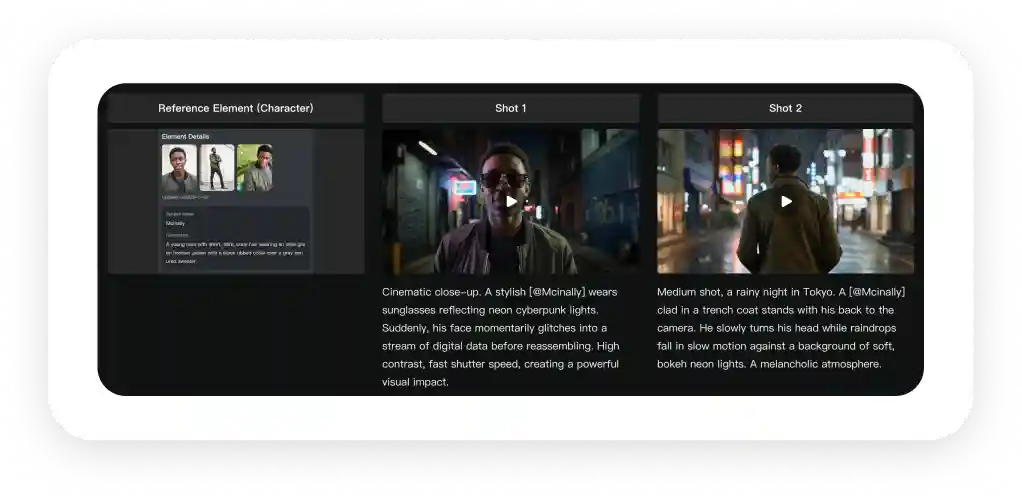
The all-in-one reference system solves the consistency problem, locking in characters, props, and scenes across frames and handling multiple subjects independently in group scenes.
Kling o1 lets you modify many things at once in a single prompt (add a subject + change background + switch style), replacing the linear Comfy UI / FAL workflows that chain multiple models and incur a cost per step.
Video length is freely adjustable between 3–10 seconds for narrative pacing control.
In Kling AI's internal evaluation, o1 hit a 247% win ratio vs Google Veo 3.1's Ingredients to Video feature on image reference tasks and 230% vs Runway Aleph on transformation tasks.
Professional use cases span AI filmmaking (character/prop consistency via Element Library), advertising (replace traditional shoots), fashion (virtual runways), and post-production (natural-language instructions instead of tracking and masking).
The tech stack behind it: a Multimodal Transformer with Multimodal Long Context, a new Multimodal Visual Language (MVL) format that blends text, visual, and audio signals inside the Transformer, and built-in Chain-of-Thought reasoning for realistic outputs.
Available through Kling's new creative interface and on Overchat AI for streamlined access.
The tradeoff: a steeper learning curve than Sora 2 or Veo 3.1 because there are so many capabilities to understand — but once learned, it replaces expensive multi-tool workflows entirely.
What is Kling VIDEO O1?
Kling VIDEO O1 is the first AI video generation model that can take any reference from any input and apply it to any scene. Essentially, this model accepts any information as a reference, and supports all types of generations:
Text-to-video
Image-to-video
Video-to-video
Keyframe-to-video
Multiple-images-to-video
Reference-to-video-to-video
This is easier to explain with an example.
Let’s say you want to take a character from reference video one, use camera movement from reference video two, and insert them into reference video three — you can do this. You’d attach all three videos and type something like:
Take the character from @video1, add them to @vidoe3 and use the camera motion from @vidoe2. Also, change style to pixel art.
This is a reference-and-text-to-keyframe-to-video workflow!
The model launched with immediate access through the new creative interface at Kling, and it's also available on Overchat AI for those who want streamlined access to cutting-edge AI models.
What Makes Kling o1 Better than Other Video Models?
1. Anything-input
VIDEO O1 accepts images, videos, character references, text prompts, or any combination of these elements and treats everything as interconnected pieces of your creative vision. You can mix and match, modify and edit, change and reuse elements in any way — your only limit is your imagination.
2. Next-level instruction following
VIDEO O1 has exceptional prompt-following accuracy. You can:
Reference images or elements including characters, props, and scenes.
Transform videos by adding or removing content, switching angles, modifying subjects, backgrounds, styles, colors, and weather
Generate previous or next shots based on existing footage
Use Start and end frame control to make transitions and camera movements
3. All-in-One Reference
One of the biggest challenges in AI video generation has always been consistency. VIDEO O1 tackles this head-on with its reference system that works like a human director's memory.
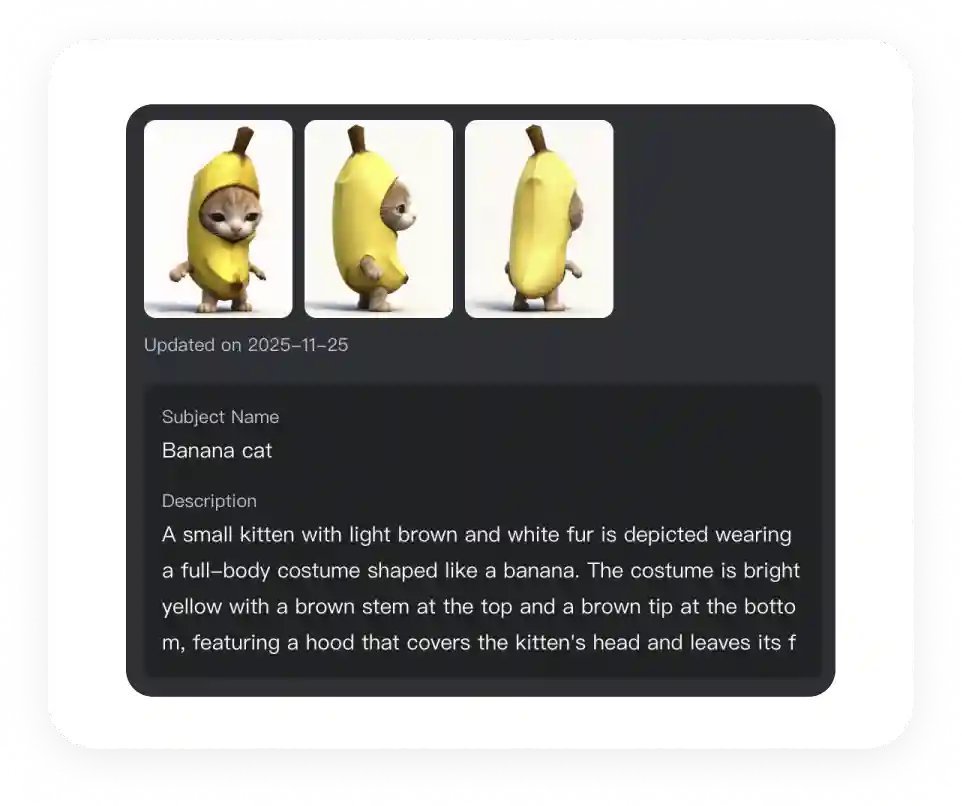
Upload reference images or create elements from multiple angles, and the model maintains character, prop, and scene consistency across every frame — regardless of camera movement or scene changes.
Even more impressive, VIDEO O1 handles multiple subjects simultaneously. In complex group scenes or interactive settings, the model independently locks onto and preserves the unique characteristics of each character or prop.
4. Ability to modify many things at once
AI creators are familiar with the frustration of having to jump through many hoops to achieve a simple result.
For example, if you wanted to insert a character into another scene and change their outfit, you might have needed to:
take a still image of them
upscale it
generate an image with a neutral pose
change their clothes in an image generator
and then drop them back into a video generator to generate a new scene with them.
For a long time, workflows in platforms like Comfy UI or FAl were the way around this. They are basically automated chains of prompts that pass the output of one model to the next with instructions. This method is effective, but it takes a long time and costs a lot of money or credits (each generation incurs a cost).
But VIDEO O1 doesn't limit you to single tasks. You can combine different operations in one prompt: add a subject while modifying the background, change the style while using reference elements, or mix and match any combination of the model's capabilities.
This opens up exponentially more creative possibilities than traditional linear workflows.
5. Customizable video length between 3–10 seconds
Every story has its own rhythm. VIDEO O1 supports free generation between 3-10 seconds, giving you complete control over narrative pacing.
How Kling VIDEO O1 Stacks Up Against the Competition
The following table shows how Kilng o1 performs vs. Veo 3.1, Runway Aleph and Seedance:
Capability
Kling VIDEO O1
Google Veo 3.1
Runway Aleph
Seedance
Image/Element Reference
Image Reference
✓
✓
✗
✓
Element Reference
✓
✗
✗
✗
Image+Element Reference
✓
✗
✗
✗
Transformation
Add Content to Video
✓
✓
✓
✗
Remove Content from Video
✓
✗
✓
✗
Switch Angle/Shot Size
✓
✓
✓
✗
Modify Video Element
✓
✗
✓
✗
Modify Parts of Video
✓
✗
✓
✗
Modify Video Style
✓
✗
✓
✗
Modify Object Color
✓
✗
✓
✗
Modify Video Weather
✓
✗
✓
✗
Video Green Screen Keying
✓
✗
✓
✗
Support Using ≥2 Images
✓
✗
✗
✗
Support Using Elements
✓
✗
✗
✗
Video Reference
Generate Next Shot
✓
✗
✓
✗
Generate Previous Shot
✓
✗
✓
✗
Reference Video Camera Movements
✓
✗
✗
✗
Reference Video Actions
✓
✗
✗
✗
Start & End Frames
Generate Start Frame Video
✓
✓
✓
✓
Generate Start & End Frames Video
✓
✓
✓
✓
Text-to-Video
✓
✓
✓
✓
Combined Skill Generation
✓
✗
✗
✗
According to Kling AI's internal evaluation, VIDEO O1 achieved a 247% performance win ratio compared to Google Veo 3.1's Ingredients to Video feature in image reference tasks, and a 230% performance win ratio compared to Runway Aleph in transformation tasks.
What Can You Achieve with VIDEO O1?
Thanks to the extensive control it offers, VIDEO O1 is excellent for professional applications in many industries, including, but not limited to, the following:
AI filmmaking: Lock in characters and props using the Element Library to generate multiple scenes with perfect consistency.
Advertising: Replace expensive, time-consuming traditional shoots by uploading product, model, and background images.
Fashion: Create endless virtual runways by uploading model photos and clothing images.
Post-Production: Instead of complex tracking and masking, use simple, natural language instructions.
How Did Kling Achieve These Results?
VIDEO O1's capabilities rest on three technical innovations:
Multimodal Transformer. Kling o1 uses a Multimodal Transformer along with Multimodal Long Context tools. Thanks to these components, it can generate, edit, and understand videos within the same system.
Multimodal Visual Language (MVL). MVL is a new interactive format that blends text with visual and audio signals inside the Transformer architecture. This creates a stronger overall understanding and lets you perform different tasks through one unified input.
Built-in reasoning. With MVL, the model can refer to specific multimodal details and support advanced interactive editing. When combined with Chain-of-Thought reasoning, it can show clear common-sense logic and make accurate deductions about events, making its generations feel natural and realistic.
Bottom Line
Kling VIDEO o1 is probably the most advanced AI video model ever released. It's fundamentally different from everything that came before it, including Sora 2 and Veo 3.1, in terms of how you control and interact with it.
This makes it harder to learn because you need to understand its different capabilities and how they play into the video generation process. However, if you learn to use it, you will be able to create professional results much faster, easier, and cheaper than before.
The era of juggling multiple AI video tools and building complex, expensive workflows is over. Welcome to unified multimodal video generation.