8 Best Higgsfield AI Alternatives We Tested for Free
Last Updated:
2026-10-25
8 Best Higgsfield AI Alternatives We Tested for Free
Higgsfield AI is one of the most popular platforms for making AI videos, bringing together Kling 4.0, Seedance 2.5, and other top video models on top of its own tools for camera moves, consistent characters and video ads. But it gets expensive quickly, and the landscape of AI video editors today is incredibly competitive.
So we tested 8 Higgsfield alternatives to see which apps can fully replace Higgsfield — and whether you should switch to another AI video studio. In this article, you'll learn:
Why people leave Higgsfield
What each alternative lets you make for free
How much each one costs when the free credits run out
When it comes to features, Higgsfield is one of the leaders in AI video production, and that's an undisputed fact. Besides a wide array of third-party video models, it has its own models and tools: the Soul image model, Soul ID for keeping the same face across images and videos, Cinema Studio with camera and lens controls, and Marketing Studio for video ads. There's also Supercomputer, an agent that plans and generates whole projects.
That said, no platform is perfect. Most of Higgsfield's downsides have to do with credits and payments. For example:
There's no free trial and no free credits. On the free tier, you get a small set of models, and every generation has a Higgsfield watermark.
Higgsfield has no mobile app.
Prices also depend on your country and device — the entry plan can cost anywhere from $9 to $19 a month. At the highest prices, Starter costs $19/month for 270 credits, Plus is $59/month for 1,200 credits and Ultra is $129/month for 3,000 credits.
Best Higgsfield alternatives at a glance
App
Best for
Free plan
What we made for free
Paid plans from
Overchat AI
Comparing video models side by side
100 credits a day
Chat and images
$14.99/month
Dreamina
Free video generation
120 credits a day
A 5-second 720p video
$19/month
Kling AI
Kling 4.0 from its developer
Trial credits
4 images
$6.99 for the first month
Krea
Many models in one workspace
100 credits a day
A 6-second 480p video
$9/month
Runway
Editing existing videos
125 credits, one time
1 image
$15/month
OpenArt
Consistent characters and stories
40 trial credits
Nothing, a video costs 300 credits
$14/month
Pika
Effects and editing apps
No credits
Nothing
$10/month
Hailuo AI
MiniMax H3 videos
Welcome credits for 3 days
Nothing, the welcome credits had expired
$14.99/month
1. Higgsfield vs Overchat AI
Yes, you're on the Overchat AI blog, but we really believe that Overchat AI is one of the best Higgsfield alternatives. It's an all-in-one AI platform with chatbots, image generators and video models, offering about 20 video models, including Kling 4.0, Seedance 2.5, MiniMax H3, Grok Imagine Video 1.5 and Wan 2.6, among others.
One of the interesting Overchat AI features is Multiple selection, which allows you to generate a video with multiple models simultaneously to compare the results.
Along with text-to-video and image-to-video, Overchat AI can also edit videos or transfer motion from a reference video in the Motion control studio.
Overchat AI also has Filters, ready-made video templates such as Pop Star and Paris Love that work like Higgsfield's Effects. For camera moves, there are separate tools: AI Dolly Shot, AI Crane Shot, AI Whip Pan and AI 360 Degree Shot.
Choosing Kling 4.0 in the Overchat AI video generator
Video generated with Kling 4.0 in Overchat AI
Price comparison
Overchat AI has one paid plan, Pro, and you can pay for it weekly, monthly or yearly:
Plan
Higgsfield
Overchat AI
Free
No credits
100 credits a day
Weekly
No weekly plan
Pro: $5.99/week, 2,000 credits
Monthly
Starter: $19/month, 270 credits
Pro: $14.99/month, 8,000 credits
Yearly
Starter: $228/year, 270 credits a month
Pro: $49.99/year, 8,000 credits a month
Cheapest plan with Seedance 2.5
Plus: $59/month, 1,200 credits
Pro: $14.99/month, 8,000 credits
On Higgsfield, the plan decides what you can use: Starter, for example, doesn't include Seedance 2.5, so for it you need Plus at $59 a month.
What Overchat AI does better
A year of Overchat AI Pro costs $49.99, which is less than a single month of Higgsfield Plus, and it already includes Kling 4.0 and Seedance 2.5.
Overchat AI also isn't only about video. The same subscription covers chat with models like GPT-6.1 Sol and Claude Opus 5.5, so you don't need a separate ChatGPT or Claude plan for scripts and ideas. And unlike Higgsfield, Overchat AI has apps for iOS and Android.
What Higgsfield does better
Higgsfield is built only for video, and its video tools go deeper. In Cinema Studio, you can set the camera and lens for every shot, while in Overchat AI camera moves like a dolly shot or a crane shot are separate tools.
Higgsfield also has Supercomputer, an agent that plans and generates a whole project from one request. Its MCP connector lets you generate videos right from Claude or ChatGPT.
2. Higgsfield vs Dreamina
Dreamina is an AI studio from ByteDance, the company behind TikTok and CapCut. If you're used to Higgsfield, a lot here will feel familiar. Video and image generation live in one place, and there's an AI agent that plans a project for you.
ByteDance also makes Seedance, so Dreamina has the whole Seedance line, from Seedance 2.5 to Seedance 2.0 Mini. For images, there are Seedream 5.0 and Nano Banana Pro. Dreamina also makes talking avatars with OmniHuman 1.5 and has Skills, ready-made prompts for things like a cinematic long take or a film storyboard.
You can use Dreamina in the browser, in its iOS and Android apps or right inside CapCut.
Dreamina AI video generator with a Seedance 2.0 Mini video
Video generated with Seedance 2.0 Mini in Dreamina
Price comparison
Here's how the monthly plans compare:
Plan
Higgsfield
Dreamina
Free
No credits
120 credits a day
Entry
Starter: $19/month, 270 credits
Basic: $19/month, 1,575 credits
Middle
Plus: $59/month, 1,200 credits
Standard: $36/month, 3,885 credits
Top
Ultra: $129/month, 3,000 credits
Advanced: $79/month, 8,645 credits
A credit on Higgsfield and a credit on Dreamina aren't worth the same, so here's what one popular model costs on each, an 8-second Seedance 2.5 video at 720p:
Seedance 2.5, 8 seconds, 720p
Higgsfield
Dreamina
Cost of one video
56 credits, about $2.75 on Plus
296 credits, about $2.75 on Standard
Videos on the entry plan
None, Starter doesn't include Seedance 2.5
About 5 on Basic
Videos on the middle plan
About 21 on Plus
About 13 on Standard
Videos on the top plan
About 53 on Ultra
About 29 on Advanced
One video costs about the same on both platforms. The difference is which plan you need to get it.
What Dreamina does better
On less expensive plans, Dreamina gives you access to much more powerful models. For example, to use Seedance 2.5 on Higgsfield, you need the Plus plan, which costs almost $60 a month, while on Dreamina this model is included in Basic at about $20 a month.
Dreamina is also part of CapCut, so you can generate clips and edit them into a finished video in one app, on your computer or your phone. Higgsfield works only in the browser and doesn't have a mobile app.
What Higgsfield does better
Higgsfield has a much wider choice of models. Dreamina is mostly ByteDance's own models, while on Higgsfield you also get Kling 4.0, Wan, MiniMax and others, so you can pick the best model for each shot.
Higgsfield also has its own tools that Dreamina doesn't. Soul ID trains a model on your face from 20 to 80 photos and keeps it the same in every video. Cinema Studio adds camera and lens settings, and Marketing Studio turns a product link into a video ad.
If you generate a lot, Higgsfield's bigger plans also work out cheaper. On Ultra, an 8-second Seedance 2.5 video comes to about $2.40, compared with about $2.70 on Dreamina's Advanced plan.
3. Higgsfield vs Kling AI
After its release, Kling 4.0 has become one of the most discussed AI video models — and Higgsfield heavily promotes it. But did you know that Kuaishou, the company that developed this model, also runs its own AI video platform, Kling AI?
On Kling AI, Kling 4.0 makes videos up to 30 seconds long with sound and takes up to 10 keyframes to plan how a shot develops. Besides video generation, there's Motion Control, which copies movement from a reference video, and Avatar, which turns a photo into a talking video. For images, Kling has its own model, Kling Image 3.0, which makes native 4K images.
We tested Kling AI on a free account with 21 trial credits. That's not enough for a Kling 4.0 video, which costs 50 credits, so we made images instead. Kling Image 3.0 made four 2K images for 4 credits:
Kling AI images generated with Kling Image 3.0 on the free plan
All four images match the prompt.
Price comparison
Here's how the monthly plans compare:
Plan
Higgsfield
Kling AI
Free
No credits
Trial credits
Entry
Starter: $19/month, 270 credits
Standard: $8.80/month, 660 credits
Middle
Plus: $59/month, 1,200 credits
Pro: $32.56/month, 3,000 credits
Top
Ultra: $129/month, 3,000 credits
Premier: $181.99/month, 18,000 credits
On Kling AI, a 5-second Kling 4.0 video at 720p costs 50 credits. That's about $0.67 on Standard, and the plan covers about 13 such videos a month. On Pro, the same video comes to about $0.54.
What Kling AI does better
If you mostly use Kling, it's much cheaper to get started on Kling AI. Its entry plan costs less than half of Higgsfield's Starter, and the first month is only $6.99.
Credits also last longer. If you buy extra credits on top of a plan, they stay valid for two years, while Higgsfield's extra credit packs expire after 90 days. And unlike Higgsfield, Kling AI has apps for iOS and Android.
What Higgsfield does better
On Kling AI, you only get Kling. If one shot works better with Seedance and the next one with Wan, you'll need a second subscription, while on Higgsfield all of them are in one place.
Higgsfield also has Soul ID, which trains a model on your face from 20 to 80 photos and keeps it the same in every video you make.
4. Higgsfield vs Krea
Of all the apps on this list, Krea works the most like Higgsfield. It's one workspace with models from different companies, 37 for video and 39 for images, including Seedance 2.5, MiniMax H3 and Wan 3.0. Krea also has its own image model, Krea 3.
Where Krea goes further is tools for people who want control. In the Node Editor, you connect models into a workflow, and with Train LoRA you teach a model your own character or style. There's also an Enhancer that upscales images up to 22K.
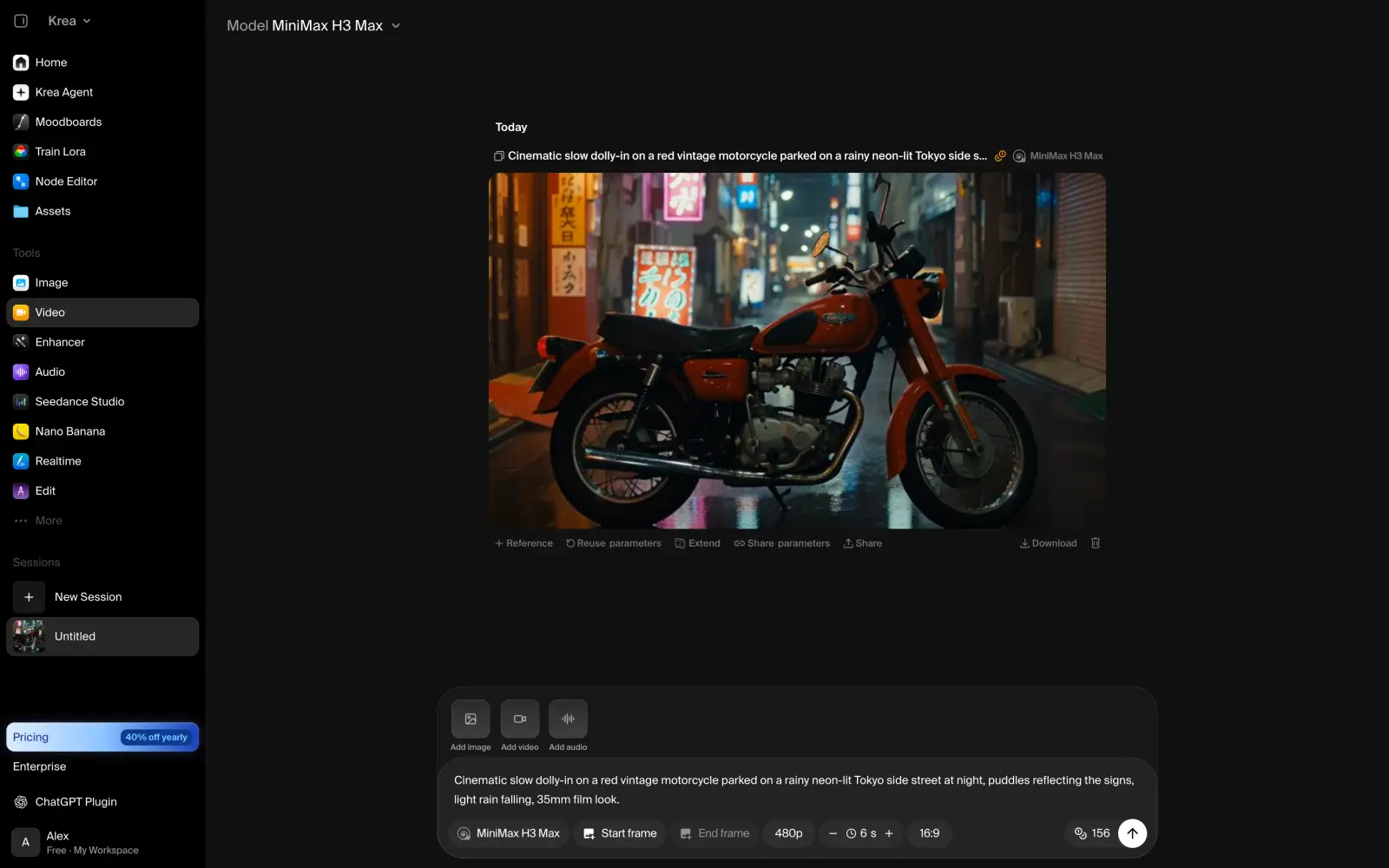
On a new account, Krea let us make one free video with MiniMax H3 Max at 480p:
Krea video generated with MiniMax H3 Max on the free plan
The video is 6.6 seconds long, with sound. The camera moves closer, but the rain is barely visible.
Video generated with MiniMax H3 Max in Krea
Price comparison
Here's how the monthly plans compare:
Plan
Higgsfield
Krea
Free
No credits
100 credits a day
Entry
Starter: $19/month, 270 credits
Basic: $9/month, 5,000 credits
Middle
Plus: $59/month, 1,200 credits
Pro: $35/month, 20,000 credits
Top
Ultra: $129/month, 3,000 credits
Max: $105/month, 60,000 credits
If you pay yearly, Krea gets even cheaper: Basic comes to $5.25 a month. By Krea's own estimate, Basic covers about 15 Seedance 2.0 Fast videos a month. Our MiniMax H3 Max video at 480p costs 156 credits, which is about $0.28 on Basic.
What Krea does better
Krea gives you a Higgsfield-style workspace for less than half the price. Basic at $9 a month already has dozens of video models, while Higgsfield's Starter costs $19 and leaves out some of the best ones.
Krea is also more flexible for repeat work. A node workflow or a trained LoRA lets you get the same look in every video without writing the prompt from scratch each time.
What Higgsfield does better
Higgsfield adds new models quickly. Kling 4.0 is already on Higgsfield, while on Krea it's still marked as coming soon.
Higgsfield also has Marketing Studio, which turns a product link into a ready video ad with an AI actor. On Krea, you'd have to build an ad like that yourself, shot by shot.
5. Higgsfield vs Runway
Runway is one of the oldest companies in AI video. Back in 2022, it helped release Stable Diffusion, and today it trains its own video models. Gen-4.5 generates new videos, and Aleph 2.0 edits footage you already have by prompt. For example, it can change the weather or the time of day in a clip.
These days, the main way to work in Runway is the Agent. You describe what you need in a chat, and the agent picks the model and writes the prompt for you. Besides its own models, Runway also has Seedance 2.5 and Kling 3.0.
On the free plan, Runway doesn't make videos at all, because every video model needs a paid plan. So we asked the agent for a still, and it made one with Nano Banana Pro for 20 credits:
Runway Agent generating an image with Nano Banana Pro on the free plan
The image is sharp and close to the prompt.
Price comparison
Here's how the monthly plans compare:
Plan
Higgsfield
Runway
Free
No credits
125 credits, one time
Entry
Starter: $19/month, 270 credits
Standard: $15/month, 625 credits
Middle
Plus: $59/month, 1,200 credits
Pro: $35/month, 2,250 credits
Top
Ultra: $129/month, 3,000 credits
Max: $95/month, 9,500 credits
By Runway's own estimate, the 625 credits on Standard cover about 52 seconds of Gen-4.5 video. That's about ten 5-second videos a month, or roughly $1.44 per video.
What Runway does better
Runway is better when you already have footage. Aleph 2.0 edits a real clip by prompt, so you can fix a shot without generating it again from scratch.
Runway also lets unused credits carry over. On the Max plan, they stay for one more month, while on Higgsfield, subscription credits reset every month on every plan. And unlike Higgsfield, Runway has apps for iOS and Android.
What Higgsfield does better
Higgsfield has newer third-party models. Runway still offers Kling 3.0, while Higgsfield already has Kling 4.0. Runway also doesn't have Wan or MiniMax at all.
Higgsfield also has a big library of ready-made effects and camera moves. You pick one from a list and apply it to your photo, which is faster than describing the move in a prompt.
6. Higgsfield vs OpenArt
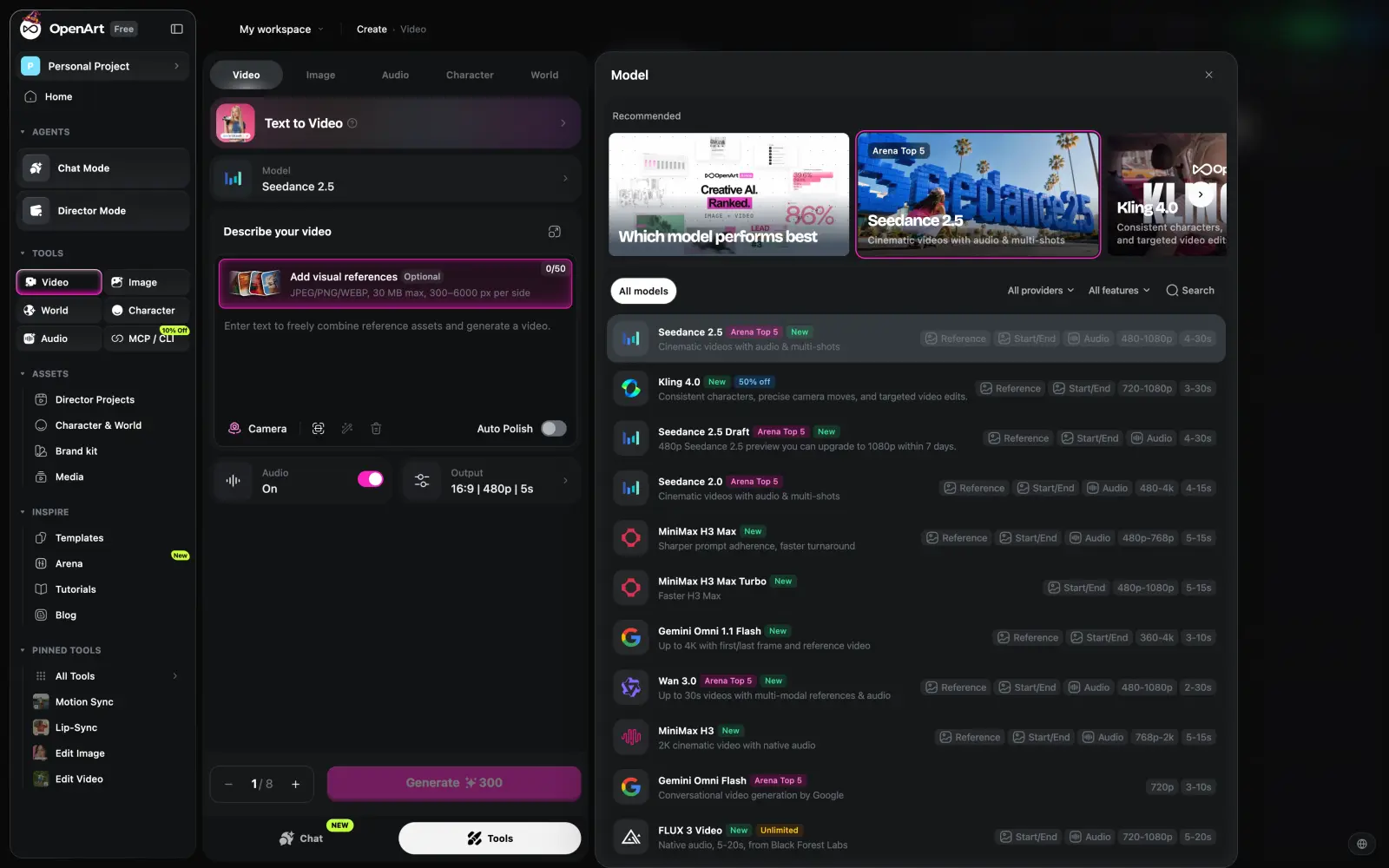
OpenArt is a creative studio with more than 100 AI models. Kling 4.0 and Seedance 2.5 are both there, and OpenArt also has newer models like FLUX 3 Video and Wan 3.0.
OpenArt model picker with Seedance 2.5, Kling 4.0 and other video models
What makes OpenArt different is how it handles stories. You create a Character once, or a World, the place where your story happens, and reuse them in every generation. Director Mode then turns a story into a long video, and Chat Mode lets you make images and videos by chatting with an agent.
OpenArt is also moving to a new workspace right now, and the old version of the site will shut down on November 16, 2026.
New accounts get 40 trial credits for 7 days. A 5-second Seedance 2.5 video at 480p costs 300 credits, so we couldn't make even one video.
Price comparison
Here's how the monthly plans compare:
Plan
Higgsfield
OpenArt
Free
No credits
40 trial credits for 7 days
Entry
Starter: $19/month, 270 credits
Starter: $14/month, 4,000 credits
Middle
Plus: $59/month, 1,200 credits
Plus: $34/month, 12,000 credits
Top
Ultra: $129/month, 3,000 credits
Pro: $56/month, 24,000 credits
OpenArt also has Wonder at $240 a month with 106,000 credits. Here's what a 5-second Seedance 2.5 video at 480p costs on each platform:
Seedance 2.5, 5 seconds, 480p
Higgsfield
OpenArt
Cost of one video
About 15 credits, about $0.74 on Plus
300 credits, about $0.85 on Plus
Videos on the entry plan
None, Starter doesn't include Seedance 2.5
About 13 on Starter
Videos on the middle plan
About 80 on Plus
About 40 on Plus
Videos on the top plan
About 200 on Ultra
About 80 on Pro
If you make about 80 Seedance 2.5 videos a month, you'll pay about the same on both: $59 for Higgsfield's Plus or $56 for OpenArt's Pro. If you make a dozen, OpenArt's Starter at $14 is enough, while Higgsfield doesn't have Seedance 2.5 on a plan that cheap.
What OpenArt does better
OpenArt is better for stories with the same characters and places. On Higgsfield, Soul ID keeps a face the same from video to video. On OpenArt, you can also save a World and use the same street or room in every scene.
If you make a lot of images too, OpenArt's credits go a long way. By OpenArt's own estimate, the 4,000 credits on Starter cover about 4,000 images.
What Higgsfield does better
On Higgsfield, you can use your videos commercially on every paid plan, Starter included. On OpenArt, commercial rights start only from Plus at $34 a month.
Higgsfield also works out better for heavy use. Ultra at $129 covers about 200 five-second Seedance 2.5 videos at 480p, while on OpenArt the next step after Pro is Wonder at $240.
7. Higgsfield vs Pika
Pika started as a video model, but today it works a lot like Higgsfield: one subscription with models from different companies. Besides its own Pika 2.5, it has Seedance 2.5 and MiniMax H3 for video, and GPT Image 2.5 and Nano Banana for images.
The main thing on Pika is its apps, each made for one job. Video Studio makes videos up to 30 seconds long with several shots, and Character Studio saves a character so you can reuse it. Camera Director reshoots your clip from another angle or with a different camera move, and Motion Transfer gives any character the moves from a reference video.
Pika apps: Video Studio, Character Studio, Motion Transfer and Relight Media
There are no free credits on Pika. After we signed up, our balance was 0, so we couldn't test anything. The only way to get credits for free is to make your first generation with Pika inside ChatGPT, which gives you 250 bonus credits.
Price comparison
Here's how the monthly plans compare:
Plan
Higgsfield
Pika
Free
No credits
No credits, packs from $25
Entry
Starter: $19/month, 270 credits
Starter: $10/month, 900 credits
Middle
Plus: $59/month, 1,200 credits
Creator: $35/month, 3,150 credits
Top
Ultra: $129/month, 3,000 credits
Fancy: from $95/month, 8,550 credits
On Pika, a credit costs the same on every plan, 90 credits for $1, so a bigger plan doesn't make videos cheaper. Here's what a 5-second Seedance 2.5 video at 720p costs on each platform:
Seedance 2.5, 5 seconds, 720p
Higgsfield
Pika
Cost of one video
About 35 credits, about $1.72 on Plus
122 credits, about $1.36 on any plan
Videos on the entry plan
None, Starter doesn't include Seedance 2.5
About 7 on Starter
Videos on the middle plan
About 34 on Plus
About 25 on Creator
Videos on the top plan
About 85 on Ultra
About 70 on Fancy
Even without discounts for bigger plans, Seedance 2.5 is cheaper on Pika at every level. A video costs about $1.36 there, compared with about $1.72 on Higgsfield's Plus and $1.51 on Ultra.
What Pika does better
Pika is better for reworking clips you already have. Camera Director can reshoot a clip from another angle, and Relight Media changes the lighting in it.
Pika also has an iOS app, so you can make and edit videos on your phone.
What Higgsfield does better
Pika has no Kling models at all. If Kling 4.0 is the model you use most, Pika can't replace Higgsfield.
Higgsfield is also better for working in a team. On Canvas, several people can work on one board at the same time and save it as a template for the next project.
8. Higgsfield vs Hailuo AI
Hailuo AI is the video app from MiniMax, the Chinese company that makes the MiniMax H3 model. H3 makes 2K videos with sound, up to 15 seconds long, and takes up to 12 reference files, including video and audio. There's also H3 Max, a faster version for drafts at lower resolution, and the older Hailuo 2.3 is still there too.
In the model picker, you can filter models by price or by camera movement:
Hailuo AI model picker with MiniMax H3 and a Camera Movement filter
New users get a welcome package of free credits, but it expires three days after sign-up. Our test account had already used it up, and Hailuo doesn't give daily credits, so our balance was 0.
Price comparison
Here's how the monthly plans compare:
Plan
Higgsfield
Hailuo AI
Free
No credits
Welcome credits for 3 days
Entry
Starter: $19/month, 270 credits
Standard: $14.99/month ($7.99 with the current discount), 1,000 credits
Middle
Plus: $59/month, 1,200 credits
Pro: $54.99/month ($24.99 with the discount), 4,500 credits
Top
Ultra: $129/month, 3,000 credits
Master: $94.99/month ($63.99 with the discount), 10,000 credits
On Hailuo, a 5-second MiniMax H3 video costs 60 credits. At the regular price, that's about $0.90 on Standard, and the plan covers about 16 videos a month. With the current discount, the same video comes to under 50 cents on Standard and about 33 cents on Pro.
What Hailuo AI does better
Hailuo is the best fit if most of your videos are MiniMax H3. You get every version of it in one place, from the fast H3 Max for drafts to the full H3 at 2K, and while the discount lasts, it's very cheap.
Credits you buy on top of a plan also last much longer. On Hailuo, they stay valid for more than a year, while on Higgsfield, extra packs expire after 90 days.
What Higgsfield does better
Hailuo is MiniMax only. That works while H3 suits your shot, but the day you need Kling 4.0 or Seedance 2.5, you're paying for a second service.
Hailuo's low prices are also a limited-time discount. At the regular price, Pro costs $54.99, almost as much as Higgsfield's Plus with its whole library of models.
Which Higgsfield AI alternative offers the best value?
Krea gives you the most for your money. It works a lot like Higgsfield, one workspace with dozens of video and image models, but Basic costs $9 a month, or $5.25 if you pay for a year. Higgsfield's cheapest plan is $19, and it doesn't even include Seedance 2.5.
The credits go a long way too. By Krea's own estimate, Basic covers about 15 Seedance 2.0 Fast videos a month, and the MiniMax H3 Max video from our test costs about 28 cents. The one thing Krea doesn't have yet is Kling 4.0, which is still marked as coming soon.
Which Higgsfield AI alternative offers the best user experience?
Overchat AI was the easiest to use of all the apps we tested. The feature we liked most is Multiple selection. You choose several models at once, and Overchat AI makes a video with each of them from the same prompt, so you can compare the results side by side and keep the best one.
You also don't always need a prompt. Filters are ready-made video templates: you upload a photo and pick a template like Pop Star or Paris Love, and Overchat AI turns it into a video. And if you'd rather talk than type, you can dictate the prompt with the microphone button.
In other apps, it took more steps to get to the first video. Krea made us click through several onboarding screens, and in Runway, the agent first had to tell us that video models need a paid plan.
FAQ
What is the best Higgsfield alternative?
Overchat AI is the best replacement for Higgsfield. It has about 20 video models, including Kling 4.0 and Seedance 2.5, in one subscription, and you can run one prompt on several of them at once. For free video generation, the best alternative is Dreamina, which gives you 120 credits a day. If you mostly use Kling, you can get Kling 4.0 directly from Kling AI.
Is there a free Higgsfield alternative?
Yes. Dreamina gives you 120 free credits every day, which is enough for a short Seedance 2.0 Mini video. Krea gives 100 credits a day and one free video at 480p. On Kling and Runway, the free plan covers only images.
Is Higgsfield AI free?
Not really. Higgsfield has a free tier, but it doesn't include any credits and puts a watermark on every generation. There's no free trial either.
Do Higgsfield credits expire?
Yes. Subscription credits reset every month and don't roll over, even on annual plans. Extra credit packs expire 90 days after you buy them.
Does Higgsfield have a mobile app?
No, Higgsfield works only in the browser. If you want to make videos on your phone, Overchat AI and Dreamina have apps for both iOS and Android, and so do Kling and Runway. Krea and Pika have iOS apps only.