Midjourney is one of the best AI image generators for stylized images, but it has its drawbacks. It's relatively expensive, operates within a closed ecosystem, and uses its own set of parameters that take time to learn. If you're looking for an alternative that offers similar image quality, more flexibility, or a lower cost per image, what are your options?
To find out, we tested nine Midjourney alternatives side by side, using the same prompt to compare their image quality, creative capabilities, and value for money.
Midjourney is relatively expensive, and several restrictions make it less practical than competing AI image generators.
Midjourney is expensive. The cheapest Midjourney subscription costs $10 per month, while many competitors offer entry-level plans for around $5–7. Midjourney also doesn't have a free plan, so you can't try it without paying first. That's a significant barrier to entry, and personally, it's one of the reasons I never got into Midjourney.
Midjourney is even more expensive if you value privacy. By default, every image you generate with Midjourney is public. If you want to keep your generations private, you need the $60-per-month Pro plan. Otherwise, your images appear in a public gallery where other users can view them and reuse your prompts. For small businesses and creators working on confidential projects or original concepts, this can be a dealbreaker, especially if they can't justify spending $60 a month on an image generator.
Midjourney doesn't easily integrate into existing workflows. There's no official public API, so you can't easily connect it to other applications or automate image generation.
Midjourney doesn't have features for character consistency in V8. Unlike platforms that offer models from several major AI labs, Midjourney develops its own image models. They're excellent at producing Midjourney's signature aesthetic, but the latest V8 model doesn't support Character Reference or Omni Reference, two features designed to keep a subject's appearance consistent across images. That makes it less suitable for projects like AI influencer photography, where you need to generate many images of the same character. Several alternatives offer dedicated reusable character features that make this easier.
Best Midjourney alternatives at a glance
With the above in mind, here are the best Midjourney alternatives at a glance:
App
Best for
Free plan
Paid plan
Overchat AI
Comparing image models side by side
100 credits a day
Pro: $5.99/week or $14.99/month
ChatGPT
Following detailed prompts
A limited number of images
Go: $8/month
Google Gemini
Images in Google's chatbot
A daily limit on Nano Banana 2 images
Google AI Pro: $19.99/month
Krea
Style control and custom models
100 credits a day
Basic: $9/month
Dreamina
Seedream models and editing tools
120 credits a day
Basic: $19/month
Leonardo AI
Consistent characters
150 tokens a day
Essential: $12/month
Ideogram
Text in images
30 credits a week
Plus: $20/month
Adobe Firefly
Images for commercial use
3 images a day
Standard: $9.99/month
Grok Imagine
Images and videos in Grok
Images with Grok Imagine Image 2.0
Plus: $8/month
The control
To help you choose the best Midjourney alternative, we'll compare not only the features of each platform but also the images they produce. As a baseline for our tests, here's the prompt we used and four images generated by Midjourney that we'll use for comparison throughout the article:
A dreamy twilight portrait of a Japanese woman in her early 20s sitting on a rooftop at blue hour, the city below starting to glow with warm window lights, a thin crescent moon and the first stars appearing in a violet-to-peach gradient sky, she holds a warm mug with both hands and looks up at the sky with soft wonder, wavy medium-length dark hair, oversized pale lavender sweater, gentle bokeh, cool ambient light mixed with warm practical light on her face, cinematic color grading, photorealistic skin texture, composition with the woman on the left third and empty sky on the right
Four images generated with Midjourney V8.2 from a prompt in Midjourney Explore
We'll look at the composition and at details like the thin crescent and the stars, as well as the overall vibe of each image and how it stacks up against Midjourney.
1. Midjourney vs Overchat AI
While Midjourney limits you to one proprietary model, Overchat AI brings together 15 of the most popular image generators from different developers, including GPT Image 2.5, Nano Banana 2.1, Seedream 5 Pro, and Grok Imagine Image 2 (and new models are added the same day they become publicly available). This gives Overchat AI an advantage in flexibility, as you can select the right model for every prompt.
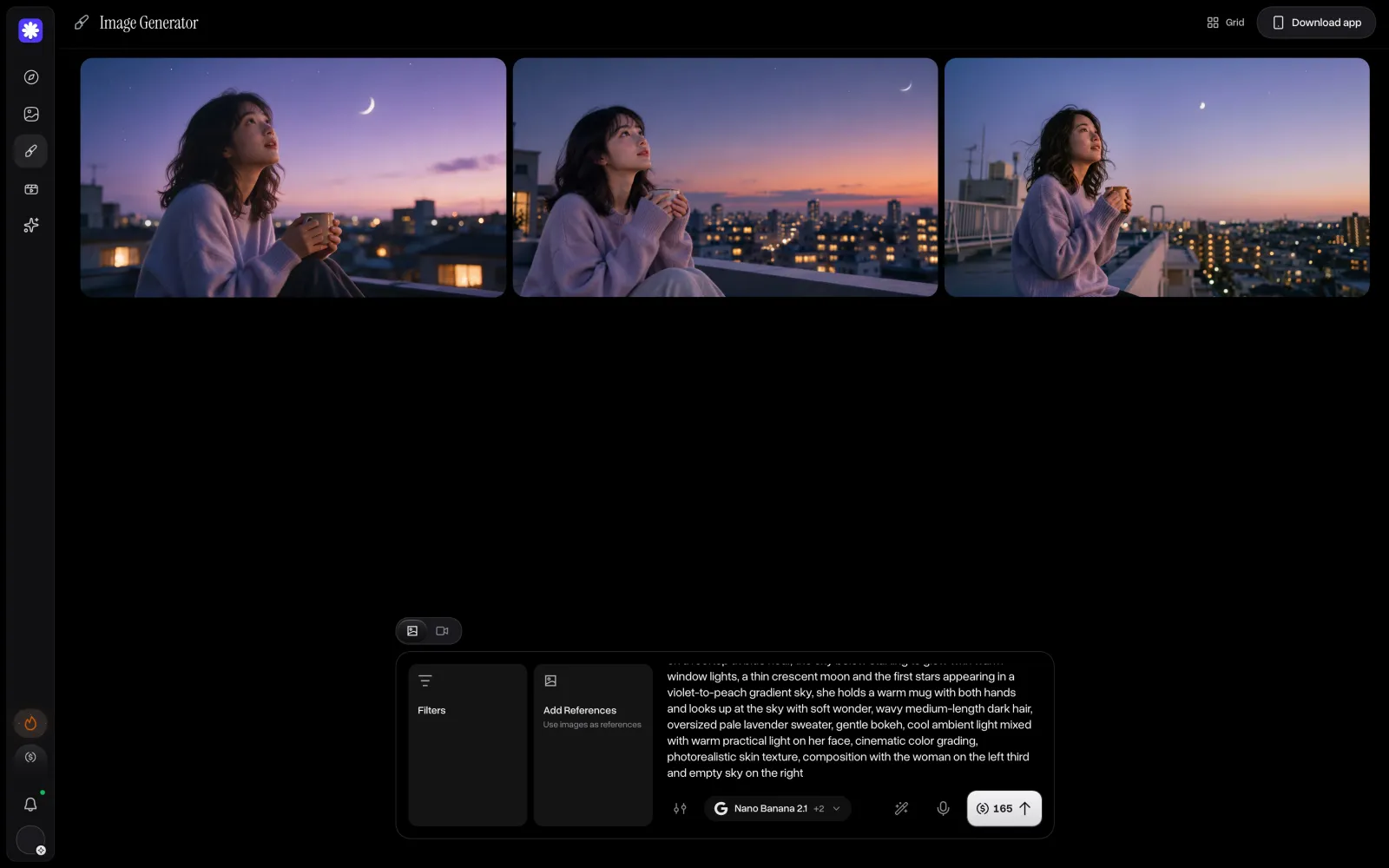
What's more, with Multiple selection, you can generate images using several models simultaneously and compare their results side by side, as shown here:
Overchat AI image generator comparing three image models side by side
With models like Grok Imagine Image 2 and GPT Image 2.5 Sunburst, you can replicate the cinematic style that Midjourney is known for, while other models like Seedream 5 Pro or Nano Banana 2.1 excel at gritty realism and day-in-the-life style images.
Furthermore, because Overchat AI is an all-in-one AI platform, you can do more with the images here, which comes at no extra cost — for example, turn an image into a video in the video generator.
Overchat AI also has a free plan, which gives you enough credits to generate four GPT Image 2.5 images per day, so you can try the platform out before committing.
Or choose one of the Pro plans that unlock all features and models in the app:
Pro plan
Price
Credits
Weekly
$5.99/week
2,000/week
Monthly
$14.99/month
8,000/month
Yearly
$49.99/year ($4.17/month)
8,000/month
At 8,000 credits per month, you can generate 320 images with GPT Image 2.5 or 200 with Seedream 5 Pro.
Overchat AI Pro also costs less annually: $49.99 compared with $96 for Midjourney Basic. The subscription covers AI chat with models such as GPT-6.1 Sol and Claude Opus 5.5, as well as image and video generation.
Choose Overchat AI if you want access to several image and video models in one place.
2. Midjourney vs ChatGPT
ChatGPT doesn't need an introduction, and chances are you're already using this platform for asking AI questions. However, ChatGPT isn't just a great chatbot — it's also a serious image generator. After all, GPT Image 2.5, one of the best image generation models in the world, is also developed by OpenAI. In ChatGPT, you can activate it simply by asking to create an image:
ChatGPT image generation with GPT Image 2.5 on the free plan
ChatGPT's image generator is excellent at prompt following and editing, and is very easy to use thanks to the conversational flow. Also, it's very accessible, since many people already have a ChatGPT account. And, if you're already paying for a ChatGPT paid plan, you're already paying for ChatGPT Images too:
Plan
Price per month
Go
$8
Plus
$20
Pro
From $100
Choose ChatGPT if you're already a ChatGPT user or have a ChatGPT plan and don't need a separate image generation platform or access to more models.
3. Midjourney vs Google Gemini
Similar to ChatGPT, Google Gemini also creates its own models, including the Nano Banana family, which went viral in 2025 for turning photos into 3D figurines. Nano Banana was the first model (outside of Midjourney) that introduced reliable image editing. And from then, it just kept getting better and better with every new release.
Well — you can use Nano Banana 2.1 directly in Gemini. Just like with ChatGPT, Nano Banana in Gemini works through a conversational interface, where you ask to create or edit an image in chat, like so:
Google Gemini image generation with Nano Banana 2 on the free plan
When it comes to usage limits, it's free to try, and the paid plans are as follows:
Plan
Price per month
Image models
Limit
Resolution
Free
$0
Nano Banana 2
Daily limit
1K
Google AI Pro
$19.99
Nano Banana 2.1 and Nano Banana Pro
4 times the free limit
2K
Choose Gemini if you want to generate images in Gemini.
4. Midjourney vs Krea
Krea is an AI image generation platform that offers models from several developers, including GPT Image 2.5, Nano Banana 2.1, and others. It also develops its own models, the latest being Krea 3, released in October 2026.
Krea is particularly interesting as a Midjourney alternative because of its style controls. Like Midjourney, it supports Moodboards that use reference images to establish a consistent visual style. Krea also offers Train LoRA, which lets you train a custom model on images of a particular character or aesthetic.
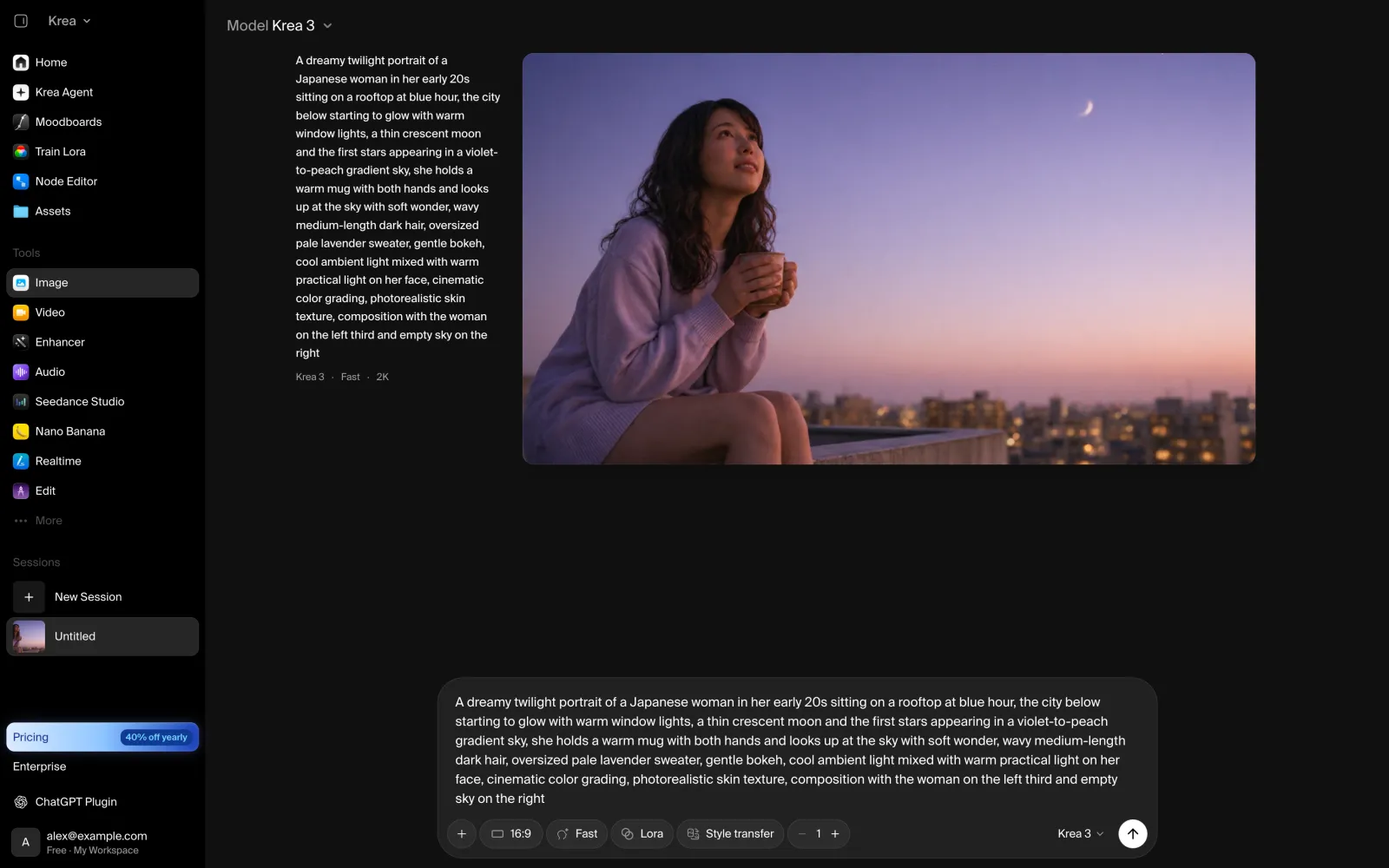
We tested Krea 3, and it produced one of the closest matches to Midjourney's visual style:
Krea image generation with Krea 3 on the free plan
The muted colors and blurred city lights give the image a similar cinematic appearance, while the composition follows the prompt more closely.
Krea gives free users 100 credits per day, enough for approximately two images with Krea 3 at 2K resolution. Paid subscriptions provide larger monthly credit allowances.
Plan
Monthly
Yearly, per month
Credits a month
Basic
$9
$5
5,000
Pro
$35
$21
20,000
Max
$105
$63
60,000
Krea Basic covers approximately 138 images with Krea 3 at 2K, compared with around 800 images on Midjourney Basic. Commercial use of Krea-generated images requires a paid plan.
Choose Krea if you like Midjourney's aesthetic but need more control over characters and visual styles.
5. Midjourney vs Dreamina
Dreamina is an image and video generation platform from ByteDance, a Chinese AI company that created Seedream models, including Seedream 5.0 Pro. However, you can also access third-party models such as GPT Image 2.5 and Nano Banana 2.1 on the platform.
Unlike Midjourney, Dreamina lets you switch between different image models within the same editor. It also includes Inpaint for editing selected areas and Expand for extending an image beyond its original frame. Dreamina is integrated with CapCut, making it particularly useful for creators who work with both images and video.
Dreamina image generation with Seedream 5.0 Lite on the free plan
You can try Dreamina for free, but outputs are watermarked. To remove that, upgrade to one of the paid plans:
Plan
Monthly
Yearly, per month
Credits a month
Basic
$19
$14
1,575
Standard
$36
$34.17
3,885
Advanced
$79
$75
8,645
Though, we should note that in terms of the number of images, Dreamina doesn't offer the best value. For example, on Basic, you can generate approximately 260 Seedream 5.0 Lite images per month, while Midjourney Basic costs less and provides roughly 800 images.
Choose Dreamina if you regularly use Seedream models or create videos in CapCut.
6. Midjourney vs Leonardo AI
Leonardo AI is an image and video generation platform owned by Canva. Unlike platforms that simply aggregate third-party AI models, Leonardo also develops its own, including Lucid Origin and Phoenix. This makes it a more direct Midjourney alternative, since you get access not only to popular third-party models but also to proprietary models you won't find on other platforms.
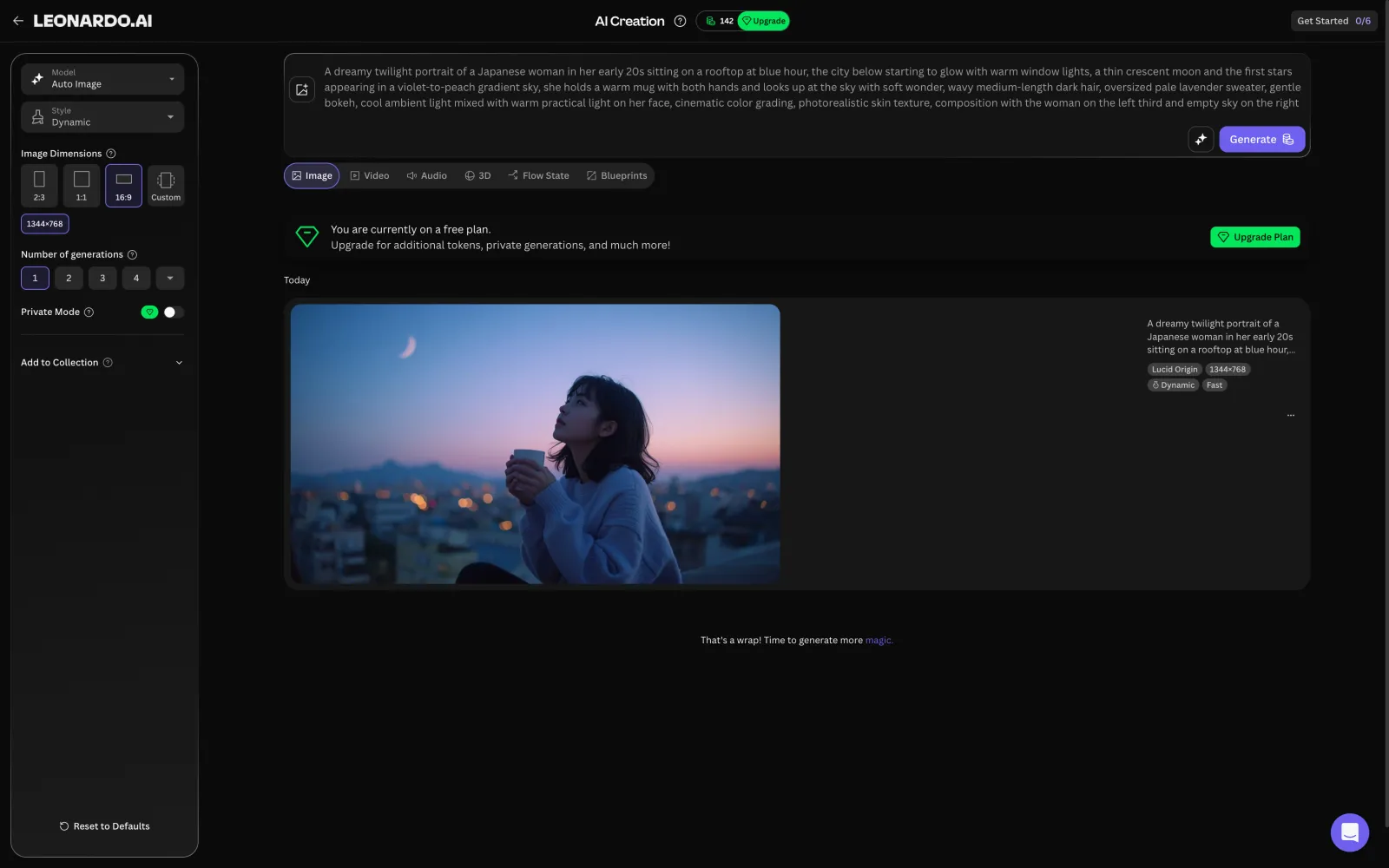
But unlike Midjourney, you can test this platform for free. And if you're wondering how Lucid Origin output looks, here's an example we generated:
Leonardo AI image generation with Lucid Origin on the free plan
In this case, it's a dark, cinematic image close to Midjourney's style, with blurred city lights and subdued colors.
Another similarity with Midjourney is that free generations are public. If you don't want that, you'll need to get one of the paid plans:
Plan
Monthly
Yearly, per month
Tokens a month
Essential
$12
$10
8,500
Premium
$30
$24
25,000
Ultimate
$60
$48
60,000
Premium and Ultimate include unlimited generation in the slower Relaxed mode, although this applies only to Leonardo's proprietary models. Third-party models continue to consume tokens.
Choose Leonardo AI if your project requires the same characters across many illustrations and you prefer Midjourney's darker, cinematic aesthetic, or want access to proprietary models.
7. Midjourney vs Ideogram
Ideogram specializes in AI-generated images containing text, particularly posters, logos, and other graphic designs where typography matters. If you're generating images that feature some kind of typography, this is the best Midjourney alternative for your use case.
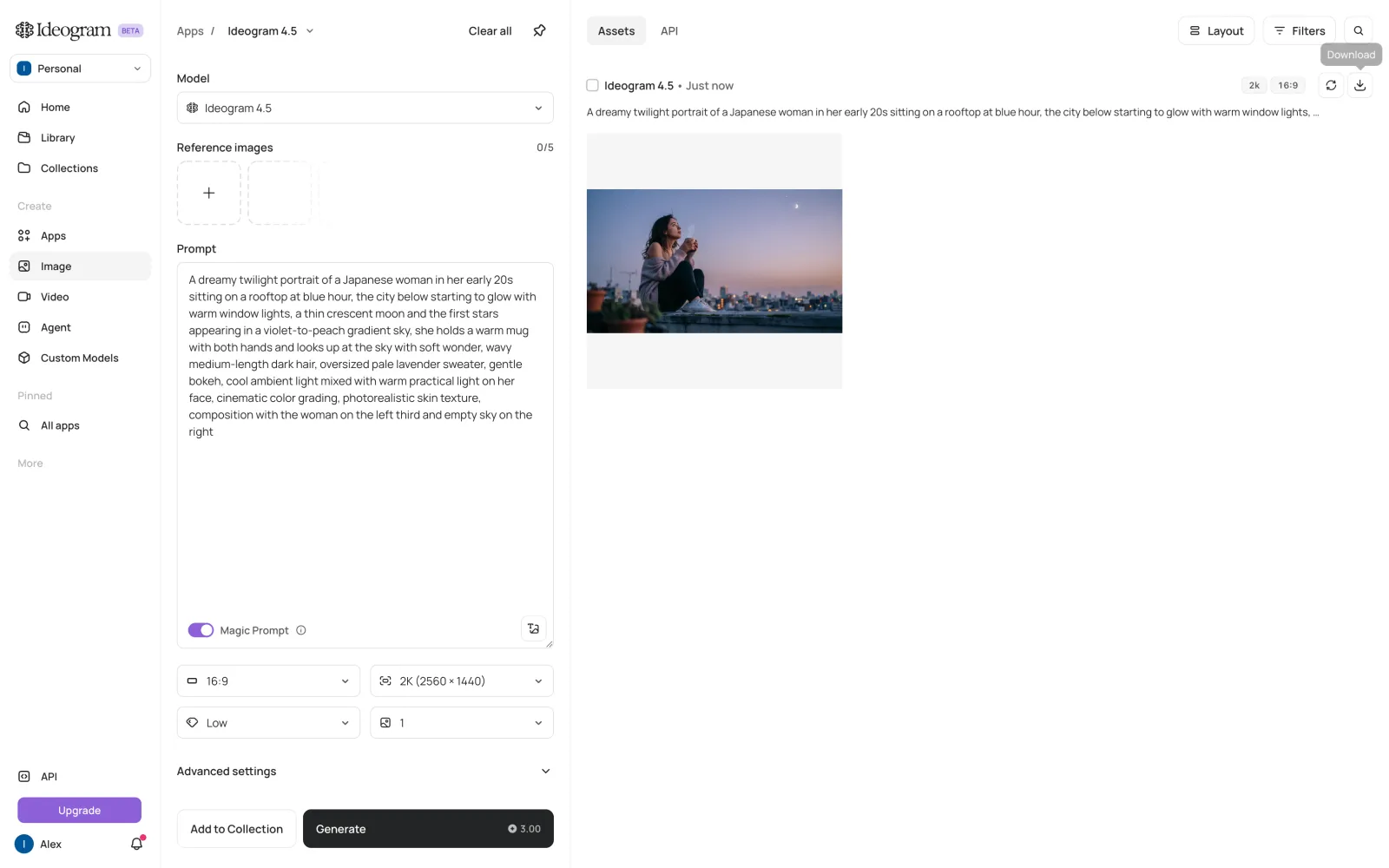
But Ideogram is not a one-trick pony. It also supports reference images and localized editing, can generate wide compositions up to 3:1, and includes style presets and style references. Paid subscriptions also provide access to third-party models such as GPT Image 2.5 and Nano Banana 2.
Ideogram image generation with Ideogram 4.5 on the free plan
When it comes to pricing, Ideogram offers the following plans:
Plan
Monthly
Yearly, per month
Credits a month
Plus
$20
$15
2,400
Pro
$60
$42
7,500
Paid subscriptions provide larger monthly allowances and access to slower, unlimited generation with Ideogram's models.
Unlimited slow generation is available on Ideogram Plus for $20 per month. Midjourney's equivalent Relax mode starts with the $30-per-month Standard plan.
Choose Ideogram if you primarily create designs containing text, such as posters, logos, or marketing graphics.
8. Midjourney vs Adobe Firefly
Adobe Firefly is an AI image and video generation platform designed to work with Adobe's creative software. It's best known for its proprietary Firefly Image Model, trained on licensed and public-domain content to make its outputs safer for commercial use. However, Firefly isn't generally considered the most advanced image generator, which may explain why Adobe also offers access to third-party models, including GPT Image 2.5 and Nano Banana 2.
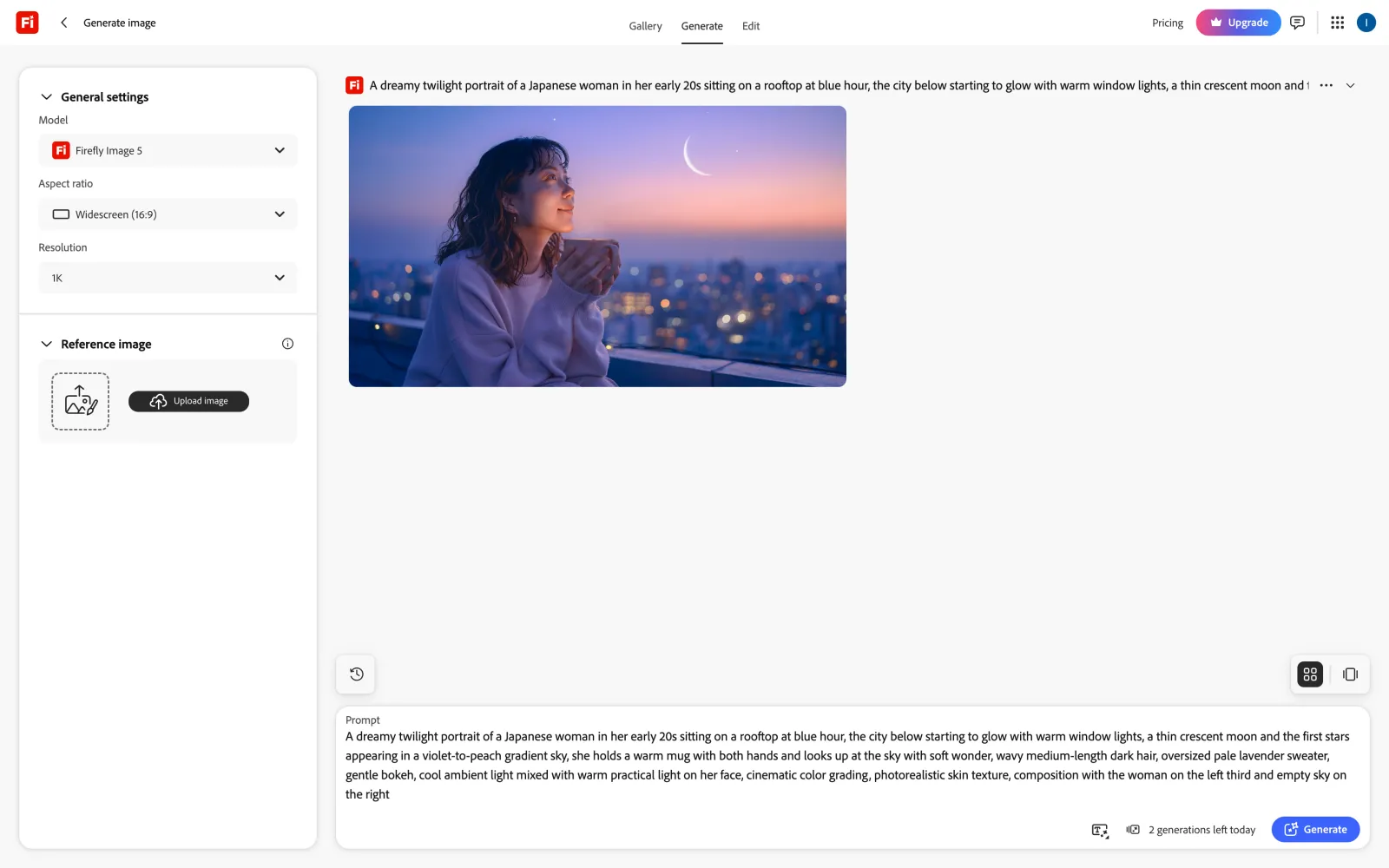
For our test, though, we used Adobe's own Firefly Image 5 model:
Adobe Firefly image generation with Firefly Image 5 on the free plan
Firefly followed the composition correctly and reproduced the warm light on the woman's face. The background city lights are softly blurred, giving the image a cinematic appearance closer to Midjourney's than the results from ChatGPT or Gemini.
You can also test Firefly for free, or upgrade to one of the paid plans:
Plan
Price per month
Credits a month
Standard
$9.99
2,000
Pro
$19.99
4,000
Pro Plus
$49.99
10,000
At $9.99 per month, Firefly Standard offers unlimited standard images with Adobe models. Midjourney's unlimited Relax mode starts at $30 per month.
Choose Adobe Firefly if you create images for commercial projects or regularly work in Photoshop and other Adobe apps. Its licensing approach, integration with Adobe's editing software, and unlimited standard generation make it a practical alternative to Midjourney for professional design work.
9. Midjourney vs Grok Imagine
Last but not least, we couldn't forget Grok Imagine. This image generator is integrated directly into the Grok chatbot and is, of course, developed by Elon Musk's xAI. Under the hood, it uses Grok Imagine Image 2.0 — a capable image model that offers pleasant aesthetics and great prompt following, supports editing, and, perhaps most importantly, has much more lenient safety filters, so fewer of your prompts will be refused.
Grok Imagine also includes image-to-video generation at 480p or 720p, powered by proprietary models.
Grok Imagine image generation with Grok Imagine Image 2.0 on the free plan
Also great is that you don't need to pay for Grok Imagine separately — you get it with any Grok plan that includes the chatbot:
Plan
Monthly
Yearly, per month
Usage
Plus
$8
$7
Chat and Grok Imagine
Premium
$30
$25
4 times the usage of Plus
Choose Grok Imagine if you already use Grok or want image and video generation included in a chatbot subscription.
Which Midjourney alternative offers the best value?
Another way to compare these platforms is by cost per image. To calculate this, we divided the price of each platform's cheapest paid plan by the number of images you can generate with it. This gives us an estimated cost per image, assuming you use your entire monthly allowance. Here's how the platforms compare:
App
Cheapest paid plan, per month
One image
Midjourney
$8 (Basic, billed yearly)
$0.01 with V8.2
Overchat AI
$4.17 (Pro, billed yearly)
$0.01 with GPT Image 2.5
ChatGPT
$8 (Go)
Included in the plan's limit
Google Gemini
$19.99 (Google AI Pro)
Included in the plan's limit
Krea
$5 (Basic, billed yearly)
$0.04 with Krea 3 at 2K
Dreamina
$14 (Basic, billed yearly)
$0.05 with Seedream 5.0 Lite
Leonardo AI
$10 (Essential, billed yearly)
$0.01 with Lucid Origin
Ideogram
$15 (Plus, billed yearly)
$0.02 with Ideogram 4.5 at 2K
Adobe Firefly
$9.99 (Standard)
Unlimited standard images with Firefly models
Grok Imagine
$7 (Plus, billed yearly)
Included in the plan's usage
FAQ
Below are answers to the most common questions about Midjourney and its alternatives.
What is the best Midjourney alternative?
Overchat AI is the best replacement for Midjourney. It has about 15 image models, and you can run one prompt on several of them at once. In our test, GPT Image 2.5 followed the prompt better than Midjourney, and Seedream 5 Pro came close to Midjourney's look.
Is there a free Midjourney alternative?
Yes. Every alternative in this article lets you generate images for free, with a daily or weekly limit. ChatGPT and Gemini followed our test prompt better than Midjourney, and you only need a regular account to use them.
Is Midjourney free?
No. Midjourney has no free plan or free trial on the website or in Discord. A limited trial exists only in niji·journey, Midjourney's separate app for anime images. The cheapest plan, Basic, costs $10 a month, or $8 a month if you pay for a year.
Is ChatGPT better than Midjourney?
ChatGPT is better at following detailed prompts. In our test, it put the woman on the left third and drew a thin crescent moon, and Midjourney missed both. Midjourney's images had more cinematic color grading, though, and each Midjourney job gives you four versions to choose from.
Which Midjourney alternative is best for consistent characters?
Leonardo AI is the best choice for consistent characters. Character Reference keeps a person's face from a reference photo, and you can train a custom model on 10 to 20 images. Krea lets you train a LoRA on your character, and Nano Banana in Gemini keeps a character's appearance across images.