10 Best Kling AI Alternatives Compared (2026)
Kling AI only has Kling models, its credits expire after 31 days, and payments are non-refundable. We compared 10 alternatives by models and price.


Contents
Kling AI is the official app for Kling 4.0, one of the strongest AI video models of 2026. But the app only has Kling models, and the credits you get with a subscription expire after a month. We've compared 10 of the best Kling AI alternatives, including AI aggregators where you can use Kling 4.0 together with models from other developers.
Why Look for a Kling AI Alternative?
You might want a Kling AI alternative for one of these reasons:
1. You can only use Kling models
Kling 4.0 is a great model, but no model handles every prompt equally well. For example, in a test with the same dance prompt, Seedance 2.5 made a spinning dress move like light fabric, while Kling 4.0 turned the skirt into a stiff pleated disc.
In Kling AI, you can't switch to another developer's model when a prompt doesn't work with Kling. To compare Kling 4.0 with Seedance 2.5 or MiniMax H3 on the same idea, you need a second subscription in another app.
2. Credits run out fast and expire after 31 days
Kling bills videos by the second. A 10-second Kling 4.0 video in 1080p costs 150 credits, so the 660 credits of the $8.80-a-month Standard plan cover only four such videos.
Plan credits stay valid for 31 days from the day Kling adds them to your account, so in a month with fewer projects you still pay the full price of the plan. When your subscription ends, unused plan credits disappear.
3. Buying credits doesn't get you out of the queue
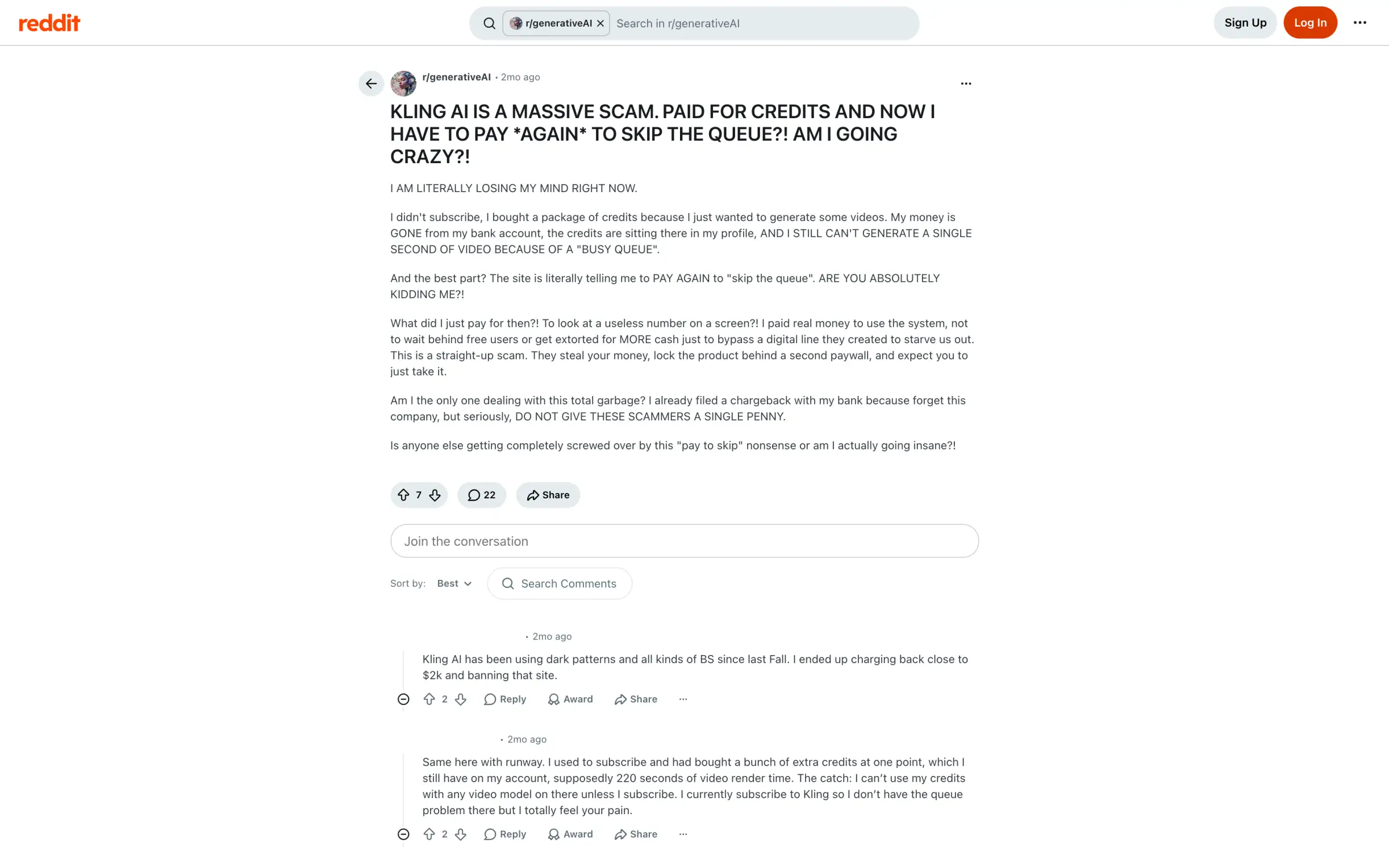
Kling also sells credit packs, and purchased credits stay valid for two years. Packs look convenient if you make videos from time to time, but only subscribers get Fast-track generation and a dedicated queue.
Without a subscription, a video paid for with purchased credits can get stuck in a busy queue, and Kling asks you to pay extra to skip it:
4. Payments aren't refundable
Kling treats subscriptions and credits as virtual products under its Terms of Paid Service. Once you activate a plan or a credit pack, the payment is non-refundable, and you can't exchange unused credits back for money.
Subscriptions also renew automatically until you cancel them, and Kling can change the renewal price. So if you're not sure Kling is the right app for you, it's safer to start with a monthly plan.
Kling AI alternatives at a glance
In the table below, prices with yearly billing are shown per month, and Magnific's prices are for Europe:
| App | Best for | Paid from | Free plan |
|---|---|---|---|
| Kling AI | Kling 4.0 and Motion Control from the developer | $6.60/month | Monthly credits, watermark |
| Overchat AI | Kling and other video models in one app | $7.50/month | 100 credits a day |
| Higgsfield | Camera and lens control | $15/month | Limited models, watermark |
| Krea | Custom models for recurring characters and products | $5.25/month | 100 units a day |
| Magnific | Credits that last a whole year | €10.50/month | 20 images a day, Auto only |
| OpenArt | Long videos planned by an AI agent | $13/month | Trial credits |
| Dreamina | Seedance 2.5 from ByteDance | $15/month | Daily credits, watermark |
| Hailuo AI | MiniMax H3 with prices per second | $8.40/month | One-time trial credits |
| PixVerse | Template videos on a small budget | $8/month | 30 credits a day |
| Google Flow | The best free plan | $4.99/month | 50 credits a day |
| Runway | Editing videos with AI | $12/month | 125 one-time credits |
AI aggregators
AI aggregators bring video models from many developers into one subscription. Most of them have Kling 4.0, so you can keep using it and switch to another model when a prompt works better there.
1. Overchat AI
Overchat AI is an AI aggregator we've built for image and video generation. Its AI video generator has 31 video models, and six of them are Kling models, including Kling 4.0 and Kling 4.0 Flash. The other models come from different developers and include Seedance 2.5 and MiniMax H3.
The model list shows how many credits each model costs before you generate, so you can test an idea on a cheaper model and switch to Kling 4.0 for the final version:

If Motion Control is the Kling feature you use most, Overchat AI has it as a separate mode in the Video Generator. You upload a 3–30 second video with the movement you want to copy and a photo of your character, and Kling V3 Motion Control transfers the movement onto that character.
For videos without a prompt, the Video Generator also has more than 300 filters, such as Pop Star and Frozen Motion.
Every video you make in Overchat AI comes with full commercial rights. AI video often takes a few attempts, so Overchat AI doesn't charge for failed ones.
Overchat AI gives 100 credits a day for free. Paid plans add a monthly credit allowance:
Price:
| Plan | Monthly | Yearly, per month | Credits a month |
|---|---|---|---|
| Mini | $15 | $7.50 | 7,000 |
| Pro | $29 | $14.50 | 15,000 |
| Max | $59 | $29.50 | 35,000 |
| Ultra | $119 | $59.50 | 80,000 |
You can try full access to Overchat for just $1.99. Credits from a subscription don't roll over to the next month, while credits from one-time packs never expire.
Best forCreators who want Kling 4.0 and other popular video models in one subscription.
Pros
- Six Kling models and 25 video models from other developers, with the price shown before you generate
- Motion control with Kling V3 Motion Control
- 100 free credits every day
Cons
- Free daily credits aren't enough for a Kling 4.0 video
- Unused subscription credits don't roll over
2. Higgsfield
Higgsfield is the best Kling AI alternative if you want to control the camera the way you would on a film set. Its Cinema Studio 4.0 lets you set up the camera and the lens before you generate, and you can stack up to three camera movements in one shot.
Each setting has its own presets, from a DV camcorder look to a wide-open f/1.4 aperture:

Higgsfield also has Kling 4.0 and Kling 4.0 Flash, so you can use them next to Seedance 2.5 and Higgsfield's own Genjutsu model.
A 5-second 1080p video in Cinema Studio costs 80 credits, so the $15 Starter plan with 200 credits covers only two of them.
Price:
| Plan | Monthly | Yearly, per month | Credits a month |
|---|---|---|---|
| Starter | $15 | $15 | 200 |
| Plus | $49 | $39 | 1,000 |
| Ultra | $129 | $99 | 3,000 |
Best forFilmmakers and ad creators who want to set up the camera before generating.
Pros
- Cinema Studio with camera, lens, and movement settings
- Kling 4.0 along with Seedance 2.5 and Genjutsu
Cons
- The $15 Starter plan covers only two 1080p Cinema Studio videos
- Free videos have a watermark
3. Krea
Krea is a good Kling AI alternative if your videos have to show the same person or product again and again. Describing them in every prompt rarely gives the same result twice, so Krea lets you train a LoRA, a small custom model, on photos of that face or product.
You upload several images of the same subject, Krea trains the LoRA in a few minutes, and then you use it in Krea's image and video models:

This is useful for brands that make dozens of videos with the same mascot or product.
Krea's Basic plan costs $5.25 a month with yearly billing. However, unused units don't carry over to the next month, and you need a paid plan to use your videos commercially.
Price:
| Plan | Monthly | Yearly, per month | Units a month |
|---|---|---|---|
| Basic | $9 | $5.25 | 5,000 |
| Pro | $35 | $21 | 20,000 |
| Max | $105 | $63 | 60,000 |
Best forBrands that need the same character or product in many videos.
Pros
- Custom LoRA models for faces, products, and styles
- Paid plans from $5.25 a month
Cons
- Commercial use only on paid plans
- Unused units don't roll over
4. Magnific (formerly Freepik)
Magnific is the best Kling AI alternative if you don't make videos every month. With Kling, the credits you don't use in a month are gone. On Magnific, you get a yearly pool of credits that stays valid for the whole year.
Magnific, previously known as Freepik, also includes a stock library with more than 250 million assets. You can find photos and vectors for a video and generate the video itself under the same subscription.
Kling 4.0 is one of the video models on Magnific. But on the free plan, Magnific chooses the model for you, so you'll need a paid plan to generate with Kling 4.0.
Price:
| Plan | Monthly | Yearly, per month | Credits a year |
|---|---|---|---|
| Premium | €15 | €10.50 | 240,000 |
| Plus | €34 | €25.50 | 600,000 |
| Pro | €83 | €62.25 | 1,500,000 |
These are prices for Europe. If you run out of credits on Premium, you can't top them up and will need a higher plan.
Best forCreators who make videos in bursts and don't want their credits to expire every month.
Pros
- Credits stay valid for a full year
- More than 250 million stock assets in the same subscription
Cons
- Free users can't choose the model
- No credit top-ups on Premium
5. OpenArt
OpenArt is worth trying if you need a video longer than one Kling generation. Kling 4.0 can make up to 30 seconds in one go, which is enough for most social videos. For a short film or an ad with several scenes, you still have to plan and generate the video shot by shot.
OpenArt's Director Mode plans the video for you. You describe what you want in a chat, and the AI agent breaks the idea into scenes and keeps the characters consistent between them:

If you don't know where to start, quick starts like Product Ads and Micro Drama give the agent a ready structure. Kling 4.0 is also the default model in OpenArt's frame-to-video tool, so you keep Kling's look.
Commercial use on OpenArt starts with the $34 Plus plan. OpenArt charges you for the next month unless you cancel at least five days before the renewal date.
Price:
| Plan | Monthly | Yearly, per month | Credits a month |
|---|---|---|---|
| Starter | $14 | $13 | 4,000 |
| Plus | $34 | $27 | 12,000 |
| Pro | $56 | $44 | 24,000 |
| Wonder | $240 | $175 | 106,000 |
Best forMulti-scene ads, music videos, and short films.
Pros
- Director Mode plans long videos from a chat
- Kling 4.0 is the default video model
Cons
- Commercial use only from the $34 Plus plan
- You have to cancel at least five days before renewal
Apps from other model developers
Like Kling AI, these apps come from the companies that build the models, so new versions of their models usually appear there first. They're worth trying if another model suits your videos better than Kling 4.0.
6. Dreamina
Dreamina is an AI image and video app from ByteDance, the company behind TikTok and CapCut. New versions of Seedance come out there first, and Seedance 2.5 is Kling 4.0's main competitor.
Seedance 2.5 costs more per video than Kling 4.0, and Dreamina helps you spend less on it with Seedance 2.5 Draft. This model creates 480p drafts, so you can test an idea before you spend more credits on the full version:

The full Seedance 2.5 model accepts up to 50 references, which helps when a video has several characters or products that have to look the same in every shot. If you use Kling for Motion Control, Dreamina Recreate does a similar job. It transfers motion from a video or swaps objects in clips up to 30 seconds long.
Dreamina gives free credits every day, but videos you download on the free plan have a watermark.
Price:
| Plan | Monthly | Credits a month |
|---|---|---|
| Basic | $15 | 1,575 |
| Standard | $49 | 3,885 |
| Advanced | From $99 | 8,645 |
These are US prices at the time of writing.
Best forCreators who prefer Seedance 2.5 to Kling 4.0.
Pros
- New Seedance versions directly from ByteDance
- 480p drafts to test ideas for fewer credits
- Recreate for motion transfer
Cons
- Free downloads have a watermark
- No Kling models
7. Hailuo AI
Hailuo AI is MiniMax's video app. It's the place to use MiniMax H3 with all of its settings, like 2K resolution and up to 12 reference files.

Hailuo's pricing is also easier to plan with. Kling tells you how many credits you get, and you have to work out how many seconds of video they buy. Hailuo's pricing page shows the price per second for each model and how many seconds of video each plan covers.
For example, the Standard plan at $8.40 a month with yearly billing covers about 84 seconds of MiniMax H3 in 2K, or about 143 seconds in 768p.
The free plan gives you only one-time trial credits, and you can use them only with Hailuo's models. So you'll need a paid plan to keep generating after the trial.
Price:
| Plan | Monthly | Yearly, per month | Credits a month |
|---|---|---|---|
| Standard | $14.99 | $8.40 | 1,000 |
| Pro | $54.99 | $30.40 | 4,500 |
| Master | $119.99 | $71.20 | 10,500 |
Best forCreators who use MiniMax H3 and want to know the cost of a video before buying a plan.
Pros
- MiniMax H3 in 2K with up to 12 references
- Plans show the price per second of video
Cons
- Free credits are a one-time trial
- Only MiniMax models on the free plan
8. PixVerse
PixVerse develops its own video models, PixVerse V6 and C1, and works best for short viral videos made from templates.

If you make a lot of videos, PixVerse's credits also go further than Kling's. Besides the monthly allowance, every paid plan adds 60 credits that reset daily, so you get new credits even after you've spent the monthly ones. If you're not in a hurry, Off-Peak Mode generates videos with PixVerse models when the servers are less busy and saves 30% of credits on Pro or 50% on Premium.
From the Pro plan, PixVerse also gives you models from other developers, including Kling 4.0 and Seedance 2.5. So a PixVerse subscription can replace Kling AI and add other models on top. However, the Standard plan is limited to 720p, so for 1080p and 4K you'll also need Pro.
Price:
| Plan | Monthly | Yearly, per month | Credits a month |
|---|---|---|---|
| Standard | $10 | $8 | 1,200 + 60 a day |
| Pro | $30 | $24 | 6,000 + 60 a day |
| Premium | $60 | $48 | 15,000 + 60 a day |
Best forCreators who make a lot of short template videos on a small budget.
Pros
- Credits that refill every day
- Off-Peak Mode saves up to 50% of credits
- Kling 4.0 and Seedance 2.5 on Pro
Cons
- Standard is limited to 720p
- Off-Peak discounts work only with PixVerse models
9. Google Flow
Google Flow has the best free plan of all the apps we've researched. Every Google account gets 50 credits a day, and a 10-second 720p video with Omni Flash 1.2 costs 30 of them, so you can make one such video every day for free.
Omni Flash 1.2 is Google's newest video model. It creates videos from any reference, real or generated, and you can edit a finished video by describing the change in a chat.

The free plan also includes most of Flow's tools, such as Frames to Video and video-to-video editing. For videos longer than 10 seconds, you'll need a Google AI subscription, which starts at $4.99 a month.
Price:
| Plan | Monthly | Flow credits a month |
|---|---|---|
| Google AI Plus | $4.99 | 200 |
| Google AI Pro | $19.99 | 1,000 |
| Google AI Ultra | $99.99 | 10,000 |
| Google AI Ultra | $199.99 | 25,000 |
Every plan keeps the 50 daily credits on top of the monthly ones. Prices may vary by country.
Best forMaking AI videos for free every day.
Pros
- 50 free credits every day
- Omni Flash 1.2 with editing in a chat
Cons
- Free videos are limited to 10 seconds
- Daily credits don't roll over
Video editing
Sometimes a Kling video is almost right, and only one detail spoils it. Generating the whole video again costs the full price and can break what was already good, so an AI video editor that changes only that detail is often the cheaper fix.
10. Runway
Runway is the best Kling AI alternative for fixing videos you've already generated. Its Aleph 2.0 model edits a clip from a text description. You describe a change like a different jacket color, and Aleph 2.0 changes only that, keeping the background and lighting as they were.
Aleph 2.0 edits 1080p clips up to 30 seconds long, which is also the maximum length of a Kling 4.0 video. Edit Studio previews the edit as an image before you generate the video, so you don't spend credits on a version you don't like.

Runway also has Kling 4.0, so you can generate a video and then fix it with Aleph 2.0 in the same app.
Runway's plans don't include many credits, though. On the $15 Standard plan, 625 credits cover four 5-second Aleph 2.0 edits a month. Only the $95 Max plan lets unused credits carry over, and only for one month.
Price:
| Plan | Monthly | Yearly, per month | Credits a month |
|---|---|---|---|
| Standard | $15 | $12 | 625 |
| Pro | $35 | $28 | 2,250 |
| Max | $95 | $76 | 9,500 |
Best forFixing details in generated videos without generating them again.
Pros
- Aleph 2.0 edits clips up to 30 seconds long
- Kling 4.0 and Aleph 2.0 in one app
- Edit Studio previews the edit as an image first
Cons
- Standard covers only four 5-second Aleph 2.0 edits
- Free credits don't renew
FAQ
Below are answers to common questions about Kling AI and its alternatives.
Overchat AI is the best Kling AI alternative. It has Kling 4.0 and five other Kling models together with 25 video models from other developers, including Seedance 2.5 and MiniMax H3. It also has Kling V3 Motion Control and 100 free credits every day.
Other models and apps do some things better than Kling 4.0. For instance, Seedance 2.5 handles fabric and natural movement better, and Higgsfield gives you more control over the camera. Overchat AI has both Kling 4.0 and Seedance 2.5, so you can compare them on one prompt.
Google Flow has the best free plan, with 50 credits a day, which is enough for one 10-second Omni Flash 1.2 video in 720p. Overchat AI gives you 100 free credits a day, and PixVerse also refills its free credits every day.
Kling AI is better for realistic videos with Kling 4.0, while PixVerse is cheaper for template videos, thanks to its daily credits and Off-Peak Mode. PixVerse's Pro plan also includes Kling 4.0, so you can use both in one subscription.
Yes, Overchat AI has Kling V3 Motion Control as a separate mode in its Video Generator. You upload a video with the movement and a photo of your character, and the model copies the movement onto the character. Dreamina Recreate also transfers motion from a video, and PixVerse has its own Motion Control tool.
Yes, Kling AI's monthly credits expire 31 days after you get them, and they disappear when your subscription ends. Purchased credits stay valid for two years, and the daily bonus credits for subscribers expire at midnight.
No, once you activate a plan or a credit pack, the payment is non-refundable under Kling AI's Terms of Paid Service. Kling AI still returns the credits to your balance if a generation fails.
Kling 4.0 is one of the top AI video models of 2026, and it can generate up to 30 seconds in one go with keyframes and references.