Leonardo AI is a popular platform for generating images and videos. But if you're unhappy with its pricing, concerned about recent changes, or simply want to see what else is out there, you have plenty of options. We've compared 10 Leonardo AI alternatives to help you find the right one based on their features, pricing and limitations.
Leonardo AI has some limitations that may make it less suitable for your needs, particularly when it comes to pricing, credit usage, and content moderation. Here are the main reasons you might want to consider an alternative:
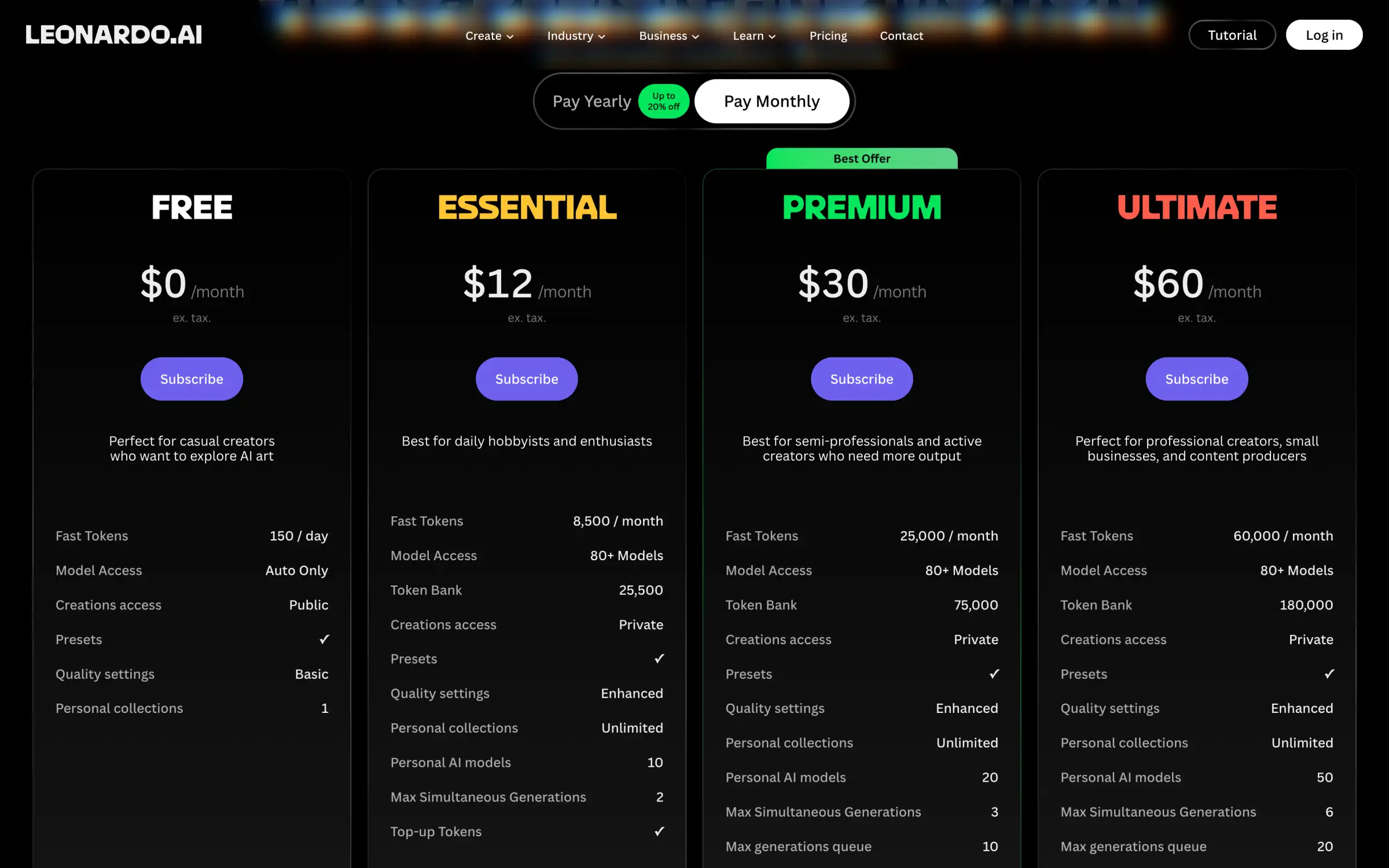
Unlimited generation isn't entirely unlimited. Unlimited generation is only available on the Premium and Ultimate plans, but only for selected models running in the slower Relaxed mode. These restrictions have caught some subscribers by surprise.
Content moderation can be too restrictive. Some users have reported that Leonardo rejects even harmless prompts, though Leonardo acknowledged the complaints and adjusted its moderation filters in February 2026, so this issue is not as bad as it was before.
Leonardo AI pricing page with Auto Only model access and Public creations on the Free plan
That said, Leonardo still has plenty of satisfied users, with a 4.7 out of 5 rating on Trustpilot from 1,581 reviews. But if any of the restrictions above are a dealbreaker for you, there are other platforms worth considering. Here's how they compare on features and price.
Leonardo AI alternatives at a glance
App
Best for
Paid from
Free plan
Leonardo AI
Custom models and consistent characters
$10/month
150 tokens a day, Auto only
Overchat AI
Comparing models for images, video and chat
$7.50/month
100 credits a day
Krea
Training custom models and building workflows
$5.25/month
100 units a day
OpenArt
Character and story tools
$13/month
Trial credits
Higgsfield
Cinematic portraits and video
$15/month
Limited models, no monthly credits
Magnific
AI images plus a stock library
$14.50/month
20 images a day, Auto only
Midjourney
A distinctive visual style
$8/month
No free plan
Ideogram
Text inside images
$15/month
30 credits a week
Recraft
Logos and vector graphics
$10/month
Limited credits
Adobe Firefly
Commercial work with Adobe's models
$9.99/month
3 generations a day
ComfyUI
Running models on your own computer
Cloud from $16/month
Free desktop app
Starting prices are per month; most require yearly billing.
AI aggregators
If you like having different AI models in one place, you'll feel right at home with these AI image generators.
1. Overchat AI
Overchat AI is an AI aggregator we've built that gives you access to AI models from different developers through one subscription. It's a particularly good Leonardo AI alternative if you want to generate images with different models rather than rely on a single company's technology. However, Overchat AI is also a much broader platform, with AI video generation, chat models, an AI agent, and more than 150 tools for different tasks.
For example, if you're creating content for social media, you can generate an image and then turn it into a video without leaving Overchat AI. The AI video generator supports models such as Kling, Veo, Seedance, and Grok Imagine. You can generate clips from text prompts or animate existing images, with options for different aspect ratios, resolutions, and video lengths. Some models also generate sound.
Overchat AI also has Superchat, an AI agent that can handle tasks involving more than one model or tool. Instead of choosing a model yourself, you describe what you want to accomplish, and Superchat selects models based on the task. For example, you could ask it to help develop an advertising concept and generate an image for it. Superchat can use a language model to work on the concept and an image model to create the visual, all within the same conversation.
For more specific tasks, we've also developed custom AI apps. These include tools for removing backgrounds and unwanted objects, upscaling photos, generating portraits, and applying different image styles. They're useful when you need to make a particular edit and don't want to spend time writing prompts or choosing a model.
We won't go into all of these tools here, since we're primarily comparing Leonardo AI alternatives for image generation.
In our AI image generator, you can currently choose from more than 15 models, including:
We think having access to multiple models is one of the biggest advantages of Overchat AI. Different image generators have different strengths, so a model that produces an excellent illustration might not be the best choice for editing a photograph or generating an image with accurate text.
However, trying models one by one can get expensive, particularly when you aren't sure which one to use. To make this easier, we've added a feature called Multiple selection. You can select up to four image models, enter your prompt once, and get their results side by side. This makes it easier to compare how each model handles your instructions, composition, and visual style before deciding which one to use for the rest of your project.
Multiple selection is available on paid plans. You can also see the price of each model in credits before generating, so you know how much you're spending.
Overchat AI Image Generator with the model list open and the price in credits next to each model
You don't have to pay to try Overchat AI's image generator, either. Unlike Leonardo AI, which restricts model selection on its free plan, Overchat AI lets you choose between supported image models even without a subscription.
Free users receive 100 credits every day. That's enough for one Nano Banana 2.1 image or four GPT Image 2.5 Flare images at 1K resolution. You can only generate one image at a time, though, and some models require a paid subscription.
Overchat AI's Mini plan starts at $7.50 per month with annual billing, making it cheaper than Leonardo AI's Essential plan at $10 per month. The subscription also covers access to chat models, video generation, Superchat, and other AI tools, although individual features and generations may consume credits.
As for credit rules, unused subscription credits don't roll over to the next billing period. However, credits purchased through one-time packs never expire. And canceling your Overchat AI subscription doesn't immediately end your plan: you can continue using it until the current billing period ends.
Best for: People who want to compare image models from different developers and use AI for video generation, editing, and other tasks without juggling multiple subscriptions.
Pros:
✅ Image, video, chat models, Superchat, and custom AI apps in one platform
✅ Model selection on the free plan, with credit costs shown upfront
✅ Multiple selection lets you compare up to four image models side by side
Cons:
❌ 100 daily free credits are enough for only one image with some models
❌ Unused subscription credits don't roll over
❌ No custom model training
2. Krea
Krea is an AI image and video generation platform that brings together models from different developers alongside its own. Like Leonardo AI, it supports custom model training, but it also offers a few tools that make it particularly useful for designers and artists.
For example, if you're working on a series of illustrations and need the same character or visual style across multiple images, you can train a custom model using your own references. And if your project involves several steps, such as generating an image, changing its background, and upscaling the result, Krea's Node Editor lets you connect these operations into a reusable workflow.
There's also Realtime, which is worth trying if you prefer to work visually rather than describe everything in a prompt. It updates the generated image as you draw, so you can experiment with compositions and see the results immediately.
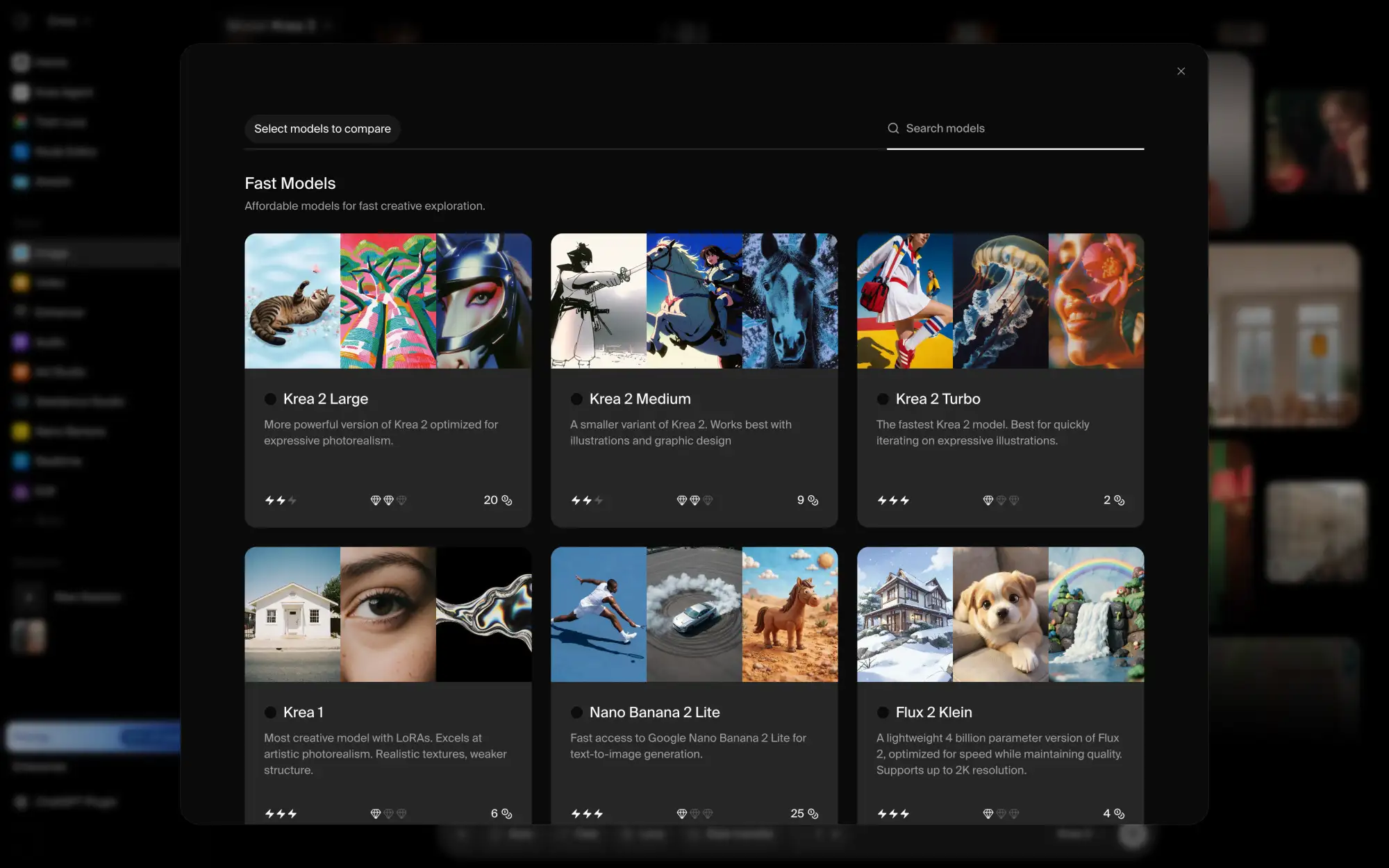
Krea model gallery with a button to compare models and the price in units on each model card
You can try Krea without a subscription. The free plan gives you 100 units a day and, unlike Leonardo AI, lets you choose between different image models. Krea also shows the cost of each model before you generate, which makes it easier to manage your credits.
However, 100 units are enough for just four Nano Banana 2 Lite images, so you'll probably need a paid plan if you intend to use Krea regularly.
Price:
Plan
Monthly
Yearly, per month
Units a month
Basic
$9
$5.25
5,000
Pro
$35
$21
20,000
Max
$105
$63
60,000
All paid plans include a commercial license, but unused units don't roll over to the next month.
Best for: Creating consistent characters and visual styles, particularly if you want to build reusable image generation workflows.
Pros:
✅ Choice of image models on the free plan
✅ Model prices shown in units before generation
✅ Custom model training, Realtime generation, and a Node Editor
Cons:
❌ Free plan is limited to 100 units a day
❌ Unused units on Basic, Pro, and Max don't roll over
3. OpenArt
OpenArt is an AI image and video generation platform with a particularly strong focus on storytelling. If you're creating a comic, an animated short, or a series of videos with recurring characters, OpenArt has tools to help you keep those characters consistent across scenes. You can also use Director Mode to put together videos from multiple scenes rather than generating each clip separately.
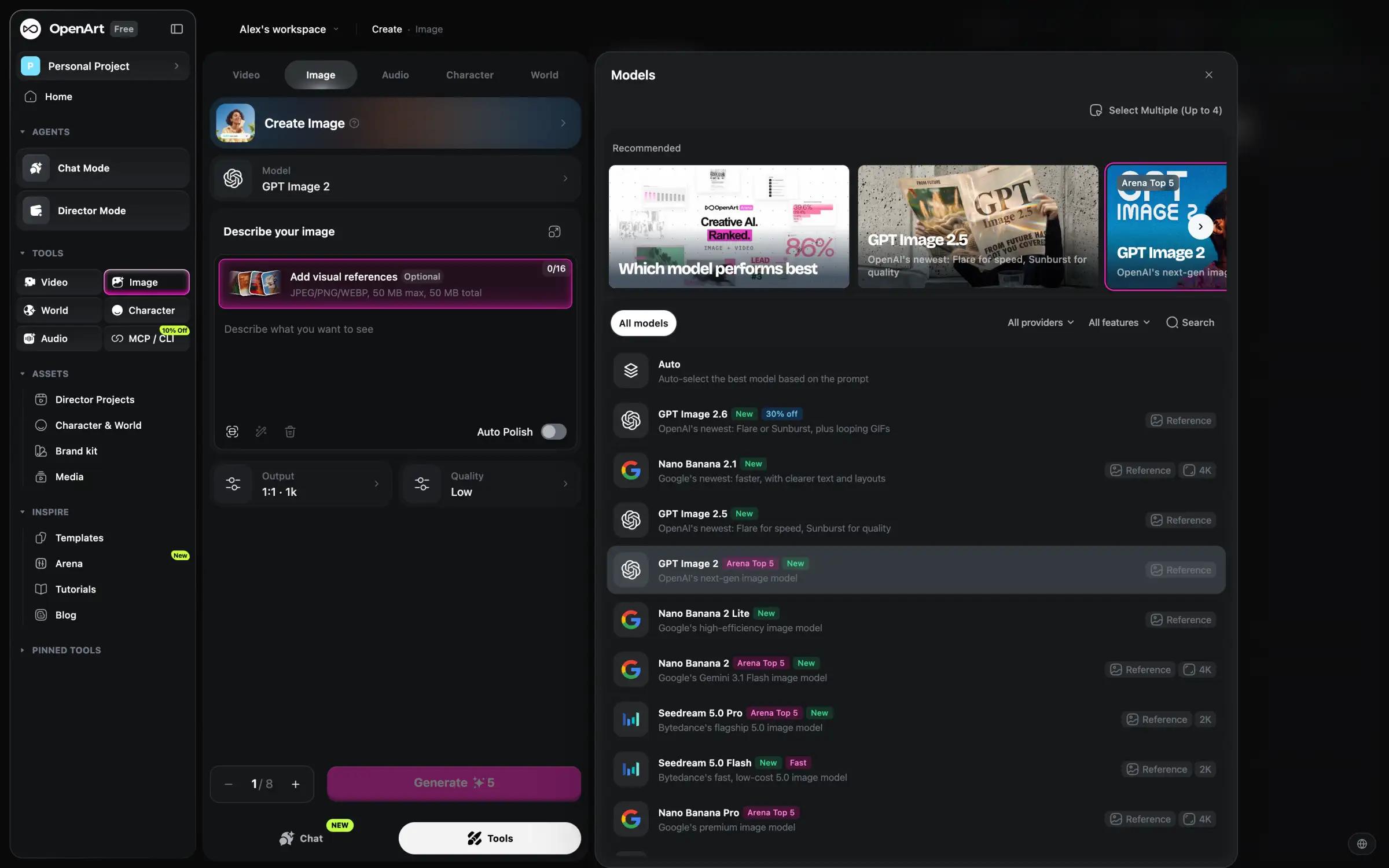
For regular image generation, OpenArt works much like Leonardo AI. You can choose from models developed by different companies, including GPT Image 2.6, Nano Banana 2.1, Seedream 5.0 Pro, Flux 3 Image, and Ideogram 4.5. And if you're not sure which model will handle your prompt best, the Select Multiple feature lets you run it through up to four models at once and compare the results.
OpenArt image page with the Models panel open, listing Auto, GPT Image 2.6, Nano Banana 2.1 and Seedream 5.0 Pro
You can explore OpenArt's model library with a free account, but you only get a limited number of trial credits, and your creations are stored for seven days. You'll also need at least the Plus plan if you want to use generated content commercially.
Price:
Plan
Monthly
Yearly, per month
Credits a month
Starter
$14
$13
4,000
Plus
$34
$27
12,000
Pro
$56
$44
24,000
Wonder
$240
$175
106,000
One thing to watch out for is OpenArt's billing policy. Unused subscription credits expire at the end of each month, and you have to cancel at least five days before your renewal date to avoid being charged again.
This has been a source of frustration for some users. Around 30% of OpenArt's Trustpilot reviews give it one star, with complaints about credits running out faster than expected and charges after cancellation.
Best for: Creating stories and videos with recurring characters, with access to multiple image models in one platform.
Pros:
✅ Access to GPT Image 2.6, Nano Banana 2.1, and other recent models
✅ Select Multiple lets you compare up to four models with the same prompt
✅ Character tools and Director Mode for multi-scene projects
Cons:
❌ Limited trial credits and seven-day storage on the free plan
❌ Commercial use requires the $34/month Plus plan or higher
❌ Complaints about billing and credit usage
4. Higgsfield
Higgsfield is an AI image and video generation platform with a strong focus on cinematic visuals. While Leonardo AI is more of a general-purpose image generator, Higgsfield is particularly interesting if you're creating fashion photography, advertising content, music videos, or short films.
One of its main attractions is the Soul family of image models, developed by Higgsfield itself. Soul 2.0 is designed for realistic fashion and editorial photography, while Soul Cinema focuses on images with a more cinematic look. If you want to create portraits that resemble professional photoshoots or movie stills, these models are worth trying.
However, you're not limited to Higgsfield's own models. The platform also offers image generators from other developers, including GPT Image 2.6 and Nano Banana 2.1. This gives you the option to use Soul for fashion photography and switch to another model when you need a different style or more precise image editing.
Higgsfield image page with the model list open, showing Soul 2.0, Soul Cinema, GPT Image 2.6 and models with a PREMIUM label
Higgsfield's video tools are another reason to consider it over Leonardo AI. Beyond generating clips from text or images, the platform offers controls for camera movements and visual effects. For example, you can animate a still portrait with a cinematic camera movement or create short product videos with more deliberate camera work. This makes Higgsfield especially appealing to creators who want their AI-generated images and videos to share a consistent visual style.
You can try Higgsfield for free, but the selection of available models is limited, your generations will have a watermark, and you won't receive a monthly credit allowance. To use the platform regularly, you'll need a subscription.
Price:
Plan
Monthly
Yearly, per month
Credits a month
Starter
$15
$15
200
Plus
$49
$39
1,000
Ultra
$129
$99
3,000
Higgsfield is relatively expensive compared with some other Leonardo AI alternatives, especially if you want access to its more advanced features. The Starter plan includes only selected models and tools, while Plus and Ultra give you more credits and access to additional features.
Plus and Ultra also advertise unlimited generation with selected models, but there's an important restriction: these unlimited periods last only seven days and apply only on higgsfield.ai. Generations can also take longer during busy periods. On top of that, unused subscription credits don't roll over, and prices may vary depending on your country.
Higgsfield is therefore more compelling if you specifically want its cinematic tools and Soul models than if you're simply looking for a cheaper way to generate images. If video generation is your main priority, you may also want to compare it with Dreamina and Kling AI.
Best for: Fashion photography, cinematic portraits, and AI videos with controlled camera movements.
Pros:
✅ Proprietary Soul models for fashion and cinematic photography
✅ Access to image models from other developers
✅ Video generation with camera controls and visual effects
Cons:
❌ Free generations have watermarks, with no recurring monthly credits
❌ Starter has limited access to models and features
❌ Frequent promotional pop-ups in the app
5. Magnific (formerly Freepik)
Magnific is a good Leonardo AI alternative if you use stock photos, illustrations, and design templates alongside AI-generated content. It's the platform previously known as Freepik, which rebranded to Magnific in April 2026. The stock library is still there, but it's now part of a larger creative platform with AI image, video, and audio generation tools.
For example, if you're designing a website or preparing a marketing campaign, you might need stock photography for one section, custom AI illustrations for another, and icons or mockups to complete the design. Instead of finding these assets on separate websites, you can get them all through Magnific.
For AI image generation, Magnific offers models from Google, OpenAI, ByteDance, Black Forest Labs, Ideogram, and other developers. You can choose a model depending on what you're creating, although you'll need a paid subscription to do so.
Another advantage is how Magnific handles credits. Most AI platforms give you a monthly allowance that expires if you don't use it. Magnific's paid plans instead come with an annual credit pool, so you can use fewer credits during quiet months and save the rest for larger projects. This is particularly useful for freelancers and agencies whose workloads vary throughout the year.
Magnific Image Generator with the model list open on Auto and an Upgrade note under the model field
You can try Magnific's image generator for free, with up to 20 images a day. However, like Leonardo AI, the free plan limits you to Auto mode, which selects the model for you. If you want to compare models or use a particular one, you'll need to upgrade.
Price:
Plan
Monthly
Yearly, per month
Credits a year
Premium
$20
$14.50
240,000
Plus
$45
$33.75
600,000
These are US prices, and Magnific charges different rates depending on your region. For example, Premium costs €15 a month in Europe, or €10.50 a month with annual billing.
The Plus plan also includes unlimited generation with Nano Banana 2 at 1K resolution and Nano Banana Pro, which may be worthwhile if you regularly use these models.
Best for: Designers and marketers who need stock assets and AI-generated content in the same subscription.
Pros:
✅ Stock photos, vectors, templates, and AI generation tools in one platform
✅ More than 15 groups of image models to choose from on paid plans
✅ Annual credit pool without monthly resets
Cons:
❌ Free users can't choose their image model
❌ Subscription prices vary by region
Tools for specific creative work
The platforms above are useful if you want access to many AI models and tools. But having dozens of models isn't necessarily an advantage if you already know what you're trying to create. The following Leonardo AI alternatives focus more on particular types of creative work, from artistic image generation to logos and commercial design.
6. Midjourney
Midjourney is one of the most established AI image generators, and it's a good alternative to Leonardo AI if you care more about the visual style of your images than having access to models from different developers.
Unlike Leonardo AI, Midjourney develops and uses its own image models. You can't switch to GPT Image or Nano Banana if a result doesn't turn out as expected. Instead, Midjourney gives you tools to influence how its models interpret your prompts and develop a recognizable style across multiple images.
For example, if you're creating illustrations for a book or concept art for a game, you probably don't want every image to look like it was made by a different artist. Midjourney's Personalize feature lets you develop a preference profile based on images you like, which the model can then use when generating new images. Moodboards work differently: you collect visual references to guide the colors, atmosphere, and overall aesthetic of your generations.
These features can help you maintain a consistent artistic direction without describing the same style in every prompt. They're also useful when you're exploring ideas and aren't sure exactly how to describe the look you want.
Midjourney Explore page with a grid of images in different styles and the Personalize and Moodboards menu items
The main reason you might hesitate to switch from Leonardo AI is Midjourney's pricing and privacy restrictions. There's no free plan, so you have to subscribe before trying it. Your creations are also public by default. If you're working on an unreleased product, a client campaign, or anything else you'd rather keep private, you'll need the $60-per-month Pro plan or higher.
Price:
Plan
Monthly
Yearly, per month
Fast time a month
Basic
$10
$8
3.3 hours
Standard
$30
$24
15 hours
Pro
$60
$48
30 hours
Mega
$120
$96
60 hours
Unlike the other platforms in this comparison, Midjourney measures its main generation allowance in GPU time rather than credits. The Standard plan and higher also include unlimited image generation in the slower Relax mode, so you can continue generating after using your Fast time.
There's another licensing consideration for businesses: if your company earns more than $1 million in annual gross revenue, you need a Pro or Mega subscription.
Midjourney also has a poor Trustpilot rating, with 76% of reviews giving it one star. Complaints include prompts being ignored and charges after cancellation.
Best for: Artists, illustrators, and concept designers who want to develop a consistent visual style.
Pros:
✅ Distinctive image aesthetics and strong artistic capabilities
✅ Personalize and Moodboards help maintain a consistent style
✅ Unlimited Relax generations from the $30 Standard plan
Cons:
❌ No free plan or models from other developers
❌ Private generation requires the $60 Pro plan or higher
❌ Poor Trustpilot reviews, including complaints about billing
7. Ideogram
Ideogram is worth considering if your images need to contain text. AI image generators have historically struggled with typography, often producing misspelled words or distorted letters. Ideogram focuses heavily on this problem, making it particularly useful for posters, advertising graphics, logos, and other designs where the text is part of the image.
For example, if you're creating a promotional poster with a headline, you can describe the layout, specify the text you want, and have Ideogram generate the complete composition. You may still need to correct some details, but you have a better chance of getting readable lettering than with an image model that isn't optimized for typography.
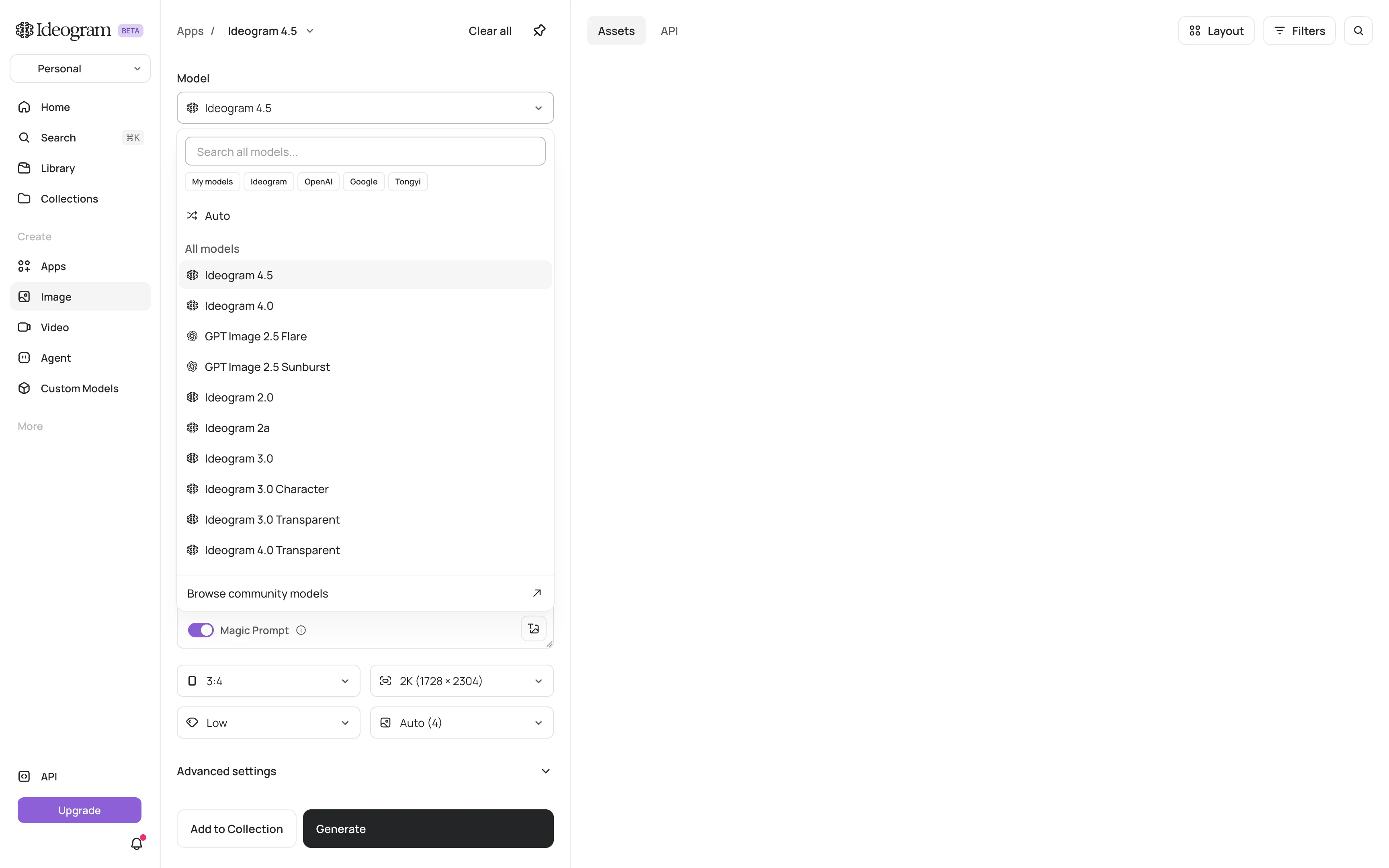
Ideogram also gives you access to several models. Alongside its own Ideogram 4.5 and 4.0 models, you can use GPT Image 2.5 Flare and Sunburst. The selection is much smaller than Leonardo AI's, but if most of your work involves typography and graphic design, Ideogram's own models are the main reason to use the platform.
Ideogram image page with the model list open, showing Ideogram 4.5, Ideogram 4.0, GPT Image 2.5 Flare and Sunburst
Another interesting difference is how Ideogram handles generation limits. Paid plans include monthly priority credits for faster processing, but running out of credits doesn't necessarily mean you have to stop working. You can continue generating images with Ideogram's own models in an unlimited slow queue.
There are restrictions, though. The slow queue doesn't support AI editing or image references, so you'll need priority credits for those features. It's most useful when you're generating new images from text prompts and don't mind waiting longer.
If you want to test Ideogram before paying, the free plan provides enough credits for approximately ten Ideogram 4.5 images a week at Low quality. Your free generations are public, so keep that in mind if you're working on private client projects.
Price:
Plan
Monthly
Yearly, per month
Priority credits a month
Plus
$20
$15
2,400
Pro
$60
$42
7,500
Team
$30
$20
3,600
Team prices are per user. All three paid plans include private generations, which makes them more practical for client work than the free tier.
Best for: Creating posters, advertising graphics, and logos that incorporate readable text.
Pros:
✅ Image models with a strong focus on typography
✅ Unlimited slow generation with Ideogram models on paid plans
✅ Private generations included with all paid plans
Cons:
❌ Free plan allows only about ten images a week, and they're public
❌ Limited selection of third-party models
8. Recraft
Recraft is an AI design platform aimed at people who create graphics for websites, apps, packaging, and marketing materials. While Leonardo AI is primarily useful for generating raster images, Recraft also supports vector graphics, which makes it particularly interesting for professional design work.
The main difference is what you can do with the finished image. Most AI generators produce PNG or JPEG files, which lose sharpness when enlarged beyond their original resolution. Recraft can generate vector illustrations and graphics that you can export as SVG files and resize without losing quality.
For example, if you're designing an icon for an app, you may need to use it at several sizes, from a small button to a large promotional banner. A vector file can scale between these sizes without becoming blurry. The same applies to simple illustrations, decorative graphics, and certain logo designs.
Recraft also supports regular AI image generation, so you aren't limited to vectors. You can use its own Recraft V4.1 models or select options from other developers, including GPT Image 2.6 and Nano Banana 2.1. This is useful if you need both illustrations and realistic images for the same project.
Recraft home page with the model list open, showing Recraft V4.1 models, GPT Image 2.6 and Nano Banana 2.1 with a Try for free label
One thing to pay attention to is Recraft's licensing. You can use the platform for free, but images generated on the free plan are public, belong to Recraft, and aren't licensed for commercial use.
That's an important restriction if you're creating graphics for clients or products you intend to sell. With a paid subscription, your generated images are private, and you retain ownership even after canceling. This gives you more control over how you use the finished work.
Price:
Plan
Monthly
Yearly, per month
Credits a month
Basic
$12
$10
1,000
Pro
$20
$16
2,000
Recraft's paid plans are relatively affordable compared with some other design-focused AI generators. However, unused subscription credits don't carry over to the next month. If you need additional credits, you can purchase top-up packs, which don't expire.
Best for: Designers creating vector illustrations, icons, logos, and other graphics that need to be resized or edited.
Pros:
✅ AI vector generation with SVG export
✅ Paid generations remain private and belong to you after cancellation
✅ Model costs are displayed before generation
Cons:
❌ Free generations are public, owned by Recraft, and not licensed for commercial use
❌ Unused subscription credits don't roll over
9. Adobe Firefly
Adobe Firefly is a good Leonardo AI alternative if you already use Photoshop, Illustrator, or other Adobe applications. Instead of treating AI generation as a separate step, Firefly lets you create images and then continue working with them using Adobe's familiar editing tools.
For example, you might generate a background for a product photo and then open the result in Photoshop to adjust the composition, remove unwanted objects, or extend the image. Adobe's Generative Fill feature lets you select an area and describe what you want to add or replace, so you don't have to regenerate the entire image every time you need a small change.
Paid Firefly plans include Photoshop on the web and Adobe Express Premium, along with unlimited access to standard features such as Generative Fill. This makes Firefly particularly convenient if your workflow already involves editing and preparing graphics for websites, advertisements, or social media.
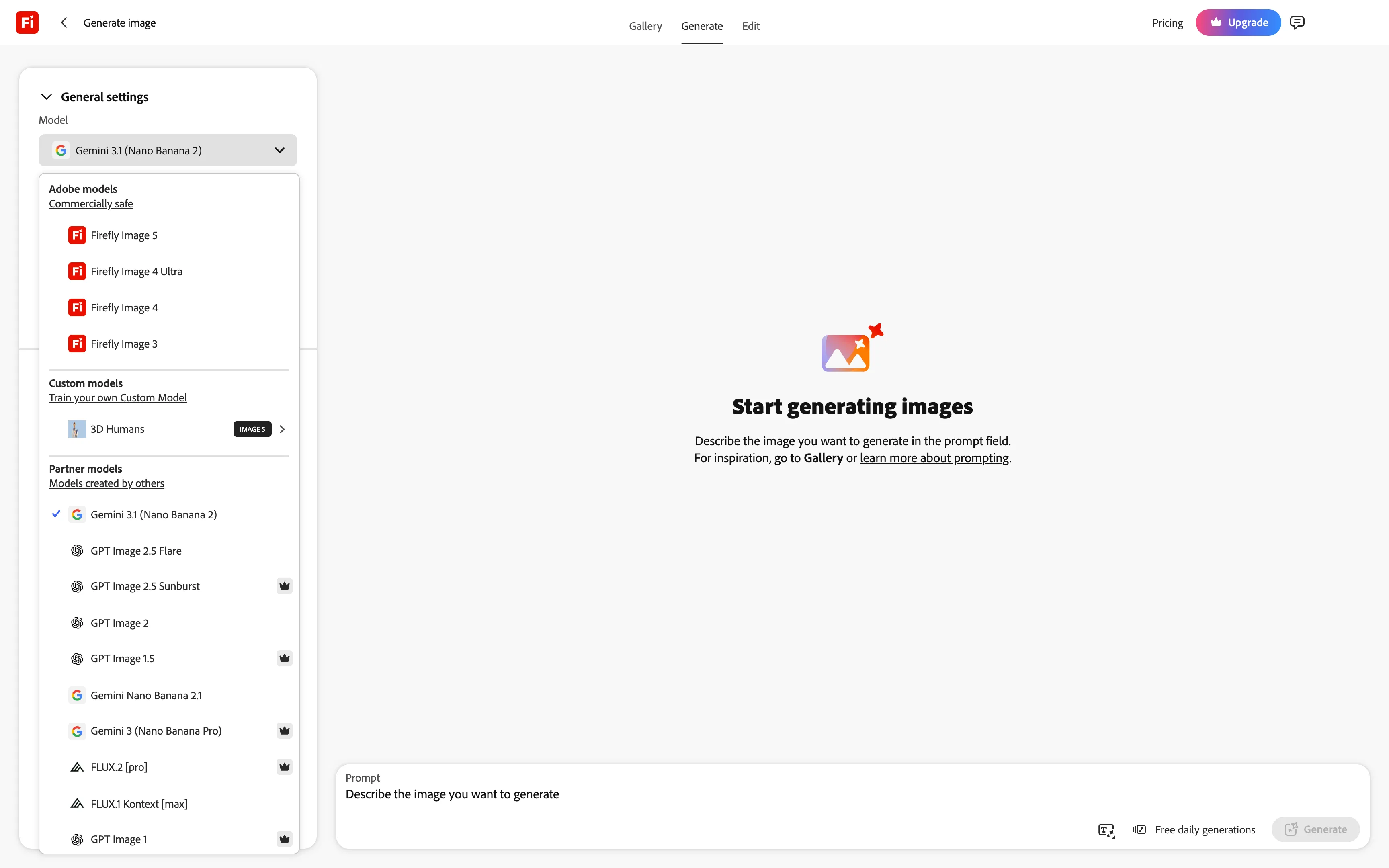
Another reason businesses may prefer Firefly is Adobe's approach to commercially safe AI generation. Adobe trains its own Firefly models on licensed content and other permitted sources, and identifies these models as commercially safe. This can be an important consideration for designers working on advertising campaigns or other commercial projects.
However, that designation applies to Adobe's own models, not the third-party models available through Firefly. You can also generate images using models from Google, OpenAI, and Black Forest Labs, but those models have their own training practices and usage terms.
Adobe Firefly image page with Adobe models marked Commercially safe and partner models from other developers below
Like Leonardo AI, Firefly also supports custom model training. This can be useful for businesses that regularly create content in a particular visual style, such as product photography, branded illustrations, or campaign assets.
The main limitation is the credit system. While standard editing features are included without generation limits on paid plans, video, audio, and third-party model generation consume monthly credits. These credits don't roll over, so you may find the allowance restrictive if you work with more expensive models regularly.
The free plan is also fairly limited, with enough credits for approximately three generations a day.
Price:
Plan
Monthly
Credits a month
Standard
$9.99
2,000
Pro
$19.99
4,000
Pro Plus
$49.99
10,000
Premium
$199.99
50,000
If you're already paying for Adobe software, it's worth comparing what Firefly includes with your existing subscription before purchasing another plan. The biggest advantage here is how well the AI tools fit into an established design workflow, rather than the number of image models available.
Best for: Professional designers and teams that use Adobe software to create and edit commercial content.
Pros:
✅ Adobe's own Firefly models are designated commercially safe
✅ Photoshop on the web and Adobe Express Premium included with paid plans
✅ Access to models from Google, OpenAI, and other developers
Cons:
❌ Free plan covers only about three generations a day
❌ Adobe's commercially safe designation doesn't apply to partner models
Run it yourself
All the alternatives we've covered so far use cloud servers to generate images. This is convenient because you don't need a powerful computer, but it also means dealing with subscriptions, credit limits, and the provider's restrictions.
If you have a capable GPU and don't mind a more technical setup, you can run open image models locally instead.
10. ComfyUI
ComfyUI is a free, open-source application that lets you run AI image and video models on your own computer. Unlike Leonardo AI, where you choose a model and enter a prompt through a conventional interface, ComfyUI gives you direct control over the steps involved in generating an image.
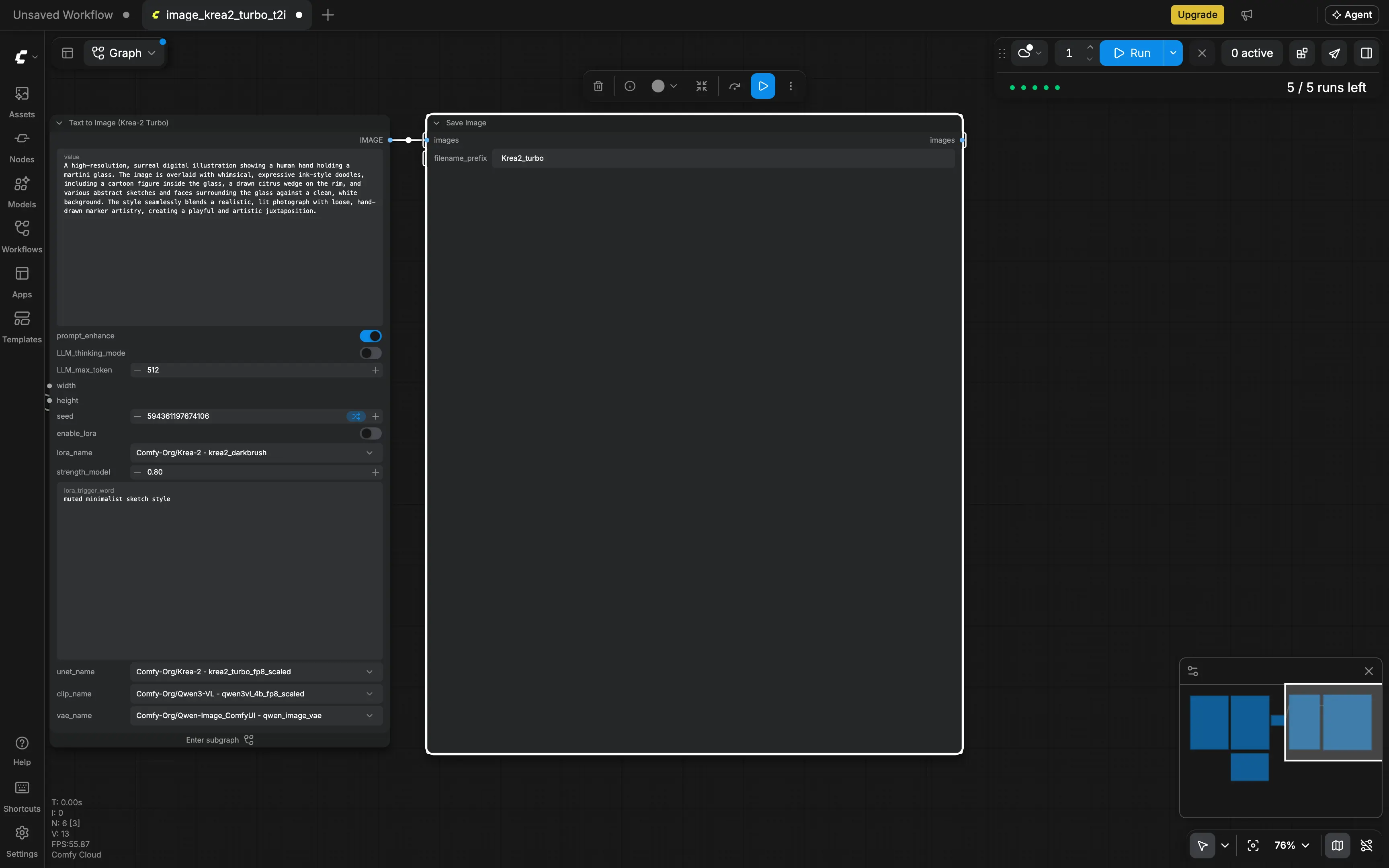
It does this through a node editor. Each node represents an operation, such as loading a model, entering a prompt, generating an image, or saving the result. You connect these nodes to build a workflow that determines how your image is created.
This might sound unnecessarily complicated if you only want to generate a picture from a prompt. However, the node system becomes useful when you need to perform several operations in a specific order.
For example, you could build a workflow that generates an image, enlarges it with an upscaling model, and saves the finished result automatically. Once you've set it up, you can reuse the workflow with different prompts instead of repeating each step manually.
ComfyUI also supports custom models and LoRAs, which are small files that modify how a model generates images. These can be useful if you want to reproduce a particular character, style, or visual subject. You're free to install compatible open models rather than wait for a platform to add them to its catalog.
Another advantage is privacy. When you run ComfyUI locally with downloaded models, generation happens on your computer, so your images and prompts don't need to leave your device. You also don't pay a provider for every image you generate, although you still need suitable hardware and electricity.
ComfyUI editor with a Krea-2 Text to Image template, a prompt node and a Save Image node, with 5 of 5 free runs left
The biggest drawback is that ComfyUI is harder to learn than Leonardo AI. You'll need to understand how models, nodes, and workflows fit together, and running larger models locally can require substantial GPU memory.
Fortunately, you don't have to build everything from scratch. ComfyUI has ready-made workflow templates that you can load and modify, which makes it easier to get started.
There's also Comfy Cloud if you don't have a powerful enough computer. It runs your workflows on cloud GPUs, so you can use ComfyUI through a browser without installing and running the models locally. New users get five free runs, and paid plans provide credits for processing time. The cloud version also offers access to proprietary models such as Nano Banana.
Price:
Plan
Monthly
Yearly, per month
Credits a year
Desktop
$0
$0
—
Standard
$20
$16
50,400
Creator
$35
$28
88,800
Pro
$100
$80
253,200
The desktop version is completely free, so you don't have to worry about subscriptions or daily generation limits once you have the necessary hardware. Cloud plans are optional and are mainly useful if you want to run workflows without maintaining your own GPU setup.
Best for: Technical users who want to run open models locally, automate image generation, and customize every step of the process.
Pros:
✅ Free desktop app without subscription credits or generation limits
✅ Local generation keeps prompts and images on your computer
✅ Supports open models, custom LoRAs, and reusable node workflows
Cons:
❌ Local generation requires a capable GPU, especially for larger models
❌ The node editor has a steeper learning curve than conventional image generators
FAQ
Here are answers to common questions about Leonardo AI and its alternatives.
What is the best Leonardo AI alternative?
If you want access to image models from different developers without paying for several subscriptions, Overchat AI is a good alternative. It also includes video generation and AI chat, with paid plans starting at $7.50 a month when billed annually. For training your own image models, consider Krea. If you're mainly creating illustrations and stylized artwork, Midjourney is another option.
What are some free AI image generators similar to Leonardo?
Overchat AI and Krea are two alternatives that let you choose an image model without subscribing. Overchat AI gives you 100 free credits a day, while Krea provides 100 daily units. Magnific is another option, offering 20 free images a day, although it chooses the model for you. Ideogram and Adobe Firefly have limited free plans too. You can also use ComfyUI to run image models on your own GPU without paying for generations.
Is Leonardo.Ai any good?
Yes. Leonardo AI has a large selection of image models, good customer reviews on Trustpilot, and a reputation for helpful support. Its paid plans give you access to more than 80 models, private image generation, and custom model training. The main drawback is that many of these features require a subscription. On the free plan, Leonardo chooses the model for you, and everything you generate is public.
What is the best free AI art generator?
Overchat AI is a good place to start because its free plan lets you try image models from several developers, including GPT Image 2.5 Flare, Nano Banana 2.1, and Grok Imagine Image 2. You can compare their results and continue using whichever works best for your artwork.
Why can't I choose a model on Leonardo AI's free plan?
Leonardo AI removed manual model selection from its free plan, so free users can now generate images and videos only through Auto Image and Auto Video. To choose a specific model, you need an Essential subscription or higher. Essential costs $12 a month, or $10 a month with annual billing, and unlocks all 80+ models.
Does Canva Business still include Leonardo AI?
No. Canva Business stopped including Leonardo AI Essential on October 11, 2026, so a separate Leonardo subscription is now required to keep using its paid features. You can still sign in with your Canva account and use Leonardo's free plan. Any images you created before the change remain available to you.
What happens to my Leonardo tokens when I cancel?
If you cancel your Leonardo AI subscription, you lose the unused tokens in your Rollover Bank. Tokens you've purchased separately as top-ups don't expire, but you can't spend them without an active subscription. If you're planning to return, consider pausing rather than canceling your plan. Pausing preserves your Rollover Bank balance.
Who owns the images I make on Leonardo's free plan?
Under Leonardo AI's terms of service, Leonardo owns images generated on the free plan. To own your generations yourself, you need a paid subscription. Free generations are also public, meaning other users can see them, and Leonardo can use them for purposes including AI model training.
Can I move Leonardo custom models and assets to another platform?
You can download images you've generated with Leonardo AI, but you can't export your trained custom models. If you want to use a custom model elsewhere, you'll need to save its original training images and train a replacement on a platform such as Krea or Adobe Firefly.
Leonardo also doesn't offer bulk image downloads, so you'll have to save your images individually. It's worth doing this before your subscription ends, especially if you have a large collection you want to keep.