8 Best AI Image Generator Alternatives We Tested in 2026
Last Updated:
2026-10-28
8 Best AI Image Generator Alternatives We Tested in 2026
If you're new to AI image generation, you've probably tried, or at least heard of, ChatGPT with GPT Image, Gemini with Nano Banana 2, and Midjourney.
These are some of the best-known AI image generators, but they're not necessarily the best choice for everyone. Other platforms may offer better value for money, easier learning curves, more output formats, or features you won't find in these popular tools.
That's why we tested eight alternatives to see how they compare, what each one does best, and when you might want to use it instead.
Why look for an alternative to ChatGPT, Gemini or Midjourney?
Midjourney is paid only. Most AI image generation platforms offer a free trial or a limited number of free credits, so you can try them before committing to a subscription. Midjourney doesn't. Its cheapest plan costs $10 per month, and there's no way to test it for free on the main platform. That's already a significant barrier, especially when several Midjourney alternatives also offer better value in terms of how many images you can generate per dollar spent.
Images are watermarked. ChatGPT adds invisible watermarks to generated images, while Google's Gemini app adds a visible watermark to images generated with Nano Banana 2. Some third-party AI platforms let you generate images using these models without visible watermarks, although invisible provenance markers may still be present.
Limited model selection. Different AI models have different strengths and visual styles, but platforms like ChatGPT, Gemini, and Midjourney largely restrict you to their own model families. This makes it harder to experiment and find the best model for a particular image. Some of the alternatives we'll cover give you access to multiple model families in one place, and a few even let you run the same prompt through several models side by side.
Best AI image generator alternatives at a glance
App
Best for
Free plan
Paid plan
Overchat AI
Comparing image models side by side
100 credits a day
Pro: $5.99/week or $14.99/month
Recraft
Vector logos and brand graphics
Limited free credits, public images
Basic: $12/month
Dreamina
Seedream models and editing tools
120 credits a day
Basic: $19/month
FLUX Playground
Paying per image without a subscription
No free credits
$0.048 per 1K image with FLUX 3 Image
Magnific
AI images and stock assets in one plan
20 images a day with the Auto model
Premium: $20/month
Krea
Style control and custom models
100 credits a day
Basic: $9/month
Ideogram
Text in images
30 credits a week
Plus: $20/month
Leonardo AI
Consistent characters
150 tokens a day
Essential: $12/month
1. Overchat AI
Overchat AI is an all-in-one AI platform we've built, and yes, you are on the Overchat AI blog. But we really believe that Overchat AI is one of the best alternatives to popular AI image generation platforms.
One of the biggest advantages of Overchat AI is the ability to select and test models side by side. The platform currently offers over 15 of the most popular image models from different developers, including GPT Image 2.5, Nano Banana 2.1, Seedream 5 Pro, Grok Imagine Image 2 and FLUX 3 Image, and we add new models on the day they become publicly available. This solves the main problem of ChatGPT, Gemini and Midjourney: if one model gets your prompt wrong, you pick another one in the same chat.
Comparing models is made even easier with Multiple selection. Choose up to four models and get their results side by side, so you can see which model handles text, skin texture, composition, or editing the best on a case-by-case basis. A lot of image generation comes down to trial and error, and this is the fastest way to do that.
For our four tasks, we picked GPT Image 2.5 Flare:
Overchat AI image generator with a product shot, concert poster, fisherman portrait and logo generated with GPT Image 2.5 Flare
All the text came out right, from the three poster lines to "EST. 2026" on the logo, and the model drew real yuzu halves with seeds next to the can. It also added a yuzu illustration and a few lines of label copy to the can that we didn't ask for. In the portrait, the fisherman holds a wooden netting needle over the orange net, with a trawler in the fog and the low sun behind him.
And, because Overchat AI is an all-in-one AI platform, if you decide to subscribe to Pro, your subscription comes with text models as well, like GPT-6.1 Sol and Claude Opus 5.5, and a powerful creative suite for video generation — and yes, you can animate the images created here in one click.
Price:
Pro plan
Price
Credits
Weekly
$5.99/week
2,000/week
Monthly
$14.99/month
8,000/month
Yearly
$49.99/year ($4.17/month)
8,000/month
At 8,000 credits a month, you can generate 320 images with GPT Image 2.5 or 200 with Seedream 5 Pro.
Best for: People who want several image models, a chatbot and a video generator in one subscription.
Pros:
✅ About 15 image models from different labs in one app
✅ Multiple selection runs one prompt on up to four models at once
✅ The yearly plan costs $4.17 a month and also covers chat and video
Cons:
❌ Multiple selection is available only on Pro
❌ No vector export
2. Recraft
Recraft is an AI image generator aimed at designers. Its biggest advantage is vector generation: Recraft V4.1 Vector can create logos, icons and illustrations as actual SVG files, which you can resize and edit in vector software without losing quality. This alone makes Recraft worth considering if you need graphics for print or branding. It also supports regular image generation with Recraft V4.1, and paid plans include models from other developers, such as Nano Banana, Seedream, GPT Image and Flux.
Recraft generates two images per prompt. For our comparison, we used Recraft V4.1 for the product shot, poster and portrait, and V4.1 Vector for the logo. Here are the results:
Recraft canvas with two versions of each test image generated with Recraft V4.1 and V4.1 Vector
Recraft did particularly well with text. Every line was spelled correctly, including "YUZU FIZZ" on the can and the small ticket information on the poster. The poster also has the two-color palette and grainy print texture we requested. The logo came out as an editable SVG, as promised. The main issue was with the product shot: the fruit next to the can looks more like a lemon than a yuzu.
Price:
Plan
Monthly
Yearly, per month
Credits a month
Basic
$12
$10
1,000
Pro
$20
$16
2,000
A regular Recraft V4.1 image costs 2 credits, while a vector image costs 4. That gives you approximately 500 regular images or 250 vector images on Basic. Paid plans also make your images private and include full ownership and commercial rights.
Best for: Designers who need logos, icons and other graphics as editable vector files.
Pros:
✅ Generates real SVG files, not just raster images that look like vectors
✅ Handled all the text correctly in our tests
✅ Paid plans include third-party models from Google, OpenAI and others
Cons:
❌ Third-party models require a paid subscription
❌ Downloading images requires going through the canvas Export menu
3. Dreamina
Dreamina is ByteDance's image and video generation platform, and one of the places where you can use the company's Seedream models. It currently offers Seedream 5.0 Lite and Seedream 5.0 Pro, alongside third-party models such as GPT Image 2.5 and Nano Banana Pro. Dreamina also belongs to the CapCut family, so it's a natural option for creators who already use CapCut for video editing.
We tested the free Seedream 5.0 Lite model at 2K resolution:
Dreamina image generator with a product shot, concert poster, fisherman portrait and logo generated with Seedream 5.0 Lite
Seedream followed our instructions closely across all four images. The product shot has the can sitting in crushed ice with "YUZU FIZZ" clearly visible. All three lines on the poster are spelled correctly, and the fisherman holds a netting needle in both hands, with the sun low on the right, just as we requested.
Dreamina is also convenient for editing the images you've generated. You can select an area and regenerate it with Inpaint, extend the frame with Expand, or remove unwanted objects. There's also a Generate video option if you want to animate an image without switching to another app.
Price:
Plan
Monthly
Yearly, per month
Credits a month
Basic
$19
$14
1,575
Standard
$36
$34.17
3,885
Advanced
$79
$75
8,645
You can use Seedream 5.0 Lite for free, but Seedream 5.0 Pro and 4K output require a paid plan.
Best for: People who want to generate and edit images with Seedream, particularly if they also work with video.
Pros:
✅ Access to Seedream models directly through ByteDance's platform
✅ Built-in tools for editing images and turning them into videos
✅ Good prompt adherence across all four test images
Cons:
❌ Seedream 5.0 Pro and 4K generation require a subscription
❌ The pricing page doesn't clearly explain how many credits each model uses
4. FLUX Playground
FLUX Playground is the official image generator from Black Forest Labs, the company behind the FLUX models. You may have already used these models through Krea, Recraft or other AI image apps, but Playground lets you access them directly.
You can also upload up to 10 reference images, compare the results of two models side by side, and copy the API code for any request. Unlike most platforms in this list, FLUX Playground doesn't require a monthly subscription. You add money to your balance and pay for each image.
FLUX Playground with a product shot, concert poster, fisherman portrait and logo generated with FLUX 3 Image
The product shot is one of the stronger results in our comparison. It has a halved yuzu with visible seeds, crushed ice, splashing water and sharp shadows from the hard lighting. The fisherman portrait is also close to the prompt: he wears green bib overalls, holds a netting needle above a net with buoys, and has sailboats fading into the fog behind him.
FLUX also got the text right on both the poster and the logo. The only noticeable problem with the logo is its background, which has a slight off-white texture instead of the plain white we requested.
Price:
Model
1K image
4K image
FLUX 3 Image
$0.048
$0.607
FLUX 3 Image Klein
$0.009
$0.036
At $0.048 per image, a $10 balance is enough for roughly 200 FLUX 3 Image generations at 1K.
Best for: Developers and occasional users who want to use FLUX models without paying for a subscription.
Pros:
✅ Direct access to the latest FLUX models
✅ Pay-per-image pricing with no monthly commitment
✅ Easy access to the API code for each generation
Cons:
❌ You need to add money to your account before generating an image
❌ Very limited editing options compared with more fully featured platforms
5. Magnific (formerly Freepik)
Freepik rebranded as Magnific in April 2026, taking the name of the AI upscaler it acquired in 2024. The platform now combines image, video and audio generation with the Magnific upscaler and Freepik's library of more than 250 million stock photos, vectors and PSD files.
For image generation, you can use Magnific One, the company's proprietary model, or choose from third-party models such as Nano Banana 2.1, GPT Image 2.5 and Seedream 5 Pro. Magnific One also supports Brand Kits, which help maintain a consistent visual identity across different images. This makes Magnific particularly interesting for marketers and designers who already use stock assets in their work.
For our test, we selected Auto, which chooses the image model and aspect ratio based on the prompt:
Magnific image generator with a product shot, concert poster, fisherman portrait and logo generated with the Auto model
The poster turned out well. It has the two-line headline we requested, and even the small ticket information is legible in a typewriter-style font. The other images were less successful.
The product shot has a faint white "YUZU FIZZ" label, and instead of sitting in crushed ice, the can stands next to a small pile of ice cubes. Auto also selected a wide 16:9 format for the fisherman portrait, leaving the subject relatively small in the frame. The logo has a similar composition problem: a thin emblem sits in the middle of a large, mostly empty image.
Since Auto chooses both the model and the format, it gives you less control over these decisions. For prompts that specify a particular composition, choosing the model and aspect ratio manually may work better.
Price:
Plan
Monthly
Yearly, per month
Credits
Premium
$20
$14.50
240,000 a year
Premium+
$45
$33.75
600,000 a year
Pro Starter
$110
$82.50
1,500,000 a year
An interesting aspect of their pricing structure is that annual subscriptions provide all the credits upfront (usually they're released monthly in batches). A Nano Banana 2 image costs 75 credits, while a 2K image with Magnific One costs 180. That means Premium gives you enough credits for around 266 Nano Banana 2 images per month on average. Premium+ also includes unlimited generations with Nano Banana 2 and several other models.
Best for: Marketers and designers who regularly use stock assets alongside AI-generated images.
Pros:
✅ Access to more than 250 million stock assets
✅ Unlimited Nano Banana 2 generations on Premium+
✅ Brand Kits with Magnific One for maintaining a consistent visual style
Cons:
❌ Auto selected unsuitable aspect ratios for two of our prompts
❌ The product shot and logo were weaker than most competing results
6. Krea
Krea is another platform where you can use AI image models from different developers, including GPT Image 2.5 and Nano Banana 2.1. It also has its own models, with Krea 3 released in October 2026.
What makes Krea interesting is the amount of control it gives you over style. You can create Moodboards from reference images and use them to guide the look of future generations. There's also Train LoRA, which lets you train a custom model on images of a particular character or visual style. Both features are useful when you're producing a series of images that need to look like they belong together.
We tested Krea 3 with our fisherman portrait prompt:
Krea image generator with a fisherman portrait generated with Krea 3
Krea produced a convincing documentary-style portrait. The fisherman stands on a wet pier, working with a net in both hands, while the harbor and sailboats disappear into the fog behind him. His face has natural-looking wrinkles and skin texture, and the warm light gives the scene the early-morning atmosphere we wanted.
Price:
Plan
Monthly
Yearly, per month
Credits a month
Basic
$9
$5.25
5,000
Pro
$35
$21
20,000
Max
$105
$63
60,000
Basic gives you enough credits for approximately 138 images with Krea 3 at 2K resolution. You'll also need a paid plan if you intend to use the generated images commercially.
Best for: Creators who want to develop a consistent visual style or generate the same character across multiple images.
Pros:
✅ Moodboards and LoRA training for greater control over style and characters
✅ Krea 3 and third-party models available in the same app
✅ Natural skin texture and lighting in our portrait test
Cons:
❌ Third-party models can consume several times more credits than Krea 3
❌ Commercial use requires a paid subscription
7. Ideogram
Ideogram has long been one of the strongest AI image generators for typography. If you need to make a poster, logo, product label or any other image with text, it's worth trying. Its models are particularly good at rendering words accurately and making them part of the design rather than treating them as an afterthought.
Ideogram has also expanded beyond text-heavy graphics. You can use reference images, edit individual areas, apply style presets and generate wide compositions up to 3:1. The newer version of the platform supports vector graphics and video generation, while paid plans give you access to models from other developers, including GPT Image 2.5 and Nano Banana 2.
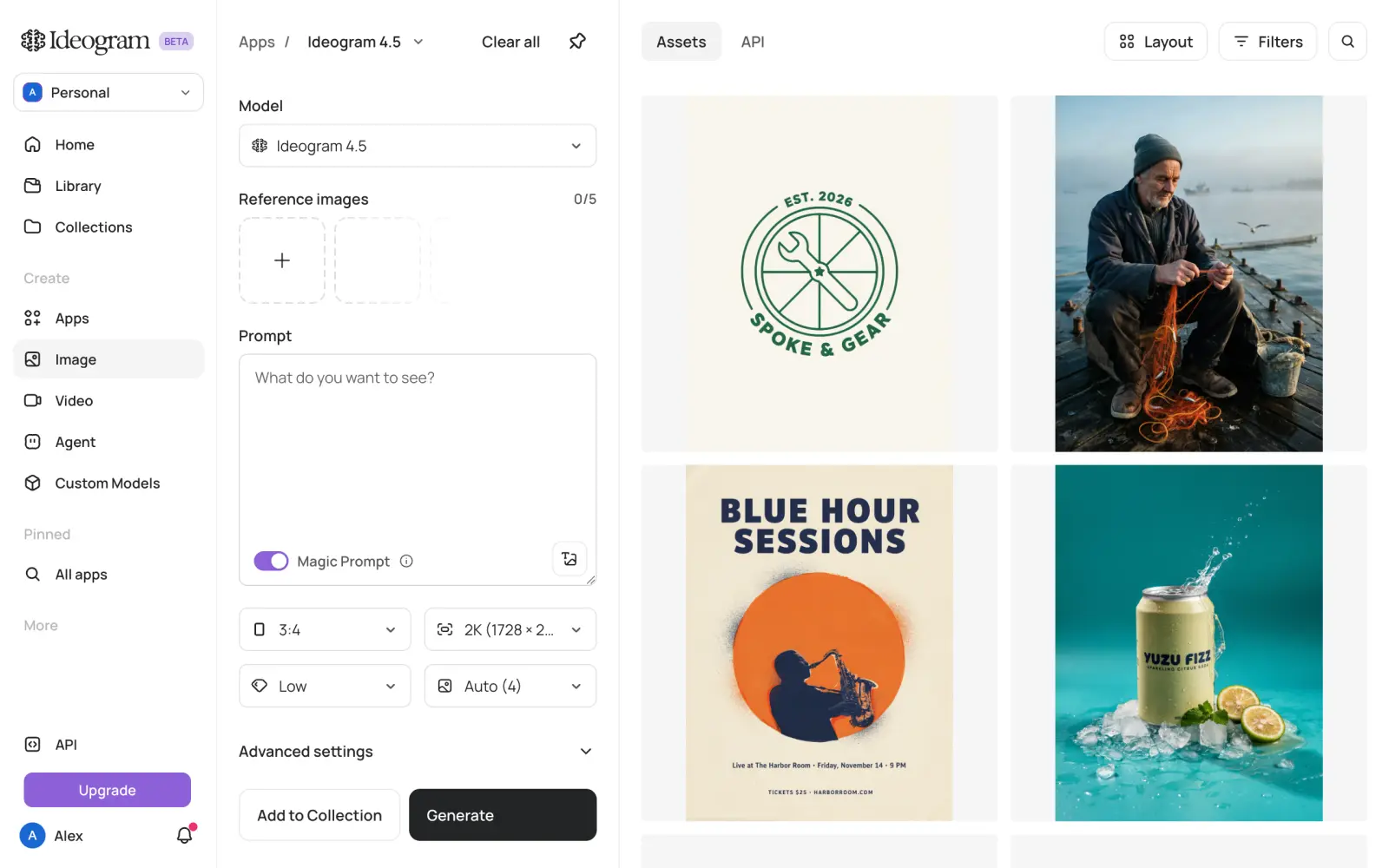
We tested Ideogram 4.5, leaving Magic Prompt enabled at its default setting:
Ideogram image generator with a product shot, concert poster, fisherman portrait and logo generated with Ideogram 4.5
Ideogram got the text right on both the poster and the logo. The poster includes the correct ticket information, although the small print is in capitals, while the logo has the requested name and year in a thin-line design.
The product shot shows one potential downside of Magic Prompt. This feature automatically expands your prompt into a longer description, and in our case it introduced details we hadn't requested: a "Sparkling citrus soda" line on the can and mint leaves in the composition. These additions aren't necessarily bad, but they do mean the result is no longer a strict interpretation of the original prompt. If you need precise control over what appears in the image, it's worth turning Magic Prompt off.
Price:
Plan
Monthly
Yearly, per month
Credits a month
Plus
$20
$15
2,400
Pro
$60
$42
7,500
An image generated with Ideogram 4.5 at 2K and default quality costs 3 credits, so Plus covers approximately 800 images. Once you've used your credits, you can continue generating images with Ideogram's own models in a slower, unlimited mode.
Best for: Posters, logos, advertisements and other designs where accurate text is important.
Pros:
✅ Accurate text in both the poster and logo tests
✅ Unlimited slow generations on the Plus plan
✅ Style references and support for wide compositions up to 3:1
Cons:
❌ Magic Prompt can introduce objects and text you didn't request
❌ Third-party models cost additional credits
8. Leonardo AI
Leonardo AI is an image and video generation platform owned by Canva. Like Krea and Recraft, it combines popular third-party models with its own. Leonardo's proprietary models include Lucid Origin and Phoenix, and the platform also offers tools for keeping characters consistent between images, which are worth considering if you're creating illustrations featuring the same people or characters repeatedly. There's also custom model training — this has a steep learning curve, but if you master it, you can really develop and lock in a specific style and reproduce it consistently.
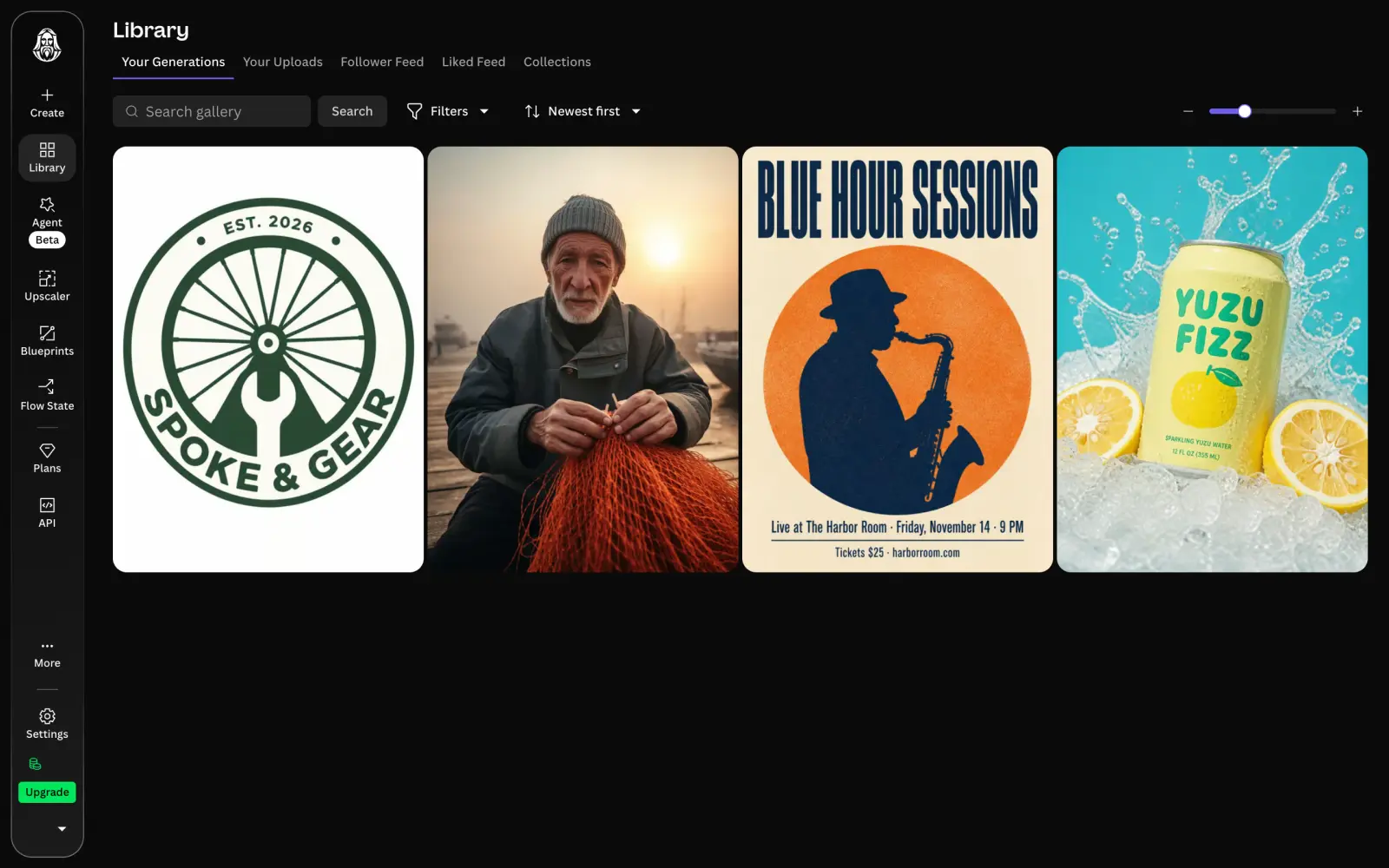
Another useful feature is Auto Image, which selects a model for your prompt. We used it for all four tests. Leonardo chose GPT Image 2 for the product shot, poster and logo, and its own Lucid Origin model for the fisherman portrait.
Leonardo AI library with a product shot, concert poster, fisherman portrait and logo generated with Auto Image
GPT Image 2 (unsurprisingly) handled the typography well, with correct text on both the poster and the logo. In the product shot, it added a yuzu illustration and an extra line of text reading "Sparkling yuzu water, 12 fl oz" to the can. These details weren't in our prompt, but the model did render the yuzu halves next to the can accurately.
The portrait is less convincing. Lucid Origin placed the fisherman facing directly toward the camera, making the image look posed (we were going for a candid documentary photograph feel). The warm fog and low sun on the right are there, but the composition doesn't quite capture the scene we described.
Price:
Plan
Monthly
Yearly, per month
Tokens a month
Essential
$12
$10
8,500
Premium
$30
$24
25,000
Ultimate
$60
$48
60,000
Premium and Ultimate include unlimited generation in Relaxed mode, which is slower but doesn't use your monthly token allowance. This applies only to Leonardo's proprietary models; third-party models still consume tokens.
Best for: Illustrators and creators who need consistent characters, custom models or access to Leonardo's proprietary image generators.
Pros:
✅ Character Reference and custom model training
✅ Auto Image selects a model for each prompt
✅ Unlimited Relaxed generations with Leonardo's own models on Premium and Ultimate
Cons:
❌ Lucid Origin made our fisherman portrait look posed rather than candid
❌ Unlimited Relaxed generation requires at least the $30 Premium plan
FAQ
Below are answers to the most common questions about AI image generators and their alternatives.
What is the best alternative to ChatGPT for image generation?
Overchat AI is the best alternative to ChatGPT for images. It includes GPT Image 2.5, the same model ChatGPT uses, plus about 15 other image models, and Multiple selection shows you how several of them handle one prompt.
What is the best free AI image generator?
Dreamina and Magnific have the most generous free plans in this list, with about 20 images a day each. Dreamina lets you use Seedream 5.0 Lite at 2K, but free downloads carry a watermark, while Magnific limits free users to its Auto model. Overchat AI gives enough free credits for four GPT Image 2.5 images a day.
Which AI image generator is best for logos?
Recraft is the best AI image generator for logos, because Recraft V4.1 Vector saves the result as an SVG file that you can scale and edit. Ideogram also has a vector generator, and most apps in this list drew the logo text correctly.
Which AI image generator is best for text in images?
Ideogram is built for text in images, but the gap has closed. Overchat AI, Recraft, Dreamina, FLUX 3 Image, Magnific, Ideogram and Leonardo AI all spelled the poster's headline, date line and ticket line correctly.
Can I use AI-generated images for commercial projects?
Yes, but it depends on the plan. Recraft's free images belong to Recraft and can't be used commercially, and Krea also requires a paid plan for commercial use. Paid plans in Recraft and Magnific include a commercial license, and Ideogram allows commercial use on every plan.
Are images from free AI image generators private?
Not always. Free images in Recraft, Ideogram and Leonardo AI are public, and in Midjourney every image is public unless you pay for the $60 Pro plan. Paid plans in these apps make your images private.
Is there an AI that generates both images and videos?
Yes. Overchat AI, Dreamina, Krea, Magnific, Leonardo AI and Ideogram generate both images and videos, and Recraft adds video models on its Pro plan. In Overchat AI and Dreamina, you can turn a generated image into a clip in the same app.
How much do AI image generators cost in 2026?
Most paid plans start at $9–20 a month, or about $5–15 a month if you pay for a year. Overchat AI Pro costs $49.99 a year, and FLUX Playground charges $0.048 per FLUX 3 Image picture at 1K with no subscription at all.