We compared GPT Image 2.6 vs GPT Image 2.5: How much better is it?
Last Updated:
2026-11-06
We compared GPT Image 2.6 vs GPT Image 2.5: How much better is it?
GPT Image 2.6 was released less than two months after GPT Image 2.5 with exciting new features. The new model promises 50% faster image generation, can output animated GIFs and make SVGs. API pricing hasn't changed, either, so there's little reason to stick with the older version on paper.
But how much better is GPT Image 2.6 in practice? To find out, we tested both models head to head to see how they handle challenging photo editing, GIF animation, logo design, and other image creation tasks and whether GPT Image 2.6 delivers the improvements OpenAI promises.
Besides faster generation, GPT Image 2.6 introduces several new features:
Animated GIFs. GPT Image 2.6 can turn text prompts into short animations. It generates individual frames in a sprite sheet, which are then combined into a looping GIF.
SVG export. You can generate logos, icons, and other vector graphics as SVG files, making it possible to resize them without losing quality or edit individual shapes and colors. Graphic designers — rejoice!
Markup layer. Instead of explaining an edit entirely in words, you can doodle on top of the image with arrows and circles to show what needs to change. This feature isn't exclusive to GPT Image 2.6, though, as GPT Image 2.5 also supports markup layers through the API.
Complexity setting. You can control how much planning the model does before generating an image. OpenAI recommends keeping complexity low for most edits.
GPT Image 2.6 vs GPT Image 2.5: Visual editing
One of the biggest improvements in GPT Image 2.6 is its ability to follow visual editing instructions. Instead of describing every change in words, you can mark up a photo with circles, arrows, and crosses to show the model what you want to change. GPT Image 2.5 also supports markup, so we wanted to see whether the new version is actually better at interpreting it.
Editing a photo with red marks
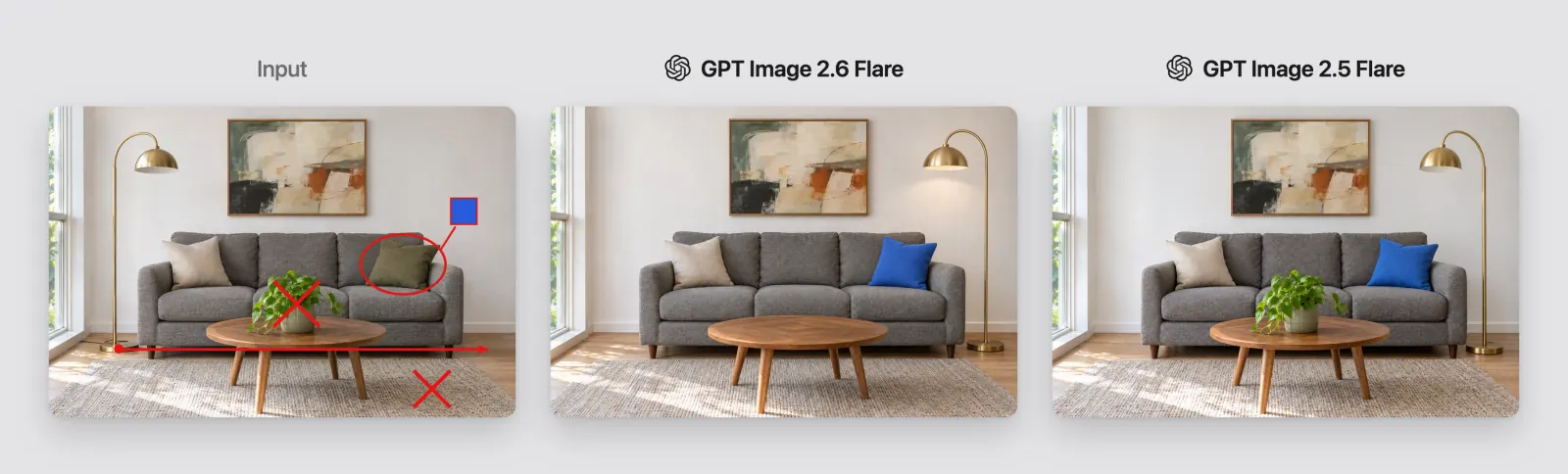
For our first test, we used a living room photo from OpenAI's launch post with four edits marked in red. The model had to recolor a cushion to match a blue swatch, remove a plant and a rug marked with Xs, and move a floor lamp to the other side of the sofa. It also had to remove all the red marks from the finished photo.
The prompt explained what each mark meant, so the test was about following multiple visual instructions rather than guessing what the annotations represented.
A living room photo with red marks, next to the edited results from GPT Image 2.6 Flare and GPT Image 2.5 Flare
The prompt:
Follow the red markup on this photo. Recolor the circled cushion to match the blue swatch, remove each object marked with an X, and move the floor lamp to where the arrow points. Apply every instruction, then remove all of the markup, including the swatch, so the result is a clean photo.
GPT Image 2.6 Flare completed three of the four edits, missing only the rug. GPT Image 2.5 Flare managed two: it moved the lamp and recolored the cushion, but left both the plant and rug untouched.
We then repeated the test with the larger Sunburst models to see whether they could handle all four instructions.
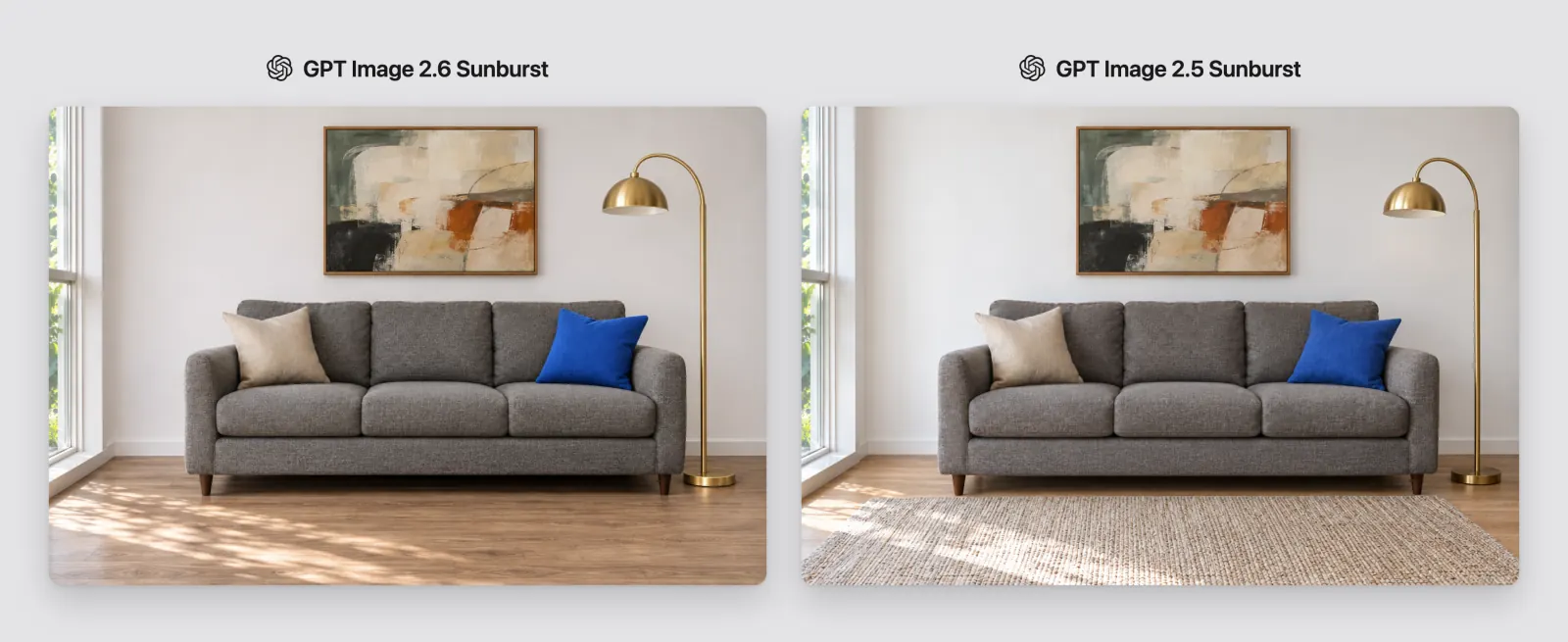
The edited living room from GPT Image 2.6 Sunburst, without a rug, and from GPT Image 2.5 Sunburst, with the rug still in place
GPT Image 2.6 Sunburst was the only model to complete all four requested edits. However, both Sunburst versions also removed the coffee table, which wasn't marked for editing. So while 2.6 Sunburst followed the instructions more accurately, it still made an unwanted change to the original photo.
Here's how all four models performed:
Edit
2.6 Flare
2.5 Flare
2.6 Sunburst
2.5 Sunburst
Recolor the cushion
Yes
Yes
Yes
Yes
Remove the plant
Yes
No
Yes
Yes
Remove the rug
No
No
Yes
No
Move the lamp
Yes
Yes
Yes
Yes
Keep the coffee table
Yes
Yes
No
No
Changing the background and armor in an illustration
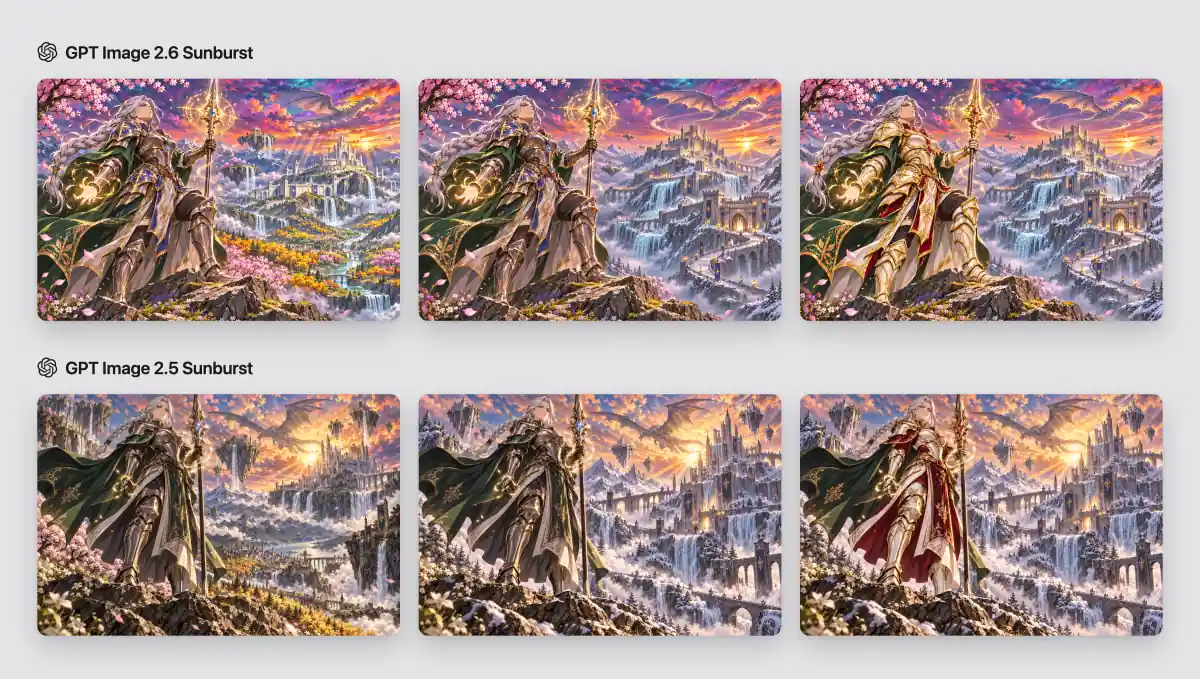
Next, we generated a fantasy illustration on Sunburst and edited it twice. First, we replaced the background. Then we recolored the armor, changed the sapphires to rubies and any blue fabric to crimson, and asked to keep the green cape and the background:
A paladin illustration and two rounds of edits, from GPT Image 2.6 Sunburst in the top row and GPT Image 2.5 Sunburst in the bottom row
GPT Image 2.6 followed both requests, while GPT Image 2.5 kept the paladin's pose and face, but in the first edit, it added snow to the rocks in the foreground and replaced the cherry trees on the left with pines. In the second edit, it recolored the armor correctly, but it also turned the green skirt and the shoulder part of the cape crimson.
If you want to run this test, here are the prompts in order:
Epic high fantasy anime key visual, mature seinen style like a modern high-budget anime film. A woman paladin in her thirties with a long silver braid and sharp violet eyes stands on a rocky ridge in ornate bronze and sapphire armor with a flowing forest-green cape, a glowing runic spear planted in front of her, magic sparks around her hands. Behind her a vast mountain kingdom: floating islands with waterfalls pouring into the clouds, a white fortress with tall towers, a huge ancient dragon flying in the distance, blooming cherry trees and golden forests in the valley below. Sunset sky with vivid orange, magenta, turquoise and violet clouds, god rays, glowing magic particles in the air. Extremely vibrant saturated colors, dramatic rim lighting, cel shading with detailed painted backgrounds, crisp clean line art, depth and atmosphere, dynamic low camera angle, wide cinematic composition. Adult, elegant, serious heroic mood, not childish, no chibi, no sci-fi, no neon, no text, no watermark.
Replace the background with a vast stone citadel on a snowy mountain pass, smaller floating islands, frozen waterfalls and a dragon circling overhead. Preserve the warm sunset, atmospheric haze and shallow depth of field. Keep the paladin and foreground unchanged.
Recolor the armor to ivory white with rich gold trim, replace the sapphire gemstones with rubies, and change any blue fabric to deep crimson. Preserve the armor design, green cape, silver braid, spear glow, pose and background.
GPT Image 2.6 new features: GIF and SVG tests
Animated GIFs and SVG files are the two biggest additions in this release, so of course we had to test them.
Animated GIFs
Yes, GPT Image can now make GIFs, which is great news for everyone who makes memes with AI, probably. But in theory, you can use GPT Image 2.5 to do the same job: you just need to instruct the model to make a board of scenes, cut them, and feed them to a GIF maker. But which leads to better results? Here's the GPT Image 2.6 GIF, next to the GPT Image 2.5 sprite sheet:
A looping GIF of a crying chibi chef from GPT Image 2.6 Flare, next to a GIF cut from a GPT Image 2.5 Flare sprite sheet
The prompt:
Create a single animation sprite sheet for a seamless looping GIF. A super-cute chibi adult chef stands at a kitchen counter watching an oven through its glass door, where a souffle is slowly collapsing. The sequence: hopeful expression, notices the souffle sinking, eyes widen, face crumples, large cartoon tears stream down both cheeks, then quietly wipes tears while still staring at the oven. Oversized round head, tiny body, big expressive eyes, soft rounded features, messy fluffy hair, white chef jacket and floppy chef hat. Exactly 6 sequential frames arranged in a precise 3-column by 2-row grid, read left-to-right then top-to-bottom. Every panel has identical dimensions. Fixed front three-quarter camera, same character, same counter, oven, outfit, and cozy miniature kitchen background. Clear incremental facial and tear motion; sixth frame transitions smoothly toward the first. Polished kawaii chibi 3D toy-like style, warm pastel lighting, funny and sympathetic mood. No captions, no words, no numbers, no logos, no speech bubbles, no panel labels, no borders, no gutters.
The chef goes through the emotions in the right order in both GIFs, and the souffle sinks more clearly in the GPT Image 2.6 version. The biggest benefit is that you get a finished GIF from one request, without cutting the frames yourself.
GIFs also work with short prompts. We asked for a waving mascot and for a pair of sneakers turning on a pedestal, and both came out on the first try. The sneakers make a full turn and keep their shape on every frame:
Two looping GIFs from GPT Image 2.6 Flare: an orange mascot waving and white sneakers turning on a pink pedestal
The prompts:
A friendly round orange mascot waves hello and blinks, standing still on a plain white background. Fixed camera, seamless loop.
A pair of white sneakers slowly turns on a pastel pink pedestal, with soft studio light. Fixed camera, seamless loop.
SVG logos
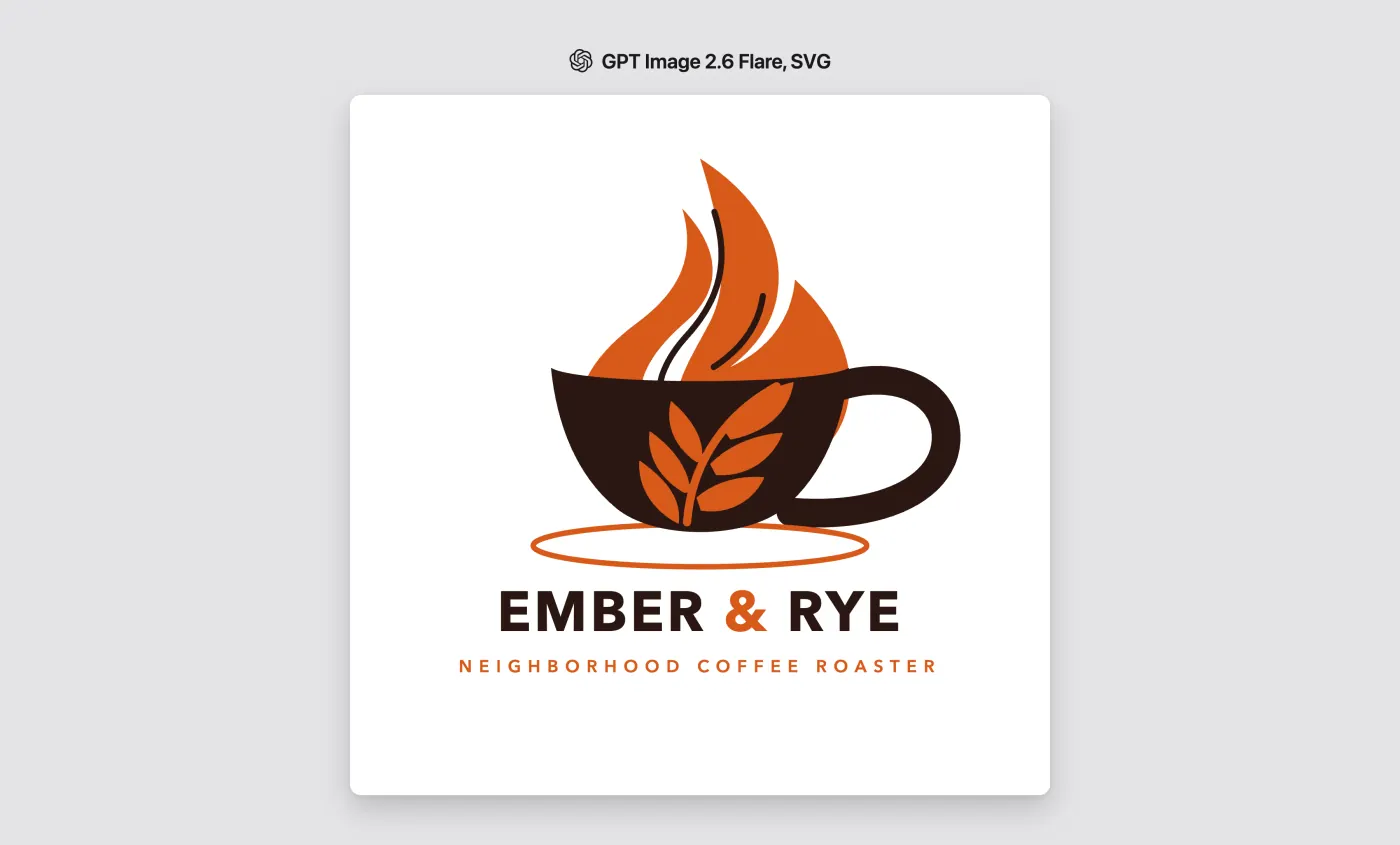
We asked GPT Image 2.6 Flare for a logo of a coffee roaster called Ember & Rye. SVG generation uses a second model, such as GPT-5.5, that turns the picture into vector paths:
An Ember & Rye coffee logo in SVG from GPT Image 2.6 Flare
The prompt:
Create an original logo for a company called Ember & Rye, a neighborhood coffee roaster. Flat vector shapes, two colors, a simple mark above a clean wordmark.
GPT Image 2.6 vs GPT Image 2.5: speed
OpenAI promises 50% faster generation, and that's about right for Flare:
Task
GPT Image 2.6 Flare
GPT Image 2.5 Flare
GPT Image 2.6 is
Travel ad at Low quality
9.7 s
15.0 s
1.5 times faster
Living room edit
16.6 s
21.4 s
1.3 times faster
Poster
13.2 s
25.3 s
1.9 times faster
Sunburst is the version for detail, and at the default High complexity, it takes longer: GPT Image 2.6 Sunburst needed 43 to 61 seconds per image, and GPT Image 2.5 Sunburst needed 32 to 42.
GPT Image 2.6 vs GPT Image 2.5: price
OpenAI didn't change the token prices: $5 per million text input tokens, $8 per million image input tokens and $30 per million image output tokens. At High quality and above, an image costs the same as before, so you get the new version's improvements at no extra cost. At Low and Medium quality, GPT Image 2.6 uses more output tokens, so images cost more. The table below shows the price of one 1024×1024 image on Flare.
Quality
GPT Image 2.5
GPT Image 2.6
Difference
Low
$0.0059
$0.0249
4.2 times more
Medium
$0.0132
$0.0437
3.3 times more
High
$0.0527
$0.0529
About the same
xHigh
$0.0939
$0.0939
The same
Max
$0.2110
$0.2110
The same
In Overchat AI, GPT Image 2.6 at High quality is cheaper than GPT Image 2.5: 58 credits, compared with 68. At Low or Medium quality, it costs 48 credits, compared with 25. On the Mini plan, which costs $15 a month for 7,000 credits, a 48-credit image comes to about $0.10.
How we tested the models
We generated all images through the API using High quality and default complexity unless stated otherwise. We also measured how long each generation took, from sending the request to receiving the finished image. Each result except the SVG logo comes from a single run, with no retries.
Should you switch to GPT Image 2.6?
Yes, GPT Image 2.6 is worth switching to, especially if you edit images. In our tests, it made more of the requested edits, and on the illustration, it also left more of the image alone. GPT Image 2.6 Flare is also faster, and you get GIF and SVG output that GPT Image 2.5 doesn't have.
The one case for staying on GPT Image 2.5 is high-volume work at Low or Medium quality, where it still costs less.
How to use GPT Image 2.6 in Overchat AI
You can use GPT Image 2.6 and GPT Image 2.5 side by side in Overchat AI:
Open the image generator and click the model name in the prompt box.
Choose GPT Image 2.6 Flare or GPT Image 2.6 Sunburst in the model list. To compare it with GPT Image 2.5, turn on Multiple selection and tick both models.
To edit a photo, draw your marks on it and add it as a reference. In the prompt, explain what each mark means.
These are the questions people ask most often about GPT Image 2.6.
What is the difference between GPT Image 2.6 and GPT Image 2.5?
GPT Image 2.6 adds GIF and SVG output and a complexity setting, and it follows edit instructions more closely. GPT Image 2.6 Flare is also faster. Token prices are the same, and at High quality, an image costs the same as before, while Low and Medium images use more tokens and cost more.
Is GPT Image 2.6 better than GPT Image 2.5?
Yes, especially for visual editing. In our tests, GPT Image 2.6 made more of the requested edits than GPT Image 2.5. GPT Image 2.6 Flare also generates images faster, and the new version adds GIF and SVG output.
Can GPT Image 2.6 make GIFs?
Yes, GPT Image 2.6 can generate looping GIFs from a prompt, both in ChatGPT and through the API, where the limit is 16 frames. GPT Image 2.5 has no GIF output, but it can draw a sprite sheet that you can cut into a GIF yourself.
Which version of ChatGPT is best for images?
ChatGPT Images 2.6 is the newest version, and it's available on all ChatGPT subscription plans. In the API, you can choose between GPT Image 2.6 Flare, which is built for speed, and GPT Image 2.6 Sunburst, which is built for detail.
Where can I use GPT Image 2.6?
GPT Image 2.6 is available in ChatGPT, Codex and the OpenAI API, and in third-party apps such as Overchat AI.