Pollo AI is one of the most popular AI video aggregators, but it's also one of the most expensive in terms of credit cost. In this article, we've compared 10 of the best Pollo AI alternatives, looking at the video models they offer, their effects and templates, free plans, and prices, to help you find the one that works for you.
The main reasons you might consider an alternative to Pollo AI are:
1. Credits run out after a few videos
Unless you use Pollo's first-party models, you'll be out of credits very, very quickly, after getting barely any work done. While it costs only 5 credits to make a video with the Pollo 2.5 video model, a Kling 4.0 clip can take 150 credits. Given that the $15-a-month Lite plan includes only 400 credits, it essentially covers just two 10-second 1080p videos.
In fact, users have been complaining about how expensive Pollo AI can get on Reddit:
Reddit thread in r/generativeAI asking for sites similar to Pollo.ai after the Lite plan's credits ran out
2. Unlimited generations come with conditions
Pollo advertises unlimited generations on every paid plan, but the models it applies to depend on the plan. On Lite and Pro, you get unlimited generations with two older image models, GPT Image 1.5 and Grok Imagine Image. Unlimited video with models like Wan 3.0 and MiniMax H3 requires the $129 Ultra plan, and even there it lasts only seven days.
Pollo AI's monthly plans with the Unlimited & Free Gens section showing 7-day and 365-day unlimited models
Unlimited also doesn't mean you can generate as much as you want. If you generate too often, Pollo puts your unlimited tasks in a queue, and every new generation you start while you wait uses regular credits.
3. Refunds are hard to get
Pollo's refund policy gives you three days after a purchase to ask for your money back, and only if you've used no more than 50 subscription credits. That's less than a single 10-second Kling 4.0 video, so one test generation can be enough to lose the right to a refund.
Pollo AI's refund policy with the 3-day limit and the 50-credit rule
Even an approved refund can come with a processing fee of up to 6% of the payment, and add-on credit packs can't be refunded at all. Changing plans has its own limits: you can upgrade on the Billing page, but to downgrade, you have to email Pollo's support and wait for them to process it.
Pollo AI alternatives at a glance
App
Best for
Paid from
Free plan
Pollo AI
Video effects and Pollo's own models
$12/month
20 credits on sign-up
Overchat AI
Video models and filters from different developers
$7.50/month
100 credits a day
Higgsfield
Cinematic camera presets and VFX
$15/month
Limited models, watermark
Krea
Marketing templates and custom models
$5.25/month
100 units a day
Magnific
Stock assets and AI video in one subscription
$14.50/month
20 images a day, Auto only
OpenArt
Ad templates and long story videos
$13/month
Trial credits
Kling AI
Kling 4.0 from its developer
$6.60/month
Trial credits, watermark
PixVerse
Viral templates on a small budget
$8/month
30 credits a day
Dreamina
Seedance models and video editing tools
$15/month
120 credits a day
Hailuo AI
MiniMax H3 videos
$8.40/month
One-time trial credits
Runway
Editing videos with AI
$12/month
125 one-time credits
Prices with yearly billing are shown per month. Let's take a closer look at each app, grouped by what they're best at.
AI aggregators
AI aggregators work like Pollo: they bring models from several developers into one app, so you can switch between them without paying for separate subscriptions.
1. Overchat AI
Overchat AI is an AI aggregator we've built that specializes in image and video generation. Its AI video generator includes 30 video models, including Kling 4.0, Seedance 2.5, MiniMax H3, Wan 3.0, and Happy Horse 1.1, just to name a few.
If Pollo's effects are the main reason you use it, the Video Generator has a Filters panel with more than 300 presets that cover everything from viral trends like Earth Zoom and Kiss Cam to camera moves or animations that, for example, turn a product photo into a UGC-style review, making them useful both for fun projects and professional ones.
Overchat AI's video generator with the Filters panel open, showing presets like Pop Star and Paris Love
Speaking of professional projects, every video generated in Overchat AI comes with full commercial usage rights — it's our policy that everything you create on the platform is yours to use however you like.
And to make generation easier, we've developed tools. Tools are specific mini-apps that make certain common use cases (like adding objects to a photo or removing people) easier to create.
Another complaint that you sometimes hear about AI video and image aggregators is that they charge you for failed attempts. It is very important to us that every video counts, given how expensive AI video creation can sometimes get, so failed attempts aren't charged.
You can try Overchat AI for free with 100 credits every day, and if you need more, you can pick one of our plans:
You can also try full access for $1.99. Subscription credits don't roll over, but credits from one-time packs never expire.
Best for: Creators who want the most popular video models and ready-made video filters in one app, along with chat models.
Pros:
✅ 30 video models from different developers, with the price of each model shown before generating
✅ More than 300 video filters and presets, plus separate tools for popular effects
✅ 100 free credits every day
Cons:
❌ 100 free daily credits cover only the cheapest video models
❌ Unused subscription credits don't roll over
2. Higgsfield
Higgsfield is the best Pollo AI alternative for cinematography. The platform features over 250 presets for camera moves and visual effects, as well as standalone modes for controlling the story and camera — Higgsfield's tools turn you into a real director.
Higgsfield's video generator with the Make Videos in One Click section and 250+ presets
Higgsfield also develops its own models, Soul for fashion photos and Genjutsu for video. It's also a particularly good fit for music videos, ads, and short films where it's important to control camera movement.
However, Higgsfield is one of the most expensive AI video aggregators. On a $15 Starter plan, you can create only two 5-second Seedance 2.5 videos in 1080p. That's really really really limiting. Here's the full Higgsfield pricing for comparison:
Price:
Plan
Monthly
Yearly, per month
Credits a month
Starter
$15
$15
200
Plus
$49
$39
1,000
Ultra
$129
$99
3,000
Prices may vary by country, though, so if the prices are different for you, it probably has to do with regional pricing.
If you're interested to learn more about what Higgsfield does well and where it can potentially underperform, check out our list of Higgsfield alternatives.
Best for: Creators who want cinematic camera moves and VFX presets without writing prompts.
Pros:
✅ More than 250 presets for camera moves and visual effects
✅ Higgsfield's own Soul and Genjutsu models, plus Seedance and Kling
Cons:
❌ Starter covers only a couple of 1080p Seedance 2.5 videos
❌ Unlimited generations last only seven days on Plus and Ultra
❌ Free videos have a watermark
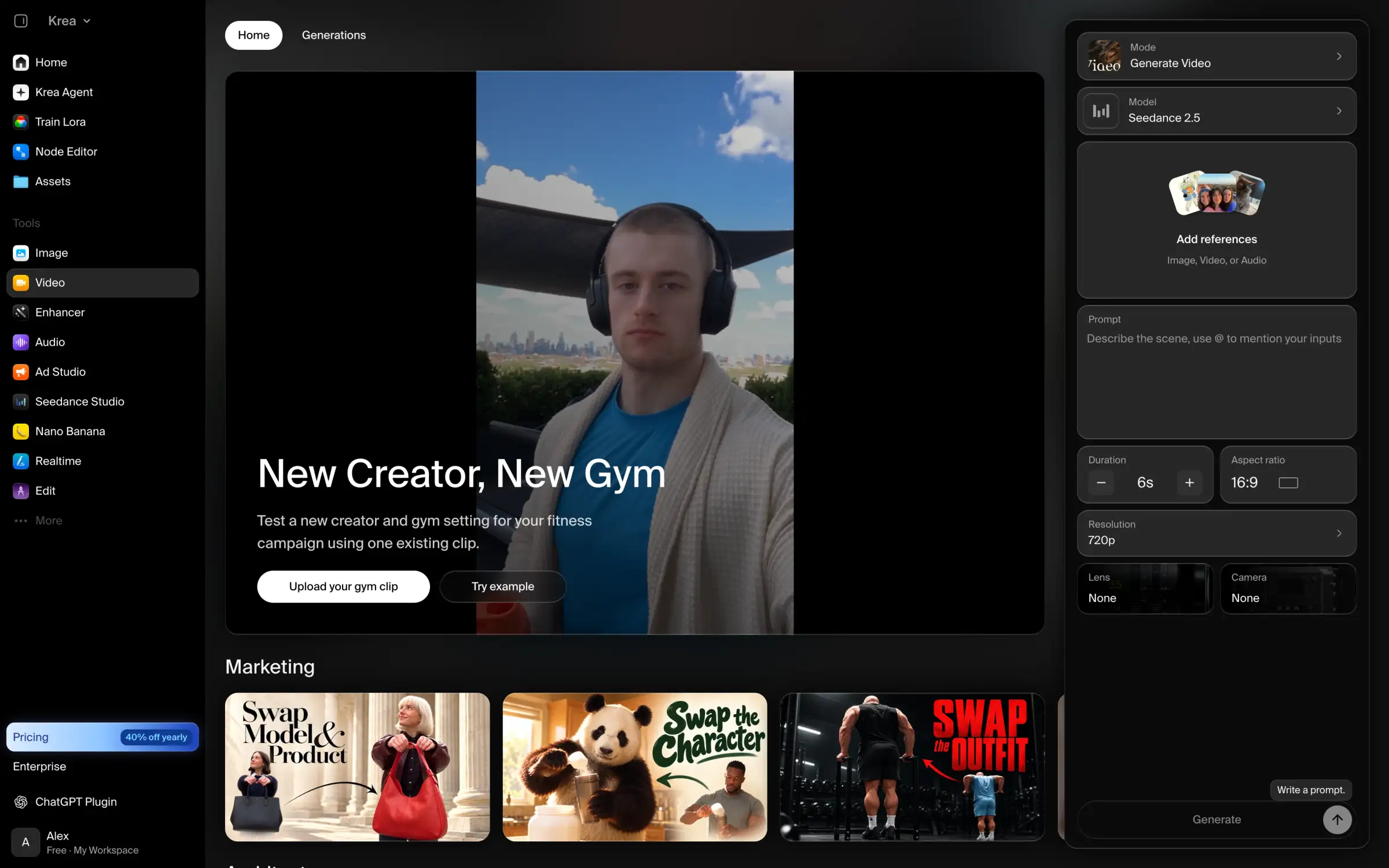
3. Krea
Krea is a particularly good alternative to Pollo AI for marketers who need to produce multiple versions of the same video ad.
For example, its video generator includes templates for replacing models, changing outfits, and swapping products in existing footage. Instead of filming or generating a new ad for every product or audience, you can reuse the original video and change the elements you need.
Krea's video tool with marketing templates like Swap Model & Product and Swap the Outfit
Krea also supports custom model training. You can train a model on your own images to reproduce a particular character, product, or visual style. This is especially useful for campaigns where you need to generate dozens of assets that all look like they belong to the same brand.
The main limitation is that commercial usage rights are available only with paid subscriptions. Also, unused units expire at the end of each billing period.
Price:
Plan
Monthly
Yearly, per month
Units a month
Basic
$9
$5.25
5,000
Pro
$35
$21
20,000
Max
$105
$63
60,000
Yearly billing saves you roughly 40% compared to paying monthly.
Best for: Marketers who make product videos and need several versions of the same ad.
Pros:
✅ Marketing templates for swapping people and outfits in existing clips
✅ Custom models for consistent characters and products
✅ Paid plans from $5.25 a month with yearly billing
Cons:
❌ Commercial license only on paid plans
❌ Unused units don't roll over
4. Magnific (formerly Freepik)
Magnific, previously known as Freepik, combines AI image and video generation with a large library of stock photos and vectors.
If you're a designer or marketer, this means you can create a video ad, find stock images for it, and prepare the supporting graphics without paying for several different services.
Magnific also has ready-made video templates for advertising and social media, so you don't have to start every project with a prompt.
Magnific's video generator with the model list open, showing Wan 3.0 Prime, MiniMax H3, Seedance 2.5, and Kling 4.0
Another reason to consider Magnific over Pollo AI is its pricing structure.
Pollo's subscription credits reset every month, so if you don't use them before the billing period ends, you lose them. Magnific gives you an annual pool of credits instead. You can use fewer credits when you're not working on videos and save the rest for larger projects later in the year.
The catch is that free users can't choose which AI model generates their videos. Magnific selects one automatically, so you'll need a paid plan if you want to compare specific models.
Price:
Plan
Monthly
Yearly, per month
Credits a year
Premium
$20
$14.50
240,000
Plus
$45
$33.75
600,000
These are US prices. In Europe, Premium costs €15 a month, or €10.50 a month with yearly billing.
Best for: Designers and marketers who need stock assets and AI video in one subscription.
Pros:
✅ Stock library and AI generation in one platform
✅ Yearly credit pool without monthly resets
✅ Video templates for ads and social media
Cons:
❌ Free users can't choose the model
❌ Prices vary by region
5. OpenArt
OpenArt is worth considering if you want to make longer videos with multiple scenes and recurring characters.
Pollo AI can generate clips up to 30 seconds long, but if you're making something longer, you'll have to generate several clips and combine them yourself. It's also difficult to keep characters looking identical across separate generations.
OpenArt addresses this with Director Mode, which helps you plan and generate a multi-scene video while maintaining character consistency.
The platform also has a large gallery of templates for ads, music videos, and short films. You can take an existing template and replace its characters or products with your own, which is useful if you have an idea for a video but don't want to plan every scene from scratch.
OpenArt's template gallery with Marketing and Advertising and Film & Stories sections
There are two things to watch out for with OpenArt's subscriptions.
First, commercial usage rights start with the Plus plan, which costs $34 a month. So if you're making videos for clients or advertising, the cheaper Starter plan won't be enough.
Second, OpenArt requires you to cancel at least five days before your renewal date. Otherwise, you'll still be charged for the following month.
Price:
Plan
Monthly
Yearly, per month
Credits a month
Starter
$14
$13
4,000
Plus
$34
$27
12,000
Pro
$56
$44
24,000
Wonder
$240
$175
106,000
Best for: Ads, music videos, and series with recurring characters.
Pros:
✅ Template gallery for ads, music videos, and micro dramas
✅ Director Mode for longer videos with consistent characters
Cons:
❌ You have to cancel at least five days before renewal
❌ Commercial use starts with the $34/month Plus plan
❌ Free creations are stored for only seven days
Apps from the model developers
Pollo AI gives you access to models from multiple developers, but you can also use many of those models directly through their creators' apps.
This is worth considering if you already know which model you prefer. You'll usually get access to new versions and model-specific features earlier, although you'll lose the convenience of having several developers' models in one place.
6. Kling AI
If you make most of your videos with Kling models on Pollo AI, you might as well try Kling AI, Kuaishou's official video generation platform.
It gives you access to Kling 4.0 and the tools built specifically for Kling models, including Motion Control, which transfers movements and poses from a reference video to a generated character.
There's also a Creative Effects section with one-click effects for social media, so switching from Pollo doesn't mean giving up ready-made video templates.
Kling AI's home page with Kling 4.0 selected in the prompt box and the Skills section
Kling AI is also more flexible when it comes to buying extra credits.
On Pollo AI, you can't buy additional credit packs with the Lite plan. If you run out, you have to upgrade your subscription. Kling lets you purchase extra credits on any plan, and those credits remain valid for two years.
That makes it more convenient if you generate videos irregularly and don't want to pay for a higher subscription just to finish one project.
However, Kling's free plan isn't suitable for commercial work. Free videos have a watermark and can't be used commercially, so you'll need a paid plan if you're making videos for clients or your business.
Price:
Plan
Monthly
Yearly, per month
Credits a month
Standard
$8.80
$6.60
660
Pro
$32.56
$24.42
3,000
The first month is discounted to $6.99 on Standard and $25.99 on Pro.
Best for: Creators who use Kling for most of their videos.
Pros:
✅ Kling's own tools, including Motion Control and Creative Effects
✅ New Kling versions arrive here first
✅ Purchased credits stay valid for two years
Cons:
❌ Only Kling models
❌ No monthly credits on the free plan
7. PixVerse
PixVerse is another good Pollo AI alternative if you mostly use AI video generators for their effects and templates.
Its Template section has a large collection of ready-made effects, including couple portraits, dance videos, fantasy transformations, and promotional clips for products. You simply choose a template, upload a photo, and let PixVerse animate it.
PixVerse's Template tab with collections like Little Heroes, Dance Party, and Product Hype
PixVerse gives free users credits that refill every day. This makes it a good option for trying different effects without committing to a subscription.
The templates use PixVerse's own V6 video model, which is also available in Overchat AI. However, if you want to use models from other developers, such as Seedance 2.5, you'll need the $30-a-month Pro plan.
PixVerse also has a couple of ways to reduce your spending. Pro subscribers and above can use Off-Peak mode to generate videos with PixVerse models at a lower credit cost when the servers are less busy. And if you only need a few more videos, you can buy extra credits starting at $5 instead of upgrading your subscription.
Price:
Plan
Monthly
Yearly, per month
Credits a month
Standard
$10
$8
1,200 + 60 a day
Pro
$30
$24
6,000 + 60 a day
Premium
$60
$48
15,000 + 60 a day
Keep in mind that the Standard plan only supports video generation up to 720p. For higher resolutions, including 4K, you'll need Pro or Premium.
Best for: Creators who make viral template videos and want to start for free.
Pros:
✅ Large template library for viral videos
✅ Free credits refill every day
✅ Off-Peak mode and credit packs from $5
Cons:
❌ Models from other developers only from the $30 Pro plan
❌ Standard is limited to 720p
8. Dreamina
Dreamina is ByteDance's AI image and video generation platform, developed by the company behind CapCut and Seedance.
If you mostly use Seedance models on Pollo AI, Dreamina is worth trying because it's where ByteDance releases new Seedance versions first. It also has several editing tools that make working with generated videos easier.
Dreamina's home page with the AI Video tab open and tools like Video recreator, Extend video, and Upscale
For example, suppose you've generated a video and everything looks good except for a few seconds in the middle. Instead of generating the whole video again and spending more credits, you can use Edit Segment to redo just that part.
Similarly, Extend Video lets you continue a clip that ends too early, while Inpaint allows you to select and change specific details in the footage.
These features are particularly useful because AI video generation often takes several attempts to get right, and being able to correct individual problems can save you a lot of credits.
Dreamina also offers free daily credits, although videos downloaded on the free plan have a watermark. This makes it fine for experimenting, but you'll need a paid plan if you want to publish clean videos.
Price:
Plan
Monthly
Credits a month
Basic
$15
1,575
Standard
$49
3,885
Advanced
From $99
8,645
These are US prices at the time of writing. Dreamina also frequently offers first-month discounts for new subscribers.
Best for: Creators who use Seedance and want to edit parts of a video without regenerating it.
Pros:
✅ New Seedance models directly from ByteDance
✅ Tools for fixing parts of a video without regenerating it
✅ Free credits refill every day
Cons:
❌ Free downloads have a watermark
❌ A much smaller choice of models than Pollo
9. Hailuo AI
Hailuo AI is MiniMax's official video generation platform. If you're already using Hailuo or MiniMax models on Pollo AI, it makes sense to check out the developer's own app.
Hailuo gives you access to MiniMax H3 with settings such as 2K resolution and support for up to 12 reference files. Being able to provide multiple references is useful when you're generating a video with several characters, products, or other elements that need to look consistent.
It also has one-click effects like LoveFrame for couple videos and PetPal for pet videos, so you can generate something quickly without writing a detailed prompt.
Hailuo AI's home page with MiniMax H3 selected in the prompt box and template categories below
Another thing we like about Hailuo is that its pricing is easier to understand than Pollo's.
Different AI video models consume different amounts of credits, so the number of credits included in a subscription doesn't tell you much on its own.
Hailuo makes this clearer by showing how many seconds of MiniMax H3 video each subscription can generate. This makes it easier to estimate how much your videos will cost before buying a plan.
However, Hailuo's free credits are a one-time trial rather than a daily allowance. Once you spend them, you won't get more unless you pay. Subscriptions are also nonrefundable, so we'd recommend trying the monthly plan before committing to a full year.
Price:
Plan
Monthly
Yearly, per month
Credits a month
Standard
$14.99
$8.40
1,000
Pro
$54.99
$30.40
4,500
Master
$119.99
$71.20
10,500
Best for: Creators who make most of their videos with MiniMax H3.
Pros:
✅ MiniMax H3 in 2K with up to 12 references
✅ Pricing page shows how many seconds of video each plan covers
✅ One-click templates like LoveFrame and PetPal
Cons:
❌ No free credits after the trial
❌ Paid plans aren't refundable
Video editing
So far, we've looked at platforms that mainly help you generate videos. However, sometimes you already have the footage you need and just want to change something about it.
In that case, an AI video editor may be a better choice, since you can fix individual shots instead of repeatedly generating new ones.
10. Runway
Runway is one of the strongest Pollo AI alternatives if you need to edit existing footage, not just generate new videos.
Its Aleph 2.0 model lets you change a video using text prompts. For example, you can adjust the lighting, replace an object, or change the background while keeping the rest of the footage.
This makes Runway particularly useful when you've generated a video that's almost perfect and don't want to start over because of one mistake.
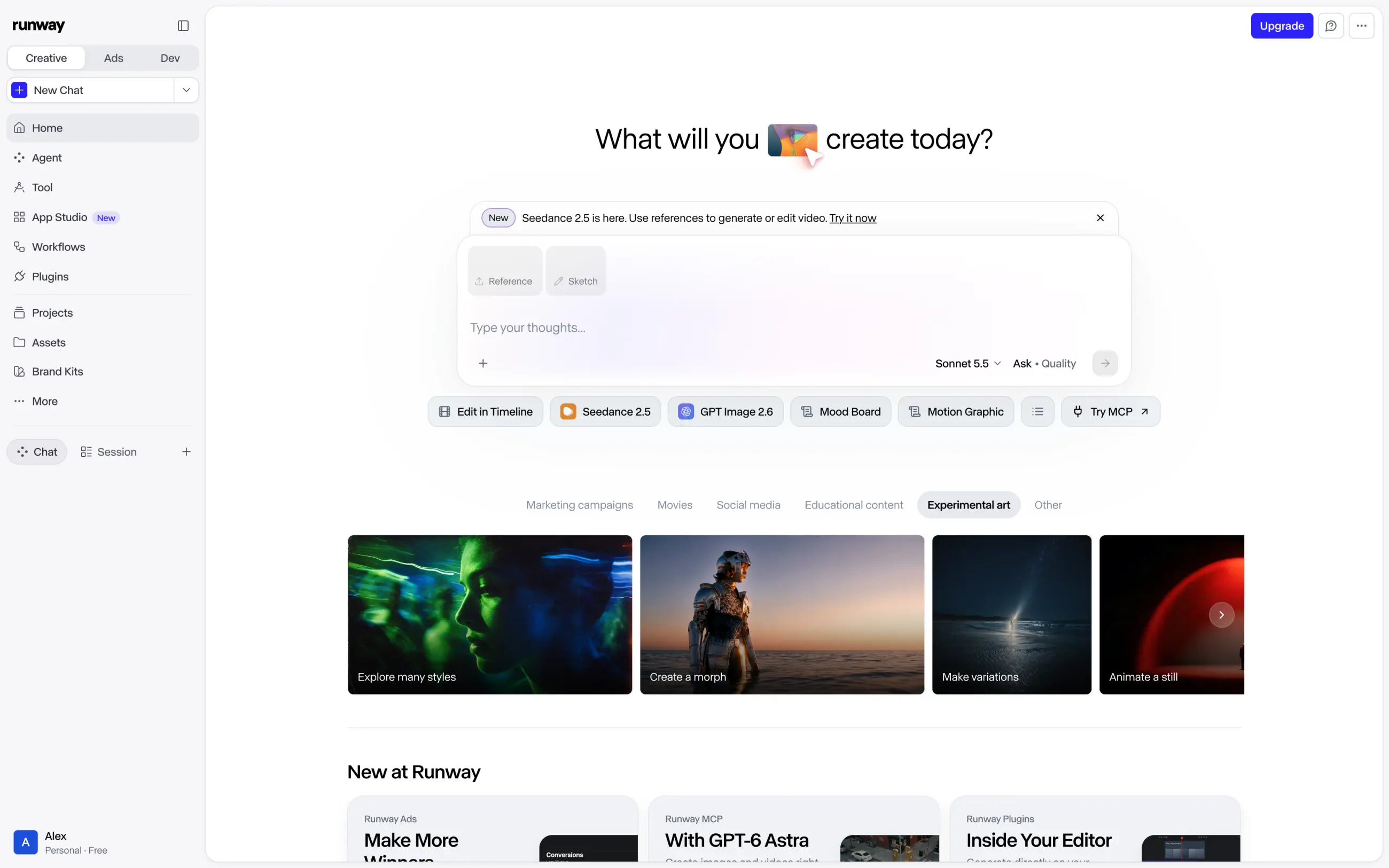
Runway also has a timeline editor, so you can arrange and edit multiple clips without exporting everything to a separate video editing app.
Runway's home page with the agent prompt box and shortcuts for Edit in Timeline, Seedance 2.5, and GPT Image 2.6
For more complicated projects, Runway has an AI agent that can plan a video from a short description and choose models for different parts of the process.
There's also Runway Ads, which lets you create new variations of an existing ad. This is useful for marketing teams that want to test different versions of a successful video without rebuilding each one manually.
The main downside is pricing. Runway's free credits don't renew, so the free plan is only useful for a short trial. Paid subscription credits also expire at the end of each billing period, except on Max, where you can carry unused credits over for one month.
Price:
Plan
Monthly
Yearly, per month
Credits a month
Standard
$15
$12
625
Pro
$35
$28
2,250
Max
$95
$76
9,500
The $15 Standard plan includes only 625 credits, which isn't enough to generate a full minute of video with Gen-4.5. So if you plan to generate and edit videos regularly, you'll probably need a more expensive subscription.
Best for: Creators and teams who need to edit generated or existing footage with AI.
Pros:
✅ Aleph 2.0 for editing videos with a text prompt
✅ Timeline editor and an agent that plans videos
✅ Runway Ads for making ad variants
Cons:
❌ Free credits don't renew
❌ Standard's 625 credits cover less than a minute of Gen-4.5 video
FAQ
What is the best Pollo AI alternative?
Overchat AI is the best Pollo AI alternative for most people, since it combines 30 video models with more than 300 video filters, and failed attempts aren't charged. If you mostly use one-click effects, Higgsfield and PixVerse are the closest to Pollo. If you use Kling most of the time, Kling AI gives you the model and its tools from the developer.
Is Pollo AI really free?
Pollo AI has a free plan, but it's limited to 20 credits for new users. That's enough for four 5-second videos with Pollo's own model, and free videos have a watermark. Daily check-in credits have moved between the website and the app several times.
Is Pollo AI trustworthy?
Yes, Pollo AI is a real service with a rating of 4.3 out of 5 on Trustpilot from more than 5,600 reviews. Most complaints are about credits. Videos that don't follow the prompt still use them, and unused subscription credits expire at the end of each month.
Is Pollo AI unrestricted?
No, Pollo AI doesn't support NSFW content, and its content filters can block prompts and images. When a generation is blocked by the filters, Pollo returns the credits.
Is there a free Pollo AI alternative?
Yes, several alternatives refill free credits every day, including Overchat AI and PixVerse, so you can keep testing without a subscription. Free videos on Dreamina and PixVerse are best for trying ideas, though, since you'll need a paid plan to remove the watermark.
Do Pollo AI credits roll over?
No, Pollo AI's subscription credits reset at the start of each billing cycle. Add-on credit packs don't expire, but you can buy them only on the higher Pro and Ultra plans. If you want credits that last longer, Magnific's paid plans come with a yearly credit pool.
Can I get a refund from Pollo AI?
You can request a refund within three days of your purchase by emailing Pollo's support, but only if you've used no more than 50 subscription credits. Pollo may keep a processing fee of up to 6%, and add-on credits can't be refunded.
Which Pollo AI alternative has the most video effects?
Overchat AI has more than 300 video filters and presets in its Video Generator, and Higgsfield has more than 250 presets for camera moves and visual effects. PixVerse's Template tab is the closest to Pollo's effects library, with collections for viral videos.