Nano Banana 2 (Pro) vs. Flux 2. Direct Comparison of The Two Best Image Generation Models
Last Updated:
2026-10-08
Nano Banana 2 (Pro) vs. Flux 2. Direct Comparison of The Two Best Image Generation Models
In the world of AI image generators, interesting things happen every day. However, it’s not every day that two of the leading innovators update their flagship models. But this was exactly the case in November 2025, when Google released Nano Banana Pro on the 20th and Black Forest Labs, creators of Flux.1 Context, released Flux 2 on the 25th.
These two models are already available on Overchat AI.
Both models claim to push the boundaries of realism, offer precise editing through text prompts and advanced prompt following.
We thought it would be interesting to pit them against each other to see which one would win in a direct comparison.
We’ll test them in these categories:
Text-to-image generation
World knowledge
Prompt following
Text rendering
Style transfer
This will allow us to test different aspects of both models. We will test them against tasks that even the best AI image generators typically struggle with.
Spoiler alert: there’s one clear winner, and it’s not even close! Anyways, we’ve a lot of ground to cover, so let’s get started.
Nano Banana Pro (Google's Gemini 3 Pro Image) absolutely dominates FLUX.2 in this head-to-head, winning all five real-world tests — text-to-image, world knowledge, prompt following, text rendering, and style transfer.
Nano Banana Pro launched alongside Gemini 3 Pro in late November 2025 and represents a generational leap — it can render walls of text perfectly, create infographics with real-world facts, blend up to 14 reference images, and maintain consistency across up to 5 people in different scenes.
FLUX.2 from Black Forest Labs (the German startup behind the viral FLUX.1 Kontext) launched in late November 2025 in two variants — [pro] for precision and [flex] for balance — supporting up to 4 megapixel resolution and 10 reference images.
On the infographic test (Tokyo Tower with blueprint annotations), Nano Banana Pro produced a real infographic with accurate facts while FLUX.2 generated nonsensical schematics — Google's model can tap into Search to reason about subjects it doesn't know internally.
On text rendering (a fitness flyer with heavy typography), Nano Banana Pro produced a production-ready poster while FLUX.2 filled the page with garbled text in an early-2000s design.
The one area where FLUX.2 genuinely wins is speed — it generates images in roughly one-tenth the time of Nano Banana Pro.
On Overchat AI, both are bundled in the $5.99/week or $49.99/year subscription — Nano Banana Pro costs 100 tokens per generation while FLUX.2 costs just 30 tokens.
Beyond Overchat AI, Nano Banana Pro is available through the Gemini app (2 free images/day for free users, unlimited on Google AI Ultra), Google Workspace, Vertex AI, and AI Studio — FLUX.2 is on BFL Playground, BFL API, and Hugging Face (with [dev] as an open-weight variant at $0.012 per megapixel).
If you care about quality, real-world understanding, or text rendering, Nano Banana Pro is the clear choice — if you care about speed, cost, or running locally, FLUX.2 is still worth picking.
What is Nano Banana Pro?
Nano Banana Pro (sometimes also called Nano Banana 2, official name — Gemini 3 Pro Image) is Google DeepMind's most advanced image generation and editing model, launched in late November 2025.
The Nano Banana Pro was released alongside the Gemini 3 Pro, and many people thought it represented a generational leap. Things that were previously impossible through AI generation are now possible, such as creating detailed infographics with real-world facts or rendering walls of text with perfect precision. Nano Banana is absolutely amazing!
What it can do:
Generate images with correctly rendered text in multiple languages
Blend up to 14 reference images while maintaining consistency
Create context-rich infographics based on real-world facts
Edit specific areas of images with text instructions
Maintain consistency of up to 5 people across different scenes
It’s hard to overstate how amazing this model is, though, because of how precisely and consistently Nano Banana Pro follows instructions, unlike the previous generation of Nano Banana, which often forgot things, added extras, or even, well, went bananas.
What is FLUX.2?
Released in late November 2025, FLUX.2 is Black Forest Labs' latest model in their family of visual generative AI models.
Black Forest Labs is a German AI startup founded by developers who worked on some of the world's most popular open models. The company operates with an open core philosophy, combining open-weight models for the community with commercial endpoints for paid users.
Black Forest Labs became famous after releasing FLUX.1 Kontext on May 29, 2025. It was the first widely used AI model that could edit images by allowing users to change a part of an image without affecting the rest, a process known as inpainting. It went viral at the time and became the go-to for image editing.
Interestingly, Google's original Nano Banana was released on August 26, 2025, making Flux.1 Kontext obsolete. Now, Flux.2 is being released after Google's own image generation update, creating an interesting competition.
In any case, Flux 2 comes in two variants:
FLUX.2 [pro]: the most advanced and the most precise
FLUX.2 [flex]: strikes a balance between quality and efficiency
What it can do:
Generate photorealistic images at resolutions up to 4 megapixels
Reference up to 10 images simultaneously with consistent character and style
Create complex typography, infographics, and UI mockups with legible text
Control lighting, pose, and composition with precision
Edit images while maintaining the original style and quality
Nano Banana Pro vs FLUX.2: Main Features Compared
Now that the introductions are out of the way, here’s how the two models compare on a feature-by-feature basis:
Feature
Nano Banana Pro
FLUX.2
Developer
Google DeepMind
Black Forest Labs
Max Resolution
4K
2K
Text-to-Image
✅
✅
Image-to-Image
✅
✅
Reference Images
Up to 14 images
Up to 10 images
Accurate text rendering
✅
✅
World-knowledge
Can access Google Search knowledge base
Only from training data
Model Variants
Single consumer model
4 variants (pro, flex, dev, klein)
Open Weights
No
Yes
Access
Overchat AI, Gemini app, Workspace, Vertex AI
Overchat AI, BFL Playground, API, Hugging Face
Tokens per generation in Overchat AI
100
30
Available for free
❌
❌
On paper, both Nano Banana and Flux.2 offer similar capabilities, though Nano Banana has a slight edge because of its higher resolution and greater number of supported images.
You may have noticed that Nano Banana uses more tokens per generation. That's because, when creating it, Google prioritized quality over efficiency and speed.
In fact, the Nano Banana Pro doesn't replace the original Nano Banana; it exists alongside it as a more powerful option. Meanwhile, the Flux 2 directly replaces the previous generation, the Flux.1 Kontext.
Nano Banana Pro vs FLUX.2: Real World Showdown
Let’s take a look at how both of the models stack up across a variety of image generation and image editing tasks.
We're going to test them on:
Text-to-image generation
World knowledge
Prompt following
Text rendering
Style transfer
Text-to-Image Generation
Text-to-image generation tests how well the model can visualize your description based only on your text prompt.
The prompt:
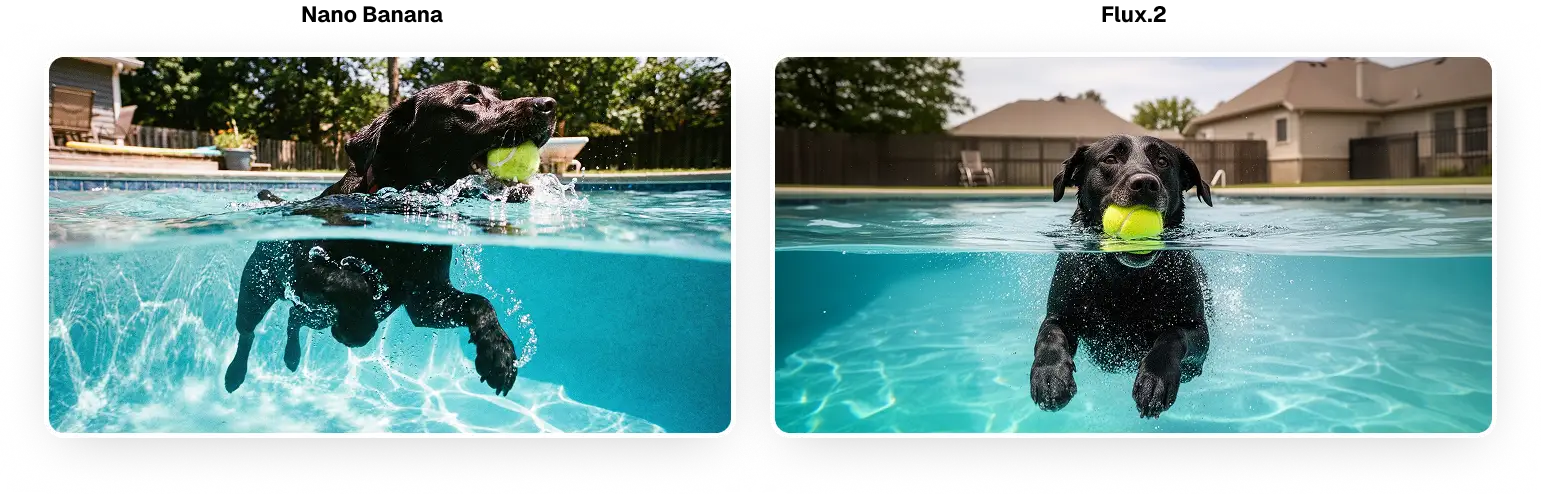
An action shot of a black lab swimming in an inground suburban swimming pool. The camera is placed meticulously on the water line, dividing the image in half, revealing both the dogs head above water holding a tennis ball in it's mouth, and it's paws paddling underwater.
The results:
In this case, the Nano Banana Pro shot is more dynamic. It features realistic lighting and exposure, more contrast, and an interesting camera angle. Even the shape of the line that forms the waterline is interesting. It’s perfectly realistic.
The Flux.2 shot also looks good. However, if you look at minor details, such as the reflections on the water, the dynamic range of the shot, or the details of the houses, the image has a slightly plasticky feel, which is typical of AI generation.
On the other hand, Flux.2 took about one-tenth the time to generate, but make of that what you will.
Winner: Nano Banana Pro
World knowledge
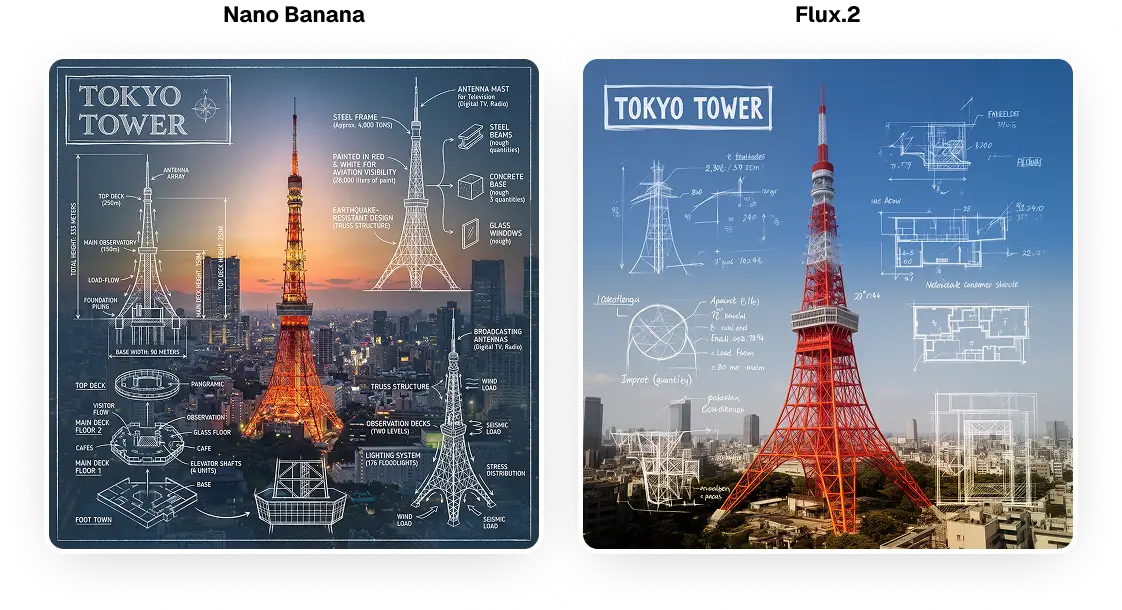
To test world knowledge, we asked each model to create an infographic of the Tokyo Tower featuring real-world facts and schematics. This subject is very difficult because it involves generating an image and rendering text in a single image, as well as requiring the model to know facts about the subject.
The prompt:
Create an infographic image of Tokyo Tower, combining a real photograph of the landmark with blueprint-style technical annotations and diagrams overlaid on the image. Include the title Tokyo Tower in a hand-drawn box in the corner. Add white chalk-style sketches showing key structural data, important measurements, material quantities, internal diagrams, load-flow arrows, cross-sections, floor plans, and notable architectural or engineering features. Style: blueprint aesthetic with white line drawings on the photograph, technical/architectural annotation style, educational infographic feel, with the real environment visible behind the annotations.
The results:
The Nano Banana Pro absolutely blows the Flux.2 out of the water in this test. To state the obvious, the Nano Banana produced a real infographic with real facts, while the Flux.2 produced nonsensical schematics and scribbles. Additionally, the overall design and layout of the Nano Banana's infographic is much better, and the Tokyo Skyline is much more realistic.
Winner: Nano Banana Pro
Prompt following
To test the following prompt, we gave each model a complex prompt. Let's see which one followed it better. It didn't fall apart when asked to render a complex scene featuring multiple elements in multiple styles, while incorporating the model from a reference image into the shot.
The prompt:
Style: Aesthetic editing, Cinematic, Scene composition, Glassmorphism
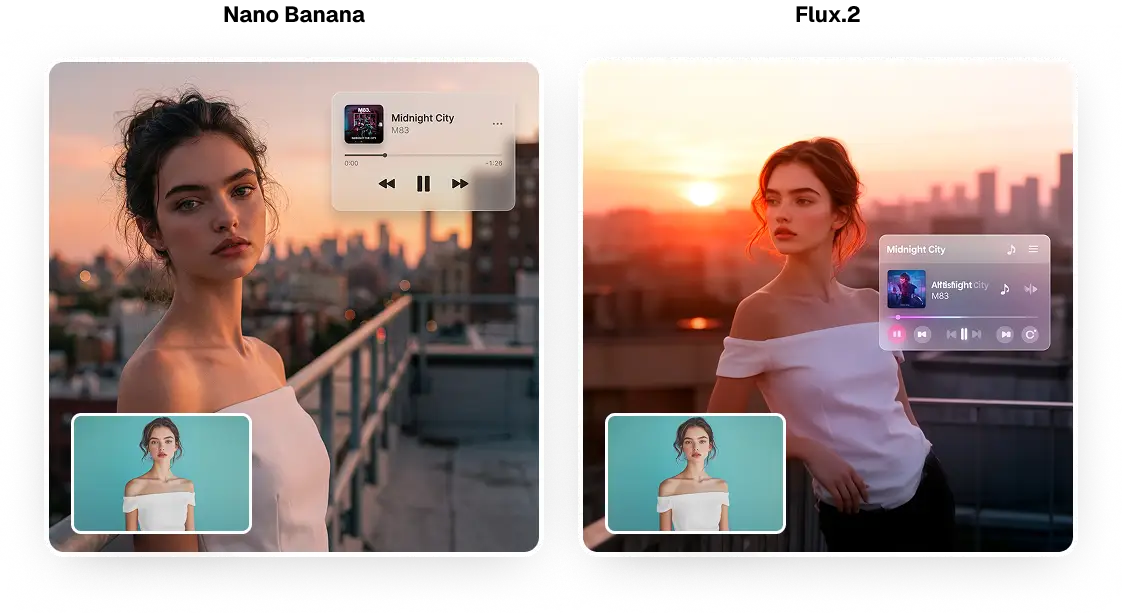
Subject Reference: Use the uploaded image only for the subject's face, hair, and appearance. Do not use the original background.
Scene Setup:
Background: Urban rooftop at golden hour with city skyline in distance, warm sunset with soft orange and pink hues
Subject: Young woman (appearance from uploaded image), relaxed pose leaning casually against a railing, looking slightly off-camera with contemplative expression
Focus: Subject in sharp focus, fully integrated into new background
Lighting: Soft, diffused, atmospheric - must match new background
Colors: Muted, cinematic color grading
The results:
Let’s break this down element by element:
The character likeness is consistent in both models.
Both models adhere to the overall scene — it’s a rooftop shot at golden hour. However, Flux.2 interprets the pinks in the prompt more literally.
Nano Banana looks more realistic — look at the hair rendering and how her face is lit, in particular.
In terms of rendering the UI glass and text, there’s no competition. Flux.2 botched the text, and the UI icons appear sloppy and blurry. Nano Banana, on the other hand, rendered the glass effect perfectly, and every pixel of that floating window is crisp. The window's position in the top right corner is also more deliberate.
Winner: Nano Banana Pro
Text rendering
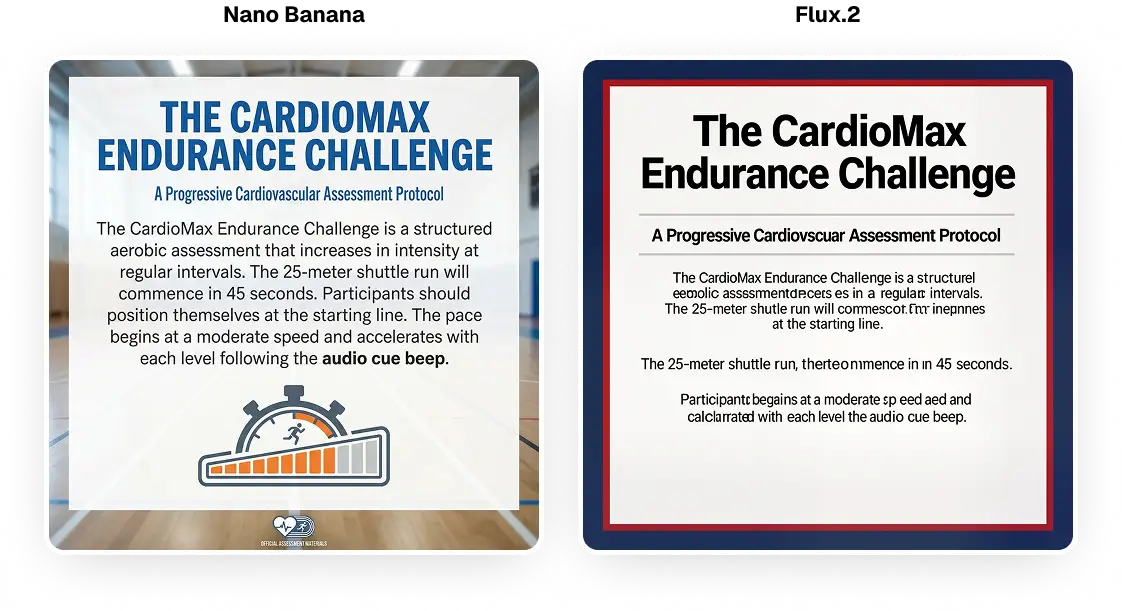
For this test, we asked each model to create an informational pamphlet about exercise. We gave them a lot of text for an AI model to render. This amount of typography is extremely challenging. How did they do?
The prompt:
Create a professional fitness assessment flyer with clean, modern typography on a gradient background (deep blue to light cyan).
Main Header (Bold, Large): "The CardioMax Endurance Challenge"
Subheading (Medium weight): "A Progressive Cardiovascular Assessment Protocol"
Body Text (Clean, readable font):
The CardioMax Endurance Challenge is a structured aerobic assessment that increases in intensity at regular intervals. The 25-meter shuttle run will commence in 45 seconds. Participants should position themselves at the starting line. The pace begins at a moderate speed and accelerates with each level following the audio cue beep. Complete one full shuttle each time you hear the tone. Continue until you can no longer maintain the required pace. Your final level achieved will determine your cardiovascular fitness rating.
In this case, Nano Banana renders the text with virtually no typefaces — it's the perfect poster. It also correctly interpreted the initial cue from the prompt, and it looks like something a school might display on a screen during PE.
Meanwhile, Flux has lots of nonsense text, and its design resembles the internet from the early 2000s. This amount of text was clearly too much for the model to handle, so it couldn't focus on other elements. To be fair, unlike Nano Banana, it split the text into paragraphs, which was the right move. However, this doesn’t save it.
Winner: Nano Banana
Style transfer
Style transfer involves reimagining an image in a different style. For example, it can transform a photograph into an anime. This kind of application became popular when Ghibli filters powered by ChatGPT went viral.
It requires understanding and replicating the requested style while preserving likeness relative to the original image. Can Flux.2 claw back at least one win? Let’s see.
The prompt:
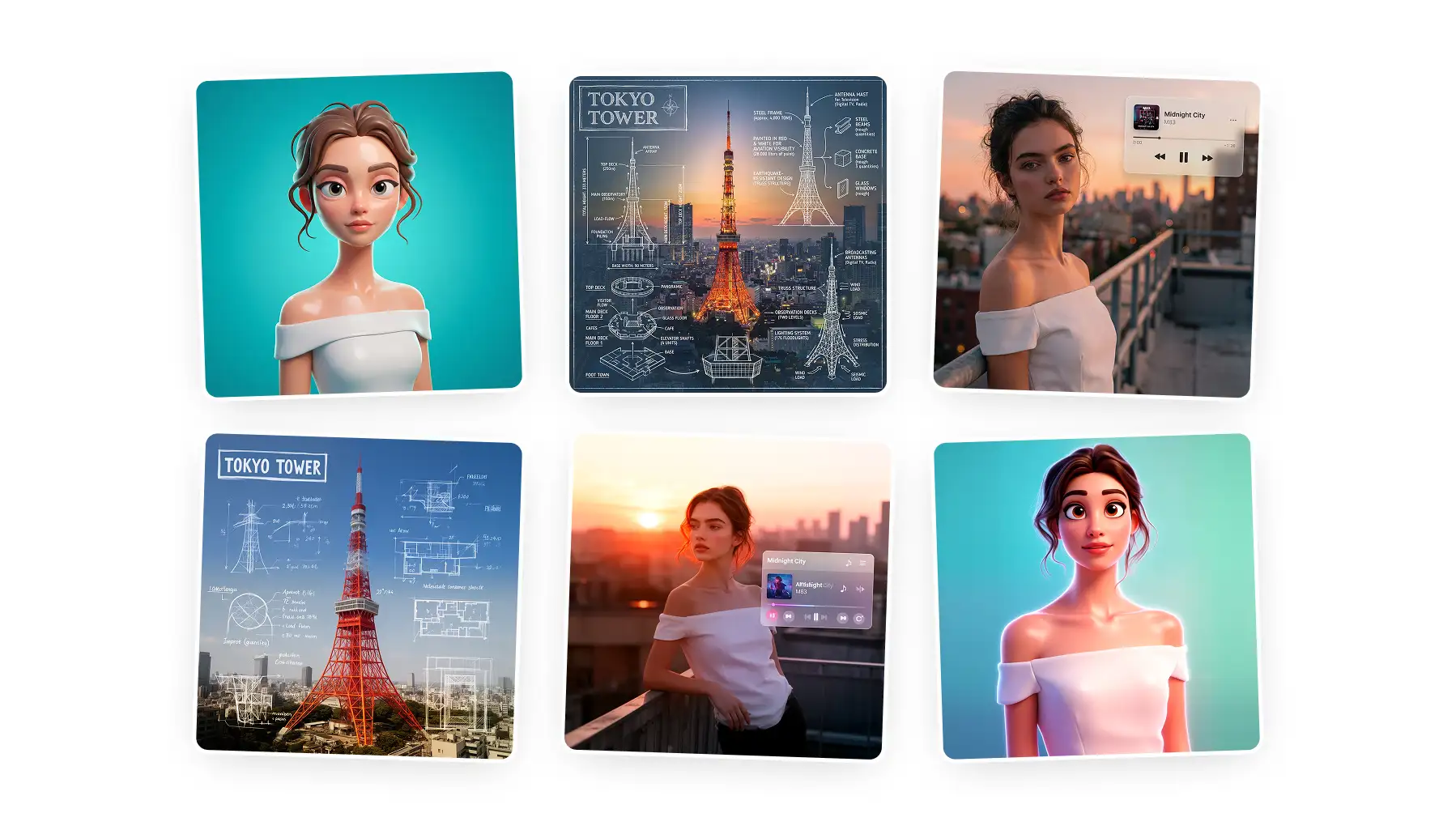
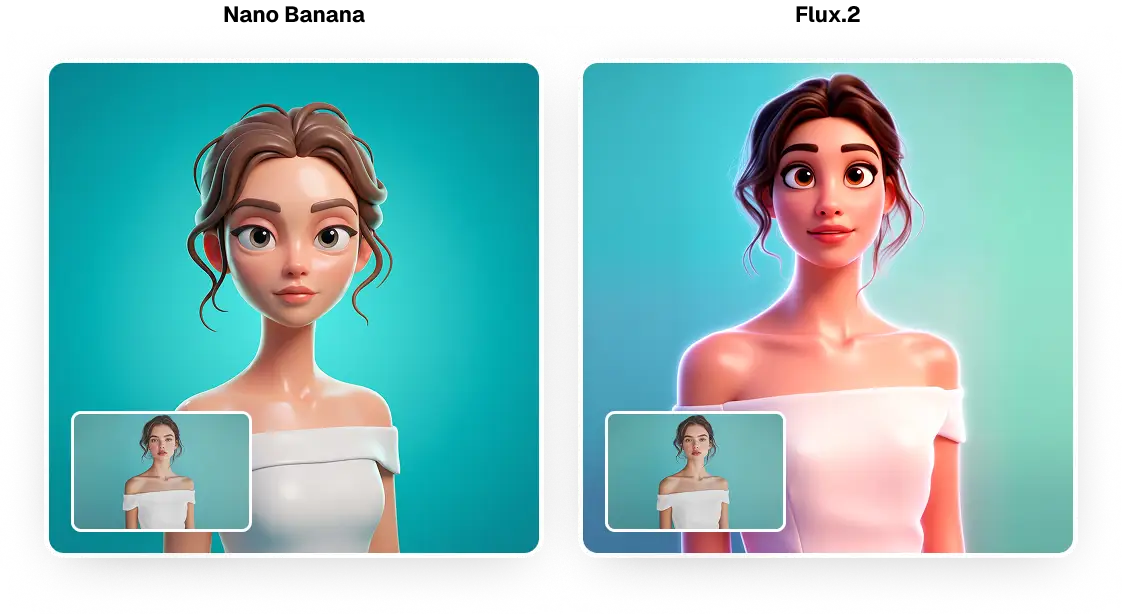
Transform the person from the attached photo into a smooth stylized 3D cartoon character in the same style as the reference. Keep all real facial features fully recognizable but translated into exaggerated proportions (elongated head, big eyelids, soft rounded shapes). Skin should look glossy and plastic-like with clean gradients and subtle highlights. Use soft studio lighting, a vibrant background, and high-end Pixar-inspired rendering. Simplify details, add gentle rim light, and preserve the person's hairstyle and accessories in stylized form.
The results:
This test is closer than the others, and personal preferences may play a bigger role in determining the winner. Realistically, though, there’s still a stark difference. For example, notice how Flux 2 turned "subtle rim light" into a glow effect. The entire image doesn't resemble a 3D avatar on the Flux 2 side; it looks more like a Pixar image.
Winner: Nano Banana
Accessibility and Pricing
Both Nano Banana Pro and FLUX.2 are accessible through Overchat AI image generator — in fact, this is where we've generated all the pictures in this article.
On Overchat AI, both models come as part of the unified subscription at $5.99/week or $49.99/year, along with all other supported AI models.
In terms of token usage:
Nano Banana Pro costs 100 tokens per generation
FLUX.2 costs 30 tokens per generation
Beyond Overchat AI:
Nano Banana Pro is accessible directly through the Gemini app.
Free users can generate 2 images per day, though this was reduced from the initial 3 images due to high demand.
For unlimited generations without visible watermarks, you'll need a Google AI Ultra subscription. The Google AI Pro subscription costs $19.99 per month.
Enterprise users can access it through Google Workspace, Vertex AI, and Google AI Studio.
FLUX.2 is available through multiple platforms depending on the variant you choose.
FLUX.2 [pro] and [flex] are available via BFL Playground and BFL API
FLUX.2 [dev], the open-weight variant, is available on Hugging Face
Pricing for commercial use is $0.06 per megapixel for [flex] and $0.012 per megapixel for [dev]. You can also deploy FLUX.2 locally using ComfyUI with the open weights.
Bottom Line
Nano Banana Pro absolutely wiped the floor with Flux.2 in this comparison, winning every single test we threw at it. Google's model excelled at a variety of tasks, including generating realistic images, creating infographics that visually represented world knowledge, and following prompts, as well as rendering text and transferring styles.
The difference was especially clear in how well it could understand the world and how it could show text.
Nano Banana Pro's integration with Google Search allows it to look up information it lacks internally and to reason about the prompt, which made it much better at tasks that required complex understanding of the subject.
For example, Nano Banana Pro understands that a dog swimming in the pool will displace the water and make the waterline uneven, or if we've placed a camera half-way underwater and exposed for the shadows it will make the highlights in the sky appear overly bright, or blown out — Flux.2 can't reason about these details, so it sometimes gets them wrong.
Even so, FLUX.2 has its strengths. It's a lot faster, generating images sometimes in about one-tenth the time of Nano Banana Pro. It's also more accessible through open weights, costs less per generation on Overchat AI (30 tokens vs. 100), and offers multiple variants for different uses. If you care about speed, cost, or flexibility, FLUX.2 is still a great choice.
For most users who want the best possible quality, Nano Banana Pro is the clear winner. It can make images look real, show text accurately, and use real-world knowledge. This makes it the better choice — if you’re ok with spending more tokens or paying more and waiting longer.