10 Best Krea AI Alternatives Compared (2026)
Krea's best features need the $135 Max plan, and third-party models cost more there. We compared 10 Krea AI alternatives by price and features.

Contents
Some of the best Krea AI features are only available on the most expensive $135 a month Max plan, so we made a list of the 10 best Krea AI alternatives and compared them on price, free plan and features.
Why look for a Krea AI alternative?
1. High cost of generations
Generating videos with third-party models is more expensive on Krea:
| Kling 4.0 video, 10 seconds | On Krea Basic ($9/month) | In Kling AI Standard ($8.80/month) |
|---|---|---|
| 720p | $2.09 | $1.33 |
| 1080p | $3.13 | $2.00 |
In Krea's video tool, you see this price on the Generate button:
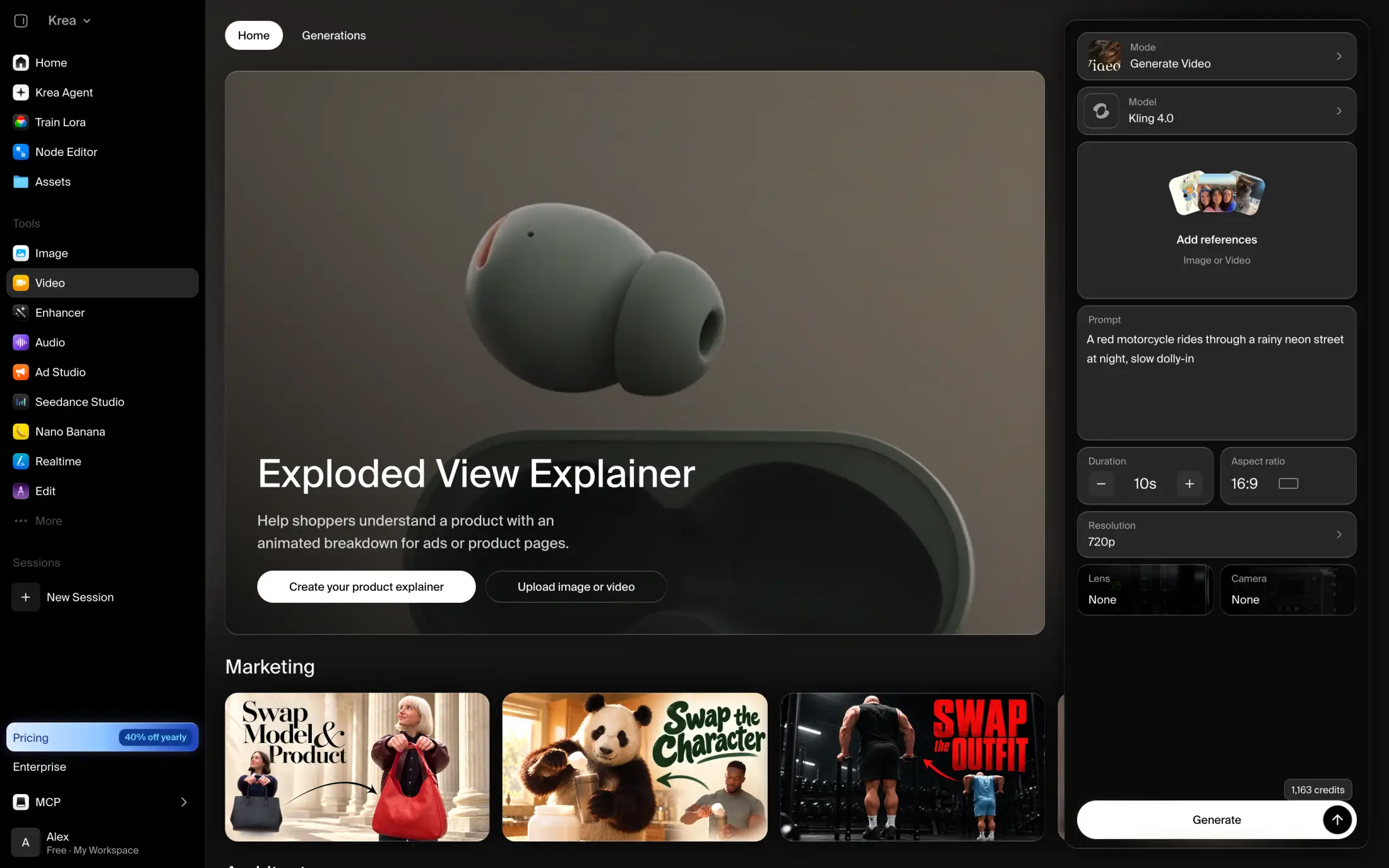
What's more, certain plans limit what models you can use:
| Plan | Price | Image models | Video models |
|---|---|---|---|
| Free | $0 | Krea's models and a few open models, like Flux.1 Dev and Qwen Image | LTX-2 only |
| Basic | $9/month | All | All except Veo 3.1 |
| Pro and Max | From $35/month | All | All |
2. Some features are only available on the Max plan
For example, you won't be able to use the following features unless you purchase the $135 a month plan:
- Ultra mode in Krea 3, Krea's image editing model
- Unlimited relaxed generations
- High-priority queues
However, other apps have similar features on cheaper plans. For example, Midjourney and Leonardo AI have unlimited relaxed image generations on their $30 plans.
Best Krea AI alternatives at a glance
| App | Best for | Paid from | Free plan |
|---|---|---|---|
| Krea | Realtime canvas, LoRA training and upscaling | $5.25/month | 100 units a day, no video models |
| Overchat AI | Popular image models on a free plan | $7.50/month | 100 credits a day |
| Magnific | Creative upscaling | €10.50/month | 20 images a day, Auto only |
| Leonardo AI | Realtime Canvas and unused tokens that carry over | $10/month | 150 tokens a day, Auto only |
| Adobe Firefly | Commercially safe images and Adobe apps | $9.99/month | Limited daily generations |
| Midjourney | A distinctive art style | $8/month | No free plan |
| Ideogram | Text inside images | $15/month | Free credits with Google or Apple sign-up |
| Recraft | Vector logos and icons | $10/month | Limited credits, public images |
| Kling AI | Kling 4.0 at the developer's price | $6.60/month | Monthly credits, watermark |
| Dreamina | New Seedream and Seedance versions | $15/month | Daily credits, watermark |
| ComfyUI | Running Krea 2 on your own computer | Cloud from $16/month | Free desktop app |
Now, let's take a closer look at each one.
1. Overchat AI
Overchat AI is our AI aggregator that brings the best image and video generation models from leading AI companies in a single place.
Although you're reading this on the Overchat AI blog, we genuinely think that our platform has features that can make it a better fit than Krea for some. For example, a more generous free plan that includes access to GPT Image 2.6, Nano Banana 2.1, Seedream 4, Flux 3 and other models in our AI image generator. You also get new free credits every day, and you can earn more credits with streaks.

Overchat AI also offers a powerful multi-generation feature, Multiple selection, where you can generate up to 64 variations of one image with up to 4 different models at the same time, which is extremely useful for bulk generation or comparing results.
Or, if you use Krea's Enhancer, Overchat AI has a separate tool to upscale photos and a powerful AI video generator with Kling 4.0, Seedance 2.5 and other video models.
Price:
| Plan | Monthly | Yearly, per month | Credits a month |
|---|---|---|---|
| Mini | $15 | $7.50 | 7,000 |
| Pro | $29 | $14.50 | 15,000 |
| Max | $59 | $29.50 | 35,000 |
| Ultra | $119 | $59.50 | 80,000 |
You can try full access to Overchat for $1.99 before you subscribe.
Best forCreators who want to try GPT Image 2.6 and Nano Banana 2.1 for free and use image and video models from different developers in one app.
Pros
- GPT Image 2.6 and Nano Banana 2.1 on the free plan
- Prices in credits before you generate
- Up to four models side by side on paid plans
Cons
- No LoRA training or real-time canvas
- Subscription credits don't roll over
2. Magnific (formerly Freepik)
Magnific is the best Krea AI alternative for upscaling. Like with Krea's Enhancer, you can use Magnific's upscaler to add new detail to a rough image while you raise its resolution.
In the Creative mode, you can fine-tune the result with sliders. For example, with Creativity, you choose how much new texture and detail to add, and with Resemblance, how much of the original image to keep:

On any paid plan, you can upscale images up to 10K, and on the Plus plan, you also get Topaz upscalers.
Magnific also has Krea 2, so you can keep using Krea's own model after you switch. What's more, instead of monthly units, you get one pool of credits for the whole year.
Price:
| Plan | Monthly | Yearly, per month | Credits a year |
|---|---|---|---|
| Premium | €15 | €10.50 | 240,000 |
| Plus | €34 | €25.50 | 600,000 |
| Pro | €83 | €62.25 | 1,500,000 |
These are prices for Europe.
Best forDesigners and photographers who upscale and refine AI images before they use them.
Pros
- Creative upscaling with Creativity and Resemblance controls
- Krea 2 in the model list
- Credits stay valid for 12 months
Cons
- Magnific Upscaler only on paid plans
- Only the Auto model on the free plan
3. Leonardo AI
Leonardo AI is the best Krea AI alternative if you like to work on a canvas. Like in Krea's Realtime, you can sketch a composition on Leonardo's Realtime Canvas and see the image change as you draw.
You can also train your own models in Leonardo, for example, to keep the same character or style across a series of images. On the Essential plan, you can create up to 10 of them.
What's more, Leonardo saves your unused fast tokens in a Token Bank, up to 25,500 tokens on Essential, or three months of the plan's tokens. However, if you cancel your subscription, you lose them.
And from the $30 Premium plan, you can generate unlimited images at a relaxed pace with Leonardo's own models, like Lucid Origin and Phoenix.
Price:
| Plan | Monthly | Yearly, per month | Tokens a month |
|---|---|---|---|
| Essential | $12 | $10 | 8,500 |
| Premium | $30 | $24 | 25,000 |
| Ultimate | $60 | $48 | 60,000 |
Best forIllustrators and designers who sketch on a canvas, train their own models and create more in some months than in others.
Pros
- Realtime Canvas
- Token Bank for unused tokens
- Unlimited relaxed images with Leonardo's models from Premium
Cons
- Only the Auto model on the free plan
- You lose the Token Bank when you cancel
4. Adobe Firefly
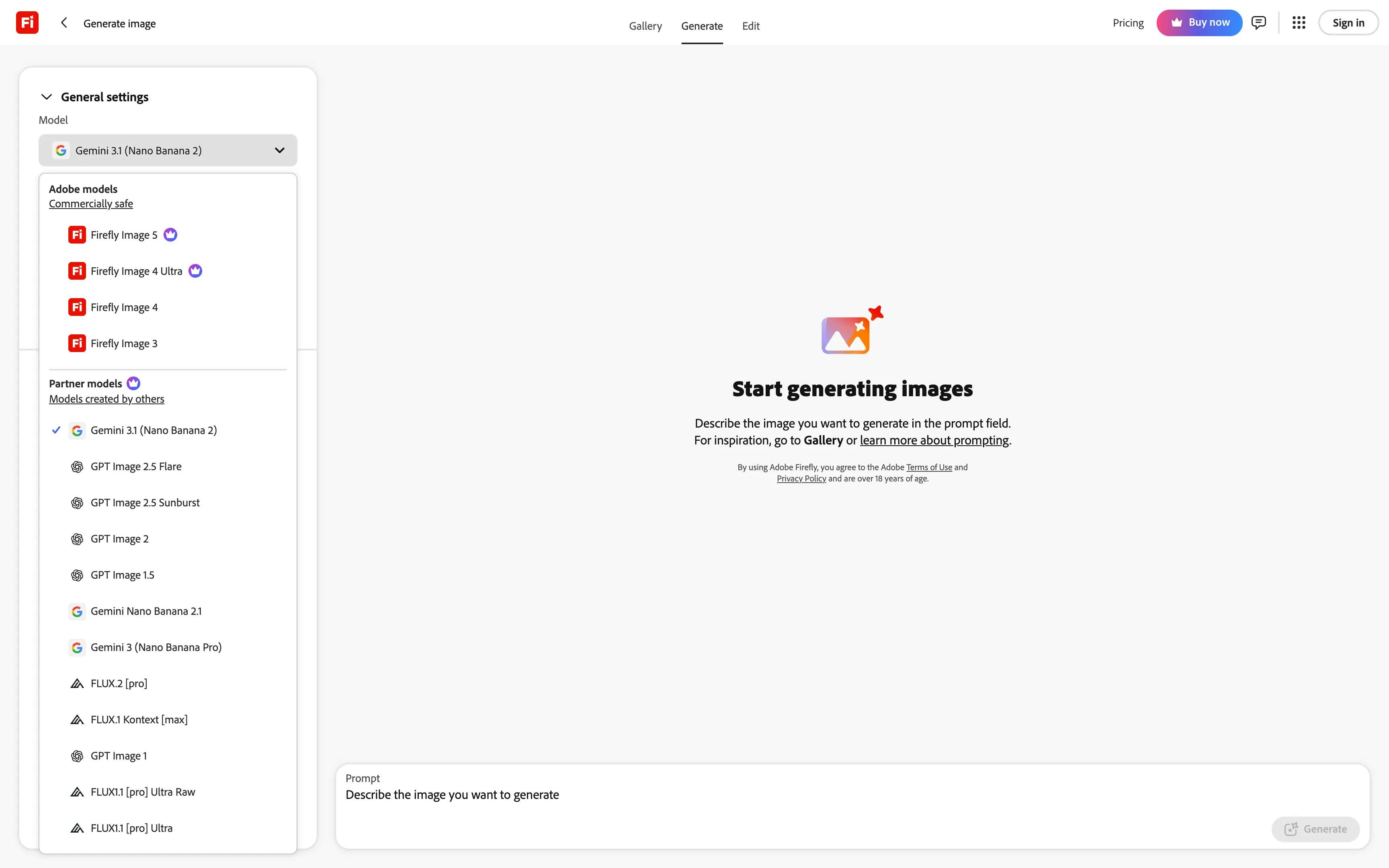
Adobe Firefly is the best Krea AI alternative for commercial work. Adobe trains Firefly models on licensed content and labels them "Commercially safe", which is important if you make ads or work with clients. In the model list, Adobe keeps its own models separate from partner models made by other developers:
If you work in Photoshop, you can also use Generative Fill and other Firefly features on paid plans without spending credits, as many times as you need.
Firefly also has tools similar to Krea's canvas and nodes. On every plan, including the free one, you get Firefly Boards, where you collect references and generate ideas on one board. And on the Pro Plus plan, there's Firefly Graph (beta), where you build AI workflows from connected steps, like in Krea's Node Editor.
Price:
| Plan | Monthly | Credits a month |
|---|---|---|
| Standard | $9.99 | 2,000 |
| Pro | $19.99 | 4,000 |
| Pro Plus | $49.99 | 10,000 |
On Pro and Pro Plus, you also get unlimited image generations on some models for the first year. Until December 6, Pro is 50% off and Pro Plus is 60% off for the first six months. These are US prices without tax.
Best forDesigners who work in Adobe apps and need images they can safely use in commercial projects.
Pros
- Commercially safe Adobe models
- Generative Fill without credits on paid plans
- Boards and Graph for visual workflows
Cons
- Unlimited generations last only for the first year
- Unused credits don't roll over
5. Midjourney
Midjourney is the best Krea AI alternative if you want a distinctive art style. It has only its own models, and with the latest one, V8.2, you can generate images in native 2K using the --hd parameter.
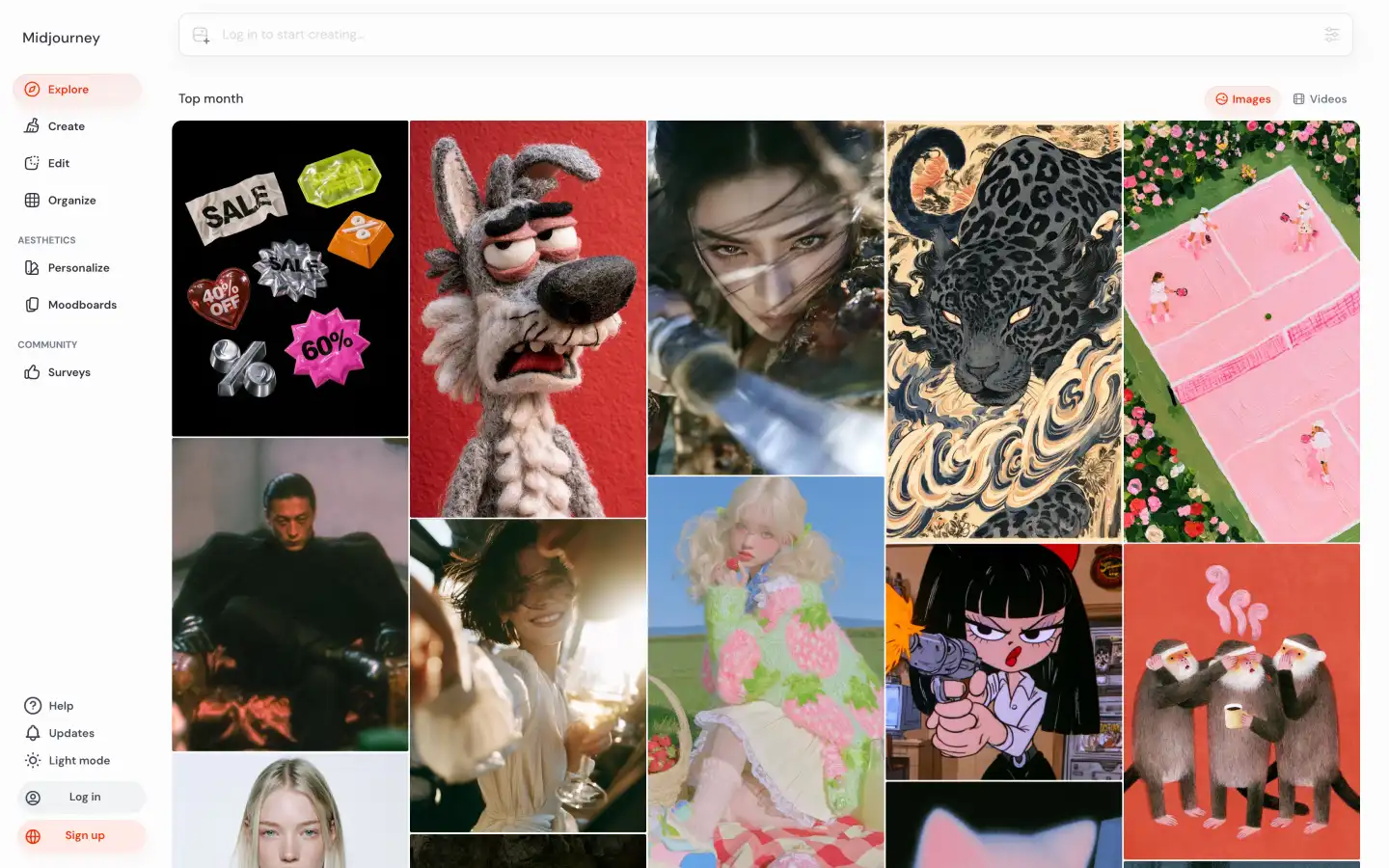
On the Standard plan, you also get unlimited image generations in Relax mode. In this mode, you wait longer for each image, although you don't spend your Fast hours, so you can make as many variations of an idea as you need.
Price:
| Plan | Monthly | Yearly, per month | Fast hours a month |
|---|---|---|---|
| Basic | $10 | $8 | 3.3 |
| Standard | $30 | $24 | 15 |
| Pro | $60 | $48 | 30 |
| Mega | $120 | $96 | 60 |
Midjourney doesn't have a free plan, though. On Basic and Standard, your images are public, and to hide them, you need Stealth mode on the Pro or Mega plan.
Best forArtists and designers who want images in a distinctive art style and make many variations of each idea.
Pros
- A distinctive style of its own models
- Unlimited Relax mode from the Standard plan
Cons
- No free plan
- Images are public below the Pro plan
6. Ideogram
Ideogram is the best Krea AI alternative for images with text, like posters, ads and social media banners. Ideogram built its Ideogram 4.5 model for readable text inside images, so you don't have to fix the lettering in another app.
For brand assets, Ideogram also has apps like Generate Vector and Vectorize Image, where you can turn a regular image into a vector one:
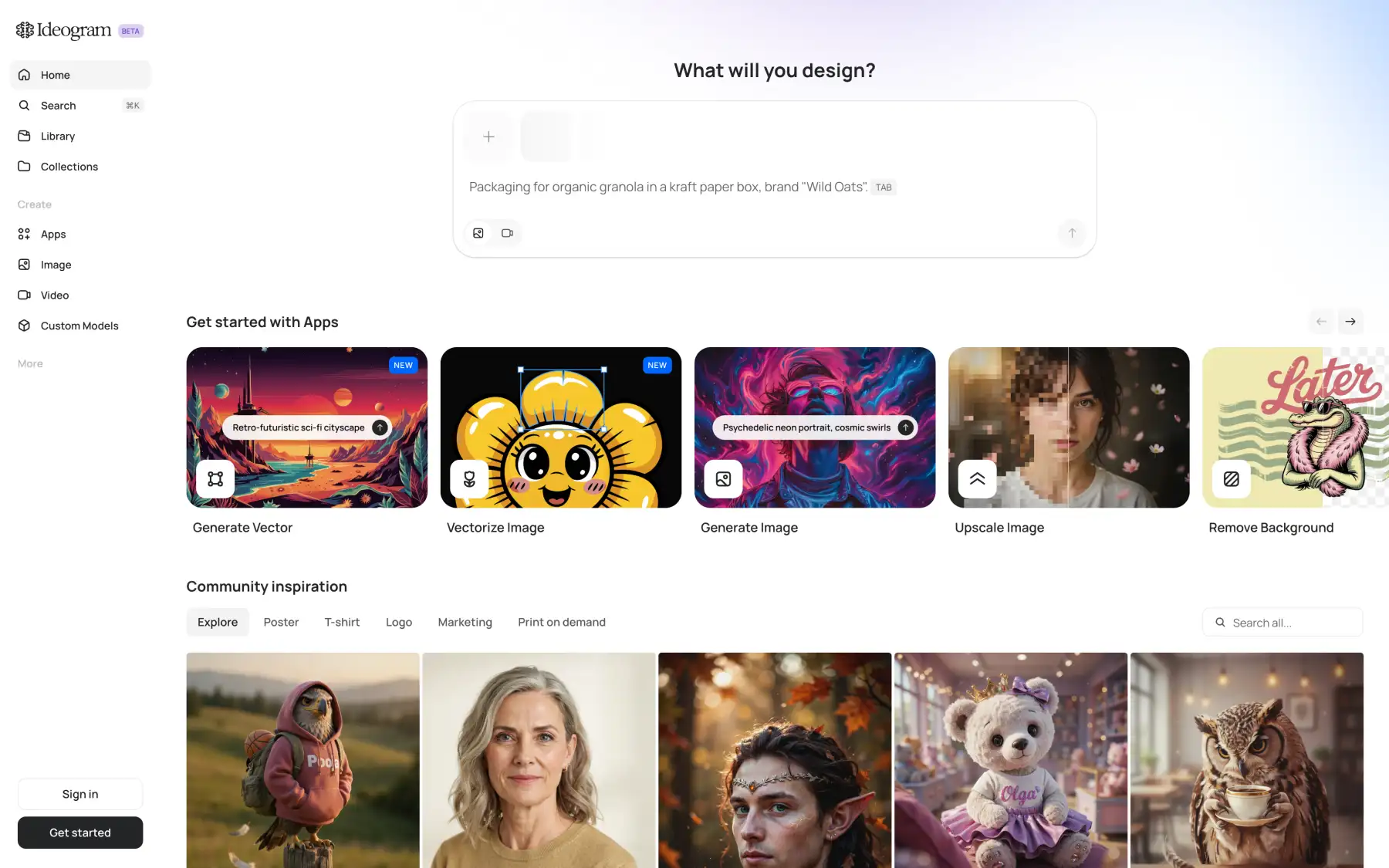
If you sign up with Google or Apple, you get free credits to try Ideogram, although you won't get any if you sign up with email. After that, you can pay as you go without a subscription: an Ideogram 4.5 image in Low quality costs 3 credits, or 3 cents.
On the Plus plan, you also get unlimited slow credits, so once you've spent your monthly priority credits, you can keep generating with Ideogram models in a slower queue.
Price:
| Plan | Monthly | Yearly, per month | Priority credits a month |
|---|---|---|---|
| Plus | $20 | $15 | 2,400 |
| Pro | $60 | $42 | 7,500 |
| Team | $30 per user | $20 per user | 3,600 per user |
Best forMarketers and designers who make posters, ads and banners with text on them.
Pros
- Readable text in images with Ideogram 4.5
- Unlimited slow credits on paid plans
- Pay as you go without a subscription
Cons
- No free credits for email sign-ups
- No editing or image references with slow credits
7. Recraft
Recraft is the best Krea AI alternative for vector graphics. When you enlarge a regular AI image, you lose quality, which is a problem for logos and icons. With Recraft V4.1 Vector, you create vector images instead, so you can scale them to any size.
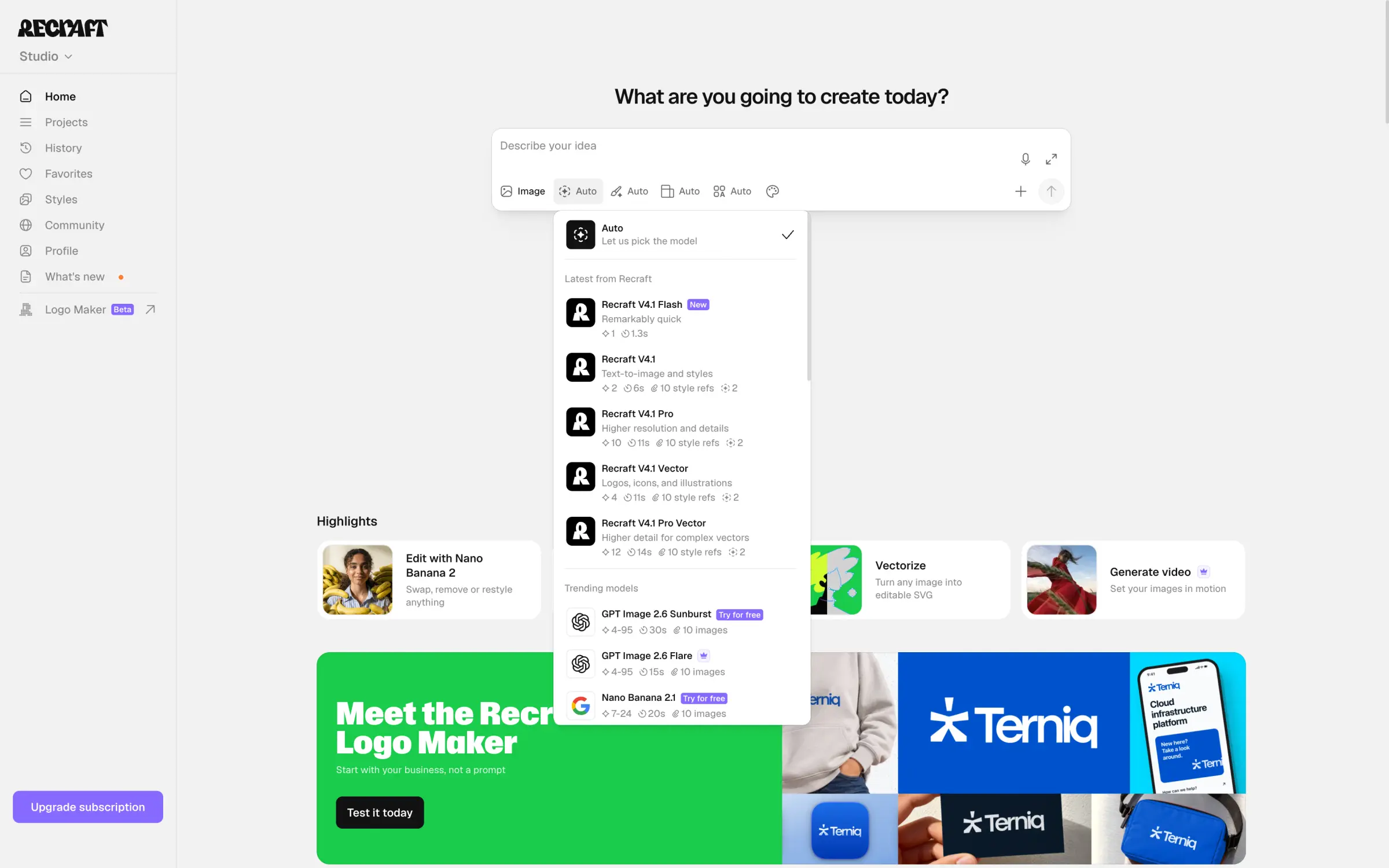
On the free plan, though, you can use only Recraft's own models, and your images are public. To keep them private and use them in commercial projects, you need the Basic plan, where you also get models from other developers, like Nano Banana and GPT Image.
Price:
| Plan | Monthly | Yearly, per month | Credits a month |
|---|---|---|---|
| Basic | $12 | $10 | 1,000 |
| Pro | $20 | $16 | 2,000 |
Best forDesigners who create logos, icons and illustrations that need to scale.
Pros
- Vector images with Recraft V4.1 Vector
- Models from other developers from the Basic plan
Cons
- Free images are public and not for commercial use
- Only Recraft models on the free plan
8. Kling AI
Kling AI is Kuaishou's own app for its Kling models. In Kling AI, Kling 4.0 videos cost about a third less than on Krea, and Kuaishou releases new Kling versions and features there first.
With Kling 4.0, you can generate up to 30 seconds in one go with keyframes, so you don't have to stitch a longer scene from several clips. The app also has Motion Control and Lip Sync:
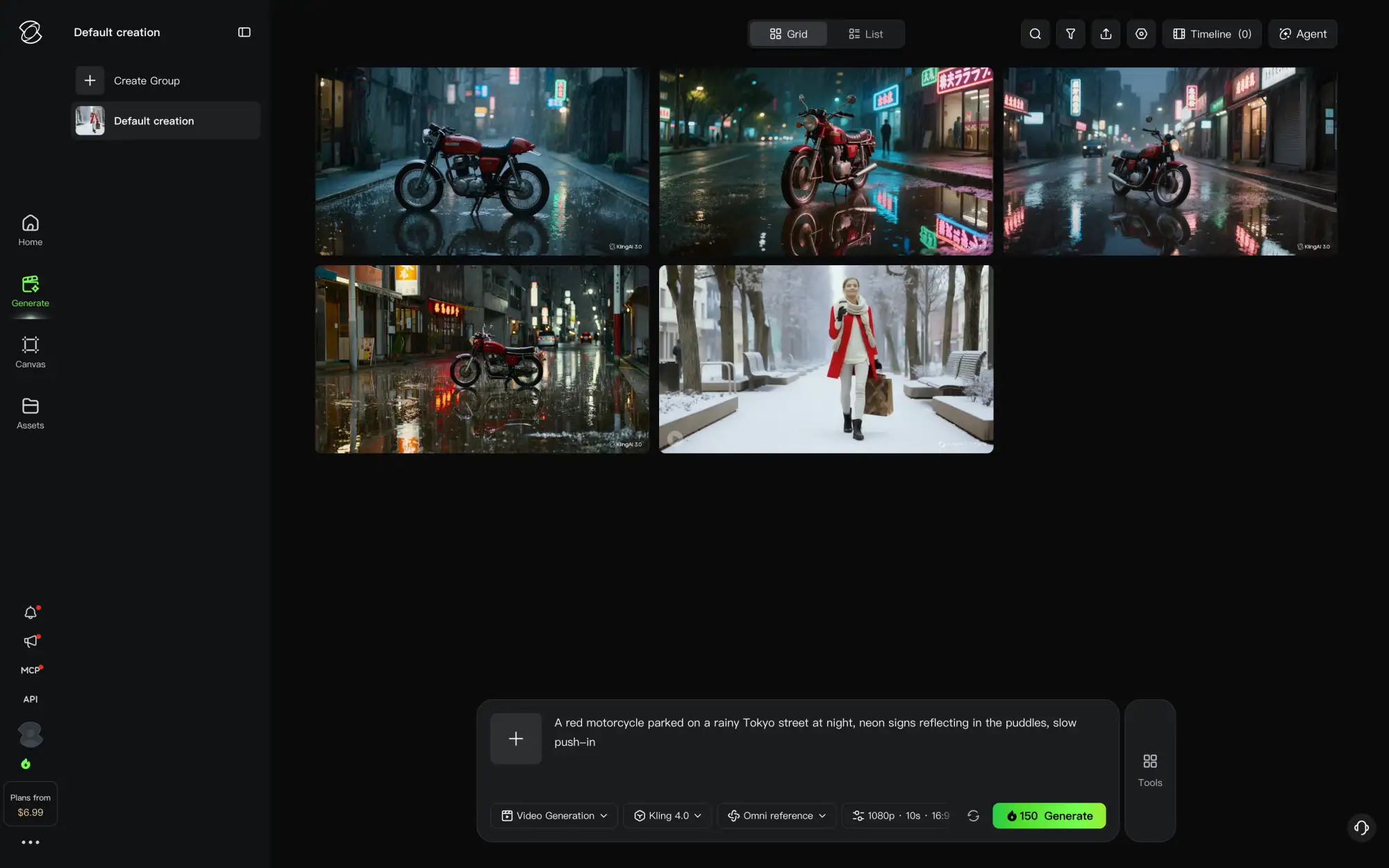
However, Kling AI has only Kling models, so you'll need another app for images with GPT Image or Nano Banana. What's more, you have only 31 days to use your plan credits, and Kling doesn't refund payments for plans and credit packs.
Price:
| Plan | Monthly | Yearly, per month | Credits a month |
|---|---|---|---|
| Standard | $8.80 | $6.60 | 660 |
| Pro | $32.56 | $24.42 | 3,000 |
| Premier | $181.99 | $136.67 | 18,000 |
Best forCreators who mostly make videos with Kling 4.0 and want to pay less for them.
Pros
- Kling 4.0 for about a third less than on Krea
- Up to 30 seconds in one generation, plus Motion Control
Cons
- Only Kling models
- Payments aren't refundable
9. Dreamina
Dreamina is ByteDance's AI image and video app (ByteDance is a Chinese tech company and the developer of the Seedance and Seedream families of models).
Seedance 2.5 videos are generally expensive, but Dreamina has smart features to offset that, such as the Seedance 2.5 Draft mode, in which you can generate 480p videos first and pay for the full video only if you like the preview. Or, you can use Seedance 2.5 Flash, which is faster and cheaper:

In Dreamina, you get free credits every day, but images and videos you download on the free plan have an AI watermark.
Price:
| Plan | Monthly | Credits a month |
|---|---|---|
| Basic | $15 | 1,575 |
| Standard | $49 | 3,885 |
| Advanced | From $99 | 8,645 |
These are US prices at the time of writing.
Best forCreators who work mostly with ByteDance models and want to try their new versions first.
Pros
- New Seedream and Seedance versions first
- 480p drafts before the full video
Cons
- Free downloads have a watermark
- No models from other developers like Kling or GPT Image
10. ComfyUI
ComfyUI is the best Krea AI alternative if you want to run Krea's model on your own computer. In June 2026, Krea published the weights of Krea 2 Raw and Krea 2 Turbo on Hugging Face, so you can generate Krea 2 images in ComfyUI on a good graphics card without paying for units.
In ComfyUI, you build a workflow from connected nodes, like in Krea's Node Editor. For example, you can put generation, editing and upscaling into one workflow and run it again with a new prompt.
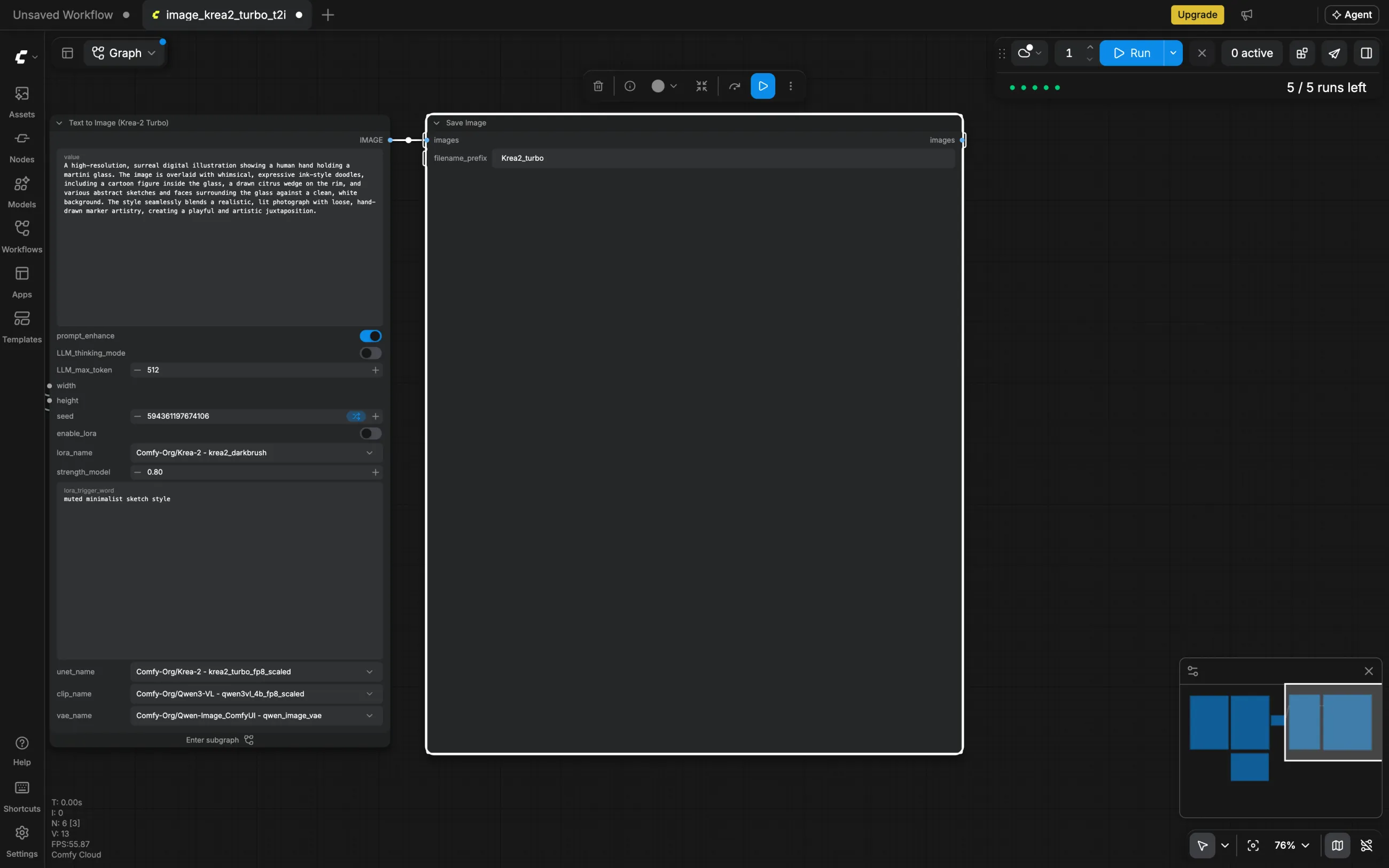
Or, if you don't have a graphics card, you can run the same workflows in Comfy Cloud. However, Krea 2 has its own community license, so check its terms before you use the images commercially.
Price:
| Plan | Monthly | Yearly, per month |
|---|---|---|
| Desktop app | Free | Free |
| Comfy Cloud Standard | $20 | $16 |
| Comfy Cloud Creator | $35 | $28 |
| Comfy Cloud Pro | $100 | $80 |
Best forTechnical creators with a graphics card who want to run Krea 2 and build their own workflows.
Pros
- Free Krea 2 on your own computer
- Node workflows for multi-step tasks
Cons
- You need a good graphics card or a Comfy Cloud plan
- Setup takes more time than in a web app
FAQ
Below are answers to the most common questions about Krea AI and its alternatives.
Overchat AI is the best Krea AI alternative. On the free plan, you can use GPT Image 2.6, Nano Banana 2.1 and other popular image models, and on paid plans, you also get video models like Kling 4.0 and Seedance 2.5 in the same app.
On Krea's free plan, you get 100 compute units every day. You can spend them on Krea's own models, a few open models and the Realtime canvas, but the free plan has no commercial license. Paid plans start at $9 a month, or $5.25 a month with yearly billing.
In Overchat AI, you get 100 free credits a day for models like GPT Image 2.6 and Nano Banana 2.1. In Leonardo AI, you get 150 tokens a day with its Auto model, and Dreamina refills its free credits daily. The ComfyUI desktop app is free, and you can run Krea 2 in it on your own graphics card. Overchat AI and Leonardo AI are also among the best free AI image generators in 2026.
Magnific is better for upscaling, because in its Creative mode, you choose how much new detail to add and how much of the original to keep. However, Krea is better if you work on its Realtime canvas. If you mostly sketch on it, Leonardo AI's Realtime Canvas is the closest replacement.
You need a paid plan for commercial use. On Basic, Pro, Max, Business and Enterprise, you get a commercial license for images, videos and other content, including ads and client work. The free plan doesn't include it.
No, on the Basic, Pro and Max plans, Krea resets your compute units every month. You can carry them over only on the Business and Enterprise plans, and extra unit packs are valid for 90 days.
You can run Krea 2 locally. Krea published the weights of Krea 2 Raw and Krea 2 Turbo on Hugging Face, and you can use them in ComfyUI. Krea 3 has no public weights, so you can use it only in Krea and through APIs like fal and Replicate.
Magnific is the closest alternative to the Krea Enhancer for adding detail while upscaling. Or, if you only need a higher resolution, you can use Overchat AI's photo upscaler or one of the other free AI image upscalers we've compared.