11 Best DeepAI Alternatives Compared (2026)
DeepAI won't let you pick an image model, and Pro gives only 30 messages a month with top models. We compared 11 DeepAI alternatives by price and features.

DeepAI lets you chat with AI and generate images for free without signing up. However, you can't choose which model generates your images, and the $9.99 a month Pro plan includes only 30 messages with top models like Claude Opus 5.5. So we made a list of the 11 best DeepAI alternatives and compared them on price, free plan, models and features.
What is DeepAI?
DeepAI is an all-in-one AI platform launched in 2016. It combines AI chat, image, video and music generation, and voice chat in one place. It also has an AI photo editor, a background remover, a website builder in beta and a separate desktop coding app called DeepAI Code.
You can use most of DeepAI for free without an account. However, the free plan limits how many messages you can send to models like Claude Haiku 5.5 and GPT-6 Luna, and how many HD images you can generate.
DeepAI Pro costs $9.99 a month, or $7.50 a month with annual billing. It removes ads and gives you the following monthly allowances:
| DeepAI Pro allowance | Per month |
|---|---|
| Standard chat messages | 2,000 |
| Genius chat messages (GPT-6.1 Sol, Gemini 3.8 Flash, Grok 4.3 and others) | 250 |
| Super Genius chat messages (Claude Opus 5.5, Gemini 4 Argon, GPT-6 Astra, Claude Fable 5) | 30 |
| HD images | 500 |
| Genius images | 60 |
| Super Genius 2K images | 10 |
| HD video | 25 seconds |
| Hollywood Mode 2K video | 8 seconds |
| AI songs | 100 |
Once you use up your monthly allowance, you can pay for extra generations and messages from a prepaid wallet. For example, a Genius image costs $0.08, a Super Genius 2K image costs $0.25, a Super Genius chat message costs $0.06, and each extra second of HD video costs $0.20.
Why look for a DeepAI alternative?
1. You can't choose a specific image model
DeepAI's image generator lets you choose between three modes: HD, Genius and Super Genius. You can also select "Very Old", "Old" or "Current" in the Preference menu, but DeepAI doesn't tell you which AI model powers each option:
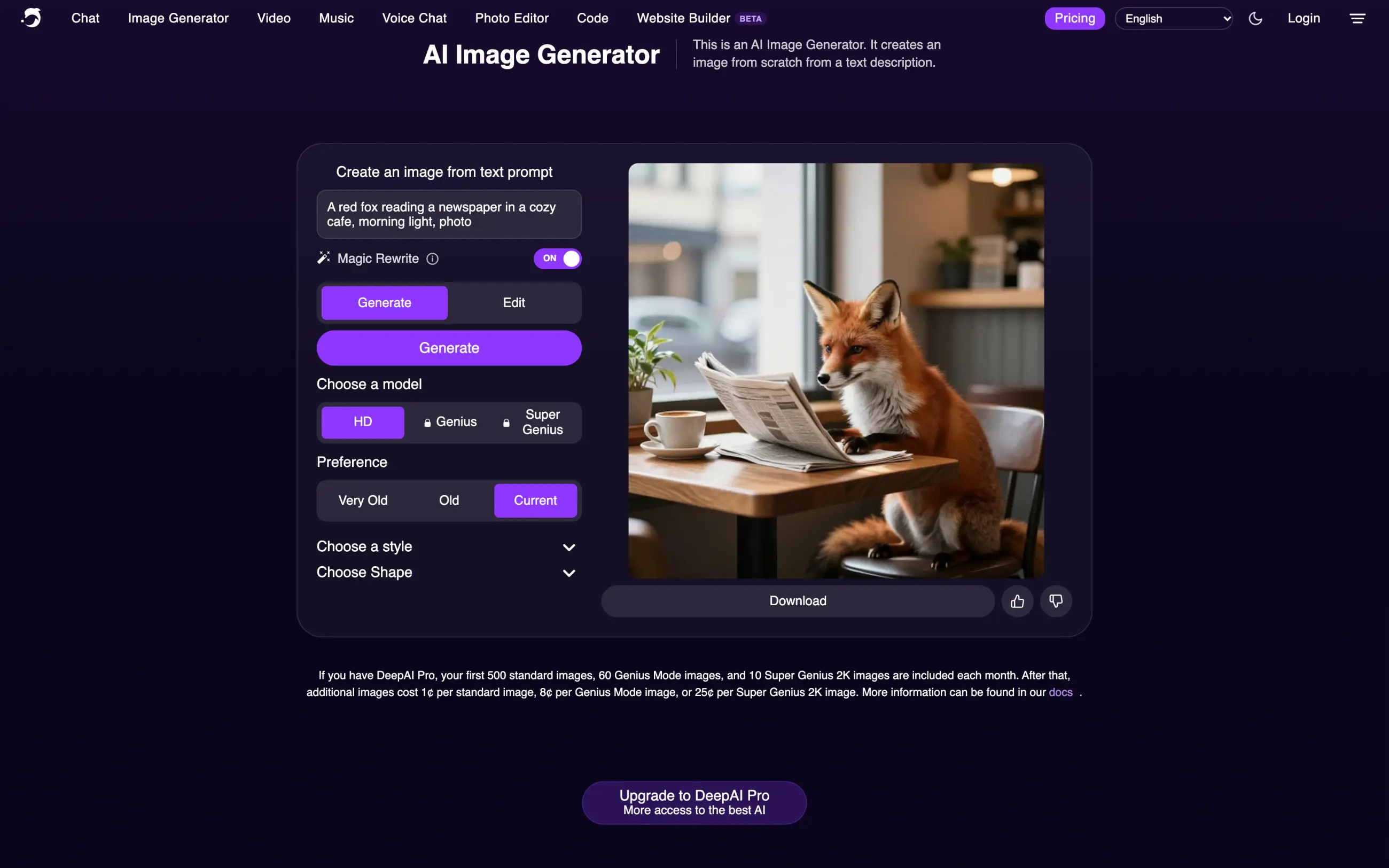
This makes it harder to choose the right model for your task. For example, GPT Image 2.6 is good at generating text and complex layouts, while Nano Banana 2.1 can edit photos while keeping faces consistent. On DeepAI, you can't choose either model directly or compare their capabilities. What's more, Genius and Super Genius image generation aren't available on the free plan.
2. Only 30 messages a month with top models
DeepAI offers Claude Opus 5.5, GPT-6 Astra, Gemini 4 Argon and other AI chat models. However, the $9.99 a month Pro plan gives you only 30 Super Genius messages a month shared across these models.
That's about one message a day. If you use Claude Opus 5.5 for coding and send five messages a day, you'll use up your allowance in six days. After that, each extra Super Genius message costs $0.06 from your prepaid wallet.
Video generation has similar limits. You get 25 seconds of HD video a month, enough for two 10-second clips. Each extra second costs $0.20, so another 10-second video will cost $2.
3. Ads and no chat memory on the free plan
DeepAI's free plan includes ads and doesn't support chat memory or live web browsing. This means the AI can't remember information from your previous conversations or search the web for up-to-date answers.
Private generations are also a Pro feature, so you don't get the same privacy options on the free plan.
4. Conflicting information about image ownership
DeepAI's homepage says you get "full ownership of everything you create". However, the FAQ under its image generator says that generated images are "considered public domain and hence, they have no owner".
DeepAI allows commercial use, but these two statements make it unclear what rights you have over your images. If you're generating images for clients or commercial projects, you may prefer a tool with clearer licensing terms.
How we tested DeepAI alternatives
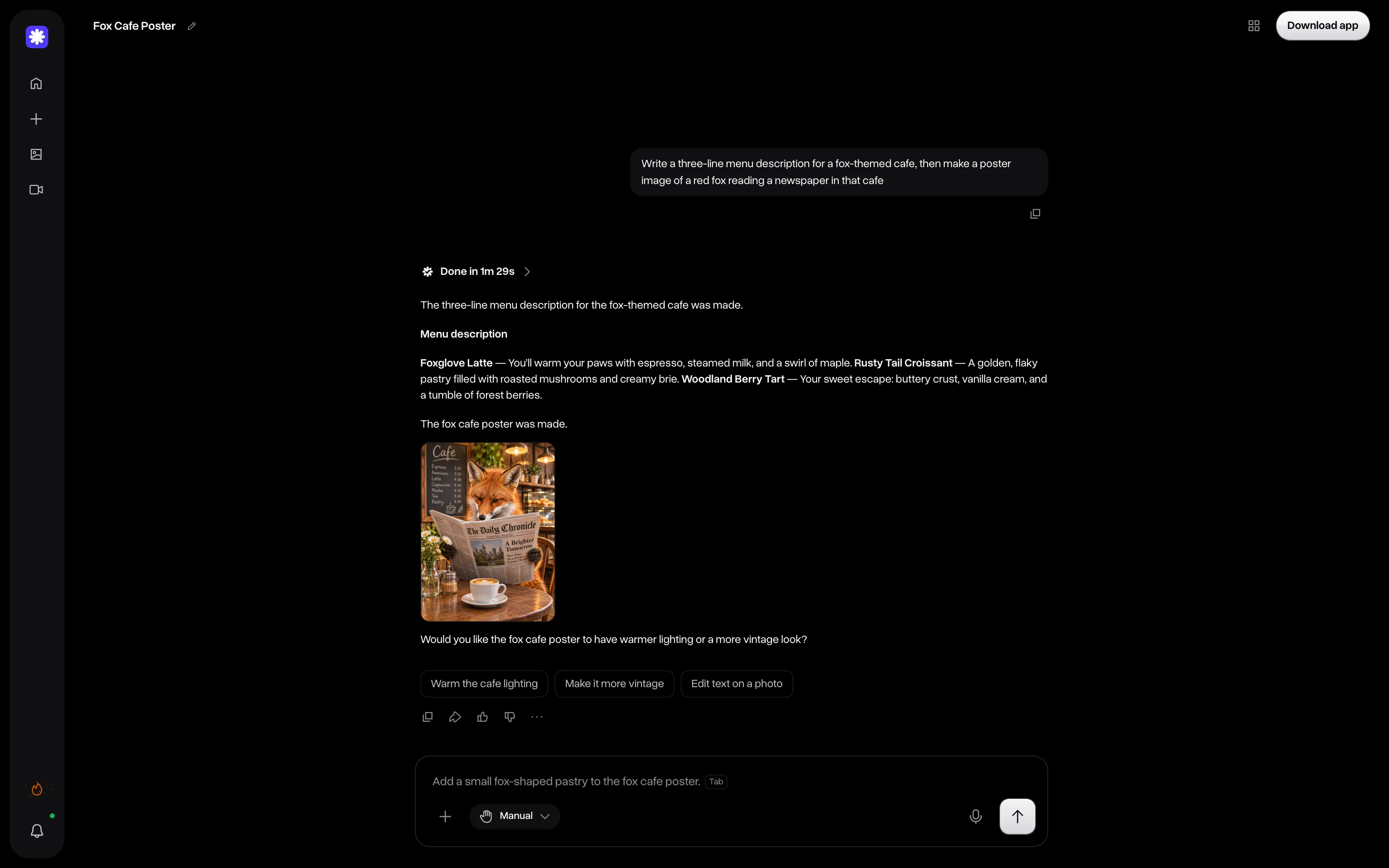
We gave DeepAI and each alternative the same two tasks: write a three-line menu description for a fox-themed cafe and generate a poster of a red fox reading a newspaper inside it.
We also compared their free plans, available models and generation limits, using pricing information from the official websites in November 2026.
DeepAI alternatives at a glance
Overchat AI, ChatGPT, Gemini, Poe and Copilot cover chat and images like DeepAI, and the other six apps are image generators.
| App | Chat | Images | Video | Free plan | Paid plans from | Best for |
|---|---|---|---|---|---|---|
| Overchat AI | ✅ | ✅ | ✅ | 100 credits a day | $15/month | Chat, images and video with named models in one app |
| ChatGPT | ✅ | ✅ | ❌ | Unlimited GPT-6 chats, limited images | $7/month (Go) | Everyday chat and image edits |
| Google Gemini | ✅ | ✅ | ✅ | Flash-Lite, Nano Banana with a Google account | $4.99/month (AI Plus) | Nano Banana images and Google apps |
| Poe | ✅ | ✅ | ✅ | Daily points | $4.99/month | Chat with many named models |
| Microsoft Copilot | ✅ | ✅ | ❌ | Free with a Microsoft account | $19.99/month (Microsoft 365 Premium) | Free images in Bing Image Creator |
| Leonardo AI | ❌ | ✅ | ✅ | 150 tokens a day, Auto model | $12/month | Creators who need image and video tools |
| Ideogram | ❌ | ✅ | ❌ | Pay as you go, 1¢ per credit | $20/month | Text and logos in images |
| Midjourney | ❌ | ✅ | ✅ | ❌ | $10/month | Art and stylized images |
| Adobe Firefly | ❌ | ✅ | ✅ | Limited daily generations | $9.99/month | Commercially safe images |
| Craiyon | ❌ | ✅ | ✅ | Limited images, no account | Supporter plan | Free images without an account |
| Stable Diffusion | ❌ | ✅ | ❌ | Free open weights | Free under $1M revenue | Running a model on your own computer |
1. Overchat AI
Overchat AI is our all-in-one AI platform that brings chat, image and video models from different developers into one app. Like DeepAI, it lets you do all three in one place, but unlike DeepAI, you can see exactly which model you're using, whether it's GPT-6.1 Sol or Claude Opus 5.5 for chat, or GPT Image 2.6 and Nano Banana 2.1 for images.
Overchat AI opens in Superchat, an AI agent that automatically picks models for different parts of your request. We asked it to write a three-line menu for a fox-themed cafe and create a poster of a red fox reading a newspaper. Superchat used GPT-6.1 Sol for the menu and GPT Image 2.6 Flare for the poster. It showed us the model and cost in credits before each step and asked for approval:
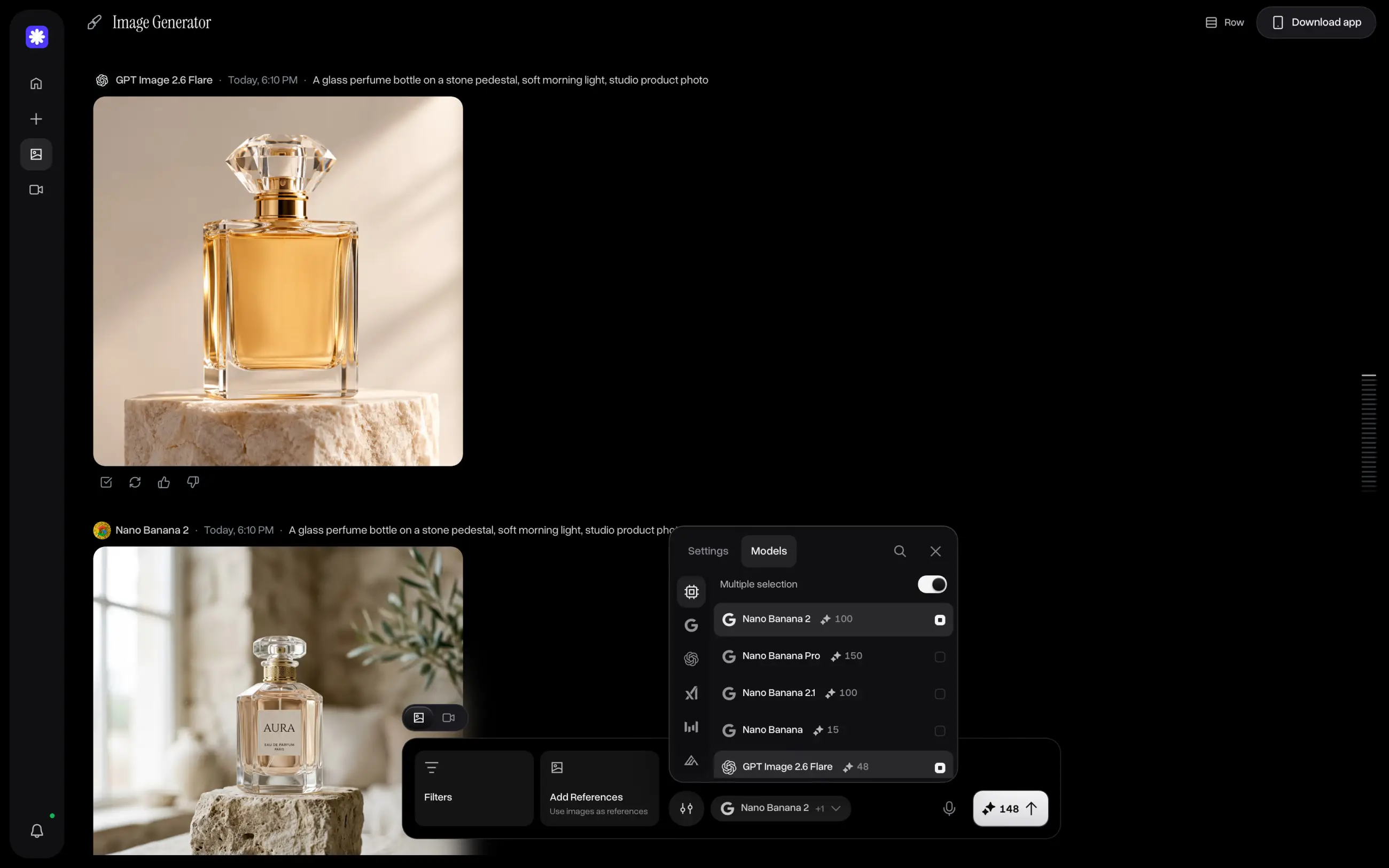
You can also pick models yourself in the AI image generator. The free plan includes GPT Image 2.6, Nano Banana 2.1, Seedream 4, Flux 3 and other models, with prices in credits shown next to each one. With Multiple selection, you can generate images with up to four models at once and compare the results side by side:
Overchat AI also has an AI video generator with Kling 4.0, Seedance 2.5 and other video models, as well as AI chat with models from OpenAI, Anthropic and Google. Your generated images and videos are saved in My Media, so you can create a poster in chat and then animate it with a video model.
Price:
The free plan gives you 100 credits a day, and you can earn more with streaks. Paid plans include monthly credits you can use across different models:
| Plan | Monthly | Yearly, per month | Credits a month |
|---|---|---|---|
| Mini | $15 | $7.50 | 7,000 |
| Pro | $29 | $14.50 | 15,000 |
| Max | $59 | $29.50 | 35,000 |
| Ultra | $119 | $59.50 | 80,000 |
You can try full access to Overchat for $1.99 before you subscribe.
Best forPeople who want to use chat, image and video models from different developers in one app, with control over which model they use.
Pros
- Named AI models and prices in credits before generation
- Superchat automatically selects models and asks for approval before spending credits
- GPT Image 2.6 and Nano Banana 2.1 on the free plan
Cons
- Requires an account, even on the free plan
- Unused subscription credits don't roll over
2. ChatGPT
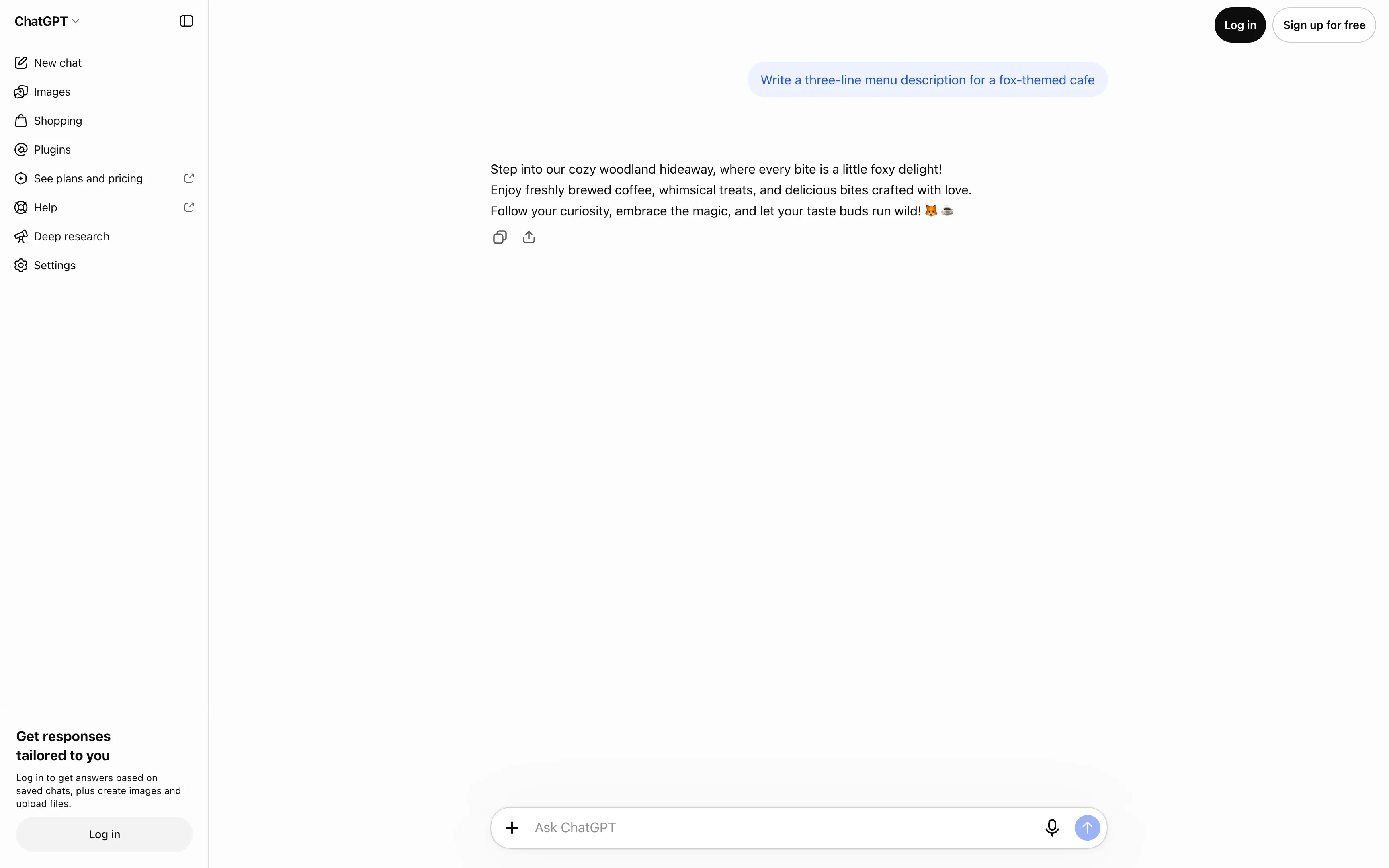
ChatGPT is OpenAI's AI chatbot for writing, research, coding and image generation. Like DeepAI, it works without an account for text chats. We tested it with our fox-themed cafe prompt while signed out, and it generated the three-line menu. However, when we asked it to create a poster, ChatGPT required us to log in:
ChatGPT's free plan gives you access to GPT-6 for everyday chats, although usage limits apply to some features. Unlike DeepAI, you can't switch between models from different developers, but you get features like web search, image editing and coding tools in the same chat.
Price: Go costs $7 a month and may include ads, Plus costs $20 a month, and Pro starts at $118 a month with access to GPT-6 Astra and higher usage limits.
Best forWriting, research, coding and editing images in one chat.
Pros
- Free GPT-6 access
- Text chat without an account
Cons
- OpenAI models only
- You need an account to generate images
- Go may include ads
3. Google Gemini
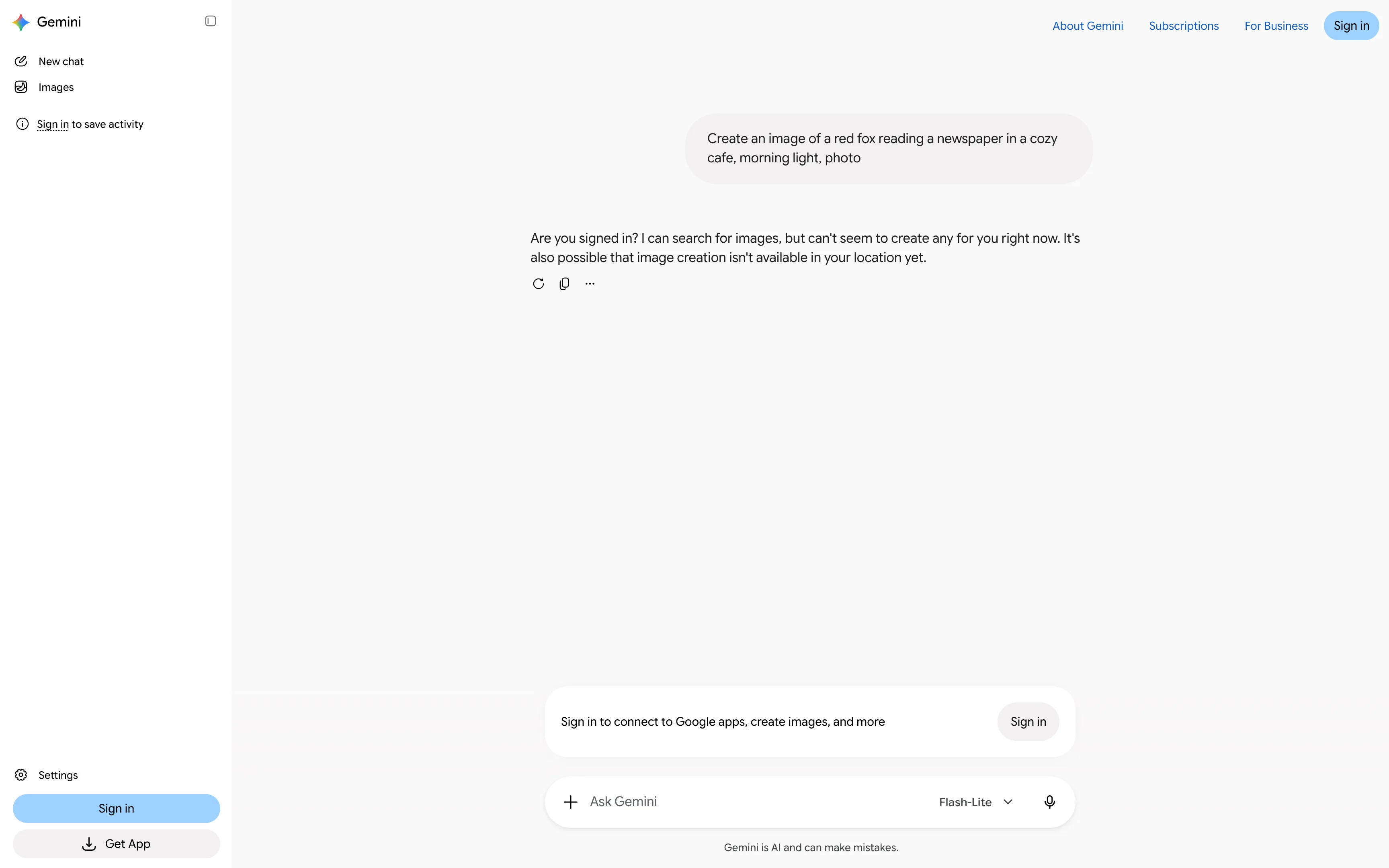
Google Gemini lets you chat with Google's AI models and generate or edit images with Nano Banana for free. However, unlike DeepAI, you need an account to create images. When we tried our fox poster prompt without signing in, Gemini refused to generate the image and asked us to log in:
With a free Google account, you also get Deep Research and Gemini Live. Paid plans give you access to more powerful models, including Gemini 4 Hydrogen and Gemini 4 Argon, as well as video generation and Gemini in Gmail and Google Docs.
Price: Google AI Plus costs $4.99 a month, Pro costs $19.99 a month and Ultra starts at $99.99 a month. Prices vary by country.
Best forFree Nano Banana image generation and editing, especially if you use Google apps.
Pros
- Free image generation and editing with Nano Banana
- Affordable entry plan with access to video generation
Cons
- Requires a Google account to generate images
- Google models only
4. Poe
Poe brings AI models from OpenAI, Anthropic, Google, xAI and other developers into one chat app. Unlike DeepAI, it lets you choose specific models, including GPT-6 Astra, Claude Opus 5.5, Gemini 4 Argon and Grok 4.7:
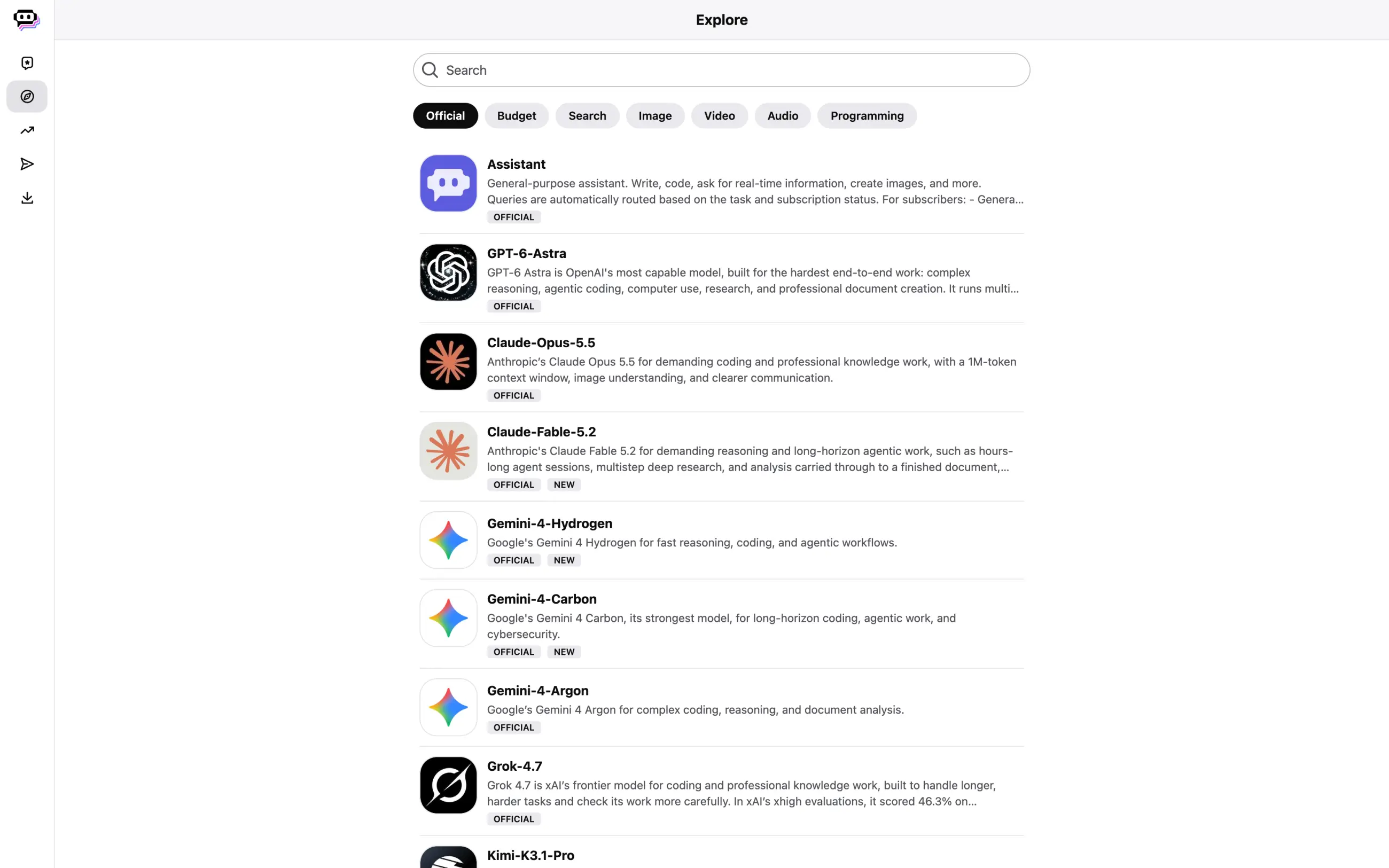
Instead of limiting you to 30 messages with top models, like DeepAI Pro, Poe uses points for every message. Each model has its own price, so you can spend all your points on Claude Opus 5.5, for example, rather than splitting your allowance between different models.
Poe also has bots for image, video and audio generation, and lets you build your own chatbot with a custom prompt.
Price: The free plan gives you a limited number of points each day. Paid plans start at $4.99 a month, while Premium costs $19.99 a month.
Best forTrying different AI chat models and comparing their answers.
Pros
- Named models with prices in points
- Image, video and audio generation
Cons
- Requires an account
- Top models can use up points quickly
5. Microsoft Copilot
Microsoft Copilot is a free AI chatbot that also works inside Windows and Microsoft 365 apps. For images, Microsoft has a separate Bing Image Creator with ready-made templates and editing tools, including background removal and image expansion:
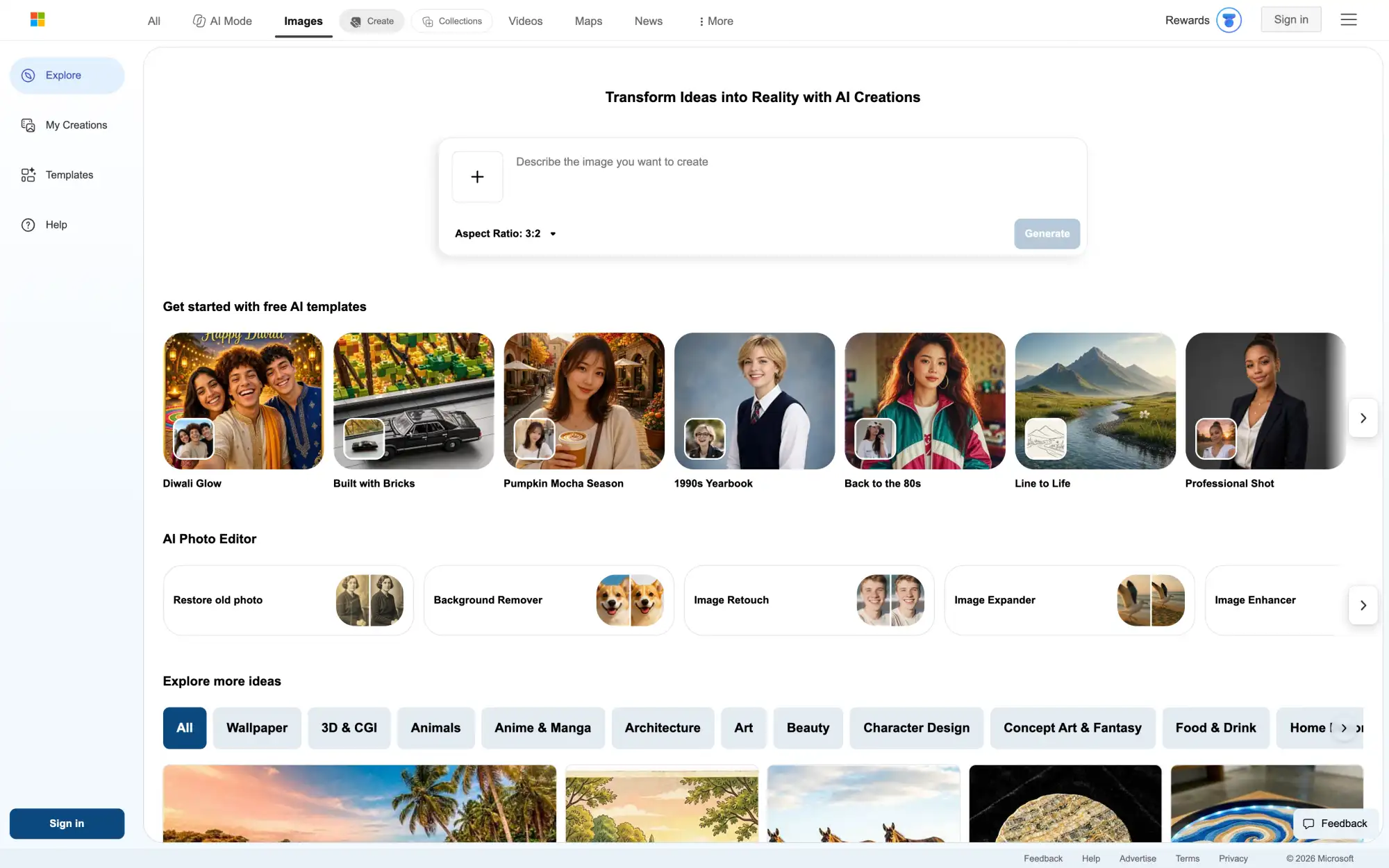
You can browse Bing Image Creator without signing in, but you'll need a Microsoft account to generate images or chat with Copilot. Both are free. If you use Word, Excel or Outlook, paid Microsoft 365 plans also give you Copilot features inside these apps and higher image generation limits.
Price: Copilot and Bing Image Creator are free with a Microsoft account. Microsoft 365 Premium costs $19.99 a month and includes higher Copilot usage limits.
Best forFree AI image generation and using AI in Microsoft 365 apps.
Pros
- Free image generation and photo editing
- Copilot in Windows and Microsoft 365
Cons
- Requires a Microsoft account
- No option to choose an image model
6. Leonardo AI
Leonardo AI is an AI image and video generator with tools for upscaling, image editing and training custom models. It also has Blueprints, ready-made workflows for tasks like creating logos and restoring old photos.
However, Leonardo's free plan has a similar restriction to DeepAI: you can't choose your image model. The app says free users generate with the Auto model and need to upgrade to access its 80+ models:
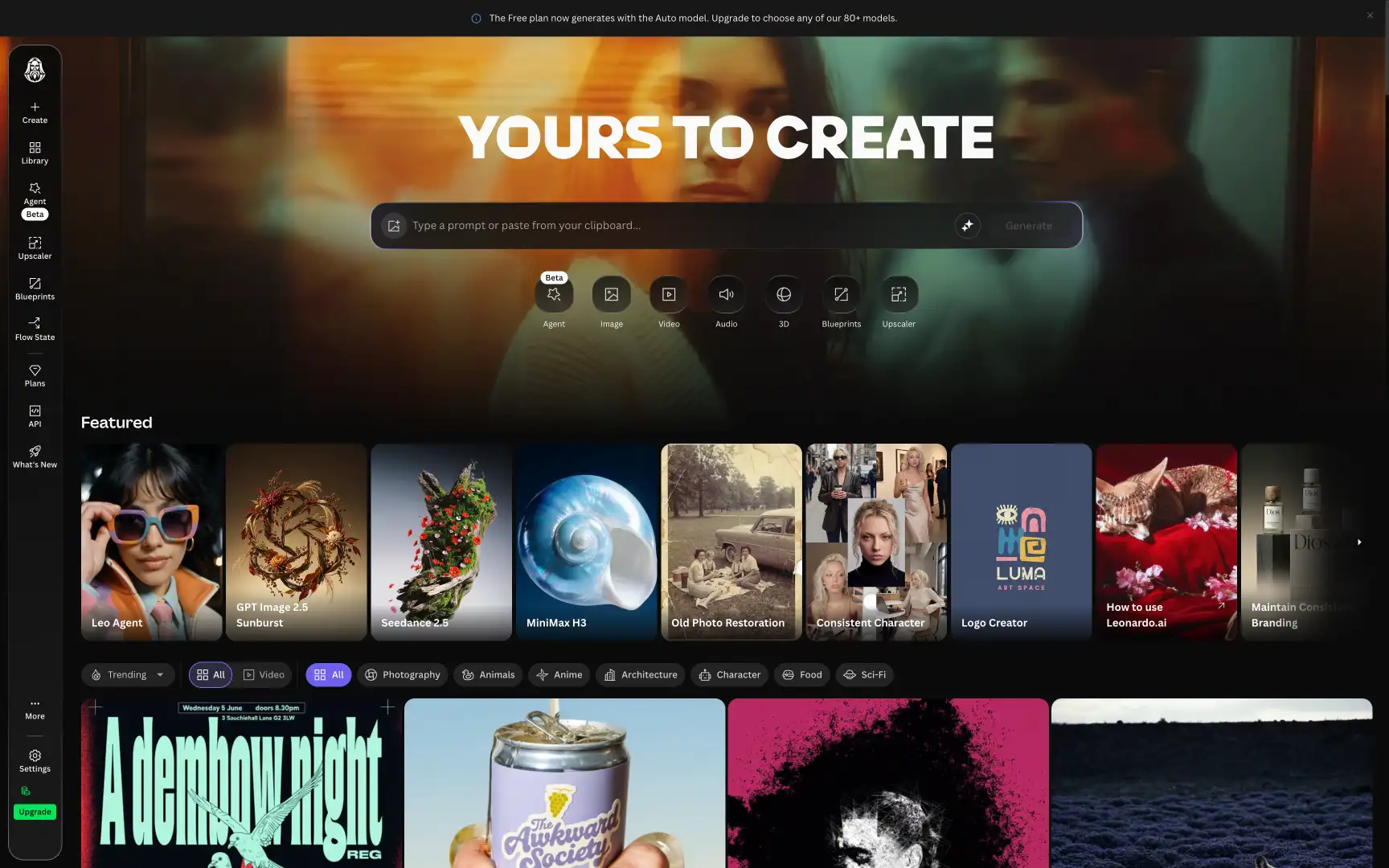
On paid plans, you can choose models like GPT Image, Seedance and Leonardo's own Lucid Origin and Phoenix. You can also train models on your images. Keep in mind that images generated on the free plan are public.
Price: The free plan gives you 150 tokens a day. Essential costs $12 a month, or $10 a month with annual billing.
Best forImage generation, editing and custom model training in one app.
Pros
- 150 free tokens a day
- Blueprints for common design tasks
Cons
- Auto model only on the free plan
- Free generations are public
7. Ideogram
Ideogram is an AI image generator that's particularly good at putting readable text into images. This makes it useful for posters, logos, T-shirt designs and other graphics where spelling matters.
Along with image generation, Ideogram has tools for creating vector graphics, converting images to vectors, upscaling and removing backgrounds:
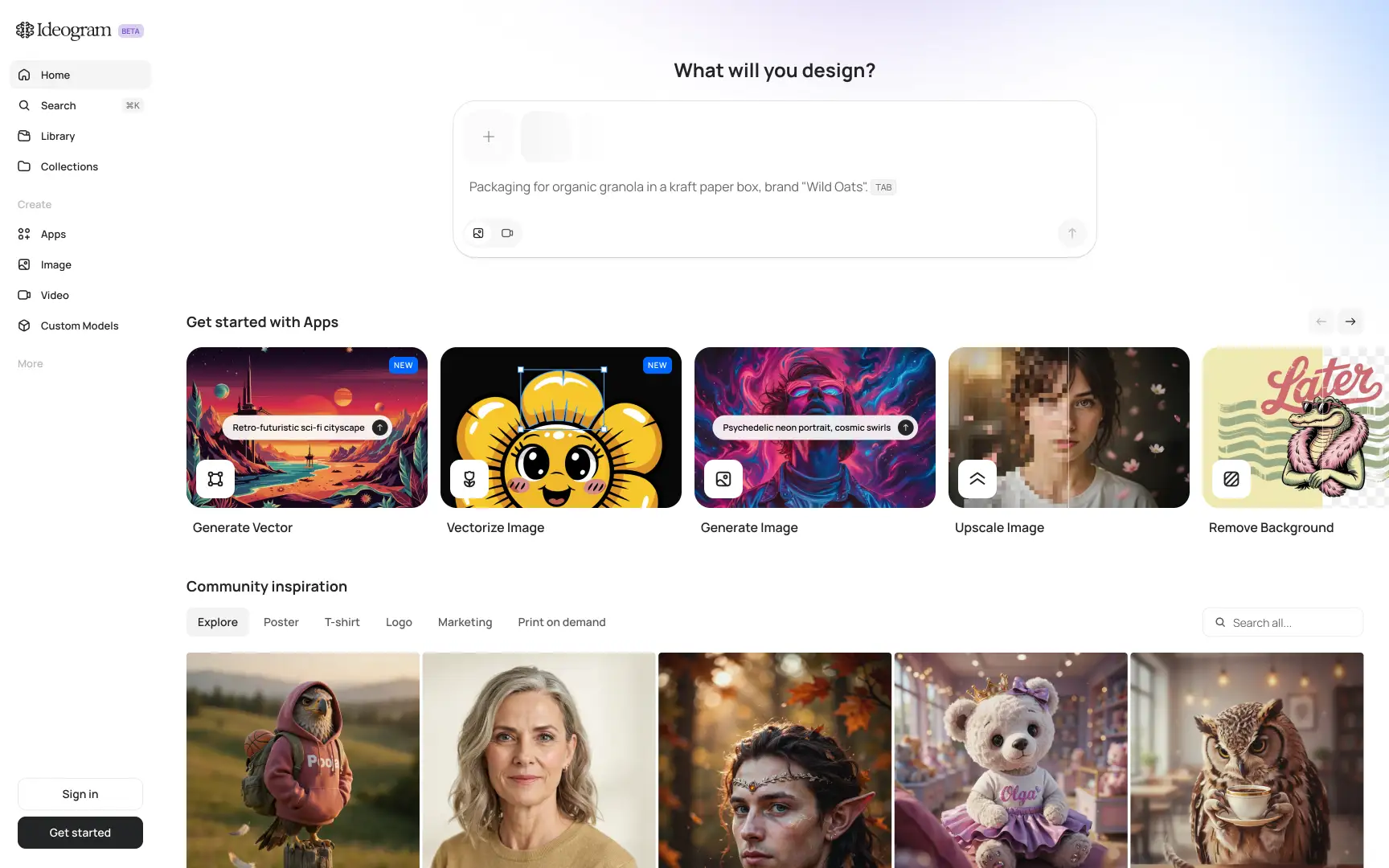
Unlike DeepAI, Ideogram no longer offers free generations. You can buy credits for $0.01 each or subscribe for priority credits, unlimited slow generations and private images.
Price: Plus costs $20 a month, or $15 a month with annual billing. Pro costs $60 a month.
Best forPosters, logos and other designs that include text.
Pros
- Good at generating readable text
- Vector generation, upscaling and background removal
Cons
- No free plan
- No AI chat or video generation
8. Midjourney
Midjourney is an AI image generator known for its distinctive artistic style. It can turn short prompts into detailed illustrations with dramatic lighting and composition. You can also browse images made by other users in its Explore feed and reuse their prompts:

Midjourney V8.2 can generate native 2K images with the --hd parameter, while DeepAI Pro limits you to 10 Super Genius 2K images a month. Midjourney also lets you animate generated images with its video model.
Price: There's no free plan. Basic costs $10 a month, or $8 with annual billing. Standard costs $30 a month and includes unlimited Relax mode for images. For private generations, you need Pro ($60) or Mega ($120) with Stealth mode enabled.
Best forIllustrations, concept art and stylized images.
Pros
- Distinctive artistic results, even with short prompts
- Native 2K image generation
Cons
- No free plan
- Images are public on Basic and Standard
9. Adobe Firefly
Adobe Firefly is worth considering if you're concerned about DeepAI's unclear image ownership terms. Adobe trains its own Firefly models on licensed content, including Adobe Stock, and labels them "Commercially safe" in the model selector. Models from Google, OpenAI and other partners appear in a separate list:
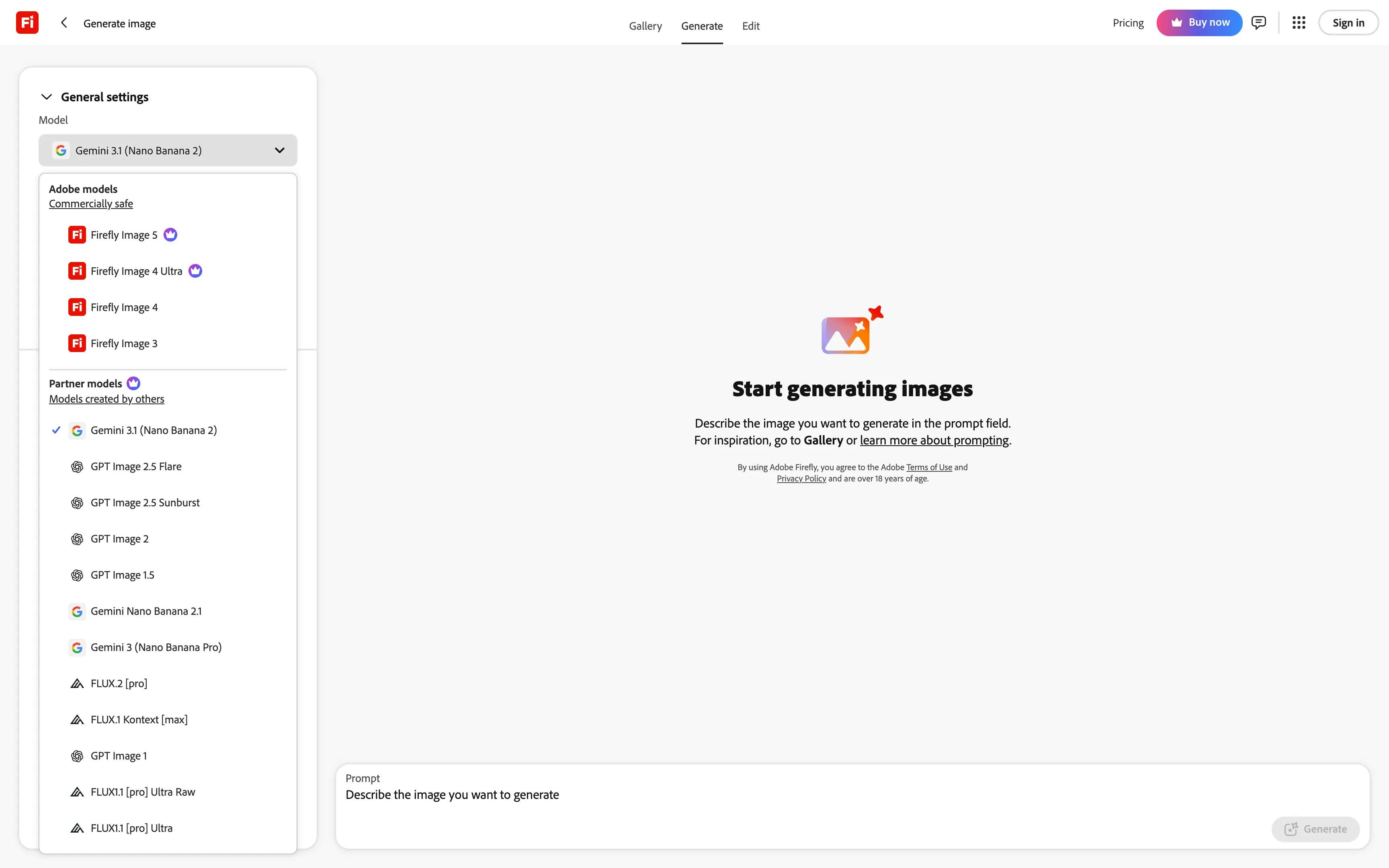
Adobe's models are designed for commercial use, although this doesn't guarantee that every generated image is free of copyright or trademark issues. Firefly also works with Photoshop and Adobe Express, so you can generate an image and continue editing it with tools like Generative Fill.
Price: The free plan includes a limited number of generations. Standard costs $9.99 a month with 2,000 credits, and Pro costs $19.99 a month with 4,000 credits.
Best forCommercial design work, especially if you already use Photoshop or Adobe Express.
Pros
- Adobe models trained on licensed content
- Integration with Photoshop and Adobe Express
Cons
- Limited free generations
- Unused credits don't roll over
10. Craiyon
Craiyon is one of the few DeepAI alternatives that still lets you generate images for free without signing up. It started as DALL·E mini in 2022 and now has its own image generator with style and aspect ratio options:

Craiyon also has presets for logos and coloring pages, a photo editor, and tools for converting images to SVG or video. However, free generations are public and watermarked. You also need to credit Craiyon when using free images commercially.
Price: You can generate a limited number of images for free. Paid Supporter, Professional and Ultra plans offer unlimited image generation without watermarks, private images and monthly editing credits. Payments are non-refundable.
Best forGenerating quick images for free without creating an account.
Pros
- Free image generation without signing up
- Image editing and SVG export
Cons
- Free images are public and watermarked
- No option to choose a specific AI model
11. Stable Diffusion
Stable Diffusion is a family of open-weight image models that you can download and run on your own computer. Stable Diffusion 3.5 Large, released in October 2024, has 8 billion parameters and is available on Hugging Face after you accept the license:
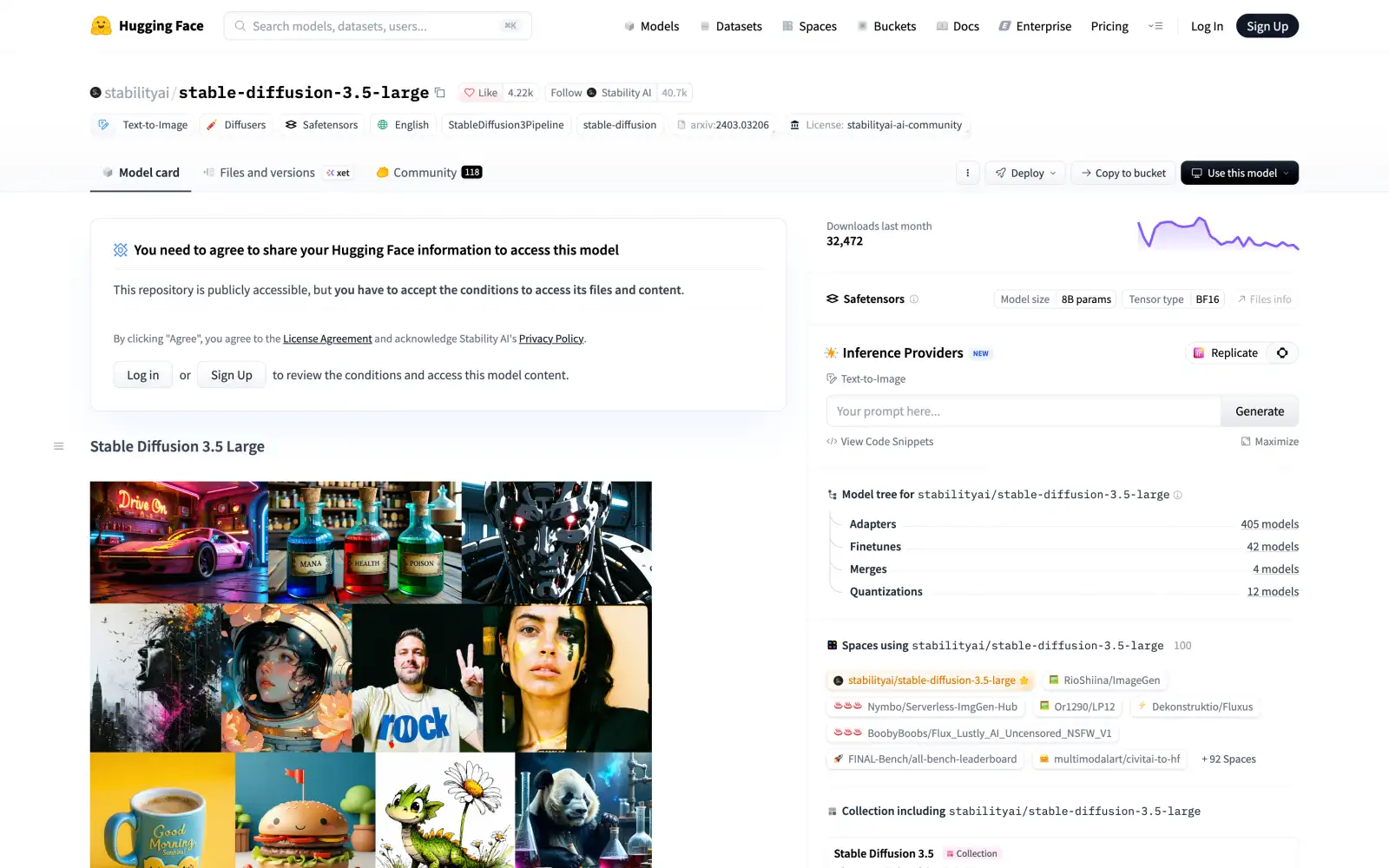
Unlike DeepAI, running Stable Diffusion locally doesn't require an account, credits or a monthly subscription. Your prompts and images also stay on your computer. However, you'll need compatible hardware and an app like ComfyUI or DiffusionBee to run the models.
You can also use community fine-tunes and adapters to generate images in different styles or train the model for specific subjects.
Price: Free under the Stability AI Community License for individuals and businesses with less than $1 million in annual revenue, subject to the license terms.
Best forPrivate image generation without subscription fees or generation limits.
Pros
- Local image generation without credits or monthly limits
- Community models and adapters for different styles
Cons
- Local setup requires compatible hardware and some technical knowledge
- Stable Diffusion 3.5 was released in October 2024
Which DeepAI alternative should you choose?
If you want to replace DeepAI with one app for chat, images and video, we'd recommend Overchat AI. It gives you access to models from different developers, shows their prices in credits and lets Superchat choose models for multi-step tasks. You can also try GPT Image 2.6 and Nano Banana 2.1 with 100 free credits a day.
For images with readable text, try Ideogram. Adobe Firefly is worth considering for commercial design work, while Craiyon is a good option if you want to generate images for free without signing up.
FAQ
Yes, you can use DeepAI without an account, but free chats and HD image generations are limited, and the site shows ads. Genius and Super Genius modes, video generation, memory and web browsing require DeepAI Pro, which costs $9.99 a month.
DeepAI has been operating since 2016, but private generations are only available on Pro. If you're using the free plan, avoid uploading confidential documents or sharing sensitive information in your prompts.
DeepAI's image generator FAQ says its images are public domain and have no owner, although the homepage promises full ownership of your creations. Commercial use is allowed, but the conflicting statements make it unclear what exclusive rights, if any, you receive.
Overchat AI gives you 100 free credits a day to try chat, image and video models, including GPT Image 2.6 and Nano Banana 2.1. If you prefer to generate images without creating an account, try Craiyon.