


About Kimi K3.1 Pro
Kimi K3.1 Pro is a large language model from Moonshot AI, released on October 23, 2026. It is the first model of the Kimi K3.1 series and a further-trained version of Kimi K3: the same mixture-of-experts model with 2.8 trillion parameters, 104 billion of them active for each token, with much more reinforcement learning on top.
Moonshot built it for long, multi-step work: coding in game engines and Three.js, 3D and CAD scripts for Blender and FreeCAD, financial research and office documents. It always reasons before it answers, reads images and video as well as text and keeps up to 1 million tokens in context.
Moonshot plans to publish the weights by November 4, 2026. On Overchat AI, Kimi K3.1 Pro is in the same chat as GPT-6, Claude, Gemini and other models, so you can switch to another model without starting a new conversation.
- Developer
- Moonshot AI
- Released
- Oct 23, 2026
- Parameters
- 2.8T, 104B active
- Context window
- 1M tokens
- Input
- Text, images, video
- Output
- Text
See how Kimi K3.1 Pro answers
Write a Blender Python script that builds a simple wooden chair: four legs, a seat and a backrest. Put every size in centimeters as a variable at the top, and give the parts a wood material.
Run this in Blender’s Scripting workspace. It uses meters internally, while all chair dimensions are defined in centimeters at the top.
import bpy

# =========================================================
# CHAIR DIMENSIONS — all measurements are in centimeters
# =========================================================
LEG_THICKNESS_CM = 4.0
LEG_HEIGHT_CM = 45.0       # Floor to underside of seat
LEG_INSET_CM = 1.0         # Distance from seat edge to leg's outer face

SEAT_WIDTH_CM = 45.0
SEAT_DEPTH_CM = 45.0
SEAT_THICKNESS_CM = 4.0

BACKREST_WIDTH_CM = 45.0
BACKREST_THICKNESS_CM = 3.0
BACKREST_HEIGHT_CM = 40.0

EDGE_BEVEL_CM = 0.25
BEVEL_SEGMENTS = 3

CM_TO_METERS = 0.01


# Display Blender's measurements in centimeters.
scene = bpy.context.scene
scene.unit_settings.system = 'METRIC'
scene.unit_settings.length_unit = 'CENTIMETERS'
scene.unit_settings.scale_length = 1.0


# Remove only a chair generated by a previous run of this script.
old_collection = bpy.data.collections.get("Wooden Chair")
if old_collection:
    for obj in list(old_collection.objects):
        bpy.data.objects.remove(obj, do_unlink=True)
    bpy.data.collections.remove(old_collection)

chair_collection = bpy.data.collections.new("Wooden Chair")
scene.collection.children.link(chair_collection)


def create_wood_material():
    """Create a simple procedural wood material."""
    material = bpy.data.materials.new("Chair Wood")
    material.use_nodes = True
    material.diffuse_color = (0.42, 0.20, 0.07, 1.0)

    nodes = material.node_tree.nodes
    links = material.node_tree.links
    nodes.clear()

    output = nodes.new("ShaderNodeOutputMaterial")
    shader = nodes.new("ShaderNodeBsdfPrincipled")
    shader.inputs["Roughness"].default_value = 0.4

    tex_coord = nodes.new("ShaderNodeTexCoord")
    mapping = nodes.new("ShaderNodeMapping")
    noise = nodes.new("ShaderNodeTexNoise")
    color_ramp = nodes.new("ShaderNodeValToRGB")

    # Stretch the noise to suggest wood grain.
    mapping.inputs["Scale"].default_value = (4.0, 4.0, 0.35)
    noise.inputs["Scale"].default_value = 4.0
    noise.inputs["Detail"].default_value = 3.0
    noise.inputs["Roughness"].default_value = 0.65

    color_ramp.color_ramp.elements[0].position = 0.2
    color_ramp.color_ramp.elements[0].color = (0.12, 0.04, 0.012, 1.0)
    color_ramp.color_ramp.elements[1].position = 0.8
    color_ramp.color_ramp.elements[1].color = (0.52, 0.27, 0.09, 1.0)

    links.new(tex_coord.outputs["Generated"], mapping.inputs["Vector"])
    links.new(mapping.outputs["Vector"], noise.inputs["Vector"])
    links.new(noise.outputs["Fac"], color_ramp.inputs["Fac"])
    links.new(color_ramp.outputs["Color"], shader.inputs["Base Color"])
    links.new(shader.outputs["BSDF"], output.inputs["Surface"])

    return material


wood_material = create_wood_material()


def add_box(name, dimensions_cm, center_cm):
    """Add a wooden rectangular part using centimeter-based inputs."""
    bpy.ops.mesh.primitive_cube_add(size=1.0, location=(0.0, 0.0, 0.0))
    obj = bpy.context.object
    obj.name = name

    obj.dimensions = tuple(
        value * CM_TO_METERS for value in dimensions_cm
    )
    bpy.ops.object.transform_apply(
        location=False,
        rotation=False,
        scale=True
    )
    obj.location = tuple(
        value * CM_TO_METERS for value in center_cm
    )

    # Move the part into the chair collection.
    for collection in list(obj.users_collection):
        collection.objects.unlink(obj)
    chair_collection.objects.link(obj)

    obj.data.materials.append(wood_material)

    bevel = obj.modifiers.new("Rounded wooden edges", 'BEVEL')
    bevel.width = EDGE_BEVEL_CM * CM_TO_METERS
    bevel.segments = BEVEL_SEGMENTS

    return obj


# Four legs, with their top faces touching the underside of the seat.
leg_x = (
    SEAT_WIDTH_CM / 2.0
    - LEG_INSET_CM
    - LEG_THICKNESS_CM / 2.0
)
leg_y = (
    SEAT_DEPTH_CM / 2.0
    - LEG_INSET_CM
    - LEG_THICKNESS_CM / 2.0
)

for y_sign, row_name in ((-1, "Front"), (1, "Rear")):
    for x_sign, side_name in ((-1, "Left"), (1, "Right")):
        add_box(
            f"{row_name} {side_name} Leg",
            (LEG_THICKNESS_CM, LEG_THICKNESS_CM, LEG_HEIGHT_CM),
            (
                x_sign * leg_x,
                y_sign * leg_y,
                LEG_HEIGHT_CM / 2.0
            )
        )


# Seat.
seat_top_cm = LEG_HEIGHT_CM + SEAT_THICKNESS_CM

add_box(
    "Seat",
    (SEAT_WIDTH_CM, SEAT_DEPTH_CM, SEAT_THICKNESS_CM),
    (0.0, 0.0, LEG_HEIGHT_CM + SEAT_THICKNESS_CM / 2.0)
)


# Solid backrest, resting on the rear edge of the seat.
# Positive Y is the rear of the chair.
backrest_center_y_cm = (
    SEAT_DEPTH_CM / 2.0 - BACKREST_THICKNESS_CM / 2.0
)

add_box(
    "Backrest",
    (
        BACKREST_WIDTH_CM,
        BACKREST_THICKNESS_CM,
        BACKREST_HEIGHT_CM
    ),
    (
        0.0,
        backrest_center_y_cm,
        seat_top_cm + BACKREST_HEIGHT_CM / 2.0
    )
)


# Select the finished chair.
bpy.ops.object.select_all(action='DESELECT')
for obj in chair_collection.objects:
    obj.select_set(True)

print("Wooden chair created in the 'Wooden Chair' collection.")
Use Material Preview or Rendered view to see the procedural wood grain.
A SaaS company has $4.2M ARR, 18% annual churn, a customer acquisition cost of $1,900 and an average contract of $6,000 a year at a 78% gross margin. Work out LTV, LTV to CAC and CAC payback in months, then say in two sentences whether it should spend more on growth.
Assuming constant churn and no expansion revenue or discounting:
- Annual gross profit per customer: $6,000 × 78% = $4,680
- LTV: $4,680 ÷ 18% = $26,000 (implied average customer life: 5.56 years)
- LTV to CAC: $26,000 ÷ $1,900 = 13.7×
- CAC payback: $1,900 ÷ ($4,680 ÷ 12) = 4.9 months
Yes—these unit economics strongly support spending more on growth, assuming CAC is fully loaded and the churn and margin figures are reliable. Increase spend in measured steps while monitoring marginal CAC, retention, and cash constraints, since performance at higher spending levels may differ from these historical averages.
Write a single HTML file with Three.js that shows a low-poly island with a lighthouse whose light beam slowly rotates, gentle waves on the water and orbit controls. Keep it under 150 lines.
<!DOCTYPE html>
<html lang="en">
<head>
  <meta charset="UTF-8">
  <meta name="viewport" content="width=device-width, initial-scale=1.0">
  <title>Low-Poly Lighthouse Island</title>
  <style>
    html, body { margin: 0; height: 100%; overflow: hidden; }
    canvas { display: block; }
  </style>
  <script type="importmap">
    {
      "imports": {
        "three": "https://cdn.jsdelivr.net/npm/three@0.160.0/build/three.module.js",
        "three/addons/": "https://cdn.jsdelivr.net/npm/three@0.160.0/examples/jsm/"
      }
    }
  </script>
</head>
<body>
<script type="module">
  import * as THREE from 'three';
  import { OrbitControls } from 'three/addons/controls/OrbitControls.js';

  const scene = new THREE.Scene();
  scene.background = new THREE.Color(0xa7d5df);
  scene.fog = new THREE.Fog(0xa7d5df, 45, 105);

  const camera = new THREE.PerspectiveCamera(50, innerWidth / innerHeight, 0.1, 200);
  camera.position.set(18, 14, 23);

  const renderer = new THREE.WebGLRenderer({ antialias: true });
  renderer.setSize(innerWidth, innerHeight);
  renderer.setPixelRatio(Math.min(devicePixelRatio, 2));
  renderer.toneMapping = THREE.ACESFilmicToneMapping;
  document.body.appendChild(renderer.domElement);

  const controls = new OrbitControls(camera, renderer.domElement);
  controls.target.set(0, 4, 0);
  controls.enableDamping = true;
  controls.minDistance = 10;
  controls.maxDistance = 60;
  controls.maxPolarAngle = Math.PI / 2.05;
  controls.update();

  scene.add(new THREE.HemisphereLight(0xe8fbff, 0x415b50, 2));
  const sun = new THREE.DirectionalLight(0xfff0cf, 2.6);
  sun.position.set(-12, 20, 10);
  scene.add(sun);

  const mat = (color, options = {}) => new THREE.MeshStandardMaterial({
    color, roughness: 0.85, flatShading: true, ...options
  });
  function add(geometry, material, parent = scene) {
    const object = new THREE.Mesh(geometry, material);
    parent.add(object);
    return object;
  }

  // Faceted island and grassy top.
  const island = add(new THREE.CylinderGeometry(6.3, 8.5, 3, 9), mat(0x8b7355));
  island.position.y = 0.35;
  const grass = add(new THREE.CylinderGeometry(6.3, 6.5, 0.55, 9), mat(0x64834d));
  grass.position.y = 2;

  const rockMat = mat(0x6c7161);
  for (let i = 0; i < 6; i++) {
    const angle = i * 1.07 + 0.4, radius = 4.8 + (i % 2) * 0.5;
    const rock = add(new THREE.DodecahedronGeometry(0.35 + (i % 3) * 0.12), rockMat);
    rock.position.set(Math.cos(angle) * radius, 2.35, Math.sin(angle) * radius);
    rock.scale.y = 0.65;
  }

  // Lighthouse built from alternating tapered stripes.
  const house = new THREE.Group();
  house.position.y = 2.28;
  scene.add(house);
  const white = mat(0xf4eee0), red = mat(0xc94b42), dark = mat(0x33434a);
  const base = add(new THREE.CylinderGeometry(1.25, 1.4, 0.35, 12), dark, house);
  base.position.y = 0.175;

  for (let i = 0; i < 5; i++) {
    const height = 1.05, bottom = 1 - i * 0.06;
    const stripe = add(
      new THREE.CylinderGeometry(bottom - 0.06, bottom, height, 12),
      i % 2 ? red : white, house
    );
    stripe.position.y = 0.35 + height * (i + 0.5);
  }

  const door = add(new THREE.BoxGeometry(0.42, 0.75, 0.08), dark, house);
  door.position.set(0, 0.72, 1);
  const deck = add(new THREE.CylinderGeometry(1.15, 1.15, 0.18, 12), dark, house);
  deck.position.y = 5.68;
  const glass = add(new THREE.CylinderGeometry(0.68, 0.68, 1.05, 8),
    mat(0x9ed7dd, { transparent: true, opacity: 0.45, roughness: 0.15 }), house);
  glass.position.y = 6.3;
  const roof = add(new THREE.ConeGeometry(1.05, 0.7, 8), red, house);
  roof.position.y = 7.18;

  const bulb = add(new THREE.SphereGeometry(0.22, 8, 6),
    new THREE.MeshBasicMaterial({ color: 0xfff3a6 }), house);
  bulb.position.y = 6.3;
  const glow = new THREE.PointLight(0xffd978, 18, 15);
  glow.position.y = 6.3;
  house.add(glow);

  // A translucent cone with its apex at the lamp.
  const beamPivot = new THREE.Group();
  beamPivot.position.y = 6.3;
  house.add(beamPivot);
  const beamGeometry = new THREE.ConeGeometry(2.8, 14, 24, 1, true);
  beamGeometry.translate(0, -7, 0);
  const beam = add(beamGeometry, new THREE.MeshBasicMaterial({
    color: 0xfff2a0, transparent: true, opacity: 0.16,
    side: THREE.DoubleSide, depthWrite: false, blending: THREE.AdditiveBlending
  }), beamPivot);
  beam.rotation.z = Math.PI / 2;

  const waterGeometry = new THREE.PlaneGeometry(140, 140, 44, 44);
  waterGeometry.rotateX(-Math.PI / 2);
  const water = new THREE.Mesh(waterGeometry, new THREE.MeshPhongMaterial({
    color: 0x187f96, specular: 0x9edce6, shininess: 70,
    flatShading: true, transparent: true, opacity: 0.96
  }));
  scene.add(water);

  const clock = new THREE.Clock();
  function animate() {
    requestAnimationFrame(animate);
    const t = clock.getElapsedTime();
    beamPivot.rotation.y = t * 0.28;

    const positions = waterGeometry.attributes.position;
    for (let i = 0; i < positions.count; i++) {
      const x = positions.getX(i), z = positions.getZ(i);
      positions.setY(i, Math.sin(x * 0.45 + t * 1.2) * 0.09
                       + Math.cos(z * 0.38 + t) * 0.07);
    }
    positions.needsUpdate = true;
    waterGeometry.computeVertexNormals();
    controls.update();
    renderer.render(scene, camera);
  }
  animate();

  addEventListener('resize', () => {
    camera.aspect = innerWidth / innerHeight;
    camera.updateProjectionMatrix();
    renderer.setSize(innerWidth, innerHeight);
  });
</script>
</body>
</html>
More prompts to try with Kimi K3.1 Pro
Kimi K3.1 Pro vs other models
The same tests on every model, plus context, output and speed, one rival at a time.
| Spec | Kimi K3.1 Pro | Claude Opus 5.5 |
|---|---|---|
| Developer | Moonshot AI | Anthropic |
| Released | Oct 23, 2026 | Sep 22, 2026 |
| Context window? | 1M tokens | 1M tokens |
| Max output? | Up to 1M tokens | 128K tokens |
| Output speed? | 74 tokens/s | 96 tokens/s |
| Input | Text, images, video | Text, images, files |
| Spec | Kimi K3.1 Pro | GPT-6 Astra |
|---|---|---|
| Developer | Moonshot AI | OpenAI |
| Released | Oct 23, 2026 | Sep 3, 2026 |
| Context window? | 1M tokens | 1M tokens |
| Max output? | Up to 1M tokens | 128K tokens |
| Output speed? | 74 tokens/s | 58 tokens/s |
| Input | Text, images, video | Text, images, files |
| Spec | Kimi K3.1 Pro | Gemini 4 Argon |
|---|---|---|
| Developer | Moonshot AI | |
| Released | Oct 23, 2026 | Sep 30, 2026 |
| Context window? | 1M tokens | 1M tokens |
| Max output? | Up to 1M tokens | 1M tokens |
| Output speed? | 74 tokens/s | 79 tokens/s |
| Input | Text, images, video | Text, images, audio, video, files |
| Spec | Kimi K3.1 Pro | DeepSeek V4.1 Flash |
|---|---|---|
| Developer | Moonshot AI | DeepSeek |
| Released | Oct 23, 2026 | Oct 17, 2026 |
| Context window? | 1M tokens | 1M tokens |
| Max output? | Up to 1M tokens | 384K tokens |
| Output speed? | 74 tokens/s | 195 tokens/s |
| Input | Text, images, video | Text, images |
| Spec | Kimi K3.1 Pro | Qwen3.8 Max |
|---|---|---|
| Developer | Moonshot AI | Alibaba |
| Released | Oct 23, 2026 | Sep 2, 2026 |
| Context window? | 1M tokens | 1M tokens |
| Max output? | Up to 1M tokens | 131K tokens |
| Output speed? | 74 tokens/s | 42 tokens/s |
| Input | Text, images, video | Text, images, video |
| Spec | Kimi K3.1 Pro | GLM 5.3 |
|---|---|---|
| Developer | Moonshot AI | Z.ai |
| Released | Oct 23, 2026 | Aug 18, 2026 |
| Context window? | 1M tokens | 1M tokens |
| Max output? | Up to 1M tokens | 128K tokens |
| Output speed? | 74 tokens/s | 85 tokens/s |
| Input | Text, images, video | Text |
Kimi K3.1 Pro main features
Long coding tasks, 3D and CAD scripts, research and office files, images and video in a 1M-token context.
Long-horizon coding
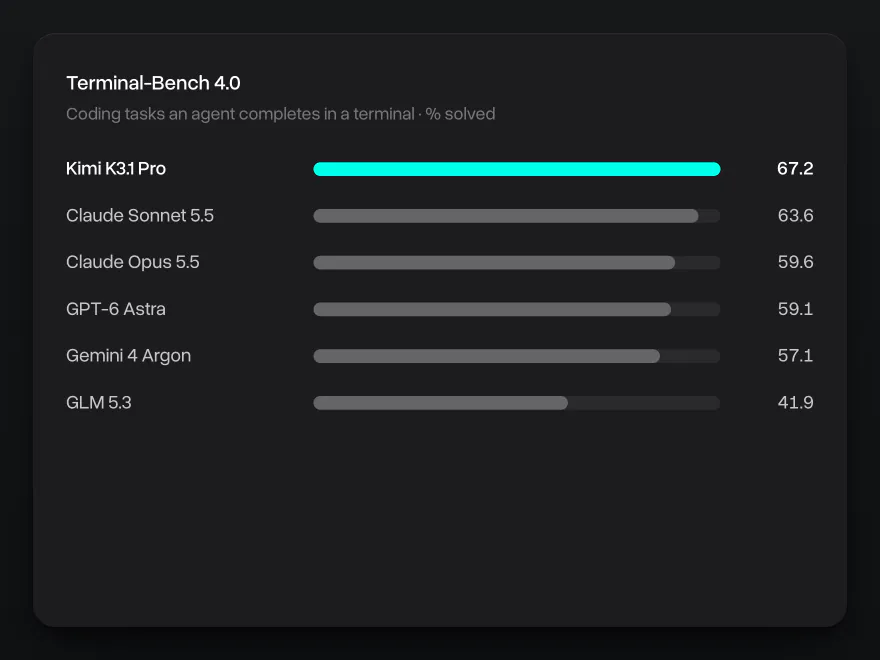
Kimi K3.1 Pro works through long coding tasks with little supervision: it plans the change, edits files across a project, runs the tests and fixes what fails. On Terminal-Bench 4.0, a test of coding tasks an agent completes in a terminal, it scores 67.2% in Artificial Analysis's runs, the highest result of any model they have tested. In Moonshot's SWE Marathon test of long software tasks it scores 51.7%, ahead of Claude Opus 5.5 and GPT-6 Astra.
3D, CAD and game code
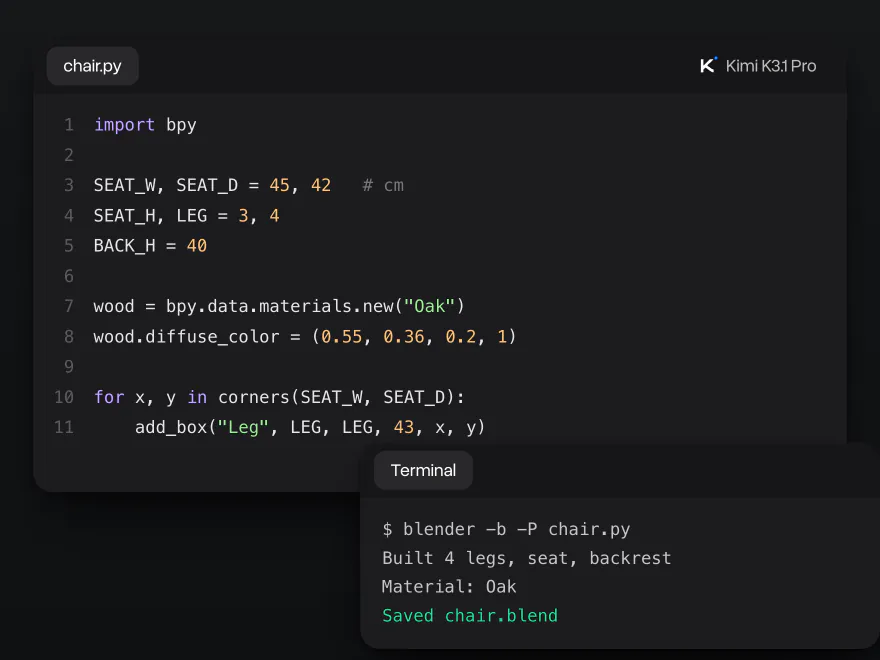
Moonshot trained K3.1 Pro on game engines and 3D tools. It writes code for Unity, Unreal Engine, Godot and Three.js, and scripts that build models in Blender and FreeCAD without extra plugins. Describe the object and give the sizes, and it returns a script you can run as is. On BenchCAD, a test of building CAD models from descriptions, it scores 92.7% with tools.
Research, finance and office files
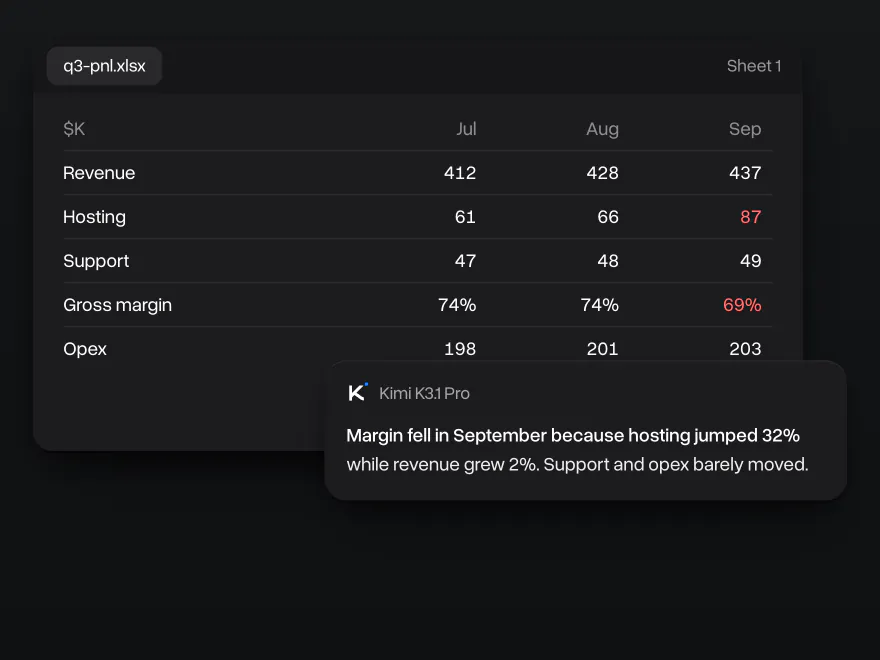
Send a spreadsheet, a report or a deck and ask what changed and why. K3.1 Pro reads tables and long documents, works out the numbers and names the cause, not only the totals. It leads Moonshot's comparison on OfficeQA Pro v2, a test of questions about real office documents, with 64.4%, and on GDPval-AA, which grades real work tasks from 44 occupations, it reaches 1,846 Elo, third among all models Artificial Analysis has tested.
Images, video and 1M tokens of context
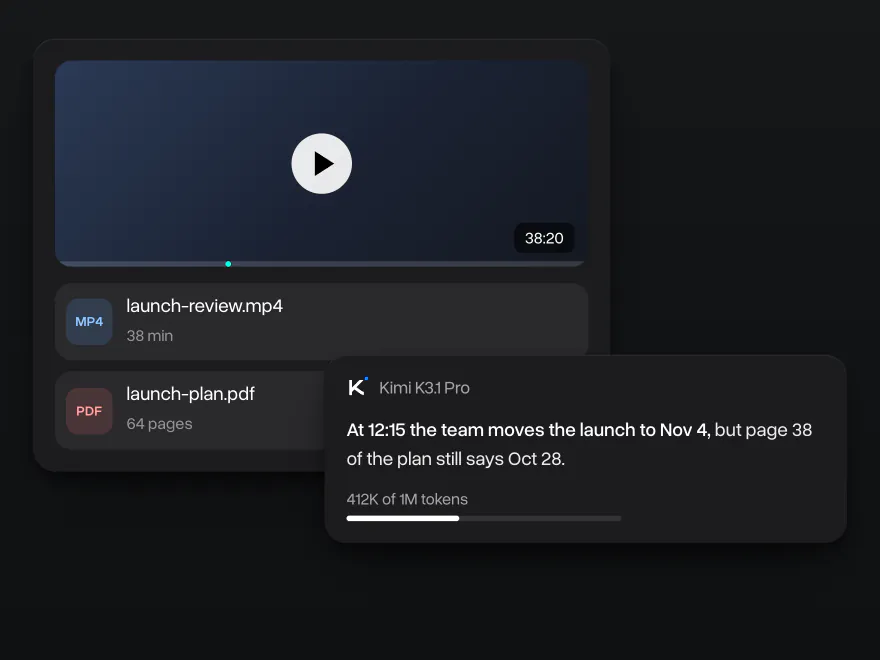
K3.1 Pro understands images and video as well as text: screenshots, charts, scanned pages and recordings. The context window holds 1 million tokens, about 750,000 words, so a long recording, a 60-page plan and the whole chat fit at once. On AA-LCR, a test of questions spread across very long documents, it scores 86.3%, ahead of Claude Opus 5.5 and GPT-6 Astra.
Why use Kimi K3.1 Pro on Overchat AI
One account for chat, images and video, on every device.
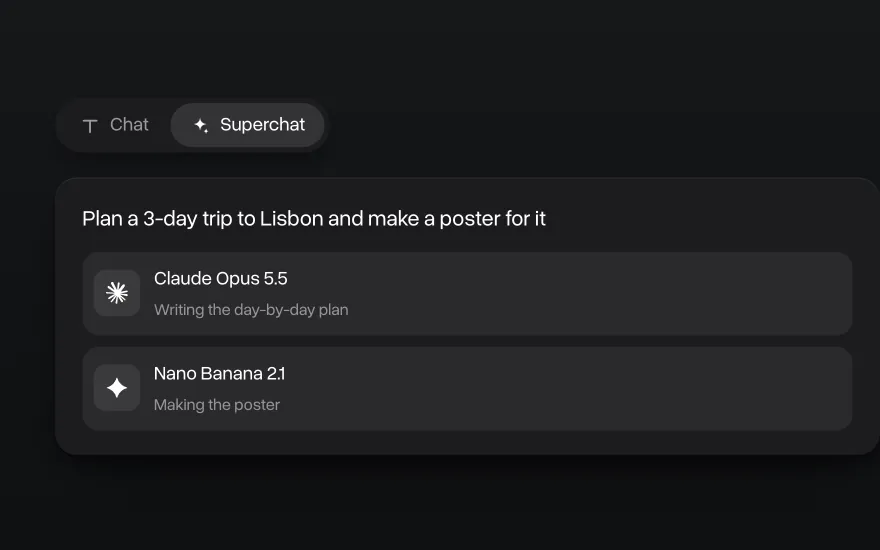
Superchat AI agent
Superchat Agent automatically routes your message to the model best suited for the task. It can generate images and videos, use the AI tools built into Overchat AI, and learn from your interactions to get better over time.
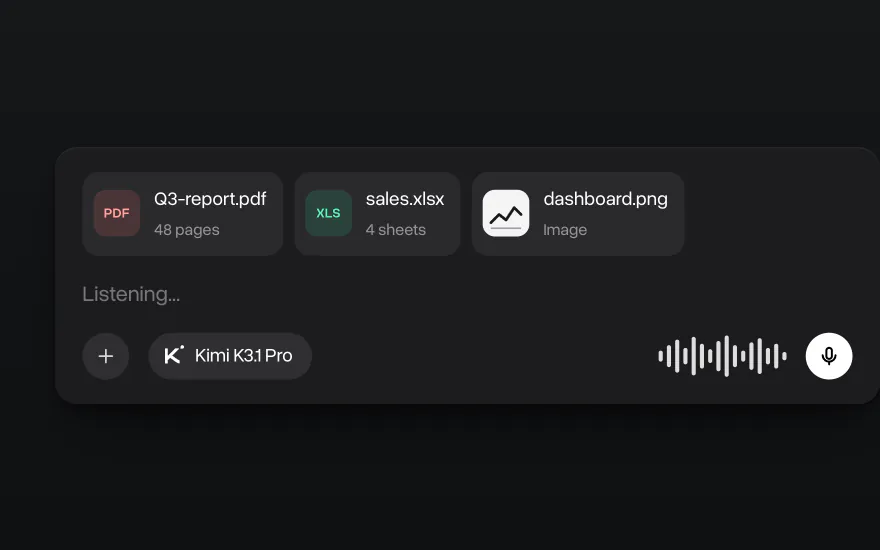
Chat with images and files
Upload PDFs, spreadsheets, code and images and ask Kimi K3.1 Pro about them. You can also dictate a message instead of typing it.
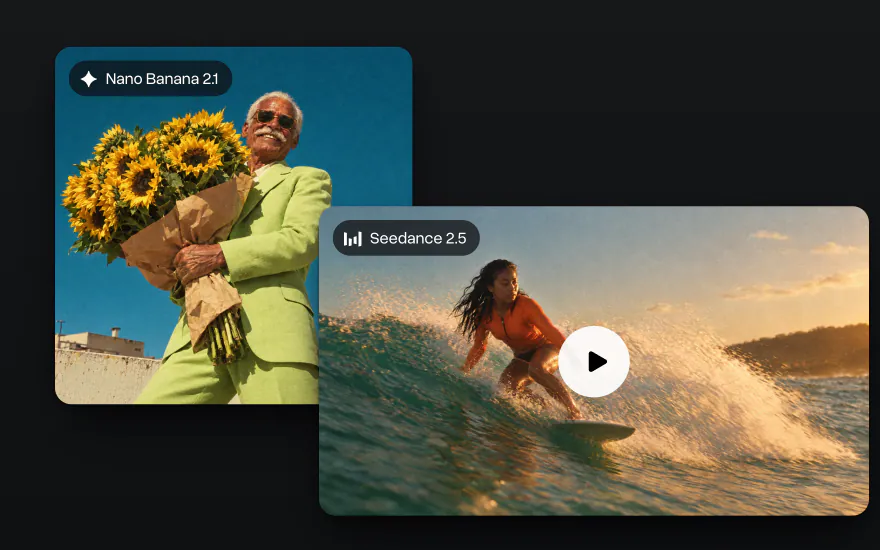
Go beyond text
Generate images with Nano Banana and GPT Image and videos with Seedance and Kling in the same account, with the same credits as chat.
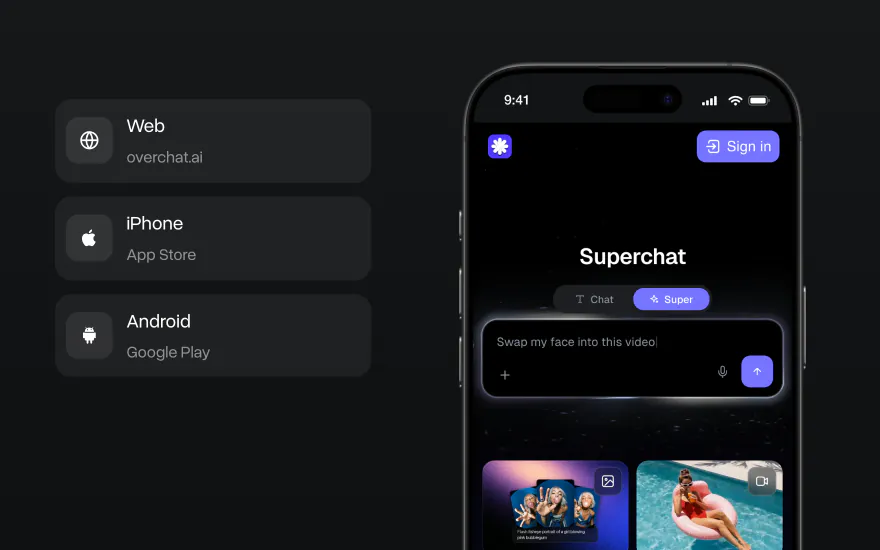
On the web, iPhone and Android
Start a chat on your laptop and finish it on your phone. The Overchat AI app has the same models, and your chats stay in one account on every device.


How to use Kimi K3.1 Pro on Overchat AI
Start in the chat at the top of this page or in the Overchat AI app on the web, iOS or Android.
- 1
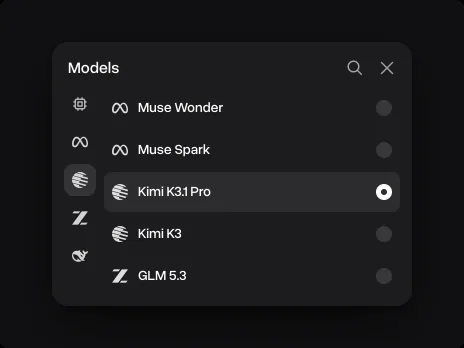
Pick Kimi K3.1 Pro
It is already picked in the chat on this page. In the Overchat AI app, open the model list next to the message field and choose Kimi K3.1 Pro.
- 2
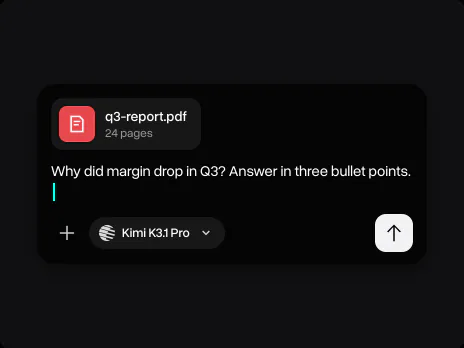
Attach files and describe the task
Add a report, a spreadsheet, code or a screenshot and write what you need: the format, the length and what to check first.
- 3

Keep going in the same chat
Ask a follow-up, ask for a table or a shorter version, or switch to another model without losing the conversation.
Explore other models
Every model below is in the same Overchat AI chat as Kimi K3.1 Pro.


Learn more about AI models

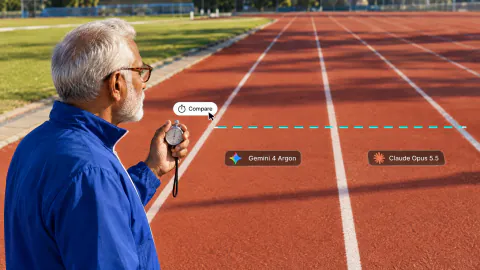
We tested Gemini 4 Argon against Claude Opus 5.5, GPT-6 Astra and Muse Wonder
We tested Gemini 4 Argon against Claude Opus 5.5, GPT-6 Astra and Muse Wonder on three coding tasks. See benchmarks, speed and how to use it.

Muse Wonder vs Muse Spark: Meta's New Model Tested
We tested Muse Wonder against Muse Spark 1.3 on logic, writing and coding tasks. See benchmarks and which Meta model is better.
10 Best All-in-One AI Platforms in 2026: Why One AI Subscription Beats Many
Compare the 10 best all-in-one AI platforms in 2026, from Overchat AI to Poe and Magai, with prices, free plans and the newest GPT and Claude models.

Kimi K3.1 Pro FAQ
If you have any questions,
reach out to us at hello@overchat.ai
Kimi K3.1 Pro is Moonshot AI's flagship model, released on October 23, 2026. It is a mixture-of-experts model with 2.8 trillion parameters, 104 billion of them active per token, and a 1-million-token context window. It reads text, images and video and is built for long coding tasks, 3D and CAD scripts, research and office work.
Moonshot AI released Kimi K3.1 Pro on October 23, 2026, together with Kimi K3.1 Pro Highspeed. It is the first model of the K3.1 series.
It is the same base model as Kimi K3, trained further with much more reinforcement learning. On Artificial Analysis its Intelligence Index rose from 43.6 to 55.1 and its Terminal-Bench 4.0 score from 12.6% to 67.2%. Moonshot also reports that it makes far fewer factual mistakes: 8.3% on its hard hallucination test, against 23.4% for Kimi K3.
It depends on the task. On Artificial Analysis, Claude Opus 5.5 has the higher overall Intelligence Index (57.6 against 55.1) and does better on Humanity's Last Exam. Kimi K3.1 Pro is ahead on Terminal-Bench 4.0 (67.2% against 59.6%) and on AA-LCR, a long-document test (86.3% against 84.7%).
Not yet. Moonshot says it will release the full weights by November 4, 2026, and the license has not been announced. Kimi K3, the base model, was released with open weights under a modified MIT license.
Kimi K3.1 Pro takes up to 1,048,576 tokens of context, about 750,000 words. Its answers are up to 131,072 tokens long by default and can go up to 1 million tokens.
Yes. It reads images and video natively, including screenshots, charts and scanned pages. PDFs and Office files are read as extracted text. On Overchat AI you can attach images and documents to your message.
No. Kimi K3.1 Pro always thinks before it answers. Through the API you can lower the reasoning effort to low, high or max to trade depth for speed.
Kimi K3.1 Pro Highspeed is the same model served faster: Moonshot says two to three times the speed of the standard version, and Artificial Analysis measured about 1.8 times. Through Moonshot's API it costs twice as much per token.
Type your message in the chat at the top of this page, attach files if you need to and press Send. After you sign in, Kimi K3.1 Pro answers in the Overchat AI chat, where you can keep the conversation going on the web, iOS or Android and switch to another model at any time.


