Jev explained: How to use Jev AI for fast browser agents
Last Updated:
2026-09-25
Jev explained: How to use Jev AI for fast browser agents
Jev is a new AI model designed to take over the small, repetitive decisions that make agentic systems slower and more expensive, leaving the main LLM to handle reasoning and generation.
Here's what you need to know about Jev, how to use it and where it fits in agentic AI systems.
Jev is a specialized AI model developed by TypeSafe AI that makes fast, structured decisions instead of generating text. It is designed to help AI agents make routine decisions without repeatedly calling a large language model (LLM).
Traditional LLMs generate text token by token, even when you ask a simple question like “Is this support ticket urgent?” Jev works differently: you give it some context, called state, and one or more questions, and it returns structured answers and probabilities, such as a 99.9% chance that the ticket is urgent.
Why is Jev useful for AI agents?
Jev can improve an agent's harness — the surrounding software that manages execution, tools, permissions and decisions. Jev is especially beneficial in two applications:
Model routing: Jev classifies a request and decides which LLM should handle it. A straightforward lookup goes to an inexpensive model, while an architecture problem goes to a more capable one.
Tool safety: Jev examines a proposed tool call before execution, for example to decide whether an agent should be allowed to run a shell command.
TypeSafe AI reports up to 200 times faster inference and more than 400 times lower cost than comparable LLMs on some classification workflows.
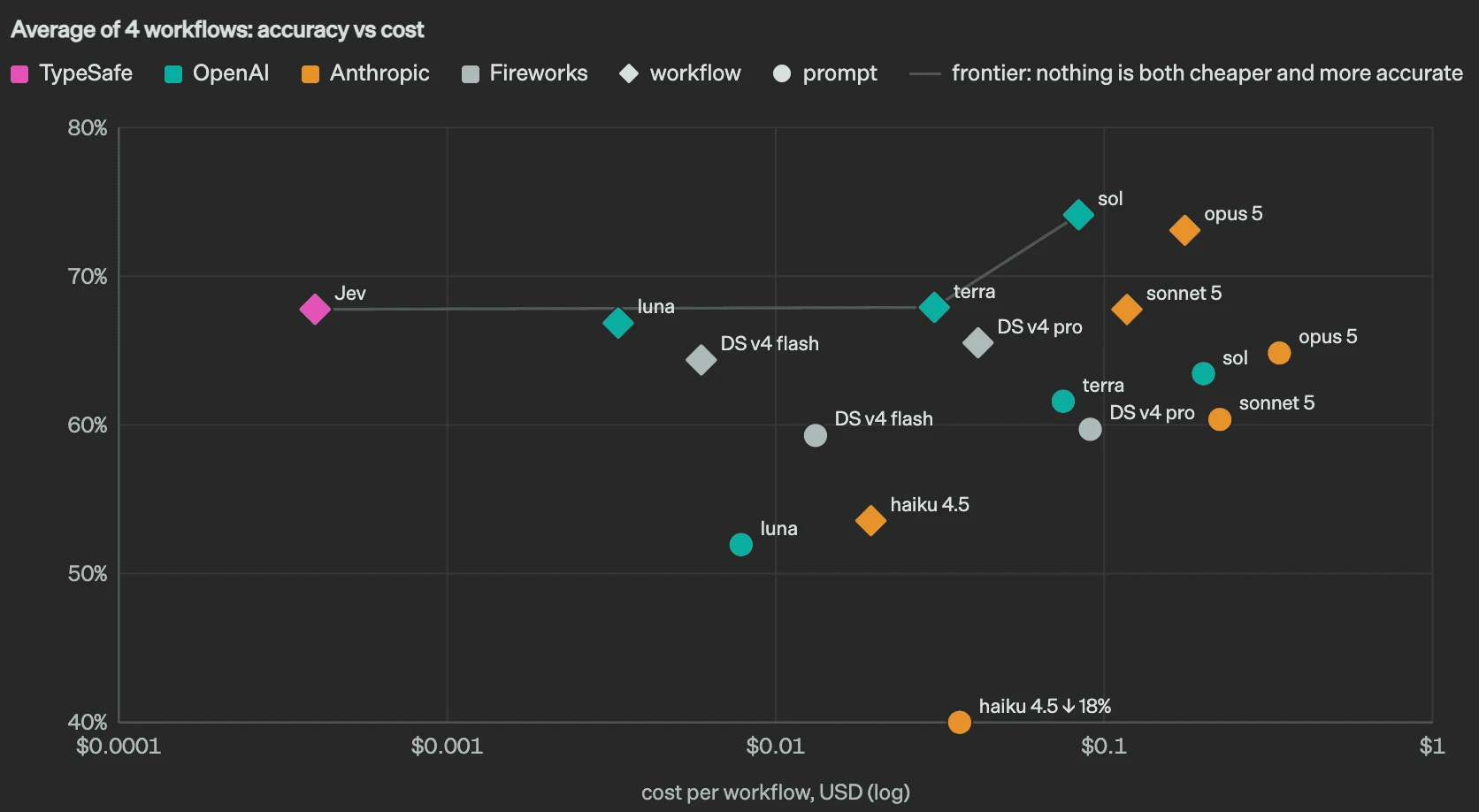
Accuracy vs cost per workflow, averaged over four workflows. Source: TypeSafe AI
How Jev works
TypeSafe AI calls Jev a System One model: a model designed to make fast decisions that software can use directly.
1. Jev receives a state and questions
Every Jev request has two parts:
State: the information you want the model to evaluate, such as a user message, agent conversation, tool call or structured data.
Questions: the decisions you want Jev to make about that information.
Say a customer reports a failing payment integration, and you want to know whether the message is urgent and which team should handle it:
{
  "model": "jev-latest",
  "state": "My payment integration has failed three times. Customers cannot complete purchases. Please fix this immediately.",
  "questions": {
    "is_urgent": {
      "type": "noul",
      "instructions": "The customer needs immediate assistance."
    },
    "team": {
      "type": "choice",
      "options": ["billing", "technical_support", "sales"],
      "instructions": "Which team should handle this request?"
    }
  }
}
Jev receives one state and evaluates two different questions about it.
2. Jev returns probabilities instead of prose
Jev doesn't generate text. It predicts values for the specified questions, and its output is constrained to the kinds of answers each question allows. For the urgency question above, Jev might return:
The 0.999 is a 99.9% estimated probability that the statement is true. Jev produces a prediction, while your application determines what action to take.
3. Jev becomes part of an AI agent's execution loop
An AI agent typically operates in a loop:
The LLM decides what to do
Calls a tool
Observes the result
Decides what to do next
Jev can be inserted at certain points in that loop to make decisions without invoking the main LLM.
For example, if a coding agent wants to run rm -rf ./project, the harness can first ask Jev whether the command is risky and block it if it is.
What are Choice, Score and Noul in Jev?
Jev supports three question types, each designed for a different kind of decision.
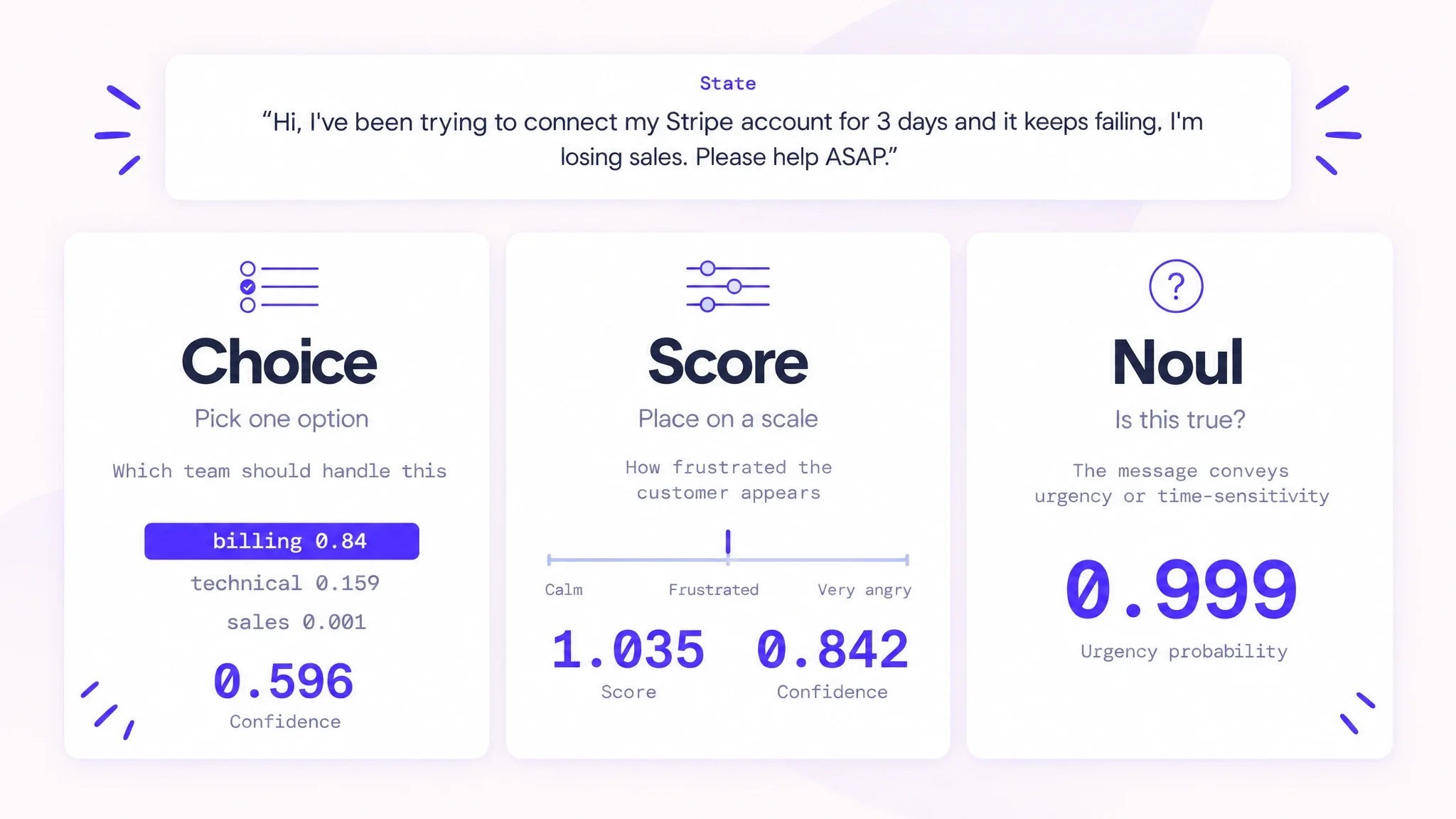
The three Jev question types applied to the same support message
Choice: Which option should I select?
Choice is used when you have a fixed set of possible answers and want Jev to identify the most appropriate one. Asked which team should handle the Stripe message above, Jev picks billing with a 0.84 probability.
Jev returns a probability for each option, along with an overall confidence value that can decide whether human review is needed. The options are distinct categories: Billing is not a higher or lower value than Sales.
Score: How much or how strongly?
Score is used when the possible answers have a meaningful order, such as calm, frustrated and very angry. For the same message, Jev places the customer at 1.035 on that scale, right at "frustrated."
Score returns a continuous score, a probability distribution across the ordered levels, and a confidence value. It's useful for evaluating risk, complexity, urgency, relevance or severity.
Noul: Is this statement true?
Noul is the simplest of the three. It evaluates a yes-or-no statement and returns the probability that the statement is true, like the 0.999 urgency value above. Your code decides how to interpret it: for example, escalate a ticket above 0.95 and send uncertain cases for human review.
Type
Question
Result
Choice
Which of these options?
Probability for each option and confidence
Score
Where does this fall on an ordered scale?
Continuous score, distribution and confidence
Noul
Is this statement true?
Probability that it is true
How is Jev different from an LLM?
An LLM generates its response token by token, and even JSON output is still language generation. Jev returns a structured probability without generating an explanation.
Capability
Traditional LLM
Jev
Primary operation
Generate text tokens
Predict structured answers
Output
Text, code or structured data
Typed predictions and probabilities
Open-ended reasoning
Yes
Not its intended purpose
Classification
Yes
Specifically designed for it
Free-form explanations
Yes
No
Multiple questions
Answers them in one generated response
Evaluates questions in parallel
Typical role in an agent
Reasoning and task execution
Routing, classification and decision support
Jev is designed to work alongside traditional LLMs in agentic systems, but it doesn't replace the main model, because its strength lies in the ability to make well-defined decisions without the overhead of a full generative model call.
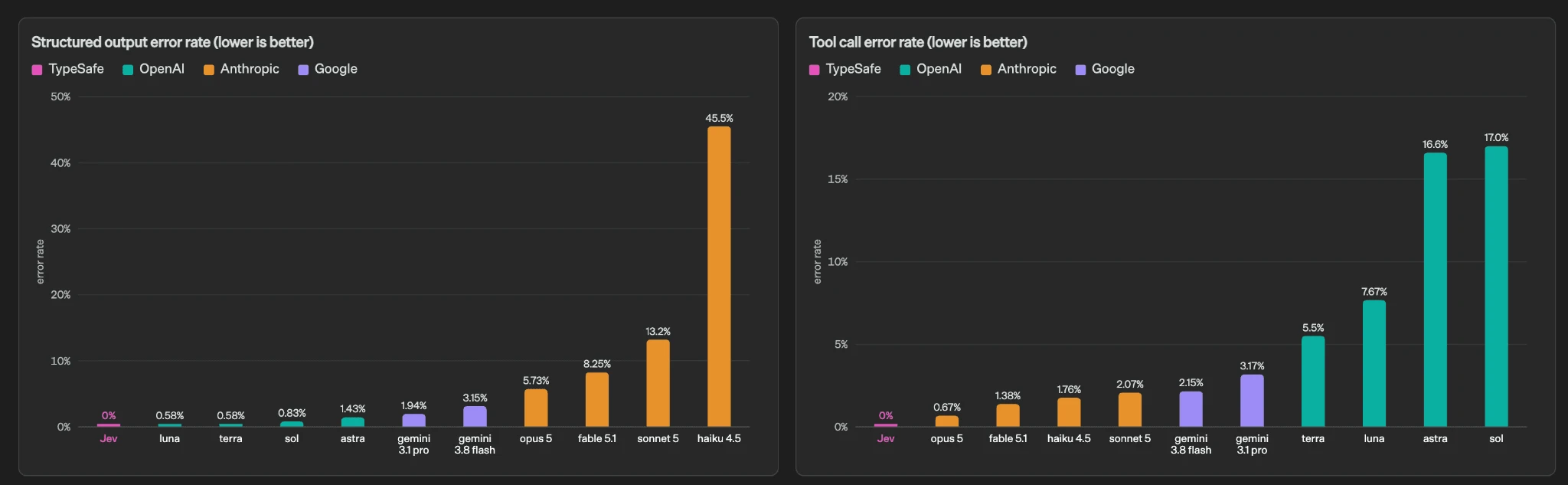
Structured-output and tool-call error rates, lower is better. Source: TypeSafe AI
How to build a browser agent with Jev and Browser Use?
Browser Use has published an actual Jev-powered browser agent, jev-ultrafast. It's a useful starting point because it already implements the browser observation, decision and execution loop:
User goal: for example, "Find the top story on Hacker News and open it."
Observe: Browser Use reads the current page and creates an indexed list of interactive elements.
Decide: Jev chooses an operation and a target, for example CLICK, element 3.
Execute and observe again: the harness validates the selected element, performs the action and inspects the updated page.
Repeat until the goal is reached or the agent cannot proceed.
The action space is built dynamically from the current page. A small generative LLM is called only when the agent needs to produce text to type into a field.
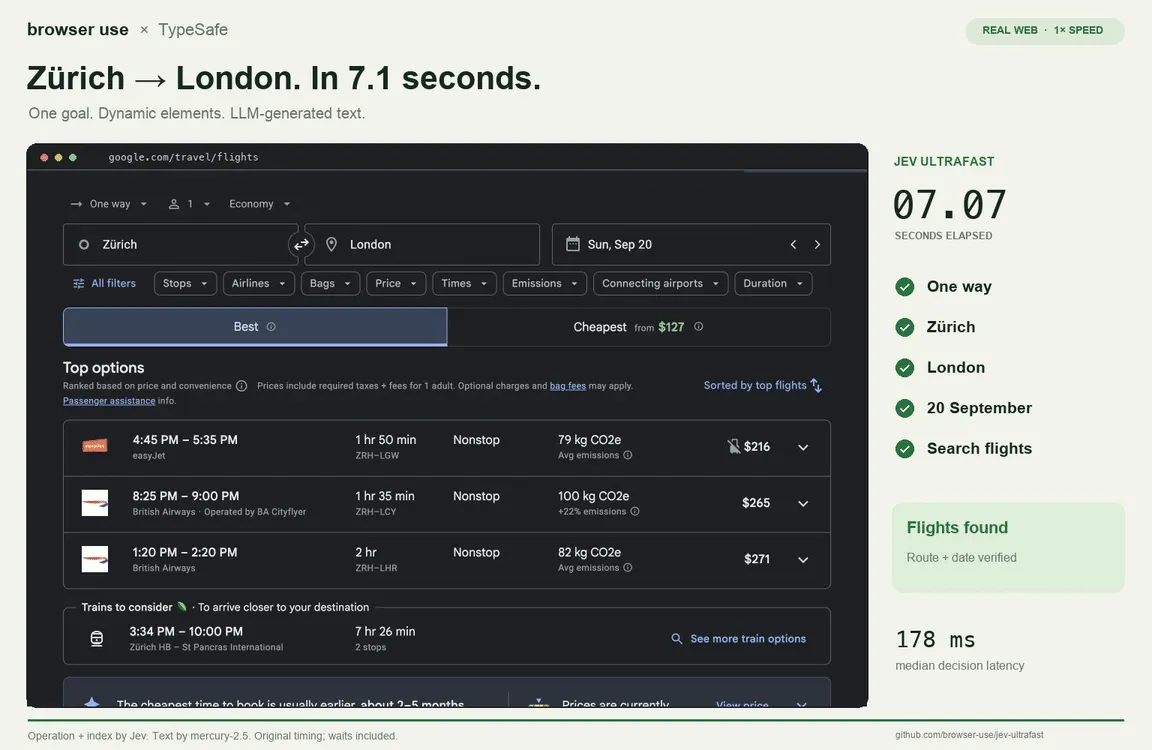
Jev Ultrafast completing a Google Flights search from Zürich to London in 7.1 seconds. Source: Browser Use
Run the existing implementation
You'll need Python 3.12 or newer, uv, Chrome and API credentials for Jev and the text-generation model.
git clone https://github.com/browser-use/jev-ultrafast.git
cd jev-ultrafast
uv sync
cp .env.example .env
Add TYPESAFE_API_KEY and TEXT_MODEL_API_KEY to the .env file (the example configuration uses an OpenRouter key for text generation). Then run uv run jev and open http://127.0.0.1:8766. The demo's inspector shows the observed browser elements, Jev's predictions and the actions executed. To skip the demo interface, import the project's Agent class in your own script and pass it a start URL and a goal.
How to use Jev with Stagehand?
Stagehand exposes browser automation primitives such as act, extract, observe and agent. You can use Jev as an external decision layer that determines which primitive to invoke or which observed action should be executed. The pattern is: Stagehand observes → Jev decides → Stagehand acts → repeat.
Then add TYPESAFE_API_KEY and OPENAI_API_KEY to your server-side environment. The OpenAI key is for Stagehand's generative browser operations.
Example: let Jev choose the next browser action
Suppose you want to open the first story on Hacker News. Stagehand observes the page, while Jev chooses among a small set of allowed actions:
import "dotenv/config";
import { Stagehand } from "@browserbasehq/stagehand";
import { TypeSafeClient, choice } from "@typesafe-ai/sdk";

const jev = new TypeSafeClient();
const stagehand = new Stagehand({ env: "LOCAL", model: "openai/gpt-4.1-mini" });

async function main() {
  await stagehand.init();
  try {
    const page = stagehand.context.pages()[0];
    await page.goto("https://news.ycombinator.com");

    // Stagehand observes the current browser page.
    const observations = await stagehand.observe("Find the first story link on the page.");

    // Jev selects a bounded next action.
    const result = await jev.systemOne({
      state: JSON.stringify({ goal: "Open the first Hacker News story", observations }),
      questions: {
        nextAction: choice("Which action should be performed next?", {
          openStory: "Open the first story link.",
          inspectPage: "Inspect the page again.",
          stop: "Stop without taking an action.",
        }),
      },
    });

    // Ordinary application code executes the decision.
    switch (result.answers.nextAction.choice) {
      case "openStory":
        await stagehand.act("Click the first story title link.");
        break;
      case "inspectPage":
        console.log(await stagehand.observe("List the available story links."));
        break;
      case "stop":
        console.log("No browser action selected.");
    }
  } finally {
    await stagehand.close();
  }
}

main().catch(console.error);
Jev returns openStory, inspectPage or stop, not executable browser code. Your application translates those decisions into supported Stagehand calls.
This example performs a single decision cycle. To turn it into an autonomous agent, put the observation, Jev decision and Stagehand execution inside a bounded loop, passing the updated page state and action history into each decision. Keep Jev's choices limited to valid browser actions, so a model-generated string never becomes arbitrary JavaScript or a shell command.
How to use Jev with LangChain?
LangChain has a dedicated langchain-typesafe integration that exposes Jev through TypeSafeClassifier, along with experimental middleware for model routing and tool-call checks. There are three ways to use it.
Call Jev directly from LangChain
Install the packages and set your TypeSafe API key:
from langchain_typesafe import Noul, TypeSafeClassifier

classifier = TypeSafeClassifier()

response = classifier.invoke({
    "state": (
        "The production deployment failed twice. "
        "Customers are seeing HTTP 500 errors."
    ),
    "questions": {
        "urgent": Noul(
            instructions="Does this issue require immediate attention?"
        ),
    },
})

if response.nouls["urgent"].noul >= 0.95:
    print("Escalate to the incident response team")
The state can be plain text, structured data or LangChain messages. You can invoke the classifier inside a LangGraph node, a LangChain tool or custom agent middleware.
Use Jev to route requests between LLMs
Agents often use the same expensive model for every task, regardless of its difficulty. ModelRouterMiddleware lets Jev classify a request and choose between predefined models:
from langchain.agents import create_agent
from langchain_typesafe.experimental.middleware import (
    ModelChoice,
    ModelRouterMiddleware,
)

router = ModelRouterMiddleware(
    choices={
        "fast": ModelChoice(
            model="openai:gpt-4.1-mini",
            criteria="Simple lookups, classification, extraction, and straightforward tasks.",
        ),
        "powerful": ModelChoice(
            model="openai:gpt-4.1",
            criteria="Complex reasoning, architecture, and difficult debugging tasks.",
        ),
    },
    instructions="Choose the least costly model capable of completing the request.",
)

agent = create_agent("openai:gpt-4.1-mini", middleware=[router])
The router evaluates the latest user message and selects a model for the agent run, keeping the routing probabilities and confidence in agent state.
Use Jev as a tool-call guardrail
AutoModeMiddleware uses Jev to inspect selected tool calls before they execute:
from langchain.agents import create_agent
from langchain_typesafe.experimental.middleware import AutoModeMiddleware

guardrail = AutoModeMiddleware(tools=["bash"])

agent = create_agent("openai:gpt-4.1-mini", middleware=[guardrail])
Here, bash must correspond to a tool registered with the agent. For a browser agent, apply the same pattern to tools that submit forms, alter data or perform transactions.
What people are already building with Jev?
Since its launch on September 15, 2026, developers have been experimenting with browser agents, coding assistants, AI games, trading simulations, semantic search and desktop automation. The common pattern is that Jev makes a small, structured decision, while ordinary software or another AI model carries out the work.
To see what people are building, browse Made with Jev. It's a community directory of Jev projects, and each entry links to its source and shows the cost and speed its author reported.
Classifies coding-agent turns to select a model and reasoning effort
Fast Jev Compaction
Judges which tool calls and results are worth retaining in a coding agent's context
Jev Review
Evaluates source-code changes and produces structured code-review judgments
Blink
Helps a codebase-navigation agent decide which directories and files to explore
Canny
Adds semantic checks when an agent claims that a task has been completed
Context compaction is an interesting example. Instead of having an LLM summarize a large tool response, Jev classifies which parts are relevant, so exact code and error messages survive instead of getting lost in a generated summary.
Real-time games and simulations
Snake: Jev receives the game state and chooses the next direction, while the game engine handles collisions, movement and scoring.
Shooter agents: in projects such as OneVOneJev, Jev controls movement, aiming, firing and jumping.
Drone simulation: Jev Drone makes tactical decisions in a MuJoCo simulation, while flight-control software handles the actual control and safety limits.
Minecraft: in Ronak Malde's agent, Jev makes the movement decisions and Astra handles the skills. The agent beat the Ender Dragon in 8 minutes 43 seconds for $0.97, of which $0.01 went to Jev.
A Minecraft agent built with Jev and Astra. Source: Made with Jev
Semantic search and data processing
A property-search application could retrieve a thousand listings and ask Jev which ones appear recently renovated or are close to major roads. Other projects use it to judge training-data records or to choose which relationship to follow through a Neo4j graph.
Everyday automation and creative tools
Agent Desktop: Jev selects actions against operating-system accessibility trees rather than screenshots.
Self-organizing Downloads folder: Marcel Pociot's workflow classifies incoming files and lets ordinary code move them into the right folders.
Creative-model routing: Higgsfield AI uses Jev to select image and video models based on a creative brief.
Generative UI: Jev selects UI components, properties and layouts with Vercel's json-render framework.
Trading simulations: Jev Trader makes decisions based on order-book data, while the surrounding strategy software controls execution and risk limits.
X post filter: Marcel Pociot's browser extension hides or collapses posts on X based on a rule you write in plain language.
A Jev-powered extension that filters posts on X. Source: Made with Jev
For more implementations, source code and demos, see awesome-typesafe-jev, an independently maintained collection of Jev projects.
FAQ
Here are quick answers to the most common questions about Jev.
Is Jev an LLM?
No. Jev doesn't generate text: it returns typed answers with probabilities. TypeSafe AI calls it a System One model.
How much does Jev cost?
At launch, TypeSafe AI priced input tokens at $0.042 per million, and output tokens are free. Access is currently through an early-access program.
Can Jev fill in forms?
Not on its own. Jev can choose which field to click or which action to take next, but it doesn't generate text. In jev-ultrafast, a small LLM writes the text that the agent types into a field.
Does Jev work in languages other than English?
TypeSafe AI's launch post doesn't list supported languages.