GPT Image 1.5 vs. Nano Banana Pro vs. FLUX.2 [max]
Last Updated:
2026-09-13
GPT Image 1.5 vs. Nano Banana Pro vs. FLUX.2 [max]
Three flagship image generator models were launched within six weeks:
Google released Nano Banana 2 Pro on 20 November.
OpenAI released GPT Image 1.5 on 16 December.
Black Forest Labs released FLUX.2 [max] on the same day.
But which of these offers the best text-to-image and image-to-image quality?
We tested all three models side by side, giving them the same prompt and tasks, to determine once and for all which AI image generator is the best.
Here’s a three-way comparison of GPT Image 1.5, Nano Banana 2 Pro and FLUX.2 [max]. We tested each model in the following areas:
Image generation
Image editing
Instruction following
Style transfer
Text rendering
Infographics
We'll also watch for overall aesthetic quality and realism throughout each test.
Throughout each test, we'll also watch for overall aesthetic quality and realism. FLUX.2 [max] claims superior visual polish in particular, so we'll see if that holds up in practice.
GPT Image 1.5 is OpenAI's first native multimodal image generator — built directly into GPT-5's architecture instead of using a separate diffusion model.
Nano Banana 2 Pro is Google's reasoning-guided generator — analyzes prompts for logic and physics before generating, with direct Google Search access for real-world context.
FLUX.2 [max] is Black Forest Labs' latest model (32B parameters, 4MP resolution) with up to 10 reference images and Mistral-3 for reasoning.
The three were tested head-to-head in six categories — GPT Image 1.5 won 4, Nano Banana 2 Pro won 2, FLUX.2 [max] won 0.
Nano Banana 2 Pro won on crowd generation (best faces and lighting) and instruction following (flawless 6x6 grid of 36 objects).
GPT Image 1.5 won on image editing (flawless multi-step T-shirt design), style transfer (portfolio-quality 3D character), text rendering (correctly converted markdown formatting), and infographics (nailed the DK encyclopedia style).
FLUX.2 [max] struggled with fundamentals — blurry faces in crowds, missed grid structure entirely, hallucinated text in blurred areas. Hard to justify choosing it right now.
Resolution hierarchy: Nano Banana 2 Pro (~8.3MP with 4K upscaling) > FLUX.2 [max] (4MP native) > GPT Image 1.5 (1.5MP).
Bottom line: GPT Image 1.5 is the best overall pick for most users — major turnaround for OpenAI after months of trailing Google and Flux.
Introduction
Before we compare the three models, let’s introduce them and explain what they are. This will set the scene for the comparison.
What is GPT Image 1.5?
GPT Image 1.5 is OpenAI's inaugural native multimodal image generator. What does this mean? Unlike the previous version, GPT Image 1.5, which used a separate diffusion model, the generation workflow is built directly into the architecture of GPT-5.
In practice, this gives the model a much better understanding of the world, allowing it to generate images that more accurately represent real life. It uses the same fundamental technology as Nano Banana Pro and Flux.2 [max].
For context, ChatGPT had the weakest image generator for a long time. While it was impressive at the time of release, Flux.1, Nano Banana Pro and Google's original Nano Banana quickly became superior by introducing contextual editing, which allows you to alter parts of an image without affecting the rest.
This is a big deal, because ChatGPT lacked a great image editing feature for a long time, so for a long time, there was practically no reason to use it. However, this is no longer the case, as it is undoubtedly amazing again.
In terms of technical details, the model can generate images at resolutions of up to 768×2,000 pixels in high-detail mode. Generation takes 15–45 seconds, which is four times faster than its predecessor. You can refine images by asking to change specific elements in the chat, and the images will stay consistent from edit to edit — only the parts you want changed will be altered.
Google took an unusual approach when launching the original Nano Banana. Instead of a traditional announcement, they deployed it anonymously on LMArena's evaluation platform. The model climbed to #1 in both text-to-image and image editing rankings in days.
Nano Banana 2 Pro builds on that hype.
The biggest change is what Google calls reasoning-guided synthesis. What it means is that the model analyzes your prompt for logic, physics, and emotional intent before generating anything.
In the real world, this means the model understands context in ways previous generators couldn't. It knows that a dog swimming in a pool will create ripples and displace water, for example.
When you look at an image you might not concisely think about these details, but something feels off when they’re missing, but they’re not missing in images created by Nano Banana Pro.
The other major advantage is real-world knowledge. Nano Banana Pro connects directly to Google Search, so it can generate contextually accurate images of real places, historical events, or current trends
What it can do:
Generate images in 1-10 seconds
Access Google Search for real-world facts and context
Combine up to 14 reference images in one generation
Maintain consistent appearance for up to 5 people across edits
Black Forest Labs was founded by the original Stable Diffusion team after they left Stability AI. They made their name in May 2025 with FLUX.1 Kontext, which was the first widely adopted model to do contextual editing well. This feature lets you change part of an image without affecting the rest, and it became the standard that everyone else had to match.
FLUX.2 [max] is Black Forest Labs' latest image editing model, which they say can beat Nano Banana 2.
The model uses 32 billion parameters and can generate images at up to 4 megapixel resolution. But the real differentiator is how it approaches image generation.
Like Nano Banana 2, the model uses a text generator to power world-knowledge and reasoning. In this case, it’s Mistral-3's 24-billion-parameter vision-language model.
It also has web grounding, which means it can pull in real-time information about current trends and events.
What’s more, FLUX.2 [max]can reference up to 10 images simultaneously, combining character references, style guides, product photos, and background elements into one output.
According to Black Forest, FLUX.2 [max] also produces the most visually polished and realistic outputs in the category. We'll test whether that holds up throughout this comparison.
What it can do:
Generate images at 4 megapixel resolution
Use up to 10 reference images
Access real-time information from the web and integrate it into images
Accurately render colors from hex-codes (useful for working within consistent brand guidelines)
Now that we understand what each of these models is, let's compare them side by side.
Feature Comparison
First, let's see how they stack up on paper. This will give us a baseline before we test them in real-world scenarios.
Feature
GPT Image 1.5
Nano Banana 2 Pro
FLUX.2 [max]
Developer
OpenAI
Google DeepMind
Black Forest Labs
Release Date
December 16, 2025
November 20, 2025
December 2025
Max Resolution
768×2,000 pixels
2K native, 4K upscaling
4 megapixels
Generation Speed
15-45 seconds
1-10 seconds
Not specified
Reference Images
Not specified
Up to 14 images
Up to 10 images
Parameters
Not disclosed
Not disclosed
32 billion
World Knowledge
GPT-5 training data
Google Search integration
Mistral-3 + web grounding
Text Rendering
87% photorealistic
Near-perfect
High accuracy
Conversational Editing
✅
✅
✅
Access
ChatGPT, API
Gemini app, Overchat AI
BFL API, Overchat AI
Pricing (API)
$0.17-0.19 per image
Part of Gemini subscription
$0.07 per megapixel
On paper, these models are quite similar at their core. After all, they all support image editing, promise advances in text rendering and can reason about images to make them more realistic. They also all have web access for current information.
Ultimately, therefore, it will come down to their accuracy and ability to deliver on those promises. So let's see how they perform in practice.
Real-World Performance
Benchmarks are only part of the story, so let's see how these models perform in a range of challenging tasks. We tested them in six categories, pushing them to their limits in each one. Let's take a look at the results.
1. Image Generation
This test assesses how well each model can generate a new scene from a text description.
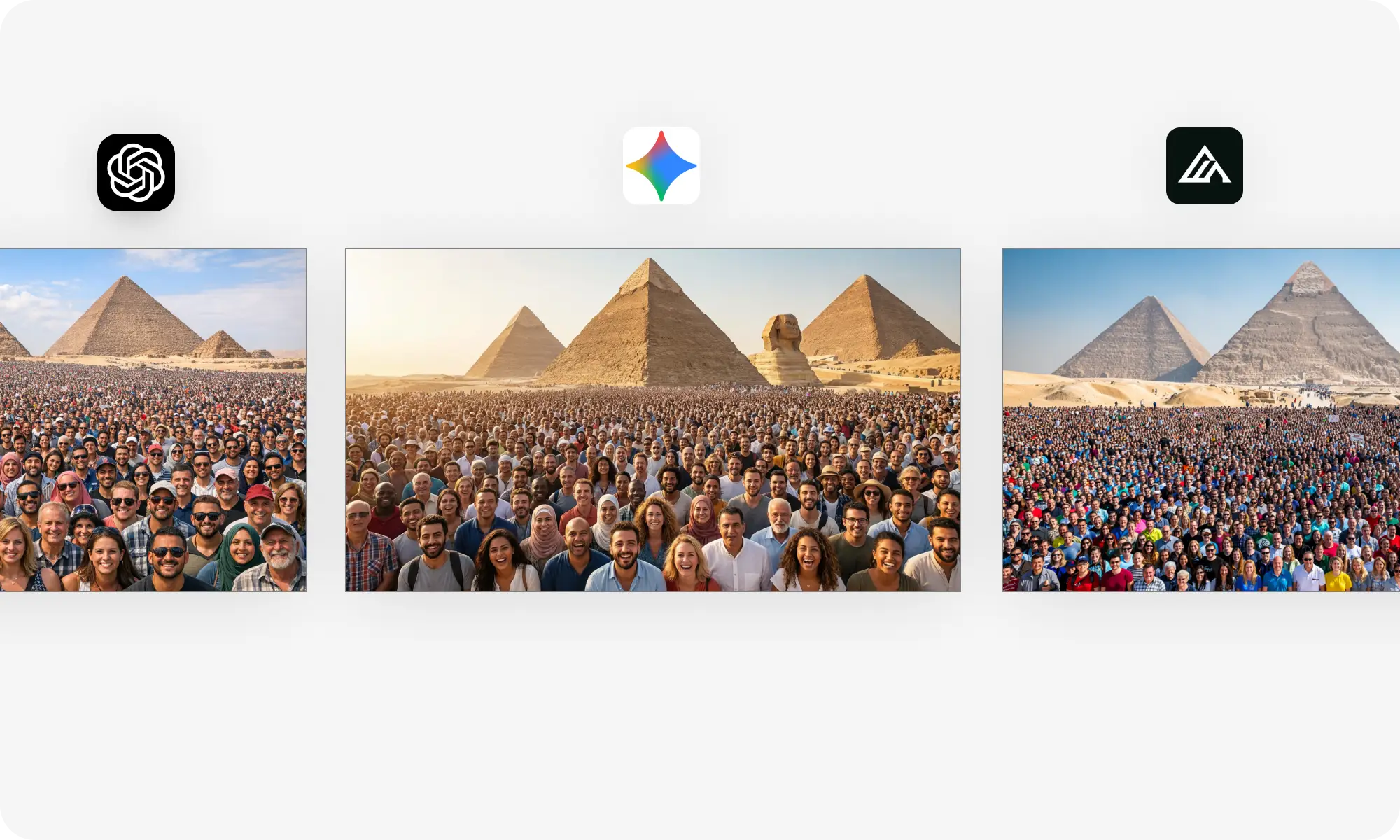
We asked each model to generate an image of a crowd in front of the Great Pyramid of Giza. This tests their ability to handle complex scenes with multiple elements and realistic human figures, as well as their ability to follow prompts, since we are asking them to render multiple elements. Faces are notoriously difficult for image models, so this is not an easy test.
The results:
GPT Image 1.5 produced a solid image with a good variety of faces in the foreground. While the people closest to the camera have clear features and varied clothing, the image feels somewhat one-dimensional as so many are wearing the same sunglasses and hats.
Nano Banana 2 Pro probably performed best here, creating the most realistic crowd, and the image itself has the most pleasant lighting. The crowd extends naturally into the distance at a realistic density. The faces in the foreground are sharp and diverse, and the overall composition feels balanced.
Unfortunately, FLUX.2 [max] did not perform as well as the other two. From a distance, the image looks OK, but if you zoom in on the faces, you can see that many of them are just blobs of colour.
Winner: Nano Banana 2 Pro
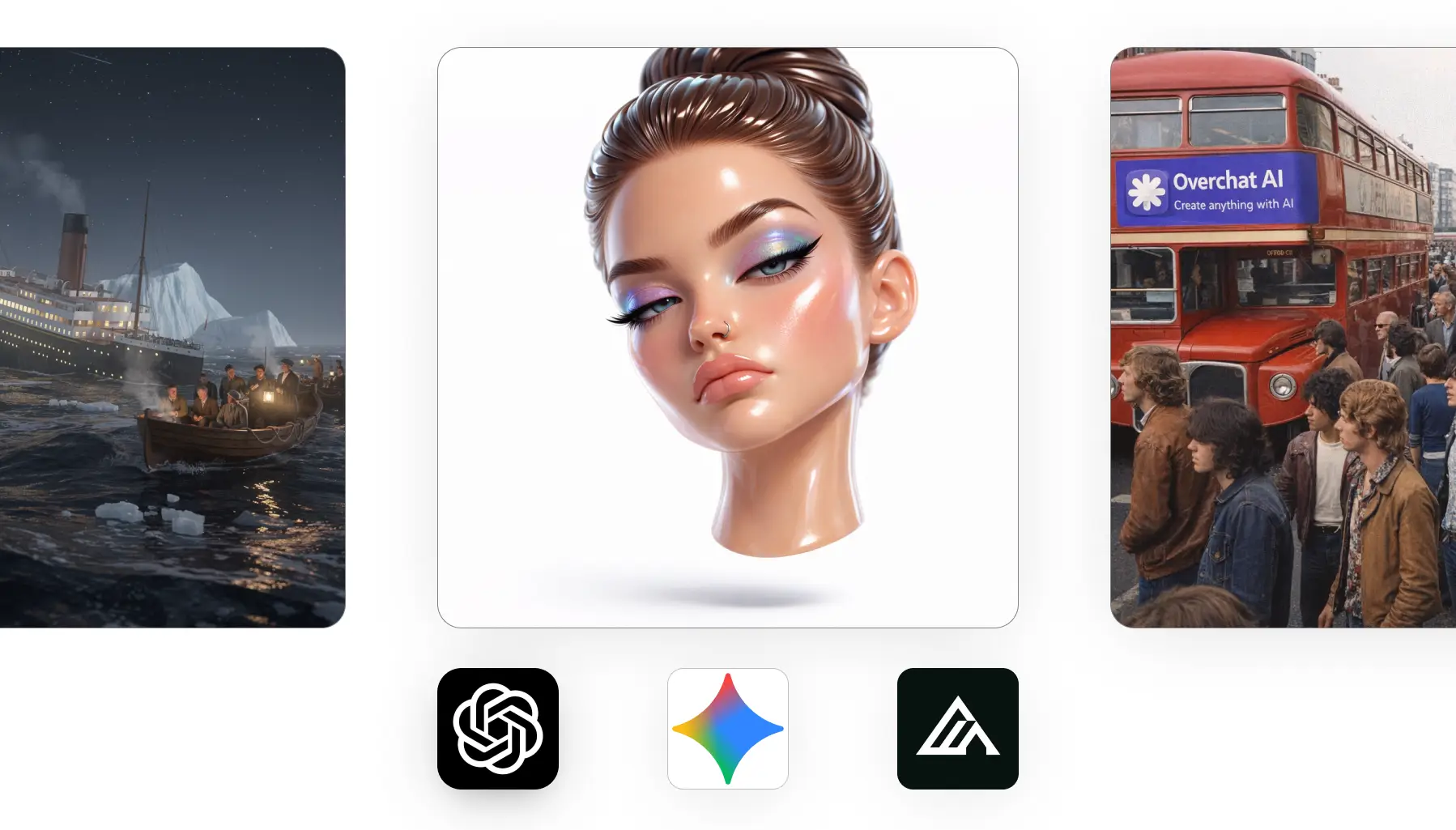
Here’s a bonus image: a realistic scene from 1970s London captured on an iPhone, featuring Overchat AI logo and text. Which iPhone model do you think performed best here?
2. Image Editing
Image editing involves modifying only part of an image according to instructions, which requires an understanding of what to change and what to preserve.
We gave each model a multi-step editing task.
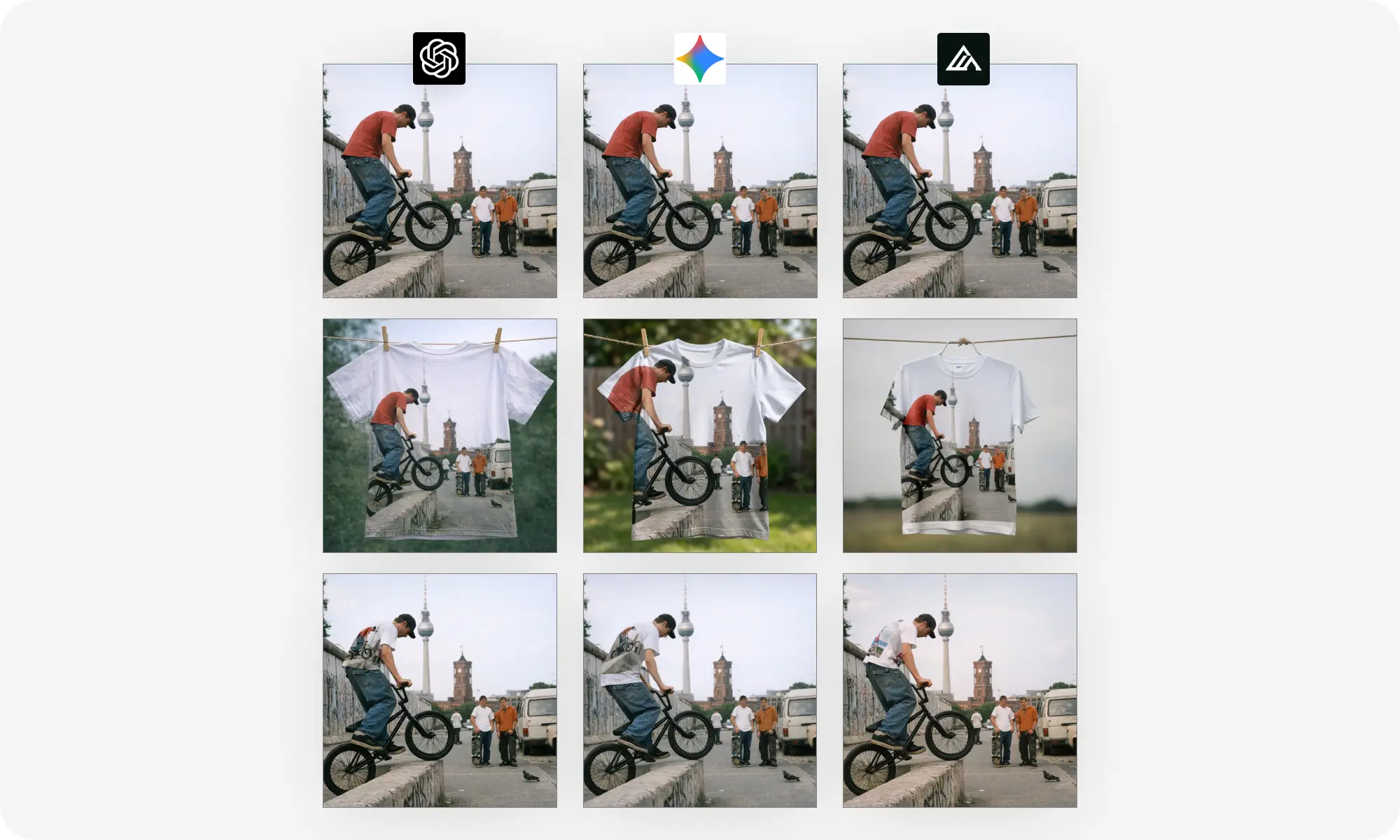
Take an image of a BMX biker and place it onto a T-shirt design
Put that exact T-shirt back on the biker in the original scene.
This tests whether the models can maintain visual consistency across multiple edits.
The results:
GPT Image 1.5 passed this test with flying colours. The first edit creates the T-shirt design we requested, and the second puts that same T-shirt on the biker. It's flawless.
The Nano Banana 2 Pro came close, but introduced a small error. The T-shirt design in step two looks good. However, when it put the shirt back on the biker, it added extra white space at the bottom of the graphic. This is something that could be fixed with a follow-up step, but it does show that there is a greater potential for error when creating complex scenes.
FLUX.2 [max] failed completely at the final step. The first two images are fine — the original biker photo and the T-shirt design both look good. However, in the third image, the biker is wearing a completely different shirt with an abstract graphic.
Winner: GPT Image 1.5
3. Style Transfer
Can these models reimagine an image in a completely different style and preserve the subject's likeness?
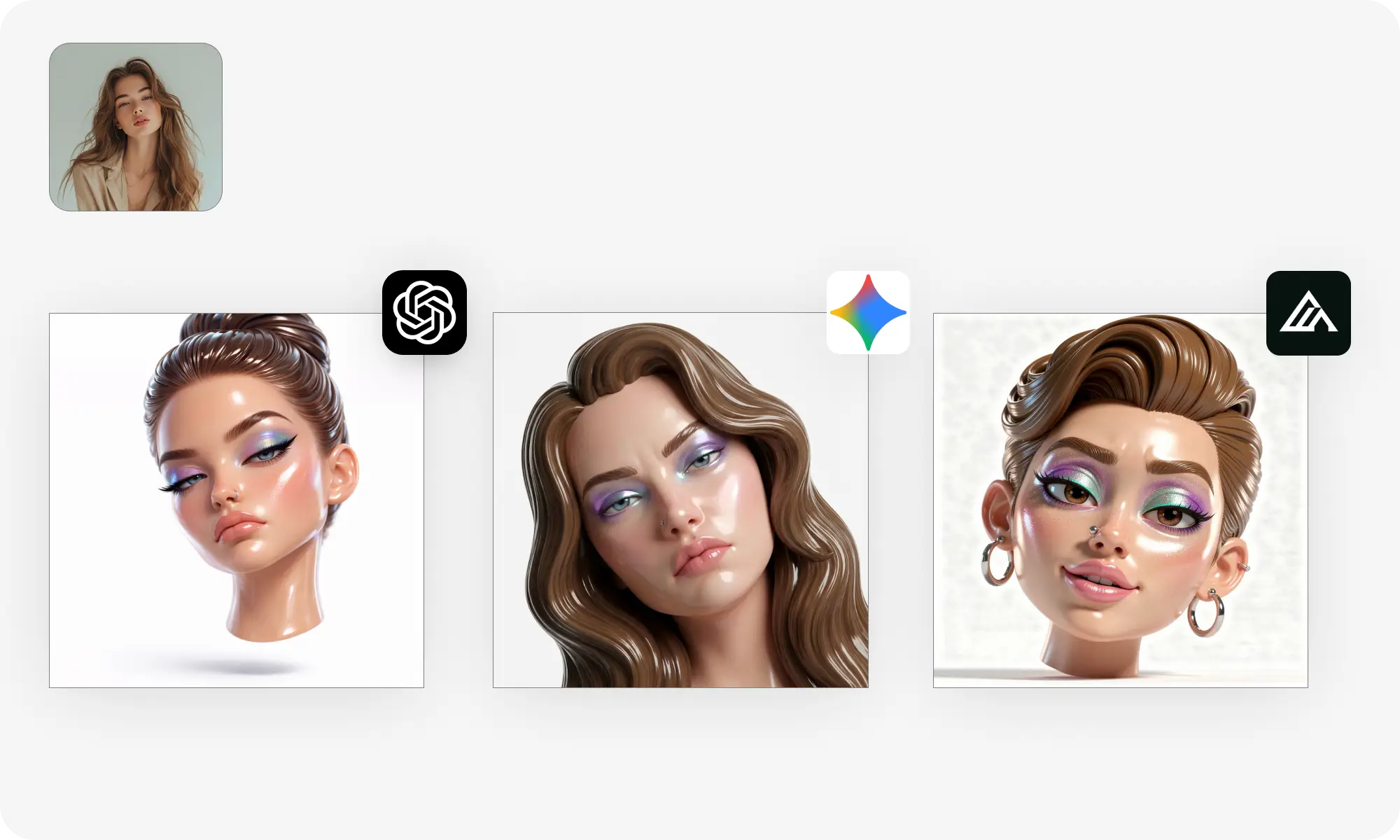
We asked each model to transform a realistic portrait into a bratty and glossy 3D character version.
The results:
GPT Image 1.5 dominated this category by a large margin. The result looks like a professional 3D character render that you could find on Artstation — you'd never guess that it was AI-generated. It has real character, and the proportions are exaggerated in an extremely aesthetically pleasing way. This could go straight into a portfolio.
In contrast, Nano Banana 2 Pro produced something technically correct, but aesthetically unpleasant. It's glossy and 3D-ish, but the face is caught in an awkward middle ground between realistic and stylised, leading to a severe uncanny valley effect. Aesthetically, it's just not pleasant to look at.
FLUX.2 [max] performed well, as the character itself has good proportions and is solid, but for some reason it added a busy interior background when none was requested. This is easily fixed with a follow-up prompt, but the design is not as pleasing as GPT Image 1.5.
Winner: GPT Image 1.5
4. Instruction Following
The instruction-following test assesses the model’s ability to accurately execute a very complex prompt. This is about precision: doing exactly what the user asked for. Previous generation models struggled with this.
For this test, we asked each model to create a grid containing six rows and six columns of different objects in different styles — that’s 36 different elements precisely arranged in a grid.
The results:
GPT Image 1.5 made a counting error in the top row, which has only 5 objects when there should be 6. This error affects the entire grid structure.
The Nano Banana 2 Pro, on the other hand, is flawless. The grid is exactly six columns by six rows. All 36 objects are present and arranged correctly.
FLUX.2 [max] completely missed the mark. This isn't a 6x6 grid at all. The objects are much larger, and the layout is completely different.
Winner: Nano Banana 2 Pro
5. Text Rendering
We asked each model to create a long product announcement with headers, and a data table. The input was markdown.
The results:
Both GPT Image 1.5 and Nano Banana 2 Pro rendered the text flawlessly, but only GPT Image 1.5 converted Markdown to the correct document formatting. However, it made an error in the benchmark table.
The Nano Banana 2 Pro rendered the Markdown characters exactly as written and did not make a mistake in the table. It's a close call, but we'd still give GPT Image 1.5 the edge.
FLUX.2 [max], on other hand, isn’t even on the same playing field. The model decided to throw most of the document out of focus, but if you look at the blurred — they contain scribbles and hallucinated content that looks vaguely text-like from a distance.
Winner: GPT Image 1.5
6. Infographics
Just a few months ago, creating detailed information with image generation models was impossible, but now it’s a perfectly viable workflow. Or is it?
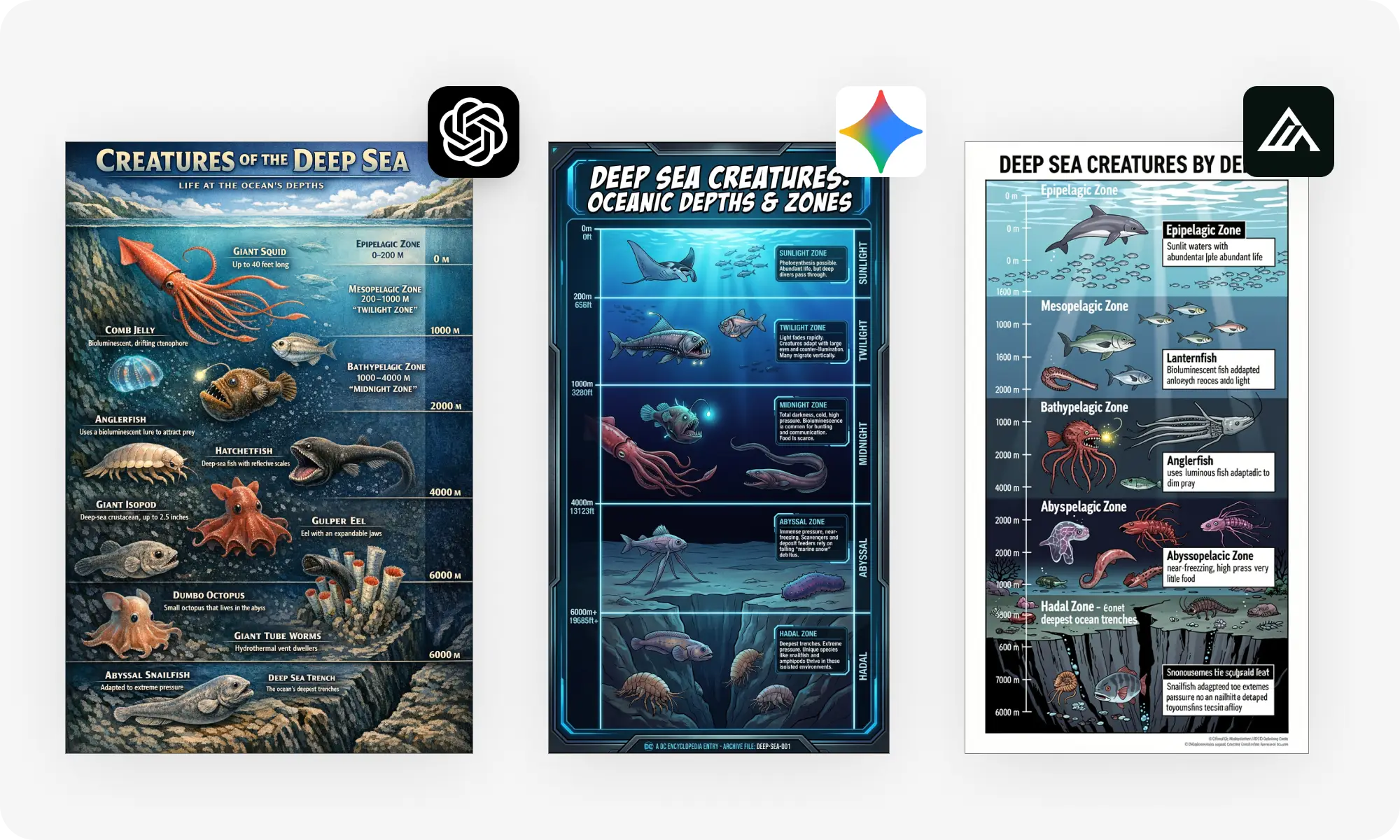
We asked each model to design an infographic of a deep-sea creature in the style of a Dorling Kindersley encyclopaedia. Here’s how they fared.
The results:
GPT Image 1.5 created what looks like a page from a DK encyclopedia, with detailed illustrations. It also included the most information in the infographic.
Nano Banana 2 Pro, in second place, missed the style requirement entirely. This looks like a modern digital infographic, instead of a DK encyclopedia page.
FLUX.2 [max] also missed the mark. The style is a bit too schematic, some of the text in the information boxes is garbled.
Winner: GPT Image 1.5
Bottom Line
GPT Image 1.5 won four out of six categories — a huge turnaround for OpenAI, which had been trailing behind Google and Flux for months.
However, Nano Banana 2 Pro is nothing to scoff at. Despite being an older release by a couple of months — which is like a couple of years in AI time — it won two categories and performed well in several others.
It generated the best crowd scene, with superior composition and lighting, and followed complex instructions more accurately.
Conversely, FLUX.2 [max] didn't win once, so we struggle to find a compelling reason to choose it over GPT Image 1.5 or Nano Banana 2 Pro at this time. From blurry faces in crowd scenes, to missing the prompt entirely when following instructions, to hallucinating fake text in blurred areas, there are too many mistakes. Where other models make mistakes, you can easily fix them with follow-up prompts. However, these are fundamental lack of capabilities; no amount of asking again will fix them — only introduce new problems.
So, which model should you choose?
GPT Image 1.5 is the best AI image generator for most users — it offers the best combination of speed and capabilities, producing beautiful images that rival Midjourney for creative applications.
Frequently Asked Questions (FAQ)
What is the best AI image generator in 2025/2026?
GPT Image 1.5 is currently the best overall AI image generator. It won 4 out of 6 categories in our testing, including text rendering, style transfer, and infographics.
Which AI can render text in images?
GPT Image 1.5 and Nano Banana 2 Pro both render text flawlessly. GPT Image 1.5 has a slight edge because it interprets formatting and converts markdown to proper document styling. FLUX.2 [max] struggles with large amounts of text.
How much does GPT Image 1.5 cost?
GPT Image 1.5 costs $0.17-0.19 per image via API, but it's also available on Overchat AI for $4.99/week or $59.99/year.
What is the highest resolution AI image generator?
Nano Banana 2 Pro with 4K upscaling offers the highest resolution at approximately 8.3 megapixels
FLUX.2 [max] generates at 4 megapixels native resolution