This is the first model from Kling AI to generate synchronised audio and video in a single pass, but this is far from the only feature that makes this video generator amazing. Spoiler alert: it's motion control.
So, what is Kling 2.6, and why should you choose it?
In this article, we’ll cover:
What makes Kling 2.6 different from previous versions?
Kling 2.6 is Kuaishou's latest AI video generator (released December 3, 2025), built on a diffusion Transformer with a 3D variational autoencoder that generates synced video and audio in a single pass.
Supports up to 1080p at 48 FPS with 10-second max clip duration — shorter than Sora 2's 25 seconds but with native audio generation on par with Sora 2 and Veo 3.1.
The Elements feature lets you combine up to 4 reference images for character consistency across scenes, and first/last frame control lets you chain clips into longer continuous scenes.
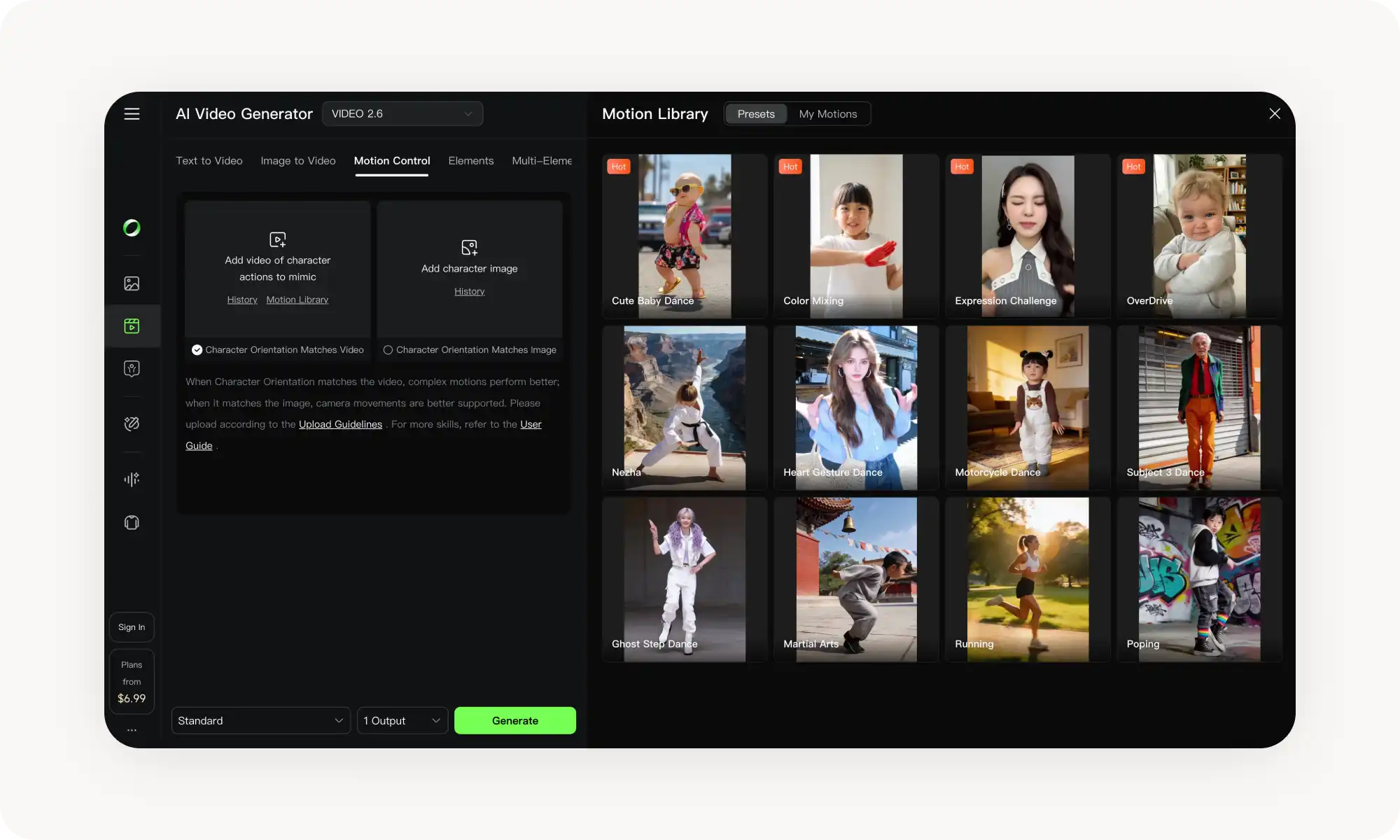
Motion Control is the headline feature — you can replicate motion from a reference video, use a motion brush on specific areas, or set first and last frame positions. It's the most reliable way to direct movement in AI video right now.
Two tiers: Standard (HD) and Pro (Full HD with better instruction following). Neither outputs 4K. Pro uses more tokens but handles complex scenes better.
vs Sora 2: Kling has better audio precision and costs far less (Pro ~$37/month vs ChatGPT Pro at $200/month for watermark-free 1080p), but Sora 2 offers longer clips and more editing tools (Storyboard, Remix, Cameo).
vs Veo 3.1: Veo ranks #1 on MovieGenBench and outputs 4K, but its base clips are only 8 seconds and it shows its age on physics and complex camera work.
Access via Overchat AI, klingai.com, Kuaishou's iOS/Android apps, or developer APIs like Fal.ai and WaveSpeed.
What Is Kling 2.6?
Kling 2.6 is the latest AI video maker from the Chinese technology company Kuaishou. It runs on a diffusion-based Transformer architecture and uses a clever proprietary technology: a 3D variational autoencoder. According to Kuaishou, this is a synchronised spatiotemporal compression technology.
Put simply, the model understands how visuals and audio should work together and generates them simultaneously.
Kling video models have long been a staple of AI video creators: they’re used by over 22 million users globally on the official platform alone, and Kling has generated over 168 million videos since launch, which puts Kling AI among the most widely adopted video ai generators available today.
What are the main features of Kling 2.6?
The table below presents main Kling 2.6 specifications:
Deep semantic alignment (audio coordinates with camera movement and character actions)
Note: the 10-second clip duration is a bit shorter than some competitors, but native audio generation in a single pass puts Kling 2.6 in line with the leading AI video generators — namely Sora 2 and Veo 3.1.
It’s worth noting that Kling 2.6 works as an image to video AI tool — this means you can upload a picture and have the model animate it, adding motion and sound to your visuals, both real and AI-generated stills.
One of the most powerful Kling 2.6 features is The Elements feature — it addresses a common frustration with ai video generators: character consistency. Consistency means you can work around the 10 second clip-length limitation by generating multiple scenes with the same characters.
This is not always possible with other video generators, where in each scene characters can appear slightly — or even widely different.
With Elements, you can combine up to four reference images. What makes this even more powerful is the ability to add first and last frames of the clip — insert the last frame of the previous clip as the first frame of the next one, and you can create continuous scenes longer than 10 seconds.
Kling 2.6 has one defining feature that sets it apart from most other AI video-making tools: it can accurately replicate and transfer motion from a reference video. This feature, Kling Motion Control, is so groundbreaking that it warrants a separate chapter.
What is Kling 2.6 Motion Control — and why it’s a game changer
Kling Motion Control is a new feature introduced with Kling 2.6. It allows you to control how your main subject movement within a scene. There are three main ways to achieve this:
Through a reference video — this is the standout feature
By applying a motion brush to specific areas of the frame
By setting the positions of the first and last frames
Why is Kling 2.6 a game changer?
AI video generation is inherently random. While you can control the motion of the subject through prompts, these are open to interpretation by the AI, which will follow them to some extent but not exactly. On top of that, it is difficult to describe movement accurately using words. Kling 2.6 solves this problem by enabling you to set motion through a reference.
How to Use Kling 2.6 Motion Control?
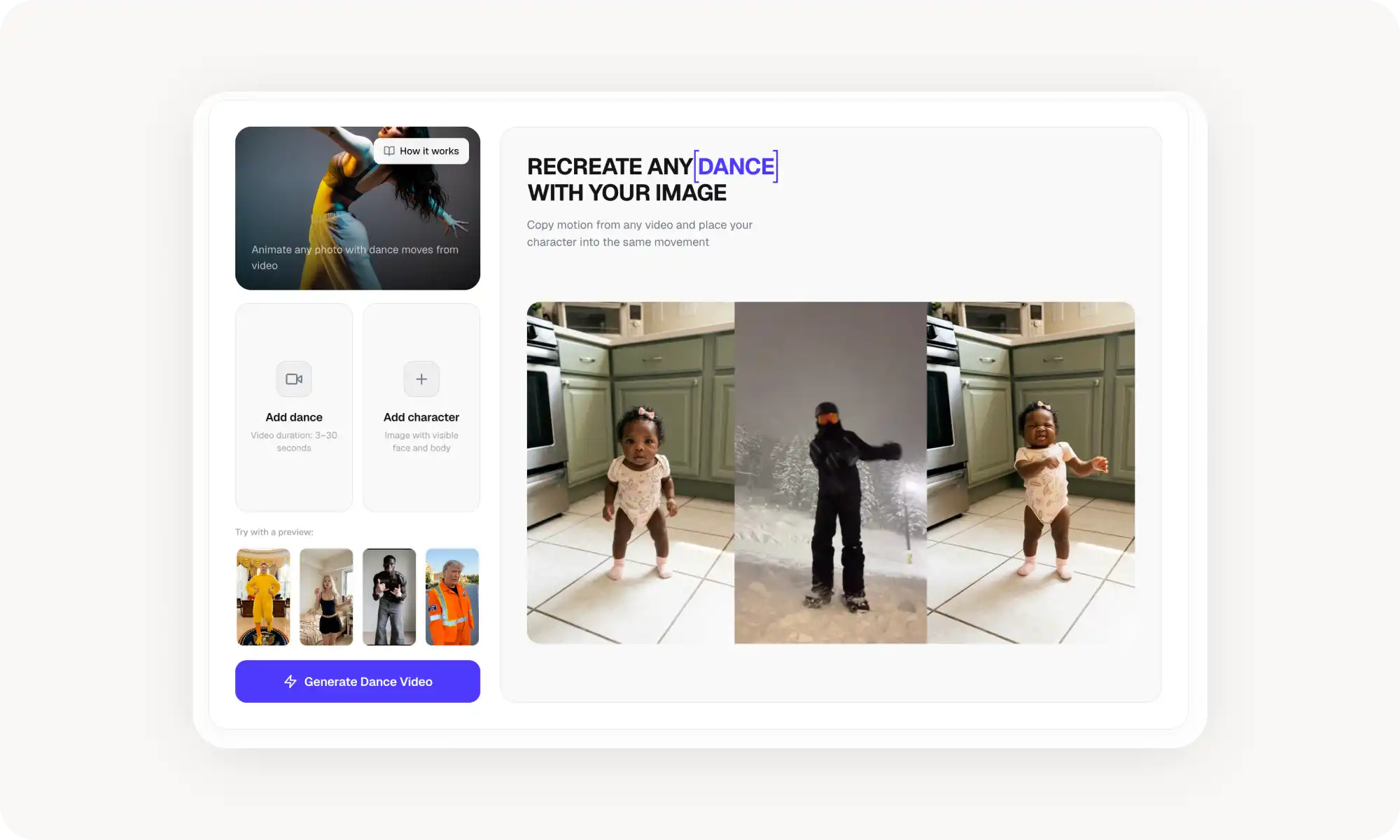
Upload a video clip that shows the movement that you want, Kling will analyze the motion patterns and apply them to your generated content. This way you can take motions and pacing from one footage and apply them to entirely new subjects and scenes. Many people on the internet use this to generate AI dances, for example.
Why choose Kling 2.6 over other video-gen models?
Three practical reasons stand out.
Videos with sound. While most AI video generators require you to first generate videos, then find or create matching audio, then sync everything in post-production, Kling AI 2.6 collapses that into one step.
Improved details. Earlier Kling versions struggled with hands and facial expressions — common weak points for ai video generators. Reviewers note that Kling 2.6 renders hands precise and artifact-free, while faces are remarkably natural.
Motion control. Kling 2.6’s unique Motion Control feature is probably the most reliable way to control movement in AI videos available anywhere right now.
Kling 2.6 Pro vs Standard: what’s the difference
Kling 2.6 is available in two variants: Standard and Pro. The main difference between the two is their output resolution. Here’s how they compare:
Model
Output resolution
Kling 2.6
720p HD
Kling 2.6 Pro
1080p Full HD
The standard version generates HD videos, while the PRO version generates Full HD videos. Unfortunately, neither option can generate 4K clips. Apart from the difference in output quality, the PRO version takes slightly longer to generate videos, but offers generally improved instruction following. You may find it easier to recreate complex scenes with it, although both options will work just fine for simpler scenes.
As you would expect, Kling 2.6 Pro uses more tokens per generation than Kling 2.6 Standard. For most use cases, the standard version is sufficient, particularly if you are creating clips for social media where ultra HD quality is not essential.
Kling 2.6 vs Sora 2 vs Veo 3.1
Choosing the best ai video generator 2026 depends on what you actually need. Here's how Kling 2.6 stacks up against the two biggest Western competitors.
Kling 2.6
OpenAI Sora 2
Google Veo 3.1
Max Resolution
1080p
1080p
Up to 4K
Max Duration
10 seconds
25 seconds
8 seconds
Max Frame Rate
Up to 48 FPS
30 FPS
24 FPS
Native Audio
Yes
Yes
Yes
Languages
Chinese, English
English
English
Kling 2.6 vs. Sora 2
Compared to Sora 2, Kling generates shorter videos — up to 10 seconds versus Sora 2's 25 seconds.
However, users say that Sora's audio generation is less precise than Kling's. That being said, the official Sora 2 platform offers more editing tools: Storyboard, Remix, Blend and Cameo, which lets you insert yourself into generated videos.
Basic Sora access requires ChatGPT Plus, priced at $20 per month. To generate watermark-free 1080p videos, you need ChatGPT Pro, which costs $200 per month — more than five times the price of Kling's Pro tier.
Kling 2.6 vs Veo 3.1
Veo 3.1 was ranked number one on MovieGenBench across 1,003 prompts, with users praising its prompt adherence, visual quality and accurate audio-video synchronisation. It outputs at 4K resolution, which neither Kling nor Sora can match at a consumer price.
However, as an older model, Veo 3.1 suffers from the same faults as previous generations of AI video makers, such as unrealistic camera work in complex scenes and physics that don't behave realistically.
It's also worth noting that Veo's base clips are only 8 seconds long, which is shorter than Kling's 10 seconds.
Other AI video models worth knowing
The market includes several other capable options:
Runway Gen-4.5 — also praised for character consistency across multiple shots. Many creators use it for AI filmmaking.
Luma Ray3 — a reasoning video model that can ouptu HDR videos in EXR format for color grading.
Hailuo 2.3 — offers arguably the best physics simulation available.
Pika 2.2 — like Sora 2, it’s optimized for making viral TikTok reels and YouTue shorts.
PixVerse V5 — also built around viral content templates and formats that are trending on Instagram, TikTok, Threads, and YouTube.
Where to Access Kling 2.6
Overchat AI provides the primary access point for Kling 2.6. The platform aggregates multiple AI video models in one interface, letting you switch between tools without managing separate subscriptions.
You can also access Kling 2.6 through:
Kling's official web app at klingai.com
Dedicated iOS and Android apps from Kuaishou
API providers like Fal.ai and WaveSpeed for developers building custom applications
FAQ
What is Kling 2.6?
Kling 2.6 is an AI video generator developed by Chinese company Kuaishou, released December 3, 2025. It generates synchronized audio and video in a single pass — the first model in the Kling family with this capability. The platform supports text-to-video, image-to-video, and motion-controlled generation at up to 1080p resolution and 48 frames per second.
How does Kling 2.6 motion control work?
Kling 2.6 motion control lets you direct movement within generated videos using three methods:
Upload a reference video that demonstrates the motion style you want
Use the motion brush to paint movement directions onto specific frame areas
Set first and last frame positions and let the model interpolate between them
These controls give you precise direction over how subjects move, rather than relying entirely on text prompts.
How does Kling AI 2.6 compare to competitors?
Kling AI 2.6 offers more reliable audio generation than Sora 2, at a lower price. Compared to Runway Gen-4.5, Kling's character consistency tools are a significant improvement, and its integrated audio workflow is far more advanced. Kling 2.6 is a serious contender for the title of best AI video generator.
Conclusion
Kling 2.6 is an AI video generator with sound and is the newest Kling AI video maker at the time of writing this article. It competes directly with other top-tier models for video, such as Sora 2, offering comparable quality and introducing features that competitors lack, such as precise motion control through references. Here are the most important takeaways:
Kling 2.6 is an AI video generator from Kuaishou that creates synchronized audio and video in one pass
Kling 2.6 was released December 3, 2025, as the first model in the Kling family with native audio generation
The platform supports 1080p resolution at up to 48 FPS with a 10-second maximum duration
Kling 2.6 Pro costs ~$37/month and unlocks HD output with 3,000 monthly credits
Motion control features include reference video workflows, motion brush, and first/last frame positioning
Kling 2.6 beats Sora 2 on audio reliability and global availability, but trails Veo 3.1 on resolution
Over 22 million users have generated 168 million videos on the platform
If you’re looking for the best AI video generator for 2026, Kling 2.6 is an attractive option if you can work around its limitations, such as the lack of 4K output and the relatively short length of video clips. After all, the ability to generate motion that exactly matches your vision is one of the most important aspects of AI video generation, and you’ll appreciate it whether you’re filming a viral TikTok dance or an AI feature-length film, as it will enable you to accurately recreate your vision.