How to Cancel a ChatGPT Subscription: A Complete Guide
Last Updated:
2026-10-19
How to Cancel a ChatGPT Subscription: A Complete Guide
If you're unhappy with your ChatGPT paid plan and want to cancel, there are several ways to do it. To avoid being charged for future months, make sure you cancel your subscription before your next billing date. Below, we'll walk you through the main cancellation methods step by step.
If you subscribed on Android, cancel it in Google Play. After you cancel, your paid plan stays active until the end of the current billing period.
This can be potentially confusing because while after subscribing on one platform you can use ChatGPT across all of them, it's not the same for the cancellation process, where you're required to access the app on the original platform.
But no matter where you need to cancel, thankfully, it's pretty straightforward.
Below, we'll show how to cancel ChatGPT Plus, Pro and Business on every platform, what happens after you cancel and how to get a refund.
Where to cancel your ChatGPT subscription
ChatGPT subscriptions are managed by the platform that bills you, so the steps depend on where you subscribed:
Where you subscribed
Where to cancel
chatgpt.com
ChatGPT Settings > Billing
iPhone or iPad app
Apple subscriptions in iOS Settings
Android app
Google Play subscriptions
ChatGPT Business workspace
Workspace settings > Billing
If you don't remember where you subscribed, check your purchase receipt.
How to cancel ChatGPT Plus or Pro on the web
If you subscribed on chatgpt.com, you can cancel Plus, Pro or Go from your ChatGPT account:
Sign in to ChatGPT.
Open your account menu and select Settings.
Select Billing.
Under Cancel plan, select Cancel.
After that, check that your subscription is no longer set to renew.
You'll be able to continue using all of the paid features until the end of the current billing period.
How to cancel ChatGPT on iPhone or iPad
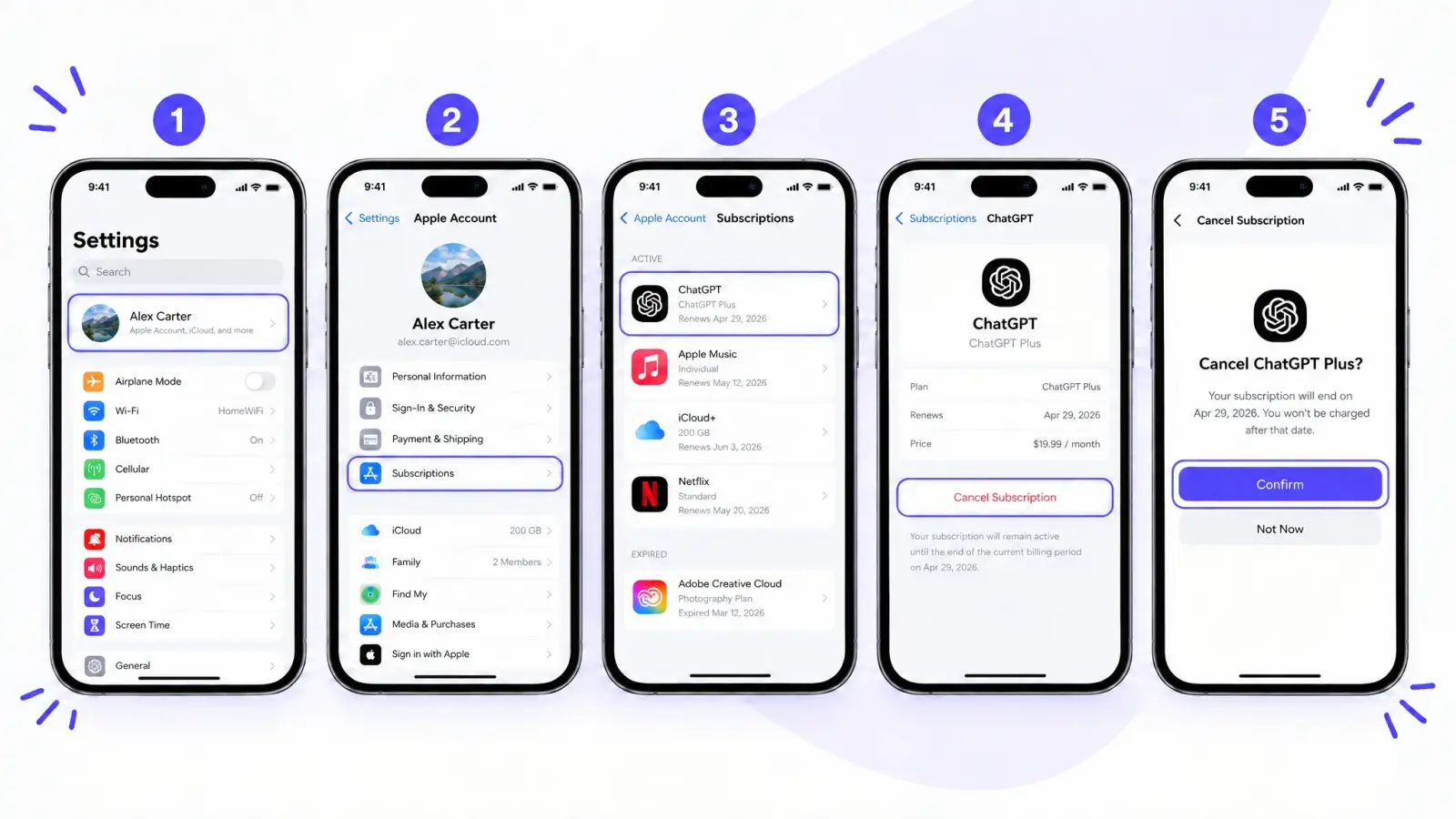
If you subscribed in the ChatGPT app on an iPhone or iPad, that means your subscription is managed by Apple, meaning you cancel it in iOS Settings:
Open Settings.
Select your name.
Select Subscriptions.
Select ChatGPT.
Select Cancel Subscription.
Confirm the cancellation.
Here's what the steps look like on an iPhone:
If you don't see Cancel Subscription and the screen shows an expiration date, the subscription is already canceled.
By the way, deleting your ChatGPT account doesn't automatically cancel an Apple subscription, so make sure you cancel it through Apple first. Otherwise, you'll continue getting charged until you cancel it in your Apple subscriptions — ChatGPT support, which nowadays is semi-automated (duh), can't do that for you and isn't always helpful based on personal experience.
How to cancel ChatGPT on Android
If you subscribed in the ChatGPT app on Android, then the subscription is managed by Google Play.
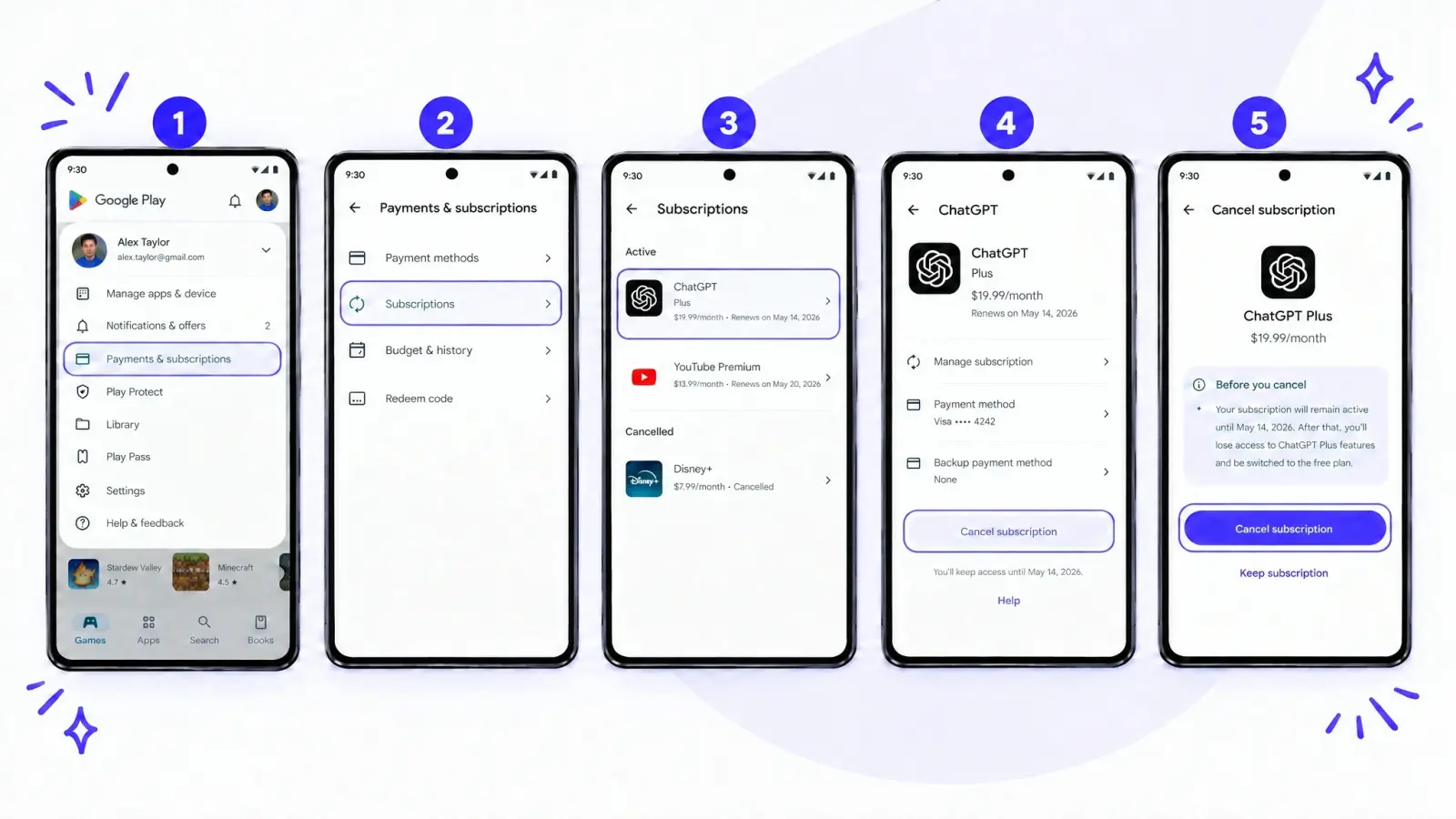
Make sure you're signed in to the Google account you used to subscribe, then cancel in the Google Play Store app:
Open the Google Play Store app.
Tap your profile icon, then select Payments & subscriptions > Subscriptions.
Select ChatGPT.
Select Cancel subscription.
Follow the instructions to confirm.
Here's the same flow in the Google Play Store app:
You can also cancel on the Google Play website. Open your Google Play subscriptions, select Manage next to ChatGPT and then select Cancel subscription.
How to cancel a ChatGPT Business subscription
A self-service ChatGPT Business subscription is canceled in the workspace settings. Only a workspace owner or a member with access to billing can do it:
Sign in to ChatGPT.
Open your account menu and select Workspace settings.
Select Billing.
Select Manage plan.
Select Cancel subscription.
If you don't have access to the workspace billing settings, ask your workspace owner to cancel the plan.
How to cancel ChatGPT if you can't sign in
So, you've lost access to your ChatGPT account before unsubscribing — what do you do now?
Don't worry, because there's still a way to cancel the subscription to make sure OpenAI isn't continuously charging you.
If your subscription was billed directly by ChatGPT and you no longer have access to the account's email, OpenAI Support can cancel it for you.
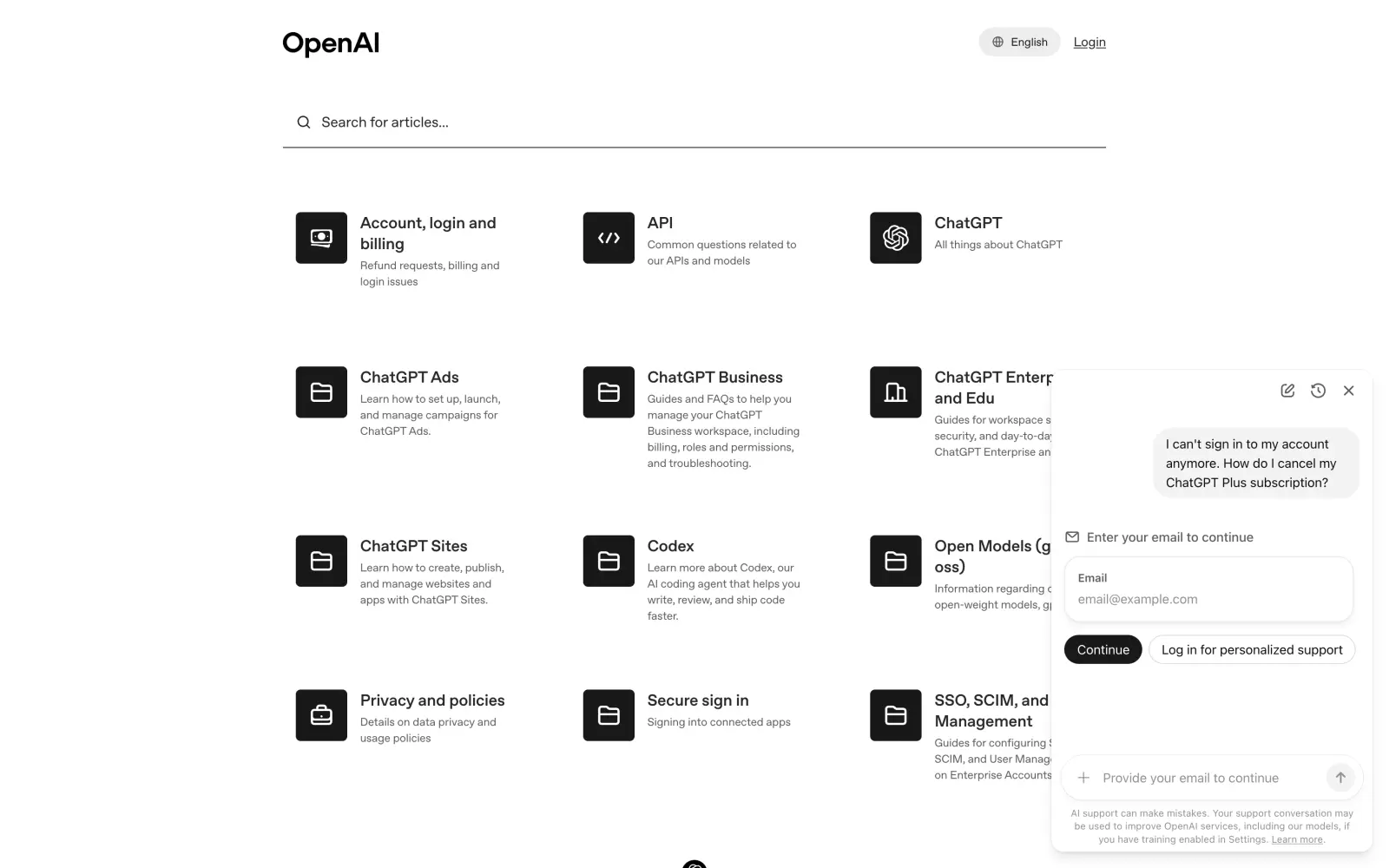
To contact OpenAI Support, open the OpenAI Help Center and click the chat bubble in the bottom-right corner. A virtual assistant answers first, and only if it can't solve the problem does a human agent join the chat. OpenAI doesn't show how long you'll wait for a person, and in our experience, it can take days — it feels like the support is built to keep you talking to the bot. OpenAI also has AI phone support at 1-888-GPT-0090 in the US and Canada, but it only answers general questions and can't connect you to a live agent.
If you aren't signed in, the support chat asks for your email before it answers, so use the email linked to your subscription.
To verify the subscription, you need to give the email linked to your account or the billing email, plus two of these details:
The last four digits of the payment card
The card expiration date
The billing address
The date of the most recent charge
Never send your full card number. If you subscribed through Apple or Google Play and can't access that store account, you need to contact Apple or Google to recover it first.
What happens after you cancel ChatGPT
Canceling stops future payments, but it doesn't end your plan right away.
Your paid features stay available until the end of the current billing period, and after that, you can keep using ChatGPT on the free plan.
To avoid being charged for the next month, cancel at least 24 hours before your next billing date. If you cancel later than that, the next payment may already be processed.
Uninstalling the ChatGPT app doesn't cancel your subscription. Deleting your ChatGPT account cancels a subscription billed directly by ChatGPT, but it doesn't cancel a subscription billed through Apple, and a Google Play subscription should also be checked and canceled in Google Play.
You bought an individual subscription and haven't used it, and you ask for a refund within seven days of the charge.
You live in the EU, the UK or Turkey and cancel within 14 days of purchase, in which case you get a prorated refund.
You were charged because of a billing error or an unauthorized payment.
To request a refund for a subscription bought on chatgpt.com or through Google Play, sign in to ChatGPT, open the OpenAI Help Center and use the chat in the bottom-right corner. Refunds for subscriptions bought through the App Store are requested from Apple.
If OpenAI approves the refund, it processes it within 5–7 business days for web purchases and within 10 business days for Google Play purchases. Your access to the paid plan ends once the refund is granted.
How to cancel a ChatGPT Plus free trial
OpenAI sometimes offers new users a free month of ChatGPT Plus. After the free month, the subscription continues at $20 per month, so if you don't want to pay, cancel it the same way as a paid plan, at least 24 hours before the renewal date.
How to switch to a cheaper ChatGPT plan instead of canceling
If ChatGPT is still useful but your plan costs too much, you can move to a cheaper plan instead of canceling. ChatGPT has a Go plan for $8 per month, Plus for $20 per month and three Pro tiers for $100, $200 and $500 per month. On Pro, you can change your plan in Settings > My Plan.
Overchat AI — an alternative to a ChatGPT subscription
Overchat AI is an all-in-one AI app we've built that gives access to OpenAI models together with models from Anthropic, Google and other companies with one subscription.
Overchat AI has GPT-6 Astra, GPT-6 Sol and GPT-6 Luna, and its Pro plan costs $14.99 per month instead of $20 a month, giving you access to more models — and indeed more powerful models — for less.
At the time of writing, a message to GPT-6 Astra costs only 3 credits, giving you about 2,660 GPT-6 Astra messages a month for about $15 — along with the ability to ask Claude Opus 5.5 and Gemini 4 Argon, and use image and video models, such as GPT Image 2.5 and Seedance 2.5.
FAQ
Below are answers to common questions about canceling ChatGPT.
Why can't I cancel my ChatGPT subscription from the app?
You can cancel a ChatGPT subscription only on the platform that bills you. If you subscribed on chatgpt.com, the subscription doesn't appear in your Apple or Google Play settings, so cancel it on the web. If you subscribed through the App Store or Google Play, cancel it in that store's subscriptions.
How do I stop auto payment in ChatGPT?
Canceling your subscription stops automatic payments. Cancel at least 24 hours before your next billing date, otherwise the next payment may already go through.
Can I cancel my ChatGPT Plus subscription at any time?
Yes. You can cancel ChatGPT Plus at any time, and your plan stays active until the end of the current billing period.
Does deleting my ChatGPT account cancel my subscription?
Deleting your account cancels a subscription billed directly by ChatGPT. It doesn't cancel a subscription billed through Apple, so cancel that one in your Apple subscriptions first.
Does uninstalling the ChatGPT app cancel my subscription?
No. Uninstalling the app doesn't cancel your subscription. You need to cancel it on the platform where you subscribed.
Why was I charged after canceling ChatGPT?
If you canceled less than 24 hours before your billing date, the next payment may have been processed before the cancellation. You may also have another active subscription under a different ChatGPT, Apple or Google account.
How do I cancel ChatGPT Pro?
ChatGPT Pro is canceled the same way as Plus: in Settings > Billing on the web, or in your Apple or Google Play subscriptions if you subscribed in the app. Your Pro features stay available until the end of the billing period.