Upload your image
JPG, PNG, WEBP or HEIC
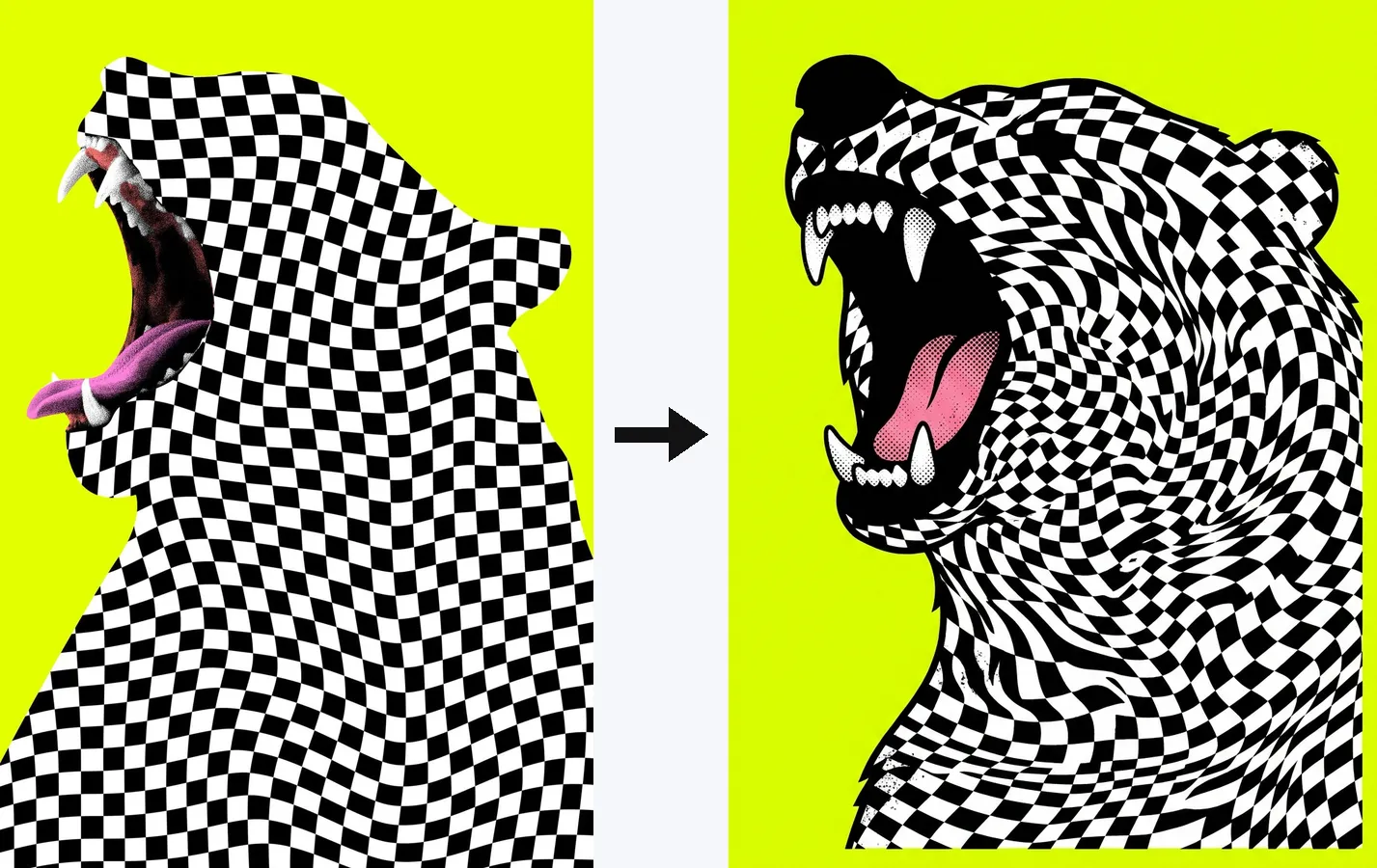
Before → after
Real results from this tool. Yours comes right after you sign in
Overchat AI image recreator takes one reference picture — a Pinterest pin, an Instagram post, a screenshot — and generates a set of new images in the same style. Each one is built from scratch. It's your image, not the creator's file, so you can publish it wherever you like without reposting anyone's work. No prompts, no design skills: upload the picture, pick the version that fits.
The model reads the reference the way an art director would: subject, composition, medium (photo, 3D render, watercolor, flat illustration), palette, light, mood. Then it draws a new scene by the same rules — images that look like they came from the same shoot, not a filtered copy. It doubles as an AI image variation generator: feed it your own photo and get a few alternatives. Want a preset style on a photo instead? Try our AI Style Transfer tool.

Every result is drawn from scratch. You get an original picture with the look of the reference — no crop, no filter over someone else's file.
One upload returns a handful of remakes. Keep the one that fits, or run it again.
The picture is the prompt. No style names to remember, no settings to tune — upload, wait a few seconds, download.
USE CASES
Found the perfect header image on Pinterest, but it belongs to someone else? Get your own version and publish it.
Recreate a post you love as your own image for your feed or a reel cover — same mood, your content.
Remake a thumbnail style that works, in the same visual language, for your own video or playlist.
Recreate the look of a campaign photo — same light, palette and framing — for your own store or ads.
Liked a stock photo but not the price or the terms? Generate your own take on the same scene.
Love a flat-vector, watercolor or 3D-render look? Get new pieces in that style for your own ideas.
Join thousands of people who are already using Overchat AI image editing tools.
Overchat AI brings you the power of the world's top AI models: GPT, Claude, Gemini, Mistral, and more.

Upload the photo to Overchat AI image recreator, wait a few seconds while the AI reads its subject, style and composition, then pick one of the generated variations and download it. No prompt or design skills needed.
Usually not as they are: most pins belong to their creators, and reposting them on your blog or socials without permission is a copyright risk. Your options are to ask the creator, use images that come with a license (CC0 or stock), or recreate your own version with Overchat AI image recreator — the result is a new AI-generated image, not the creator's file. This is general information, not legal advice.
Don't repost other people's pins. Use the picture only as a reference: upload it to the recreator, get your own image with the same idea and style, and publish that one. Keep away from logos, brand characters and recognizable people — recreating those can still cause problems.
Overchat AI works in the browser on desktop and mobile, and the Overchat AI app is available for iOS and Android. Upload any image — a Pinterest pin, a screenshot, a stock photo — and get a fresh set of images in its style.
An AI image recreator is a tool that takes an existing picture as a reference and generates new images with the same subject, style, palette and composition. It doesn't repaint or filter the source; it produces a fresh picture that looks like it belongs to the same series. Used on your own photo, it works as an AI image variation generator.
You can try Overchat AI image recreator for free. Sign in with Google or Apple to generate and download your images.

Chinese company Baidu has quietly released a model that's just as good as DeepSeek and ChatGPT — ERNIE 4.5 delivers exceptional performance at a fraction of the cost — and most people outside China have never even heard of it.

If you're wondering: what is DeepSeek AI, the answer is quite simple. DeepSeek AI is a Chinese AI research lab that builds large language models. The company released several models in late 2024 and early 2025 that compete directly with OpenAI's GPT-4 and Anthropic's Claude, but at a fraction of the operating cost.

ChatGPT Plus costs $20 per month plus tax, while the Pro plan costs $200 per month plus tax. Understandably, not everyone is willing to pay that much for a chatbot, especially if the premium features aren’t worth it to them. This raises an obvious question: how can I use ChatGPT for free?
Available on Web, iOS, and Android. Access your AI assistant anywhere, anytime.