Upload a photo and try 20+ cuts, colors and textures on yourself — bald to braids, platinum to perm. Your face and photo stay untouched.
 Add a photo, pick a hairstyle, and see the new
you.
Add a photo, pick a hairstyle, and see the new
you.
With Overchat AI, you can try on different haircuts online by uploading a selfie. You will receive personalized suggestions in the form of visual infographics to help you find the ideal look before visiting the salon.
With Overchat AI, you won't just get one haircut per generation. Instead, it uses an advanced AI image generation model to provide a detailed infographic with specific hairstyles chosen to suit your face shape. You can compare different looks side-by-side.
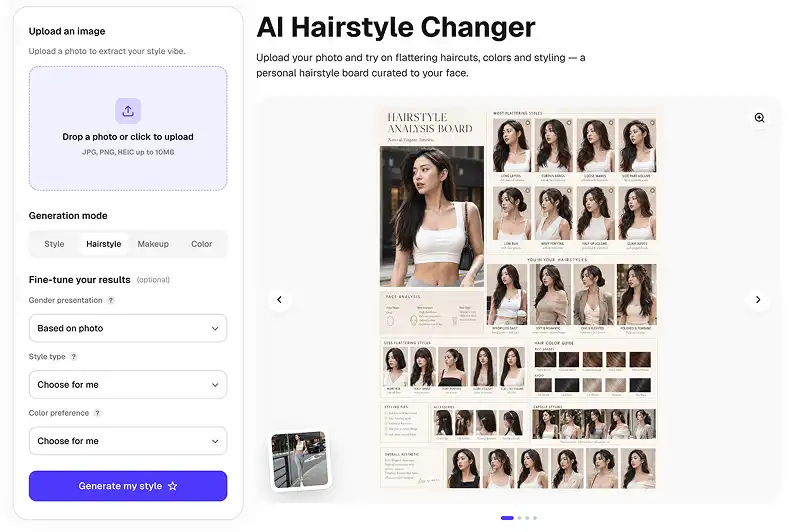
We use GPT Image 2.0, the most advanced AI image generation model, to render ultra-detailed previews of the most popular modern hairstyles for 2026.
Forget complicated prompts or limited presets. Our AI dynamically generates hairstyles that are specifically designed to highlight your best features, and it works for both men and women.
Our hairstyle changer is available as a web version, an iOS version, and an Android version, so you can try on hairstyles seamlessly wherever you are.
USE CASES
You won't really know what the haircut will look like until you try it on. Our hairstyle changer allows you to do just that without risk or an expensive salon visit.
Wondering what a buzz cut or curly hair would look like on you, but not ready to commit? Just generate your new look with Overchat AI.
Come up with a plan before cutting your hair. Go straight for the style that will make you glow — you'll look ten times better.
Save the AI Hairstyle Changer result and bring it to the salon — and get exactly the hairstyle you wanted.
Show your friends the image of yourself rocking an entirely different hairstyle from the usual one, and let the likes and shares flood in.
Specific face shapes work best with specific hair styles — our AI knows this and will help you discover the best hairstyles for your specific features.
Join thousands of users already trying their next look on Overchat AI.
Overchat AI brings you the power of the world's top AI models: GPT, Claude, Gemini, Mistral, and more.
An AI hairstyle changer is an online tool that uses artificial intelligence and image generation technology to show what different hairstyles will look like on your face. To use it, you upload a selfie of yourself. The AI then changes your hair style, taking into account your natural hair color, hair thickness, and potentially hair length. You can try on different hairstyles, like bobs, layers, bangs, fades, buzzcuts, and braids, all in a matter of seconds.
Overchat AI Hairstyle changer uses a cutting-edge image generation model — GPT Image 2. This model has real-time world knowledge of the latest haircuts and can superimpose them onto your photo or selfie with amazing realism. It does this by using an image-to-image generation pipeline with internal reasoning. This allows the model to analyze your features and choose the best styles specifically for you.
Yes, absolutely — Overchat AI hairstyle changer supports both female cuts, such as long layers, lobs, pixies, and curls, but it also works as a mens hairstyle changer for fades, crops, buzz cuts, and slick backs. The model intelligently analyzes the gender and applies the correct look based on your pictures, and you can also set the gender explicitly in the settings for even more control.
For sure. The Overchat AI hairstyle changer web app is fully supported on mobile devices, including tablets and smartphones. There are also dedicated iOS and Android apps for an even more polished, mobile-first experience. You can snap a selfie, open the app, and try on new looks in a matter of seconds.
Chinese company Baidu has quietly released a model that's just as good as DeepSeek and ChatGPT — ERNIE 4.5 delivers exceptional performance at a fraction of the cost — and most people outside China have never even heard of it.
If you're wondering: what is DeepSeek AI, the answer is quite simple. DeepSeek AI is a Chinese AI research lab that builds large language models. The company released several models in late 2024 and early 2025 that compete directly with OpenAI's GPT-4 and Anthropic's Claude, but at a fraction of the operating cost.
ChatGPT Plus costs $20 per month plus tax, while the Pro plan costs $200 per month plus tax. Understandably, not everyone is willing to pay that much for a chatbot, especially if the premium features aren’t worth it to them. This raises an obvious question: how can I use ChatGPT for free?
Available on Web, iOS, and Android. Access your AI assistant anywhere, anytime.



.svg)
