
 Antes
Antes
 Antes
Antes
 Antes
Antes
 Antes
Antes
Antes
Antes
Antes
Antes
Antes
Antes
Antes
Antes
Envie uma selfie e apareça no telão da arena em segundos. Uma foto vira um clipe com cara de transmissão ao vivo, no formato da trend que rodou o TikTok.
O gerador roda nos modelos de vídeo mais recentes e encaixa o seu rosto em imagens que parecem de transmissão real — o close no telão, a panorâmica da kiss cam, o flagra na arquibancada. Entra uma foto, sai um clipe em 1080p pronto para postar.
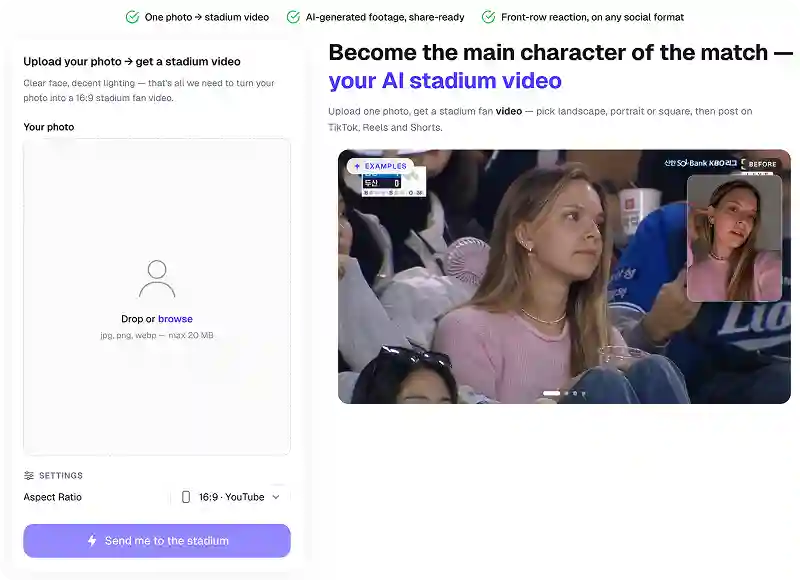
Iluminação de estádio, tremida de câmera, torcida desfocada ao fundo e o tratamento de cor de TV ao vivo — o resultado parece uma panorâmica de transmissão que pegou você na arquibancada.
Uma selfie basta. O modelo preserva os seus traços, então quem aparece no telão é você mesmo, e não um personagem genérico.
Fica pronto em cerca de um minuto, baixa em alta definição sem marca d'água e já sai na proporção certa para TikTok, Reels e Shorts.
Testar a trend do estádio
O plano clássico da trend: o seu rosto ocupa o telão gigante por alguns segundos enquanto a torcida reage em volta.
A câmera passa pela arquibancada e para em você, no meio do grito. Parece um momento não roteirizado de TV — bom começo de vídeo para o TikTok.
Coloque você e um amigo ou a pessoa amada dentro do quadro da kiss cam, no formato que todo mundo está recriando.
Finja que você foi chamado ao gramado no intervalo — confete, refletores e o barulho da torcida, tudo gerado a partir de uma única foto.
Mesma trend, outro cenário: você no painel de LED atrás do artista, num clipe de câmera de show.
Monte um recado de estádio para aniversário, pedido de casamento ou surpresa. Rende sozinho, antes mesmo do momento real acontecer.
Junte-se a milhares de criadores que já usam o Overchat AI para fazer vídeo da trend do estádio, foto com IA e áudio.
O Overchat AI traz para você o poder dos melhores modelos de IA do mundo: GPT, Claude, Gemini, Mistral e outros.

A ferramenta transforma uma foto parada em um vídeo curto no estilo de estádio. Você envia a selfie, escolhe o plano que quer — close no telão, câmera na arquibancada, kiss cam ou gramado no intervalo — e a IA monta um clipe com o seu rosto dentro de imagens que parecem de transmissão ao vivo.
Bastante, sobretudo na tela do celular, que é onde esses clipes costumam ser assistidos. O modelo reproduz os seus traços e acrescenta o tratamento de cor de transmissão, uma leve tremida de câmera, o desfoque de movimento na torcida e até os artefatos de compressão que apareceriam num sinal real de estádio.
Para criar o seu vídeo da trend do estádio: 1. Envie uma foto sua de frente e nítida. 2. Escolha a cena: telão, arquibancada, kiss cam, gramado no intervalo ou painel de show. 3. Clique em Gerar e espere cerca de um minuto enquanto a IA monta o clipe. 4. Baixe o resultado.
Dá. Os clipes saem em vertical 9:16 por padrão, que é o formato do TikTok, do Reels e do Shorts, e há exportação em 16:9 se você quiser a versão horizontal. Não há marca d'água, o arquivo já vem otimizado para envio pelo celular e a duração acompanha o que costuma funcionar melhor na trend.

A chinesa Baidu lançou discretamente um modelo tão bom quanto o DeepSeek e o ChatGPT — o ERNIE 4.5 entrega desempenho excepcional por uma fração do custo, e quase ninguém fora da China tinha ouvido falar dele.

Se você está se perguntando o que é o DeepSeek AI, a resposta é simples: um laboratório chinês de pesquisa em IA que constrói grandes modelos de linguagem. A empresa lançou vários modelos entre o fim de 2024 e o começo de 2025 que competem diretamente com os da OpenAI e da Anthropic, por uma fração do custo.

O ChatGPT Plus custa US$ 20 por mês mais impostos, e o plano Pro, US$ 200 por mês mais impostos. Nem todo mundo está disposto a pagar isso por um chatbot, especialmente se os recursos premium não fizerem diferença no dia a dia. Daí a pergunta óbvia: como usar o ChatGPT de graça?
Disponível na web, no iOS e no Android. Leve o seu assistente de IA para onde você for.


.svg)
