Resumo
- A VRAM é a maior restrição isolada para rodar LLMs locais — a base é de cerca de 2 GB por 1B de parâmetros em FP16, com a quantização Q8 reduzindo isso à metade e a Q4 a um quarto.
- Modelos pequenos de 3B a 4B rodam em praticamente qualquer máquina recente (inclusive notebooks apenas com CPU e 16 GB de RAM), enquanto modelos de 7B a 14B atingem o ponto ideal em GPUs intermediárias como a RTX 3060 12 GB.
- Modelos de ponta de 27B a 70B exigem de 18 a 40 GB de VRAM, normalmente uma RTX 3090/4090 para os 27B ou duas GPUs de 24 GB / um M3 Max 64 GB para os 70B.
- Modelos MoE (100B+) ativam apenas uma fração dos parâmetros por token, o que os torna mais rápidos do que o tamanho sugere — eles precisam de 24 a 60 GB de VRAM, dependendo do tamanho total.
- As GPUs de consumo (RTX 3090/4090/5090) seguem sendo o melhor custo-benefício com 24 GB de VRAM, enquanto a memória unificada do Apple Silicon permite que os Macs da linha M rodem modelos que, de outra forma, exigiriam GPUs de data center.
- Requisitos do sistema além da VRAM: 16 GB de RAM no mínimo (32 GB recomendados), qualquer CPU moderna de 8 núcleos e um SSD NVMe com 100 a 500 GB de espaço livre para os arquivos dos modelos.
- A quantização de 3 bits TurboQuant do Atomic Chat reduz os modelos para além do Q4 sem perda de qualidade e comprime o cache KV em cerca de 6×, fazendo com que um modelo que normalmente precisa de 18 GB de VRAM caiba em aproximadamente 12 GB.
- Em termos de plataforma: o Mac (Apple Silicon) se destaca graças à memória unificada e ao runtime MLX, o Windows funciona melhor com NVIDIA + CUDA, e o Linux oferece a maior flexibilidade de GPU, incluindo suporte a AMD ROCm.
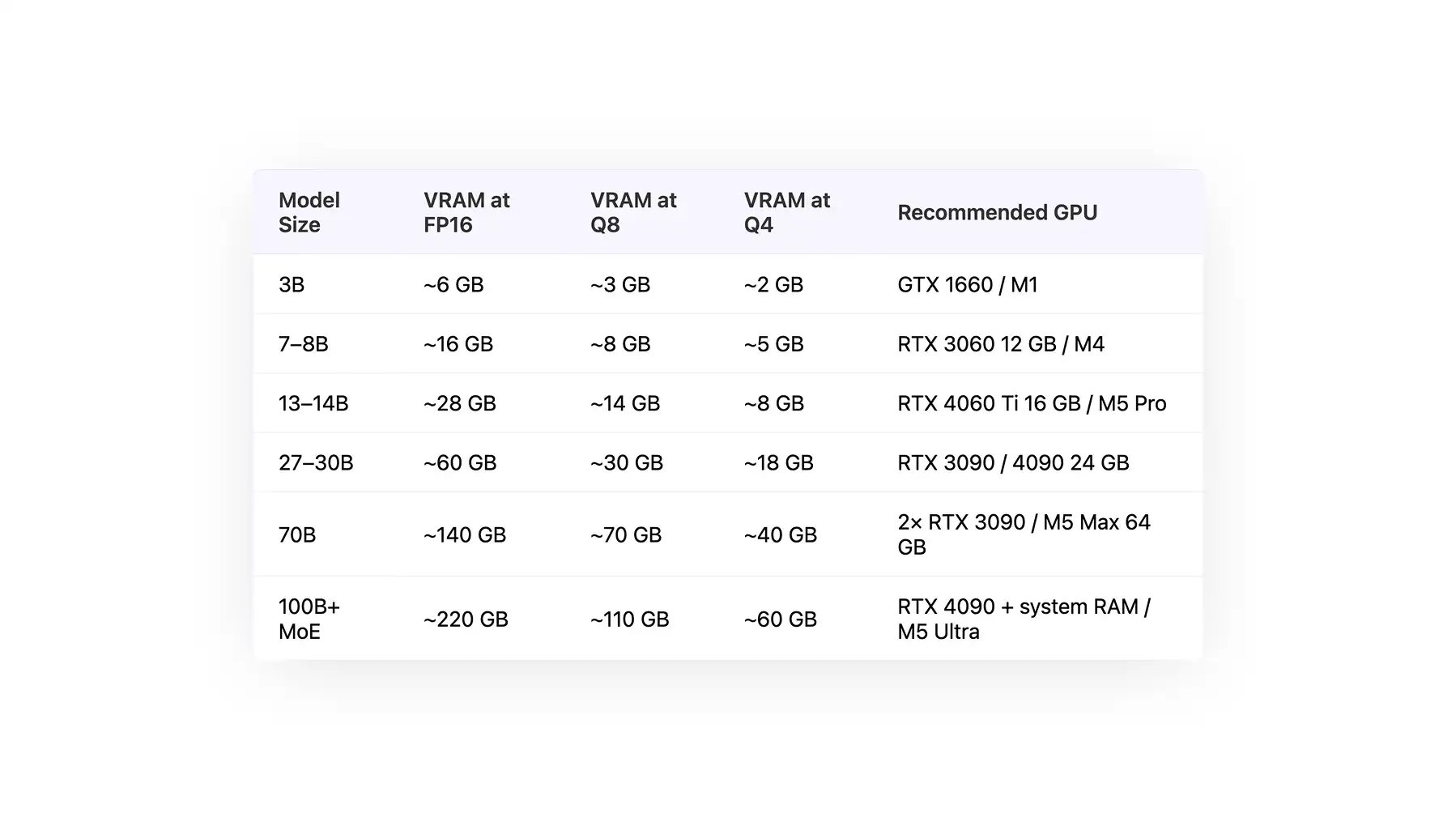
Tabela de Requisitos de Hardware para LLM Local
A tabela abaixo mostra os requisitos de sistema para rodar modelos de diferentes tamanhos, de 3B a mais de 100B de parâmetros.
| Tamanho do Modelo |
VRAM em FP16 |
VRAM em Q8 |
VRAM em Q4 |
GPU Recomendada |
| 3B |
~6 GB |
~3 GB |
~2 GB |
GTX 1660 / M1 |
| 7–8B |
~16 GB |
~8 GB |
~5 GB |
RTX 3060 12 GB / M4 |
| 13–14B |
~28 GB |
~14 GB |
~8 GB |
RTX 4060 Ti 16 GB / M5 Pro |
| 27–30B |
~60 GB |
~30 GB |
~18 GB |
RTX 3090 / 4090 24 GB |
| 70B |
~140 GB |
~70 GB |
~40 GB |
2× RTX 3090 / M5 Max 64 GB |
| 100B+ MoE |
~220 GB |
~110 GB |
~60 GB |
RTX 4090 + RAM do sistema / M5 Ultra |
Embora esse seja o panorama geral, vamos discutir em mais detalhe como a inferência de LLM afeta os diferentes componentes do seu sistema, por que isso é importante e como se traduz na prática.
Requisitos de GPU e VRAM para um LLM Local
A tabela abaixo mostra os tipos de modelos que podem ser rodados de forma realista de acordo com a sua GPU e a quantidade de VRAM disponível.
| GPU |
VRAM |
Tamanhos de Modelo Suportados (Q4 / Q8 / FP16) |
Modelos de Exemplo |
| NVIDIA GTX 1660 |
6 GB |
3B (FP16), 7B (Q4) |
LLaMA 3 3B, Mistral 7B (Q4) |
| NVIDIA RTX 3060 12GB |
12 GB |
7–8B (Q8), 13B (Q4) |
LLaMA 3 8B, Mistral 7B |
| NVIDIA RTX 4060 Ti 16GB |
16 GB |
13–14B (Q8), 30B (Q4 parcial) |
LLaMA 3 13B, Mixtral (quantizado) |
| NVIDIA RTX 3090 |
24 GB |
13B (FP16), 30B (Q4), 70B (offload) |
LLaMA 3 13B, Mixtral 8x7B |
| NVIDIA RTX 4090 |
24 GB |
13B (FP16), 30B (Q4), 70B (offload melhor) |
LLaMA 3 13B, Mixtral 8x7B |
| NVIDIA RTX 5090 |
32 GB |
30B (Q8), 70B (Q4) |
LLaMA 3 70B (Q4), modelos DeepSeek |
| 2× NVIDIA RTX 3090 |
48 GB no total |
70B (divisão Q4/Q8) |
LLaMA 3 70B |
| 2× NVIDIA RTX 4090 |
48 GB no total |
70B (Q8), 100B MoE (Q4) |
Mixtral, DeepSeek MoE |
| NVIDIA H100 |
80 GB |
70B (FP16), 100B+ (Q8) |
LLaMA 3 70B, LLMs corporativos |
| Apple M5 Pro |
36–48 GB unificados |
13B–30B (Q4–Q8) |
LLaMA 3 13B |
| Apple M5 Max |
64–96 GB unificados |
70B (Q4), 30B (Q8/FP16) |
LLaMA 3 70B |
| Apple M5 Ultra |
128–192 GB unificados |
100B+ MoE (Q4/Q8) |
Mixtral, DeepSeek MoE |
Aqui vai uma explicação rápida de como calculamos os valores acima. Uma coisa importante de entender é que a VRAM é a maior restrição limitante para a inferência de um LLM local.
Isso acontece porque os pesos do modelo precisam ficar na memória da GPU para que ela possa computar sobre eles.
Se os pesos inteiros não couberem, você ou faz o offload de camadas para a RAM do sistema (o que é drasticamente mais lento) ou simplesmente não consegue rodar o modelo.
A regra básica é de cerca de 2 GB de VRAM por 1B de parâmetros em FP16. A quantização reduz esse número em troca de uma pequena perda de qualidade: o Q8 praticamente reduz à metade a necessidade de VRAM, e o Q4 reduz a cerca de um quarto.
Isso significa que um modelo de 13B que precisa de 28 GB em FP16 cabe em uma placa de 16 GB em Q8 e em uma placa de 8 GB em Q4.
Você também precisa levar em conta o cache KV. À medida que a janela de contexto enche, o modelo armazena o estado de atenção para cada token, e esse estado fica na VRAM junto com os pesos. Para contextos longos, reserve um adicional de 10 a 20% sobre o tamanho do modelo, ou mais se você estiver rodando prompts de mais de 100 mil tokens.
As GPUs de consumo (RTX 3090, 4090, 5090) seguem sendo o ponto ideal para os requisitos de hardware de um LLM local em 2026 — 24 GB de VRAM por uma fração do preço de uma placa de data center.
O Apple Silicon é o outro caminho viável: os chips M3, M4 e M5 Pro, Max e Ultra usam memória unificada, o que significa que qualquer parte da RAM do sistema pode ser usada como VRAM. Um M5 Max com 64 GB consegue rodar modelos que, de outra forma, precisariam de uma H100.
Requisitos de RAM do Sistema, CPU e Armazenamento para um LLM Local
RAM do sistema: o mínimo prático para qualquer trabalho útil com LLM local é 16 GB, e 32 GB é um ponto de partida bem mais confortável quando você quer rodar modelos de 13B ou mais.
CPU: se você tem uma GPU, a CPU quase não importa — qualquer chip moderno de 8 núcleos serve. Ela só vira gargalo na inferência apenas em CPU ou no processamento de prompts com entradas muito longas.
Armazenamento: um SSD NVMe é fortemente recomendado, porque os arquivos dos modelos são grandes e você vai carregá-los com frequência. Os arquivos de LLM costumam ultrapassar 200 GB, então é uma boa ideia reservar de 100 a 500 GB de espaço livre se você pretende usar vários modelos.
Requisitos de Hardware para Inferência de LLM Local por Tamanho do Modelo
Outra abordagem é partir do tamanho do modelo como ponto de partida e então ver que tipo de modelos é possível rodar de forma realista diante das limitações do seu sistema. Abaixo, explicamos o hardware necessário para rodar as diferentes categorias de modelo.
LLMs Locais Pequenos (3B–4B) — Nível de Entrada
Roda em praticamente qualquer máquina dos últimos três anos, inclusive apenas em CPU num notebook.
- Exemplos: Gemma 4 E2B / E4B, Phi-4 Mini
- VRAM (Q4): 2–4 GB
- Funciona em: gráficos integrados, GTX 1660, M1 básico ou apenas em CPU com 16 GB de RAM do sistema
LLMs Locais Intermediários (7B–14B) — O Ponto Ideal
Esses modelos são rápidos o suficiente para uma experiência de chat agradável e pequenos o suficiente para hardware intermediário.
- Exemplos: Mistral Small 3, Qwen 3.5-9B, Phi-4 14B
- VRAM (Q4): 5–8 GB
- Funciona em: RTX 3060 12 GB, RTX 4060 Ti 16 GB, MacBook M5 Pro
LLMs Locais Grandes (27B–70B) — Nível de Ponta
Esses são os modelos de uso geral mais fortes, que entregam um desempenho parecido com o da IA na nuvem.
- Exemplos: Gemma 4 31B Dense, Qwen 3.5-27B, Llama 3.3 70B
- VRAM (Q4): 18 GB para 27–32B, 40 GB para 70B
- Funciona em: RTX 3090 ou 4090 24 GB para a faixa de 27–32B; duas GPUs de 24 GB ou um M3 Max com 64 GB para os 70B
LLMs Locais MoE (100B+) — O Melhor dos Melhores
Os modelos Mixture-of-Experts têm um tamanho nominal grande, mas ativam apenas uma fração dos parâmetros por token, então rodam mais rápido do que o número bruto sugere.
- Exemplos: Llama 4 Scout (109B / 17B ativos), Gemma 4 26B A4B, Qwen 3.5-122B-A10B
- VRAM (Q4): 24–60 GB dependendo do tamanho total
- Funciona em: configurações com múltiplas GPUs ou um M5 Ultra
Como Rodar Modelos Mais Potentes no Seu Hardware com o Atomic Chat
Os valores de VRAM acima pressupõem a quantização Q4 padrão. Se a sua máquina fica logo abaixo de um nível — por exemplo, com 16 GB de VRAM, mas você quer rodar um modelo de 27B que normalmente precisaria de 18 GB — ainda assim dá para rodar esse modelo com o Atomic Chat, um app de IA local gratuito e de código aberto para Mac.
O Atomic Chat vem com o TurboQuant, um método de quantização de 3 bits que reduz os modelos ainda mais do que o Q4 sem nenhuma queda extra de qualidade, e que também comprime o cache KV em cerca de 6×, que é o outro grande consumidor de VRAM em contextos longos.
Na prática, isso significa que um modelo que normalmente precisaria de 18 GB de VRAM pode caber em algo mais próximo de 12 GB, então o próximo nível acima passa a ser alcançável com o hardware que você já tem.
Requisitos de Hardware para LLM Local no Mac vs Windows vs Linux
Mac (Apple Silicon): a memória unificada funciona como VRAM, então um M2, M3, M4 ou M5 Max com 64–128 GB consegue rodar modelos que, de outra forma, exigiriam uma GPU de data center. O MLX é o runtime mais rápido no Apple Silicon e costuma dar suporte a novos lançamentos de modelos no mesmo dia em que eles saem.
Windows: a configuração com melhor suporte em 2026 é uma GPU NVIDIA com CUDA. O Atomic Chat, o Ollama, o LM Studio e o llama.cpp têm builds nativos para Windows, e os drivers da NVIDIA são estáveis.
Linux: o CUDA funciona da mesma forma que no Windows, e o Linux também tem o melhor suporte para GPUs AMD por meio do ROCm. Isso o torna a melhor escolha se você quer combinar várias GPUs em uma única máquina ou montar uma máquina dedicada à inferência.
Perguntas Frequentes sobre Requisitos de Hardware para LLM Local
Quais são os requisitos mínimos de hardware para um LLM local?
Os requisitos mínimos para rodar um modelo de LLM local competente são: 16 GB de RAM do sistema, uma CPU moderna e uma GPU com 6 GB ou mais de VRAM ou um Mac com Apple Silicon. Isso é suficiente para um modelo de 3B a 7B em Q4.
Preciso de uma GPU para rodar um LLM local?
Não, mas ajuda. A inferência apenas em CPU funciona para modelos pequenos (3B a 7B) com velocidade aceitável. Qualquer coisa maior fica dolorosamente lenta sem uma GPU ou Apple Silicon.
Um MacBook é bom o suficiente para rodar um LLM local?
Sim — os MacBooks modernos são, na verdade, alguns dos melhores sistemas para IA local. Por exemplo, um M5 Pro com 16 a 32 GB de memória unificada consegue rodar modelos com 7 a 14 bilhões de parâmetros, enquanto um M5 Max com 64 GB ou mais consegue rodar modelos com 70 bilhões de parâmetros que, de outra forma, exigiriam duas GPUs de 24 GB. Isso acontece porque a arquitetura ARM da Apple usa memória unificada — se o seu MacBook vem com 48 GB de memória, isso equivale a ter duas GPUs com 24 GB de VRAM cada.
Quanta RAM preciso para a inferência de um LLM local?
O ideal é que você tenha pelo menos 16 GB de VRAM, mas perceberá uma melhora significativa no desempenho com 32 GB ou mais, principalmente se quiser rodar modelos potentes ou manter vários modelos ativos ao mesmo tempo.
Conclusão
Os requisitos de hardware para um LLM local em 2026 se resumem a uma pergunta: quanta VRAM (ou memória unificada) você tem? Cruze esse valor com a tabela no topo deste guia e você saberá qual nível de modelos consegue rodar.